
Key takeaways
- Laptops for Premiere Pro compared on GPU, CPU cores, memory and colour-capable displays, with specs from Amazon US listings.
What's inside
As an Amazon Associate I earn from qualifying purchases. This post may contain affiliate links at no extra cost to you.
Premiere Pro editing is decided by the timeline: how smoothly 4K footage scrubs, how effects render, and how long exports take at the end of the day. The hardware that matters is a strong multi-core processor, a capable GPU for effects and encoding, enough memory for large projects, and a display accurate enough to judge colour while you cut.
This guide is for YouTubers, wedding filmmakers, and freelance editors choosing a primary editing machine. The models below were picked from their Amazon listings, and the reasoning follows the stated chips, graphics, memory and screens, matching them to what Premiere Pro actually uses rather than repeating benchmark folklore. Export behaviour, thermal design and the difference between seller-configured and standard configurations are called out along the way, because editors buy machines to finish projects, not to win specification contests.
Quick Picks
As an Amazon Associate we earn from qualifying purchases.
| Product | Best for | Key spec from title |
|---|---|---|
| Apple MacBook Pro 14 (M4) | Editors who want a balanced, portable cutting machine | M4 10-core CPU, 16GB memory, 512GB SSD, XDR display |
| Apple MacBook Pro 14 (M4 Max) | Professionals cutting heavy multi-cam and effects work | M4 Max 14-core CPU, 36GB memory, 1TB SSD |
| Lenovo Legion 5i (RTX 4060) | Windows editors who want RTX power and screen size | i7-13650HX, RTX 4060 8GB, 32GB RAM, 16-inch QHD 165Hz |
| ASUS ROG Zephyrus G14 (RTX 5070 Ti) | Editors who cut on the road without a second machine | Ryzen AI 9 HX 370, RTX 5070 Ti 12GB, 32GB RAM, OLED 3K |
How to Choose
The GPU is a timeline component, not a bonus
Premiere Pro leans on the graphics card for effects, scaling, colour work and parts of export. The Legion 5i lists an RTX 4060 with 8GB of graphics memory, and the Zephyrus G14 lists an RTX 5070 Ti with 12GB, which gives complex timelines and plug-ins more room. Apple’s M4 and M4 Max integrate their GPUs with unified memory, so the listed memory figure serves both roles. Integrated-only budget graphics are the false economy here; they make 4K timelines feel heavy from the first day.
Processor cores drive playback and export
Multi-core performance decides how many streams play without dropping to reduced resolution and how exports scale overnight. The Legion’s 14-core i7-13650HX, the MacBook Pro’s 10-core M4 and the M4 Max’s 14-core CPU all sit in the serious editing class. Single-core speed still matters for interface responsiveness. Compare the exact chip named in the listing, because the same laptop line sells with processors of very different editing ability, and the cheap variant is rarely the one reviewed online. Thermals decide whether that peak performance survives a forty-minute export or fades after five minutes.
Memory and storage for real project sizes
Premiere projects with 4K media, After Effects compositions and a browser of stock assets open will consume 16GB quickly and thank you for 32GB. The Zephyrus and the M4 Max MacBook Pro list 32GB and 36GB respectively, which is the comfortable zone for professional work. Storage is the second wall: a 1TB SSD, listed on three models here, keeps active projects and cache local, while 512GB editors will live on external drives sooner than expected. Proxy workflows can soften the requirement, but they add steps that a stronger machine simply skips.
Judge the screen like a client will
Your laptop screen is where colour decisions happen, so panel quality is an editing specification. The Zephyrus lists a 3K OLED with full DCI-P3 coverage and 500 nits, and the MacBook Pros list Liquid Retina XDR displays with up to 1600 nits peak brightness. Those figures, taken from the listings, are what separate a screen you can grade on from one you merely preview on. If you deliver for broadcast or picky clients, plan a calibrated external monitor regardless of laptop.
The 4 Best Options
Apple MacBook Pro 14-inch with M4 Chip

The MacBook Pro 14 with M4 lists a 10-core CPU, 16GB of unified memory, a 512GB SSD and the Liquid Retina XDR display. That is a coherent Premiere specification: strong media engines in the chip, a screen worth grading on, and a body that travels to shoots. It is the default recommendation here for editors inside the Apple ecosystem who cut 4K work daily. Its media engines are particularly relevant to editors working with camera codecs all day, and the machine holds its performance well on battery during location reviews.
Specs
- Apple M4 chip with 10-core CPU and 10-core GPU
- 14.2-inch Liquid Retina XDR display, up to 1600 nits peak brightness
- 16GB unified memory
- 512GB SSD storage
- Silver finish
Best for: Freelance editors and creators who edit on location and at a desk.
Watch out for: The 512GB SSD means active projects will share space with a fast external drive.
Apple MacBook Pro 14-inch with M4 Max Chip

The M4 Max configuration lists a 14-core CPU, a 32-core GPU, 36GB of unified memory and a 1TB SSD, the largest memory pool in this group. For multi-cam timelines, noise reduction and effects stacks, that headroom is the difference between working at full resolution and working around the machine. It is a flagship specification aimed at editors whose time is billed by the project, not the hour. The 1TB SSD keeps several active projects local at once, and the XDR display’s brightness range supports HDR timelines that lesser screens can only approximate.
Specs
- Apple M4 Max chip with 14-core CPU and 32-core GPU
- 14.2-inch Liquid Retina XDR display
- 36GB unified memory
- 1TB SSD storage
- Space Black finish; model MX2K3LL/A
Best for: Working professionals whose timelines are dense and deadlines are fixed.
Watch out for: This is the highest-specification configuration here, so make sure your workload genuinely uses it.
Lenovo Legion 5i Gaming Laptop with RTX 4060

The Legion 5i lists a 14-core i7-13650HX, an RTX 4060 with 8GB of graphics memory, 32GB of RAM and a 1TB SSD behind a 16-inch QHD screen. For Premiere on Windows, that is the full checklist: CUDA-capable graphics for effects, memory for big projects and a large timeline view. The gaming chassis brings serious cooling, which suits long exports at a desk. The QHD panel gives the timeline, bins and program monitor room to coexist, and the chassis has the cooling to repeat exports without slowing down.
Specs
- Intel Core i7-13650HX 14-core processor
- NVIDIA GeForce RTX 4060 8GB graphics
- 16-inch QHD 165Hz G-SYNC display
- 32GB RAM
- 1TB SSD
- 4-zone RGB backlit keyboard; Windows 11 Home
Best for: Windows-based editors who edit mainly at one workstation desk.
Watch out for: It is a large, fan-cooled machine, so expect noise and weight compared with the 14-inch models.
ASUS ROG Zephyrus G14 with RTX 5070 Ti
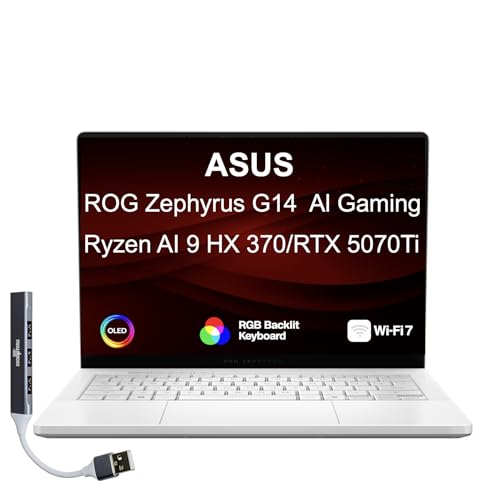
The Zephyrus G14 packs a Ryzen AI 9 HX 370, an RTX 5070 Ti with 12GB of graphics memory, 32GB of RAM and a 1TB SSD into a 14-inch body with a 3K OLED rated at full DCI-P3. That combination of GPU, memory and colour-capable screen in a travel size is rare. As a seller-configured listing, its title is the contract, so verify the configuration matches before ordering. The 500-nit OLED panel also makes it a credible grading screen for online delivery, which travelling editors rarely get from a machine this size.
Specs
- AMD Ryzen AI 9 HX 370 processor
- NVIDIA GeForce RTX 5070 Ti 12GB graphics
- 14-inch 120Hz OLED 3K display, 500 nits, full DCI-P3
- 32GB LPDDR5X memory
- 1TB SSD
- Wi-Fi 7, RGB keyboard, Windows 11 Pro
Best for: Travelling editors and creators who need full power in a carry-on.
Watch out for: Confirm the exact bundled configuration on the listing, as this model is sold in many variants.
Which One Fits Your Situation
You edit 4K client work on macOS
Choose the MacBook Pro 14 with M4 for balanced work, or the M4 Max configuration if your timelines run multi-cam and effects-heavy. Both list XDR displays suited to colour judgement, and the Max’s 36GB of memory is the professional ceiling here. If exports run overnight and timelines stay at 4K, the Max is the one that removes waiting from the schedule.
You edit on Windows at a fixed desk
Take the Legion 5i. Its listed RTX 4060, 32GB of RAM and 1TB SSD cover Premiere’s needs in one box, and the 16-inch QHD screen gives the timeline and program monitor comfortable room. Its size still suits a large desk with a second monitor, and the RTX graphics cover effects plug-ins beyond Premiere itself.
You travel to shoots and edit in the field
Pick the Zephyrus G14. It is the only 14-inch Windows option here with a listed 12GB GPU and 32GB of memory, so field edits do not have to wait until you are home. The OLED display’s colour coverage means the field edit and the final grade can happen on the same screen.
You are upgrading from a struggling laptop
Look at what limited you: dropped frames point to the GPU and chip, so the Legion or Zephyrus; memory warnings point to the 32GB-class models; colour doubts point to the OLED or XDR screens in this group. Each model in this guide answers one of those limits directly, so match the fix to the frustration rather than buying the flagship by default.
Common Mistakes
- Buying integrated graphics for 4K editing and fighting dropped frames on every timeline.
- Choosing 16GB of memory for effects-heavy professional work and hitting the ceiling mid-project.
- Editing on a dim, narrow-gamut screen and delivering colour you never actually saw.
- Keeping active projects on a nearly full SSD until cache and media choke performance.
- Comparing laptop lines by name while ignoring that the listing’s chip variant is the slow one.
Frequently Asked Questions
How much RAM does Premiere Pro need on a laptop?
Sixteen gigabytes is the entry point for HD and light 4K work. Serious 4K, multi-cam or effects-heavy editing justifies 32GB, listed here on the Legion, the Zephyrus and, at 36GB, the M4 Max MacBook Pro. Memory is not upgradeable in these designs, so buy for your largest projects.
Does Premiere Pro need a discrete GPU?
It benefits clearly from one: effects, scaling and colour work are GPU-accelerated, and exports use it too. The RTX 4060 and 5070 Ti listings here provide that on Windows. Apple’s M4 chips integrate strong GPUs with media engines, which is why the MacBook Pros remain competitive without a separate card.
Is the MacBook Pro or a Windows laptop better for Premiere?
Premiere runs well on both. Choose the MacBook Pro for its XDR screen, media engines and quiet efficiency, or the Legion and Zephyrus for RTX graphics, larger memory configurations and Windows software compatibility. Your plug-ins and collaborators’ systems usually make the decision for you.
What storage size should an editor buy?
One terabyte is the comfortable size for active projects, cache and applications, and three of these four models list it. With 512GB, plan on a fast external SSD as part of the purchase rather than an afterthought, and keep the internal drive from filling past the point where caches suffer.
Related guides
- Best Laptops to Play Roblox: From Budget Integrated Graphics to Dedicated GPUs
- Best Laptops for Zoom Teaching: Clear Video, Reliable Audio and All-Day Class Power
- Best Laptops for Video Editing and Music Production: Power, Screen and Storage
- Best Laptops for Network Engineers: Ethernet, RAM for Labs and Ports That Matter
More from Amazon
Programs that pair well with the guide above. Offers and eligibility are set by Amazon and may change.
Free shipping on eligible items, Prime Video and more. Eligible new members can start with a free trial.
Start a Prime free trialAd-free music streaming. Eligible new subscribers can start with a free trial.
Try Music Unlimited freeA Prime membership for ages 18-24 with a trial period. Eligibility is set by Amazon.
See Prime for Young AdultsAudiobooks and podcasts to listen to on the go. Eligible new members can start with a free trial.
Try Audible freeAs an Amazon Associate we earn from qualifying purchases.










Write Your Review
No reviews yet. Be the first to share your experience!