
Key takeaways
- Everyday laptops for browsing, streaming, email and family use, compared on screen, memory and storage from their Amazon US listings.
What's inside
As an Amazon Associate I earn from qualifying purchases. This post may contain affiliate links at no extra cost to you.
A casual laptop succeeds by disappearing. It should open fast, stream video without stutter, handle a dozen browser tabs, and survive being shared by the whole household. The real decision is not peak performance but balance: enough memory to feel smooth in three years, a screen that makes films and photos pleasant, and storage that does not fill up with family pictures.
This guide is for home users, students doing light coursework, and anyone replacing an ageing family laptop. Every pick comes from its Amazon listing, with the processor, memory, storage and display details quoted as stated, so you can match the machine to how your household actually uses a computer. Battery expectations, port selection and the quality of the built-in camera also get a honest look, because those are the details that decide whether a home laptop stays pleasant after the first month.
Quick Picks
As an Amazon Associate we earn from qualifying purchases.
| Product | Best for | Key spec from title |
|---|---|---|
| HP Pavilion 15 (Ryzen 5, 16GB) | Families sharing one do-everything laptop | Ryzen 5 5500U, 16GB RAM, 1TB SSD, anti-glare screen |
| Acer Aspire 5 (Ryzen 5 5500U) | Streaming, browsing and homework on a budget tier | Ryzen 5 5500U, 8GB DDR4, 256GB NVMe SSD, Wi-Fi 6 |
| Lenovo IdeaPad Slim 3 (Ryzen 5) | A second laptop for the kitchen or spare room | Ryzen 5 7520U, 8GB memory, 256GB storage, 15.6-inch FHD |
| ASUS Zenbook 14 OLED (Ryzen 5) | Casual use with a screen worth looking at | Ryzen 5 7530U, 14-inch OLED touch, 256GB SSD |
How to Choose
Memory decides how smooth it feels
For browsing, streaming and documents, memory matters more than a fancy processor. Eight gigabytes is the working minimum and handles everyday tasks, but 16GB keeps many tabs, a video call and a film open at once without the machine pausing to catch up. Two models here list 16GB, and that difference is the one casual users feel most. If a listing does not state memory clearly, treat that as a reason to look at a different configuration rather than guessing.
A Full HD screen is the casual floor
Most of a casual laptop’s life is spent looking at it, so the display deserves budget priority. Full HD resolution keeps text and streaming video sharp, and an IPS or anti-glare panel stays readable from a sofa angle. All four models here list 15.6-inch Full HD screens except the 14-inch Zenbook, which trades size for a sharper OLED panel. Avoid older low-resolution panels still sold on the cheapest machines; they make everything look soft and dated within months. Viewing angles matter more than brightness figures for shared screens on sofas and kitchen tables.
Storage fills faster than you expect
Photos, downloaded films, game installs and Windows updates quietly consume space. A 256GB SSD is fine for a single light user, but households sharing one machine should look at 512GB or the 1TB configuration of the HP Pavilion in this guide. An SSD of any size is non-negotiable: it is what makes a casual laptop feel quick when opening apps and waking from sleep. Check whether the listing states SSD storage explicitly rather than assuming it. A family machine should also leave room for a second user account and its files.
Ports and Wi-Fi for real living rooms
Casual use still involves a TV, a printer, a phone cable and a camera card. HDMI lets the laptop drive the television for films, USB ports handle peripherals, and Wi-Fi 6 keeps streaming stable on modern routers. The Acer Aspire 5 lists Wi-Fi 6 and a backlit keyboard, small comforts that add up daily. Also check the webcam honestly: several budget listings still ship 720p cameras, which look soft on family video calls compared with the screen they sit above.
The 4 Best Options
HP Pavilion 15.6-inch with Ryzen 5 5500U
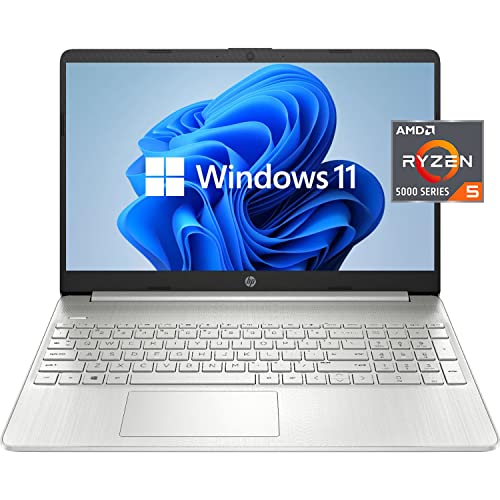
This HP Pavilion configuration lists a Ryzen 5 5500U with 16GB of RAM and a 1TB SSD, the most storage in this group, behind a 15.6-inch anti-glare FHD screen. That combination suits a shared family machine holding photos, schoolwork and downloads at once. Because it is a seller-upgraded listing, the details in the listing itself are what you are buying, so read them carefully. The anti-glare finish keeps films and photos watchable in bright living rooms, and the full-size screen makes split-screen browsing comfortable for two people sharing the view.
Specs
- AMD Ryzen 5 5500U 6-core processor
- 15.6-inch FHD micro-edge anti-glare display
- 16GB RAM
- 1TB PCIe NVMe M.2 SSD
- Windows 11
Best for: Households that want one laptop with room to grow into.
Watch out for: This is an upgraded configuration from a seller, so confirm the exact RAM and SSD stated before ordering.
Acer Aspire 5 A515-45-R74Z with Ryzen 5 5500U
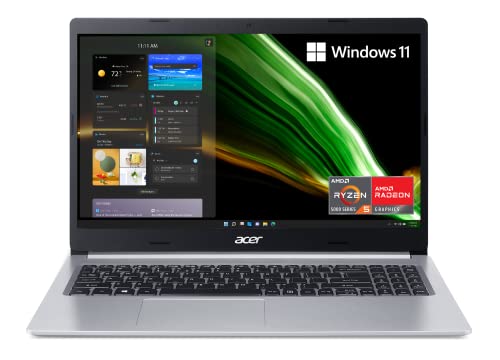
The Acer Aspire 5 A515-45-R74Z lists a Ryzen 5 5500U, 8GB of DDR4 memory and a 256GB NVMe SSD with Wi-Fi 6 and a backlit keyboard. That is the classic casual specification: quick to wake, fine for films and documents, and easy to live with. It is the sensible default for a single user whose needs are unlikely to grow much. The Ryzen 5 also keeps a little headroom for photo sorting and light creative apps, so the machine does not feel finished the moment needs grow slightly.
Specs
- AMD Ryzen 5 5500U hexa-core processor
- 15.6-inch Full HD IPS display
- 8GB DDR4 memory
- 256GB NVMe SSD
- Wi-Fi 6 and backlit keyboard
- Windows 11 Home; model A515-45-R74Z
Best for: Single users who browse, stream and write without heavy multitasking.
Watch out for: The 256GB SSD fills quickly if you download games or keep large photo libraries.
Lenovo IdeaPad Slim 3 with Ryzen 5 7520U

The IdeaPad Slim 3 with Ryzen 5 7520U lists 8GB of memory and 256GB of storage behind a 15.6-inch FHD screen, in an Abyss Blue finish. It fits the role of an always-ready household laptop for recipes, video calls, shopping and homework. Nothing in the listing chases power; everything is aimed at being adequate, quiet and available. Its straightforward specification keeps setup simple for less technical households, and the larger screen suits shared viewing of photos and video calls with family.
Specs
- AMD Ryzen 5 7520U processor
- 15.6-inch FHD display
- 8GB memory
- 256GB storage
- Windows 11
- Abyss Blue; model 82XQ006RUS
Best for: Homes wanting a simple, ready laptop for everyday tasks.
Watch out for: The listing does not promise a backlit keyboard, so check if you often type in dim rooms.
ASUS Zenbook 14 OLED with Ryzen 5 7530U

The Zenbook 14 OLED is the indulgent casual pick: a 14-inch OLED touchscreen, a Ryzen 5 7530U and a slim body that moves from desk to sofa easily. Films and photos look noticeably richer on OLED than on the budget IPS panels around it. Its 256GB SSD and 8GB of RAM are ordinary, so you are paying the difference for the display and the build. The slim metal design also looks and feels a class above the plastic budget machines around it, which matters for a laptop that lives in shared rooms.
Specs
- AMD Ryzen 5 7530U processor
- 14-inch OLED touchscreen
- 8GB RAM
- 256GB SSD
- Windows 11 Home
- Model UM3402YA-WS51T
Best for: Users who stream and browse a lot and care how the screen looks.
Watch out for: The smaller 14-inch screen and 256GB storage suit one person better than a whole family.
Which One Fits Your Situation
One laptop for the whole family
Choose the HP Pavilion 15 with 16GB and a 1TB SSD. Shared photo libraries, school accounts and downloads need exactly the two things this listing has most of: memory for simultaneous tabs and storage that will not be full by next year. The anti-glare screen keeps the shared machine usable in bright rooms where family laptops actually live.
Just browsing, email and streaming
The Acer Aspire 5 Ryzen 5 is the honest fit. Its listed specification covers everyday tasks without paying for power you will never use, and Wi-Fi 6 plus a backlit keyboard make evenings on the sofa comfortable. It is also light enough to move between rooms, so it can serve as both the homework machine and the evening streaming screen.
A laptop that mostly lives at home
Take the IdeaPad Slim 3 Ryzen 5. The 15.6-inch screen suits a kitchen table or spare desk, and the specification is aimed at availability rather than performance, which is what a household second machine needs. Its simple specification means any family member can sit down and use it without a learning curve or a setup project.
You watch a lot of films and shows
Pick the Zenbook 14 OLED. The touchscreen OLED panel is the best screen here for video, and the slim 14-inch body is easy to carry from room to room, even if its storage is sized for one user. The touchscreen makes casual browsing and photo viewing feel natural, especially for users coming from a tablet habit.
Common Mistakes
- Buying 4GB of memory to save a little, then living with a sluggish machine for years.
- Accepting a low-resolution screen on a laptop bought mainly for films and photos.
- Filling a 128GB or small SSD with photos and updates within the first year.
- Ignoring the webcam until the first family video call reveals a grainy 720p picture.
- Choosing a huge, heavy model for casual use and then never moving it off one table.
Frequently Asked Questions
How much memory does a casual laptop need?
Eight gigabytes is the minimum that still feels smooth for browsing, streaming and documents. Sixteen gigabytes, listed on the HP Pavilion here, is better for shared family machines and for keeping many tabs open. More than that is unnecessary unless gaming or creative work enters the picture.
Is a Chromebook better for casual use?
Chromebooks suit purely browser-based lives, but every model in this guide runs Windows 11, which keeps printers, downloaded apps and offline files simple. If your household uses any traditional Windows software at all, a Windows laptop like these avoids compatibility surprises later.
What screen size is best at home?
A 15.6-inch screen, listed on three of these four models, is the home sweet spot: big enough for films and split-screen browsing, still movable between rooms. The 14-inch Zenbook trades some size for a better OLED panel and easier carrying.
How long should a casual laptop last?
A machine with an SSD, at least 8GB of memory and a Full HD screen should stay pleasant for everyday tasks for years. The weak points are usually storage filling up and battery wear, so choosing 512GB or more of storage at purchase is the cheapest longevity upgrade.
Related guides
- Best Laptops to Play Roblox: From Budget Integrated Graphics to Dedicated GPUs
- Best Laptops for Zoom Teaching: Clear Video, Reliable Audio and All-Day Class Power
- Best Laptops for Video Editing and Music Production: Power, Screen and Storage
- Best Laptops for Network Engineers: Ethernet, RAM for Labs and Ports That Matter
More from Amazon
Programs that pair well with the guide above. Offers and eligibility are set by Amazon and may change.
Free shipping on eligible items, Prime Video and more. Eligible new members can start with a free trial.
Start a Prime free trialAd-free music streaming. Eligible new subscribers can start with a free trial.
Try Music Unlimited freeA Prime membership for ages 18-24 with a trial period. Eligibility is set by Amazon.
See Prime for Young AdultsAudiobooks and podcasts to listen to on the go. Eligible new members can start with a free trial.
Try Audible freeAs an Amazon Associate we earn from qualifying purchases.










Write Your Review
No reviews yet. Be the first to share your experience!