
Key takeaways
- Laptops for SketchUp compared on graphics power, single-core speed, memory and display quality, from Amazon US listing details.
What's inside
As an Amazon Associate I earn from qualifying purchases. This post may contain affiliate links at no extra cost to you.
SketchUp feels simple until a model grows: a detailed interior, a landscape with entourage, or a LayOut presentation can turn orbiting into a slideshow. The hardware that decides the experience is graphics power for the viewport, strong single-core processor speed for SketchUp’s modelling engine, enough memory for large files, and a screen that makes fine geometry easy to see.
This guide is for architects, interior designers, woodworkers and students choosing a laptop for SketchUp and LayOut. The models were selected from their Amazon listings, and the discussion uses the stated graphics, processors and displays to judge viewport duty. Extension and rendering plug-in headroom is considered alongside raw modelling, because many SketchUp users grow into visualisation work on the same machine that started as a modelling laptop.
Quick Picks
As an Amazon Associate we earn from qualifying purchases.
| Product | Best for | Key spec from title |
|---|---|---|
| ASUS ROG Zephyrus G14 (RTX 4060) | Modellers who want RTX power in a portable body | Ryzen 9 8945HS, RTX 4060, 3K OLED 120Hz, 1TB SSD |
| Lenovo Legion 5i (RTX 4060) | Large models and LayOut documents at a desk | i7-13650HX, RTX 4060 8GB, 32GB RAM, 16-inch QHD 165Hz |
| ASUS ROG Zephyrus G14 (RTX 5070 Ti) | Power users who also render and present in high colour | Ryzen AI 9 HX 370, RTX 5070 Ti 12GB, 32GB RAM, OLED 3K |
| Apple MacBook Pro 14 (M4) | Mac-based designers with moderate model sizes | M4 10-core CPU, 16GB memory, 512GB SSD, XDR display |
How to Choose
Graphics power runs the viewport
SketchUp’s viewport is a graphics workload: shadows, textures and large component libraries all draw through the GPU. The Zephyrus G14 models list RTX 4060 and RTX 5070 Ti graphics, and the Legion 5i lists an RTX 4060 with 8GB of graphics memory, which is the class of hardware that keeps big models orbitable. Integrated graphics can open SketchUp and model a shed; they struggle with the furnished house. When a listing names a discrete GPU with its memory figure, that is the line to compare first.
Single-core speed drives modelling feel
Much of SketchUp’s geometry work is single-threaded, so a modern processor with high clock speeds feels faster than an older chip with more cores. The Ryzen 9 8945HS in the 2024 Zephyrus, the Ryzen AI 9 HX 370 in the 2025 model, and the i7-13650HX in the Legion are all current high-performance parts. The MacBook Pro’s M4 is similarly strong per core. Avoid low-power U-series chips for primary modelling machines; they are built for battery life, not for pushing geometry around all day.
Memory and storage for growing libraries
Large models, texture libraries and extensions accumulate, and LayOut documents add their own weight. Sixteen gigabytes is the floor for comfortable professional SketchUp work, and 32GB, listed on the Legion and the 2025 Zephyrus, suits users with big component libraries. An SSD is assumed at this level; 1TB listings here give models, textures and rendered outputs room to live together. Check the listing’s exact memory and storage, because the same chassis sells in lighter configurations. Extensions such as renderers and report generators draw on the same memory pool, so leave them room.
The display is your drawing board
Modelling is hours of looking at edges, faces and shadows, so resolution and colour quality are working specifications. The Zephyrus models list 3K OLED panels, the Legion a 16-inch QHD screen, and the MacBook Pro a Liquid Retina XDR display. Bigger and sharper screens reduce zooming in and out on details. If you present to clients from the laptop, the OLED and XDR panels here also judge materials and lighting more honestly than basic Full HD screens. Matte finishes also help when a site visit means modelling beside a bright window.
The 4 Best Options
ASUS ROG Zephyrus G14 2024 with RTX 4060

The 2024 Zephyrus G14 lists a Ryzen 9 8945HS, an RTX 4060 and a 1TB SSD behind a 14-inch 3K OLED 120Hz display. For SketchUp, that reads as strong single-core speed for modelling, a real GPU for textured viewports, and a sharp screen for detail work, in a laptop that still travels to sites and client meetings. It is the balanced SketchUp pick in this group. The 120Hz panel keeps orbiting motion fluid, which reduces the visual fatigue of a full modelling day more than many users expect.
Specs
- AMD Ryzen 9 8945HS processor
- NVIDIA GeForce RTX 4060 graphics
- 14-inch 3K (2880 x 1800) OLED 120Hz display
- 1TB SSD
- Windows 11 Home
Best for: Designers who model at a desk and present on the move.
Watch out for: The listing’s title does not state the memory figure, so confirm the RAM on the product page before ordering.
Lenovo Legion 5i Gaming Laptop with RTX 4060

The Legion 5i lists a 14-core i7-13650HX, an RTX 4060 with 8GB of graphics memory, 32GB of RAM and a 1TB SSD, with a 16-inch QHD display. That is the most complete desk specification here for heavy SketchUp files: memory for big libraries, GPU for the viewport and screen space for toolbars and trays. Its cooling is designed for sustained work rather than quiet rooms. The numeric keypad speeds up the constant dimension entry that SketchUp modelling involves, a small detail that desk-based designers appreciate daily.
Specs
- Intel Core i7-13650HX 14-core processor
- NVIDIA GeForce RTX 4060 8GB graphics
- 16-inch QHD 165Hz G-SYNC display
- 32GB RAM
- 1TB SSD
- 4-zone RGB backlit keyboard; Windows 11 Home
Best for: Professionals whose models are large and whose laptop lives on a desk.
Watch out for: It is a big gaming-class chassis, so treat it as transportable rather than truly portable.
ASUS ROG Zephyrus G14 with RTX 5070 Ti
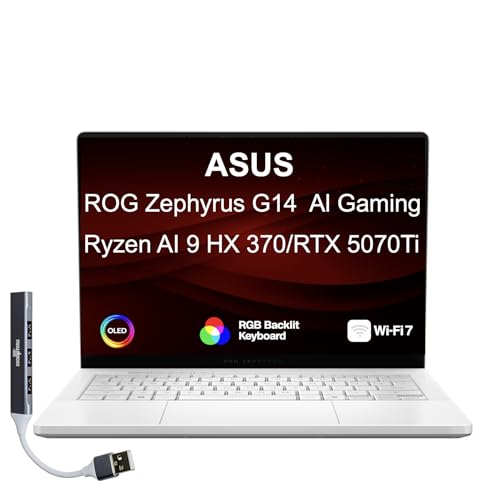
The 2025 Zephyrus G14 lists a Ryzen AI 9 HX 370, an RTX 5070 Ti with 12GB of graphics memory, 32GB of LPDDR5X memory and a 3K OLED rated at full DCI-P3. For SketchUp paired with rendering plug-ins, that GPU and memory headroom is the strongest here, and the colour-rated screen suits client presentations. It is a seller-configured listing, so the title’s configuration is the one to verify. Wi-Fi 7 and the modern port set also suit shared studio environments where models sync to team storage throughout the day.
Specs
- AMD Ryzen AI 9 HX 370 processor
- NVIDIA GeForce RTX 5070 Ti 12GB graphics
- 14-inch 120Hz OLED 3K display, 500 nits, full DCI-P3
- 32GB LPDDR5X memory
- 1TB SSD
- Wi-Fi 7, RGB keyboard, Windows 11 Pro
Best for: Architects and designers who model, render and present from one machine.
Watch out for: Verify the exact configuration at checkout, as Zephyrus variants differ widely in GPU and memory.
Apple MacBook Pro 14-inch with M4 Chip

The MacBook Pro 14 with M4 lists a 10-core CPU, 16GB of unified memory, a 512GB SSD and the Liquid Retina XDR display. SketchUp runs natively on macOS, and the M4’s per-core speed suits modelling, while its integrated graphics handle small to mid-size models well. It is the choice for designers in the Apple ecosystem whose models are detailed but not enormous, and who value the screen and battery for site work. Battery endurance helps on site surveys and client visits where the model must open quickly and run for hours away from power.
Specs
- Apple M4 chip with 10-core CPU and 10-core GPU
- 14.2-inch Liquid Retina XDR display, up to 1600 nits peak brightness
- 16GB unified memory
- 512GB SSD storage
- Silver finish
Best for: Mac users doing residential-scale modelling and presentations.
Watch out for: Very large, texture-heavy models lean on discrete GPUs like the RTX models here more than integrated graphics.
Which One Fits Your Situation
You model furnished interiors and exteriors
Choose the Legion 5i or the 2025 Zephyrus G14. Both list RTX graphics and 32GB of memory, the combination that keeps textured, component-heavy models responsive, with the Legion adding a larger 16-inch working screen. The Legion’s larger screen suits all-day modelling, while the Zephyrus keeps the same class of power in a smaller bag.
You carry the laptop to clients and sites
Take the 2024 Zephyrus G14. Its 14-inch body, RTX 4060 and 3K OLED screen travel well while still covering serious modelling, provided you confirm the memory figure on the listing before buying. Its OLED screen also makes client presentations look considered, which matters when the laptop is the presentation device.
You work in SketchUp and a renderer daily
Pick the 2025 Zephyrus G14. The listed RTX 5070 Ti with 12GB of graphics memory is the strongest rendering hardware here, and 32GB of memory keeps SketchUp and the renderer open together. The 32GB of memory also keeps Photoshop, LayOut and the renderer open beside SketchUp without closing anything between tasks.
Your studio is Mac-based
Look at the MacBook Pro 14. The M4 chip and XDR display make a fine SketchUp station for moderate models, and it keeps you inside the software and file ecosystem your studio already uses. It is also the quietest and most power-efficient option here for shared studio spaces and site offices.
Common Mistakes
- Buying integrated graphics for SketchUp and blaming the software when big models stutter.
- Choosing a low-power efficiency chip for a primary modelling machine used all day.
- Running out of memory with large component libraries because the listing’s RAM was never checked.
- Modelling on a small, dim screen and missing geometry errors until the client presentation.
- Assuming every variant of a laptop line shares the reviewed model’s GPU and memory.
Frequently Asked Questions
Does SketchUp need a gaming laptop?
It does not need gaming branding, but it benefits from the same hardware: a discrete GPU, a fast processor and 16GB or more of memory. That is why the Legion and Zephyrus models appear here. Their graphics listings, not their gaming labels, are what make large models comfortable to orbit and edit.
How much RAM does SketchUp use?
Small models run in far less, but professional work with big libraries and LayOut open alongside justifies 16GB as a floor and 32GB for comfort, as listed on the Legion and 2025 Zephyrus. Check the exact figure on any listing, because the same model often sells with less.
Can a MacBook run SketchUp well?
Yes, SketchUp is native on macOS, and the M4 MacBook Pro’s per-core speed suits modelling. The limit is very large, texture-heavy viewports, where the discrete RTX graphics in the Windows models here hold an advantage. For residential and interior-scale work, the MacBook Pro is a sound SketchUp machine.
What screen is best for modelling?
A sharp, bright screen reduces eye strain and missed details. The 3K OLED panels on the Zephyrus models, the Legion’s 16-inch QHD and the MacBook Pro’s XDR display all qualify. Size is preference: 14 inches travels, 16 inches gives toolbars and model more shared room.
Related guides
- Best Laptops to Play Roblox: From Budget Integrated Graphics to Dedicated GPUs
- Best Laptops for Zoom Teaching: Clear Video, Reliable Audio and All-Day Class Power
- Best Laptops for Video Editing and Music Production: Power, Screen and Storage
- Best Laptops for Network Engineers: Ethernet, RAM for Labs and Ports That Matter
More from Amazon
Programs that pair well with the guide above. Offers and eligibility are set by Amazon and may change.
Free shipping on eligible items, Prime Video and more. Eligible new members can start with a free trial.
Start a Prime free trialAd-free music streaming. Eligible new subscribers can start with a free trial.
Try Music Unlimited freeA Prime membership for ages 18-24 with a trial period. Eligibility is set by Amazon.
See Prime for Young AdultsAudiobooks and podcasts to listen to on the go. Eligible new members can start with a free trial.
Try Audible freeAs an Amazon Associate we earn from qualifying purchases.










Write Your Review
No reviews yet. Be the first to share your experience!