
Key takeaways
- The best fanless laptops are silent by design. Compare the MacBook Air with M4, M3, M2 and M1 chips, all passively cooled, and learn what fanless design means for performance.
What's inside
- Quick Picks
- 1. Apple MacBook Air 13-inch with M4 — Best Overall Fanless Laptop
- 2. Apple MacBook Air 13-inch with M3 — Best Fanless Laptop in the Middle of the Range
- 3. Apple MacBook Air 13.6-inch with M2 — Best Redesigned Fanless Model on a Tighter Budget
- 4. Apple MacBook Air 13-inch with M1 — Best Entry Point to Silent Computing
- How to Choose a Fanless Laptop
- FAQs
- Conclusion
As an Amazon Associate I earn from qualifying purchases. This post may contain affiliate links at no extra cost to you.
As an Amazon Associate we earn from qualifying purchases.
A fanless laptop makes no fan noise because it has no fan at all. Heat from the processor spreads through the aluminum chassis and radiates away passively, so the machine stays silent during calls, in a library, in a bedroom at night, and next to a microphone while recording. There is also one less moving part to wear, and no fan intake to pull in dust. The trade-off is physics: without active cooling, a fanless design must manage heat by moderating sustained performance, so these machines are built around very efficient processors rather than power-hungry ones. That is why the credible fanless shortlist is short, and why this guide is deliberately strict about evidence.
Every laptop in this guide is an Apple MacBook Air, and every one is included only because its fanless, passively cooled design is stated plainly by the manufacturer or in its product listing copy. Apple describes the MacBook Air line as having a fanless design that runs silently, and the listings for the models below repeat that silent, fanless operation. Other thin laptops that merely run quietly, or that reduce fan speed well, were excluded, because quiet fans are still fans. The four models span the M4, M3, M2, and M1 generations, so you can choose by performance, memory, camera quality, and how long you plan to keep the machine, while keeping the same silent design in every case.
Disclosure: This article contains affiliate links. If you buy through a link on this page, we may earn a commission at no additional cost to you.
Quick Picks
- Best overall fanless laptop: MacBook Air 13-inch with M4 — the newest chip, 16GB of memory as standard in the listing configuration, and a 12MP Center Stage camera, in the same silent fanless chassis.
- Best fanless value in the middle of the range: MacBook Air 13-inch with M3 — faster than M2, with support for two external displays when the lid is closed, and the same passive cooling.
- Best redesigned fanless model on a tighter budget: MacBook Air 13.6-inch with M2 — the modern flat-edged design, MagSafe charging, and a brighter Liquid Retina display.
- Best entry point to silent computing: MacBook Air 13-inch with M1 — the original Apple silicon Air, still fanless and still capable for everyday work and study.
1. Apple MacBook Air 13-inch with M4 — Best Overall Fanless Laptop

The 2025 MacBook Air with the Apple M4 chip is the strongest fanless laptop in this guide. The listing configuration pairs the M4 chip, which has a 10-core CPU in this generation, with 16GB of unified memory and a 256GB SSD, behind a 13.6-inch Liquid Retina display that supports one billion colors. Apple states that MacBook Air has a fanless design, and independent coverage of the M4 Air notes its always silent operation, because there is simply no fan to spin up under load. For writing, browsing with many tabs, office work, photo organization, coding, and light video edits, that silence is constant rather than conditional.
The M4 generation also fixes two practical points. Memory starts at 16GB in the listing configuration, double the base of the M2 and original M3 listings, which helps longevity. The 12MP Center Stage camera is a clear step up for video calls, keeping you framed as you move. Battery life remains a strength of the Air line, rated by Apple at up to 18 hours of video playback for this class of machine, and the chassis stays thin and light at about 2.7 pounds. Sustained, maximum-load rendering will still settle to what passive cooling can dissipate, so long exports run slower than on a fan-cooled MacBook Pro, but everyday responsiveness is excellent.
Specifications
- Display: 13.6-inch Liquid Retina, 2560 x 1664, 500 nits brightness
- Processor: Apple M4 chip
- Memory: 16GB unified memory
- Storage: 256GB SSD
- Camera: 12MP Center Stage camera
- Operating system: macOS
- Cooling: Fanless, passively cooled aluminum enclosure (manufacturer design)
- Ports: 2 x Thunderbolt / USB 4, MagSafe charging, headphone jack
Pros
- Completely silent in all use, with no fan to hear or maintain
- Fastest processor and most base memory in this fanless guide
- Improved 12MP camera for calls and online teaching
- Thin, light chassis that is easy to carry daily
Cons
- Sustained heavy rendering is limited by passive cooling
- Memory and storage are fixed at purchase and cannot be upgraded later
- Only two Thunderbolt ports, so a hub may be needed at a desk
View the MacBook Air with M4 on Amazon
2. Apple MacBook Air 13-inch with M3 — Best Fanless Laptop in the Middle of the Range

The MacBook Air with the Apple M3 chip sits in the middle of this guide and is the right choice for many buyers. Its listing configuration combines the M3 chip with an 8-core CPU and a 10-core GPU in many configurations, 8GB of unified memory in the base listing referenced here, and a 256GB SSD, with the same 13.6-inch Liquid Retina display at 500 nits with P3 wide color. The fanless evidence is the same as for the M4 model: Apple designed this Air generation without a fan, and its listing and manufacturer materials describe silent, fanless operation, with heat handled passively by the enclosure.
Compared with the M2 model below, the M3 Air adds faster Wi-Fi 6E, hardware-accelerated ray tracing and mesh shading in the GPU, and a useful display trick: with the laptop lid closed, it can drive two external displays, which makes it a better silent desk machine. Performance in everyday tasks is close to the M4 for most people, and the difference mainly appears in heavier photo, video, and compiling work. If you keep a laptop for many years, consider a configuration with more memory where available, because unified memory cannot be added later. As a silent all-rounder for office work, study, writing, and creative hobbies, this generation is easy to recommend.
Specifications
- Display: 13.6-inch Liquid Retina, 2560 x 1664, 500 nits brightness, P3 wide color
- Processor: Apple M3 chip, 8-core CPU
- Memory: 8GB unified memory (base listing configuration)
- Storage: 256GB SSD
- Camera: 1080p FaceTime HD camera
- Operating system: macOS
- Cooling: Fanless, passively cooled aluminum enclosure (manufacturer design)
- Ports: 2 x Thunderbolt / USB 4, MagSafe charging, headphone jack
Pros
- Silent fanless design shared with the rest of the Air line
- Strong everyday performance with efficient battery use
- Supports two external displays with the lid closed
- Wi-Fi 6E for faster connections on compatible networks
Cons
- Base memory is lower than the M4 listing configuration
- Sustained peak performance is capped by passive cooling
- Storage starts small for large photo or video libraries
View the MacBook Air with M3 on Amazon
3. Apple MacBook Air 13.6-inch with M2 — Best Redesigned Fanless Model on a Tighter Budget
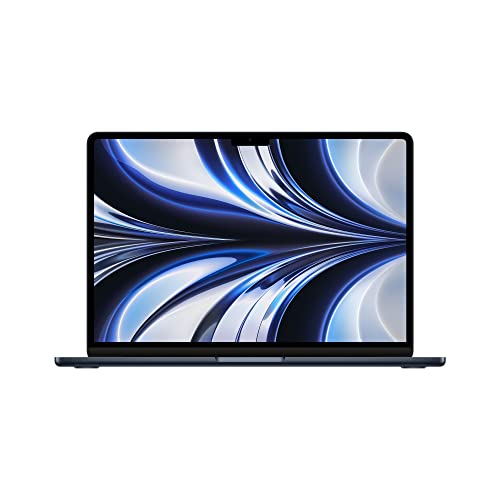
The 2022 MacBook Air with the Apple M2 chip introduced the current Air design: a flat, even chassis, a larger 13.6-inch Liquid Retina display with a notch, MagSafe charging that frees both Thunderbolt ports, and a 1080p camera. The listing configuration referenced here, in Midnight, uses the M2 chip with 8GB of memory and a 256GB SSD, model MLY33LL/A. Its fanless credentials are explicit in listing copy for this model, which describes silent, fanless operation, and in manufacturer descriptions of the Air line as a fanless design that stays silent regardless of the task.
For most everyday computing, the M2 Air still feels quick: documents, email, video calls, streaming, web work with many tabs, and light creative tasks all run smoothly, and they run in complete silence. The display reaches 500 nits and supports P3 wide color and one billion colors, so it is noticeably better than the M1 screen for brightness and color. Choose this model when you want the modern design and MagSafe without paying for the newest chip, and when your workload is mainstream rather than sustained and heavy. Students, writers, remote workers, and anyone who records voice or video near the laptop will value the absence of fan noise every day.
Specifications
- Display: 13.6-inch Liquid Retina, 2560 x 1664, 500 nits brightness, P3 wide color
- Processor: Apple M2 chip, 8-core CPU
- Memory: 8GB unified memory
- Storage: 256GB SSD
- Camera: 1080p FaceTime HD camera
- Operating system: macOS
- Cooling: Fanless design with silent operation, stated in the product listing
- Ports: 2 x Thunderbolt / USB 4, MagSafe charging, headphone jack
Pros
- Modern design with MagSafe and a brighter, larger display than M1
- Completely silent fanless operation for calls and recording
- Light at about 2.7 pounds and easy to carry
- Strong battery life for a full day of mainstream work
Cons
- Slower than M3 and M4 models in sustained and graphics work
- Base 8GB memory and 256GB storage are modest for long ownership
- Supports one external display natively in standard use
View the MacBook Air with M2 on Amazon
4. Apple MacBook Air 13-inch with M1 — Best Entry Point to Silent Computing

The 2020 MacBook Air with the Apple M1 chip started the modern fanless era for mainstream laptops. Apple replaced Intel processors with its own M1 chip and removed the fan entirely, relying on an aluminum heat spreader and the enclosure to cool the machine passively. Listing records for this model, in Silver with model number MGN93LL/A, describe the same fanless design, and the machine became well known for working in silence while feeling far faster than the Intel Air it replaced. The wedge-shaped chassis, 13.3-inch Retina display, and Touch ID all remain pleasant to use.
Expect sensible limits. The display is a 13.3-inch Retina panel at 2560 x 1600 with 400 nits brightness, a step below the later Liquid Retina screens, the camera is 720p, and the base listing pairs 8GB of memory with a 256GB SSD. None of that prevents solid everyday performance for writing, study, browsing, office documents, and video calls, and the silence is identical in character to the newer models because there is no fan in this machine either. This is the fanless laptop to choose when the budget is the deciding factor, or as a quiet second computer for the home. Buyers planning to keep a laptop for many years, or to edit video regularly, should step up to the M2 or newer models above.
Specifications
- Display: 13.3-inch Retina, 2560 x 1600, 400 nits brightness
- Processor: Apple M1 chip, 8-core CPU
- Memory: 8GB unified memory
- Storage: 256GB SSD
- Camera: 720p FaceTime HD camera
- Operating system: macOS
- Cooling: Fanless design, passively cooled (manufacturer design and listing records)
- Ports: 2 x Thunderbolt / USB 4, headphone jack
Pros
- The most accessible entry point in this fanless guide
- Completely silent, with no fan noise in any task
- Still quick for everyday writing, study, and office work
- Touch ID and a comfortable keyboard in a light chassis
Cons
- Older design, dimmer screen, and a 720p camera
- No MagSafe charging, so one port is used while charging
- Oldest chip here, so the shortest remaining software runway of the four
View the MacBook Air with M1 on Amazon
How to Choose a Fanless Laptop
First, verify that fanless is real, not a marketing description of quiet. A genuinely fanless laptop has no fan in its specification or teardown and is described by its manufacturer as fanless or passively cooled. If a listing only says quiet, whisper, or silent mode, assume a fan is present and spinning slowly. That strict test is why this guide contains only MacBook Air models: their fanless design is stated openly, while most Windows thin-and-light laptops, including many that feel quiet, still contain fans. A small number of Windows and Chromebook models have also used passive cooling in specific configurations, but only choose one when the exact configuration you are buying states fanless or passively cooled in writing.
Second, match the chip to sustained work. Fanless machines excel at bursty tasks: opening apps, editing documents, browsing, calls, and short exports feel fast, because the processor can boost briefly and then cool. Long, continuous loads such as rendering a long video, compiling a large project for an extended period, or gaming will run at the level passive cooling can sustain. If that is your main work, a fan-cooled laptop is the honest tool. If silence matters more, choose the newest chip you can, because each generation does more work per watt and therefore does more before heat becomes the limit.
Third, buy memory and storage for the whole ownership period. In the MacBook Air line, memory and storage are part of the main board and cannot be upgraded later. Mainstream users can live with the base configurations listed here, but anyone keeping the machine for many years, or working with large files, should prefer 16GB of memory and a larger SSD where that configuration is offered. Also check ports, external display support, and camera quality, which differ by generation and matter daily.
FAQs
What does fanless actually mean in a laptop?
It means the laptop has no cooling fan at all. Heat from the processor is spread into a heat spreader and the metal chassis and released passively into the air. The result is a machine that cannot make fan noise, with no fan to fail, at the cost of lower sustained maximum performance than a fan-cooled design.
Are fanless laptops slower than laptops with fans?
For short and everyday tasks, a modern fanless laptop such as the MacBook Air with M4 feels fast, because efficient chips boost quickly for brief jobs. For long, continuous heavy work, a fan-cooled laptop can hold higher performance for longer. The gap depends on the task, not on the label alone.
Why does this guide only include MacBook Air models?
Because each model here has clear, written evidence of a fanless, passively cooled design from the manufacturer or its product listing. Many other laptops are quiet but still contain fans, so they were excluded rather than guessed at. If a Windows model states fanless cooling for the exact configuration on sale, it can be judged by the same standard.
Which fanless laptop is best for students and writers?
Any model in this guide will stay silent in a library or shared room. The M2 Air is a strong balance of modern design and cost, the M3 and M4 models add performance and longevity, and the M1 model is the entry point when budget matters most.
Do fanless laptops overheat?
They manage heat by design, reducing performance when temperatures rise rather than spinning a fan. The chassis can feel warm under sustained load, which is normal for passive cooling, because the enclosure itself is part of how heat leaves the machine. For typical office, study, and browsing work, this is not a practical problem.
Conclusion
A fanless laptop is a deliberate choice: silence and simplicity in exchange for a ceiling on sustained heavy performance. Within the models that prove their fanless design in writing, the MacBook Air with M4 is the best overall choice, the M3 Air is the balanced middle option, the M2 Air brings the modern design at a lower step in the range, and the M1 Air remains the accessible starting point. Pick by chip generation, memory, and how long you will keep the machine, and every option here will work without ever making fan noise.
Related guides
- Best Laptops to Play Roblox: From Budget Integrated Graphics to Dedicated GPUs
- Best Laptops for Zoom Teaching: Clear Video, Reliable Audio and All-Day Class Power
- Best Laptops for Video Editing and Music Production: Power, Screen and Storage
- Best Laptops for Network Engineers: Ethernet, RAM for Labs and Ports That Matter
More from Amazon
Programs that pair well with the guide above. Offers and eligibility are set by Amazon and may change.
Free shipping on eligible items, Prime Video and more. Eligible new members can start with a free trial.
Start a Prime free trialAd-free music streaming. Eligible new subscribers can start with a free trial.
Try Music Unlimited freeA Prime membership for ages 18-24 with a trial period. Eligibility is set by Amazon.
See Prime for Young AdultsAudiobooks and podcasts to listen to on the go. Eligible new members can start with a free trial.
Try Audible freeAs an Amazon Associate we earn from qualifying purchases.









Write Your Review
No reviews yet. Be the first to share your experience!