
Key takeaways
- Four laptops that show what the 700 dollar tier should deliver in 2026: modern multi-core processors, 16GB memory options, fast SSD storage and Full HD screens.
What's inside
As an Amazon Associate I earn from qualifying purchases. This post may contain affiliate links at no extra cost to you.
A budget line only helps if you know what it should buy. At the 700 dollar level, the real decision is not whether a laptop can open a browser; almost anything can. It is whether the machine still feels responsive in year three, when the drive is half full, the browser holds twenty tabs, and a video call runs beside a spreadsheet. That staying power comes from processor cores, memory headroom and SSD storage, not from a flashy shell.
This guide is for home users replacing an ageing family laptop, students who need one machine for a whole course, and remote workers whose employer is not supplying hardware. Every model below was picked from its Amazon listing details, and the specs quoted are the ones printed on those listings, so you can compare like with like before checking the exact configuration on the product page.
Quick Picks
As an Amazon Associate we earn from qualifying purchases
| Product | Best for | Key spec from title |
|---|---|---|
| Acer Aspire 5 A515-45-R74Z | The safe mainstream replacement for an old family PC | Ryzen 5 5500U, 8GB RAM, 256GB SSD |
| Lenovo IdeaPad Slim 3 (Ryzen 7, Touch) | Heavier multitasking with a touchscreen | Ryzen 7 5825U, 16GB RAM, 512GB SSD, touchscreen |
| HP Pavilion 15 (Ryzen 7 5825U) | A large touch display for shared home use | Ryzen 7 5825U, 16GB RAM, touchscreen |
| Lenovo IdeaPad Slim 3 (Ryzen 5) | A simpler pick when the workload stays light | Ryzen 5 7520U, 8GB RAM, 256GB storage |
How to Choose
Spend on the processor generation, not the badge
Two laptops can both say Core i5 or Ryzen 5 on the box and be years apart in design. In this class, look for a recent multi-core chip such as the Ryzen 5 5500U or Ryzen 7 5825U in the listings below; six or eight cores keep background updates, antivirus scans and browser tabs from stealing the foreground. An older dual-core chip is the classic way a budget laptop feels slow within months, even when everything else on the spec sheet looks familiar.
Treat 8GB of memory as the floor, 16GB as the target
Memory decides how much you can leave open. With 8GB, a browser, a chat app and a document editor already crowd the system, and Windows starts leaning on the SSD. The 16GB configurations in this guide, like the IdeaPad Slim 3 with a Ryzen 7, are the ones that age gracefully. If you choose an 8GB model, check on the listing whether that configuration is the one in the box, because the same model name is sold with both amounts.
Storage size matters more than storage slogans
Every laptop here uses solid-state storage, which is why they wake and load quickly. The difference is capacity: 256GB suits documents and photos with cloud backup, while 512GB leaves room for games, offline video and a growing photo library without weekly clean-ups. Listings sometimes headline a model family and then ship a smaller drive in the selected variant, so read the storage line of the exact listing variant before ordering, not just the product name.
Where this tier quietly cuts corners
Manufacturers protect the headline price by trimming the screen, the ports and the warranty terms. A dim panel makes a sunny kitchen table hard work, a single USB-C port limits docks, and a one-year warranty is standard rather than generous. None of that makes a laptop a bad buy, but it changes which one fits you. The picks below keep Full HD IPS-class panels and modern Wi-Fi, and their watch-out notes flag the compromises that remain.
The 4 Best Options
Acer Aspire 5 A515-45-R74Z
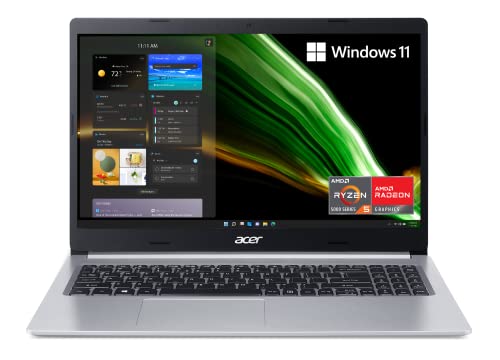
The Aspire 5 in this configuration is the reference point for the whole tier: a six-core Ryzen 5, an NVMe SSD and a Full HD IPS panel in a plain 15.6-inch shell. It suits the buyer who wants the replacement laptop to disappear into daily life: email, documents, streaming and light photo work without fanfare. The backlit keyboard and Wi-Fi 6 are small things that matter every single day, and the design has no gaming styling to explain to anyone.
Specs
- 15.6-inch Full HD IPS display
- AMD Ryzen 5 5500U hexa-core mobile processor
- AMD Radeon graphics
- 8GB DDR4 memory
- 256GB NVMe SSD storage
- Wi-Fi 6 and backlit keyboard
- Windows 11 Home
Best for: Replacing a slow family or home-office laptop with something that simply keeps up.
Watch out for: Memory is 8GB in this configuration, so heavy tab hoarders should look at the 16GB IdeaPad below or confirm a higher-memory variant of the Aspire on its listing.
Lenovo IdeaPad Slim 3 (Ryzen 7, Touch)

This IdeaPad Slim 3 is the multitasker of the group. Its Ryzen 7 chip brings eight cores, and the listing pairs it with 16GB of memory and a 512GB SSD, which is the combination that keeps a browser, office apps and a call all comfortable at once. The touchscreen is genuinely useful for scrolling long documents and signing forms, and the 720p camera covers everyday video calls. It is the one to pick when several people share one machine and nobody closes anything.
Specs
- 15.6-inch Full HD touchscreen display
- AMD Ryzen 7 5825U eight-core processor
- AMD Radeon graphics
- 16GB DDR4 memory
- 512GB SSD storage
- Wi-Fi 6 and Bluetooth 5.2
- 720p HD camera
- Windows 11 Home
Best for: Households and students who keep many apps open and want touch input.
Watch out for: Touchscreens reflect more light than matte panels, so check the listing photos and plan seating away from bright windows if glare bothers you.
HP Pavilion 15 (Ryzen 7 5825U)

HP’s Pavilion pairs the same eight-core Ryzen 7 family with 16GB of memory and a large touchscreen, making it a comfortable shared desk machine. The bigger canvas helps with side-by-side documents, and touch input suits casual browsing on the sofa as much as work at a table. It is a sensible choice for a family that wants one laptop to handle homework, admin and entertainment without a separate tablet. The listing’s boost clock figure shows this chip is tuned for short bursts of speed.
Specs
- 15.6-inch Full HD touchscreen display
- AMD Ryzen 7 5825U processor, eight cores and sixteen threads
- Boost clock up to 4.5GHz as listed
- 16GB memory
- AMD Radeon graphics
Best for: Families wanting a big, touch-friendly screen for mixed home use.
Watch out for: A 15.6-inch touchscreen is not a light travel companion; if the laptop will commute daily, weigh the smaller options in this guide first.
Lenovo IdeaPad Slim 3 (Ryzen 5)

Not every buyer needs eight cores. This IdeaPad Slim 3 uses a Ryzen 5 7520U with 8GB of memory and 256GB of storage, which covers browsing, documents, banking, email and streaming without paying for headroom that would sit unused. It makes sense as a second household laptop or a machine for a relative whose workload is predictable and light. The Full HD screen keeps text sharp, and the slim body is easy to move between rooms. Buy it for what it is, not as a future-proofing play.
Specs
- 15.6-inch Full HD display
- AMD Ryzen 5 7520U processor
- 8GB memory
- 256GB storage
- Model 82XQ006RUS in Abyss Blue
- Windows 11
Best for: Light, predictable workloads such as browsing, email and documents.
Watch out for: The 256GB drive fills quickly with photos and offline video, so pair it with cloud storage or an external drive from the start.
Which One Fits Your Situation
You are replacing the family laptop
Start with the Aspire 5. Its six-core processor, SSD and Full HD IPS screen cover the shared mix of browsing, homework and streaming, and the backlit keyboard helps in dim rooms. If your household keeps everything open at once, step up to the 16GB IdeaPad Slim 3 instead; the extra memory is the difference you will feel daily.
You study or work from home full time
Choose the IdeaPad Slim 3 with the Ryzen 7. Sixteen gigabytes of memory and a 512GB SSD give coursework, research tabs and video lectures room to coexist, and the touchscreen speeds up reading and annotating long PDFs. It is the configuration in this tier least likely to need replacing before your course or contract ends.
The laptop is for a parent or relative
The Ryzen 5 IdeaPad Slim 3 keeps things simple: a clear Full HD screen, enough storage for documents and photos, and no performance parts they will never use. Set up cloud photo backup during the first week, because the 256GB drive is the one limit they are likely to meet.
You want the biggest screen for the money
The Pavilion 15 gives you the large touchscreen and 16GB of memory for shared desks and sofa browsing. It trades portability for that canvas, so it fits homes where the laptop lives in one or two rooms rather than in a backpack every day.
Common Mistakes
- Buying on the processor badge alone and ending up with an old dual-core chip that feels slow within a year.
- Accepting 8GB of memory for a machine that must run calls, browsers and office apps together for years.
- Reading the model family’s headline specs instead of the exact variant’s storage and memory on the listing.
- Ignoring screen type and brightness, then struggling with a dim or reflective panel in a bright room.
- Forgetting that this tier usually includes a standard one-year warranty, so accidental-damage cover is a separate decision.
Frequently Asked Questions
What specs should a laptop in this class have in 2026?
Aim for a recent six-core or eight-core processor, 16GB of memory if you multitask, and at least a 256GB SSD, with 512GB preferred for photos and games. A Full HD IPS-class screen and Wi-Fi 6 round out a machine that should stay comfortable for several years of everyday use.
Is 8GB of memory enough at this budget?
It is enough for browsing, documents and streaming, and the 8GB models here are honest picks for light work. It becomes the limit when you keep many tabs, calls and apps open together. If the laptop must last four or more years as a main machine, the 16GB configurations are the safer spend.
Why do listings show different specs for the same model name?
Manufacturers sell one model name in several configurations. The Aspire 5 and IdeaPad names each cover multiple processors, memory sizes and drives. The specs in this guide come from the specific listing variant named, and you should confirm the same lines on the product page before ordering.
Should I choose a touchscreen or a standard screen?
Touch helps with scrolling, signing and casual sofa use, and two picks here include it. A standard matte screen reflects less in bright rooms and is often lighter. Choose based on where the laptop will live: bright kitchen tables favour matte, while shared family use often enjoys touch.
Related guides
- Best Laptops to Play Roblox: From Budget Integrated Graphics to Dedicated GPUs
- Best Laptops for Zoom Teaching: Clear Video, Reliable Audio and All-Day Class Power
- Best Laptops for Video Editing and Music Production: Power, Screen and Storage
- Best Laptops for Network Engineers: Ethernet, RAM for Labs and Ports That Matter
More from Amazon
Programs that pair well with the guide above. Offers and eligibility are set by Amazon and may change.
Free shipping on eligible items, Prime Video and more. Eligible new members can start with a free trial.
Start a Prime free trialAd-free music streaming. Eligible new subscribers can start with a free trial.
Try Music Unlimited freeA Prime membership for ages 18-24 with a trial period. Eligibility is set by Amazon.
See Prime for Young AdultsAudiobooks and podcasts to listen to on the go. Eligible new members can start with a free trial.
Try Audible freeAs an Amazon Associate we earn from qualifying purchases.










Write Your Review
No reviews yet. Be the first to share your experience!