
Key takeaways
- Five gaming laptops for the under-900 tier, all built around RTX 4050 graphics as their listings state: two Lenovo LOQ models, two HP Victus configurations, and an Acer Nitro 5.
What's inside
As an Amazon Associate I earn from qualifying purchases. This post may contain affiliate links at no extra cost to you.
A gaming laptop in the under-900 tier is a study in one specification: the graphics card. At this level, nearly every honest machine converges on the same class of GPU, and the real decision becomes which chassis, screen, and processor combination carries that graphics power best. Chasing a higher GPU badge in this tier usually means accepting a cut-down screen, weak cooling, or a listing that will not survive scrutiny.
This guide is for players buying their first gaming laptop and for parents and students balancing games with school or work. Following this site’s rules, it quotes no prices and promotes no discounts; it compares the RTX 4050-class machines whose Amazon listings state their specifications clearly, so you can judge cooling, displays, and memory with the same discipline you would apply at any budget.
Quick Picks
As an Amazon Associate we earn from qualifying purchases.
| Product | Best for | Key spec from title |
|---|---|---|
| Lenovo LOQ 15 (Ryzen 7 8845HS, RTX 4050) | The strongest processor pairing here | Ryzen 7 8845HS, RTX 4050 6GB, 16GB, 512GB SSD |
| Lenovo LOQ-E 15 (Ryzen 7 7735HS, RTX 4050) | The 144Hz LOQ with DDR5 | Ryzen 7 7735HS, RTX 4050, 16GB DDR5, 144Hz display |
| HP Victus 15 (Ryzen 7 7445HS, RTX 4050) | 144Hz and DTS:X Ultra audio | Ryzen 7 7445HS, RTX 4050, 144Hz, DTS:X Ultra audio |
| HP Victus 15 (Core i5-13420H, RTX 4050) | The Intel route into the same tier | Core i5-13420H, RTX 4050, 16GB, 144Hz display |
| Acer Nitro 5 (Core i5-12500H, RTX 4050) | The veteran budget gaming line | Core i5-12500H, RTX 4050, Nitro 5 gaming chassis |
How to Choose
Anchor on the RTX 4050 class and judge everything else
Every machine in this guide lists NVIDIA GeForce RTX 4050 graphics, most with 6GB of dedicated memory stated. That GPU defines what this tier plays: modern titles at 1080p with sensible settings and high frame rates in esports games. Since the graphics are a constant, your decision rests on the processor pairing, the screen, and the cooling design. A listing in this tier claiming a much stronger GPU deserves extra verification before it deserves your money. Verification in this tier means matching the GPU model, its memory figure, and the model number across the title and the specification table.
Read the screen specification like a gamer
All five listings provide 15.6-inch full HD panels, and the better ones state a 144Hz refresh rate, which is the difference between a gaming screen and an office screen borrowed for games. The LOQ-E, both Victus configurations, and the TUF-class machines in this price conversation headline 144Hz; the ASUS TUF in the wider market even specifies full sRGB coverage. In this guide, prefer the listings that state refresh rate outright, and treat an unstated refresh rate as 60Hz until proven otherwise. A 144Hz panel also makes everyday scrolling and fast mouse work feel better, which matters on a machine that doubles for school or office use.
Check memory and storage for the second year
Sixteen gigabytes of memory and a 512GB SSD is the standard specification across these listings, and it is the right floor: modern games are large, and a 512GB drive holds a handful of major titles alongside Windows and school or work files. DDR5 memory, listed on the LOQ-E and Victus, is the newer standard to prefer when two listings otherwise tie. Plan your library discipline early, because storage is the first wall this tier hits. Games installed on an external drive load more slowly, so the internal SSD should hold the titles in your current rotation.
Take cooling and build seriously at this level
Budget gaming laptops run their hardware hard in thinner, cheaper chassis, so cooling design decides whether the processor and GPU hold their speeds through a long session. Established gaming lines, LOQ, Victus, and Nitro, exist because their makers have refined exactly this problem at this price. Read the listing for the model’s generation and part number, and favor current configurations of proven lines over obscure one-off listings with bigger claims. A cooling pad is a cheap accessory, but it cannot rescue a chassis whose vents are blocked by a soft bed or a cluttered desk.
The 5 Best Options
Lenovo LOQ 15 (Ryzen 7 8845HS, RTX 4050)

Lenovo’s LOQ pairs the RTX 4050 with an AMD Ryzen 7 8845HS, the most modern processor in this group, alongside 16GB of memory and a 512GB SSD. That combination suits players who also stream, edit clips, or run demanding school and work software on the same machine. The LOQ line is Lenovo’s dedicated budget gaming family, and this configuration, model 83DX00B2US in the listing, is its well-balanced center rather than a stripped entry point.
Specs
- 15.6-inch FHD display
- AMD Ryzen 7 8845HS processor
- NVIDIA GeForce RTX 4050 6GB graphics
- 16GB memory
- 512GB SSD storage
- Windows 11 Home
- Luna Grey finish; model 83DX00B2US
Best for: Players who want one machine for gaming plus streaming, editing, or heavy coursework.
Watch out for: The listing does not headline a 144Hz refresh rate for this configuration, so confirm the panel specification on the page before ordering.
Lenovo LOQ-E 15 (Ryzen 7 7735HS, RTX 4050)

The LOQ-E configuration states the essentials plainly: a Ryzen 7 7735HS, RTX 4050 graphics, 16GB of DDR5 memory, a 512GB SSD, and a 15.6-inch FHD 144Hz display. That is the complete budget gaming recipe with nothing important left vague, which is exactly what this tier needs. As the Essential branch of the LOQ family it trims frills rather than fundamentals, making it the straightforward recommendation for a first gaming laptop bought with confidence.
Specs
- 15.6-inch FHD 144Hz display
- AMD Ryzen 7 7735HS processor
- NVIDIA GeForce RTX 4050 graphics
- 16GB DDR5 memory
- 512GB SSD storage
- Luna Gray finish; manufacturer part 83S00000US
Best for: First-time gaming laptop buyers who want every key specification stated in the listing.
Watch out for: The Essential line trims extras, so check the port selection and keyboard details against your desk setup.
HP Victus 15 (Ryzen 7 7445HS, RTX 4050)

HP’s Victus 15 combines a Ryzen 7 7445HS with RTX 4050 graphics, 16GB of memory, and a 144Hz IPS display, and its listing adds DTS:X Ultra audio and a backlit keyboard. Those extras matter in this tier, where sound and keyboard lighting are usually the first cuts. The Victus design is also the most understated here, which suits students and professionals who carry the same machine into classrooms and offices where a gaming look is unwelcome.
Specs
- 15.6-inch FHD IPS 144Hz display
- AMD Ryzen 7 7445HS, 6 cores
- NVIDIA GeForce RTX 4050 graphics
- 16GB memory
- 512GB SSD storage
- Backlit keyboard and USB-C
- DTS:X Ultra audio
- Wi-Fi 6 and Windows 11
Best for: Students and professionals who game at night and need a sober-looking laptop by day.
Watch out for: Confirm whether the memory is DDR5 on the exact listing variant, as Victus configurations differ between sellers.
HP Victus 15 (Core i5-13420H, RTX 4050)
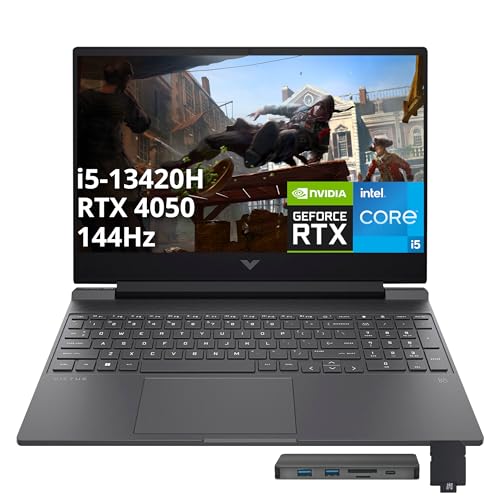
The second Victus configuration pairs an Intel Core i5-13420H with the same RTX 4050 graphics, 16GB of memory, a 512GB PCIe SSD, and a 144Hz display with a backlit keyboard. It exists for buyers who prefer Intel’s platform or find this configuration more readily available, and in games the experience will track its Ryzen sibling closely because the graphics card is shared. This particular listing is sold as a set with additional items, so read what is included before comparing it with bare-laptop listings.
Specs
- 15.6-inch FHD IPS 144Hz display
- Intel Core i5-13420H processor
- NVIDIA GeForce RTX 4050 graphics
- 16GB memory
- 512GB PCIe SSD storage
- Backlit keyboard and HD camera
- Wi-Fi 6 and Windows 11
- Mica Silver finish
Best for: Buyers who prefer an Intel processor in their budget gaming machine.
Watch out for: This listing bundles extra items, so make sure you are comparing the laptop itself, not the bundle, against other listings.
Acer Nitro 5 (Core i5-12500H, RTX 4050)

Acer’s Nitro 5 is one of the longest-running budget gaming families, and this configuration pairs a Core i5-12500H with RTX 4050 graphics under model number NH.QLZAA.001. The processor is a generation older than the newest here, but it remains a strong gaming chip, and the Nitro chassis is a known quantity with a large ownership community. For buyers who value a proven design and easy-to-find guidance for upgrades and settings, that maturity is a feature.
Specs
- 15.6-inch display
- Intel Core i5-12500H processor
- NVIDIA GeForce RTX 4050 graphics
- Model NH.QLZAA.001 as listed
Best for: Value-focused players who prefer a proven, widely owned gaming platform.
Watch out for: The listing is light on stated details, so verify memory, storage, and refresh rate on the product page before ordering.
Which One Fits Your Situation
Your first gaming laptop, bought once
The LOQ-E is the safest first purchase: every important specification is stated, the screen is 144Hz, and the memory is DDR5. It asks the fewest questions of a first-time buyer. It is also a machine a parent or student can justify honestly, because its specifications read as well for coursework as for games.
Games plus serious school or work
Choose the LOQ with the Ryzen 7 8845HS. Its processor headroom covers streaming, editing, and demanding coursework, so the machine does not need replacing when your workload grows. That headroom shows up in the unglamorous moments too: faster level loads, quicker updates, and a machine that never feels borrowed from its real job.
A laptop that must look professional at 9 a.m.
The Ryzen Victus is the discreet option, with a backlit keyboard and audio processing as genuine extras. Its design passes in an office while its 144Hz screen waits for the evening. Its sober design also survives the transition from school to a first job, which stretches the value of the purchase well past graduation.
You want the proven crowd favorite
The Nitro 5’s long-running line means abundant community knowledge for settings and upgrades. Verify the listing’s full specification first, then buy the maturity and the familiarity of the platform. Spend the verification time once, at purchase, and the Nitro rewards it with a platform that owners have documented thoroughly for years.
Common Mistakes
- Chasing a stronger GPU badge in this tier without verifying the listing, when the honest specification here is the RTX 4050 class.
- Ignoring refresh rate and ending up with a 60Hz panel on a machine bought for fast games.
- Forgetting game sizes: a 512GB drive fills with a handful of major titles, so library discipline or an upgrade plan is essential.
- Comparing a bundled listing against bare laptops as if the extras were free specification.
- Overlooking cooling and generation, then wondering why a nominally identical GPU performs worse in a cheaper chassis.
Frequently Asked Questions
What can an RTX 4050 laptop actually play?
Modern games at 1080p with medium to high settings, and esports titles at the high frame rates a 144Hz screen can show. Demanding releases will ask for upscaling features and sensible settings, which the RTX 4050 supports. Every machine in this guide carries that GPU class, so your choice among them rests on screen, processor, and build rather than raw graphics.
Is 16GB of memory and a 512GB SSD enough for gaming?
It is the correct floor for this tier, and every listing here meets it. Sixteen gigabytes covers current games alongside a browser and chat, while 512GB holds several large titles if you uninstall what you finish. Players with big permanent libraries should plan an external drive or a storage upgrade where the chassis allows it.
Does the processor matter if the GPU is the same?
Yes, at the margins that decide daily feel. The Ryzen 7 8845HS in the LOQ leads for streaming, editing, and multitasking, while the Core i5 chips here still feed the RTX 4050 well in games. If the laptop is purely for playing, prioritize the screen; if it also works and creates, prioritize the processor.
Why do listings in this tier vary so much in detail?
Budget gaming is sold by many sellers, including bundles and variant configurations under the same model names. Some listings state refresh rate, memory type, and storage plainly, while others stay vague. Treat vagueness as a warning: the configurations in this guide were chosen because their listings state the specifications a buyer needs to verify.
Related guides
- Best Laptops to Play Roblox: From Budget Integrated Graphics to Dedicated GPUs
- Best Laptops for Zoom Teaching: Clear Video, Reliable Audio and All-Day Class Power
- Best Laptops for Video Editing and Music Production: Power, Screen and Storage
- Best Laptops for Network Engineers: Ethernet, RAM for Labs and Ports That Matter
More from Amazon
Programs that pair well with the guide above. Offers and eligibility are set by Amazon and may change.
Free shipping on eligible items, Prime Video and more. Eligible new members can start with a free trial.
Start a Prime free trialAd-free music streaming. Eligible new subscribers can start with a free trial.
Try Music Unlimited freeA Prime membership for ages 18-24 with a trial period. Eligibility is set by Amazon.
See Prime for Young AdultsAudiobooks and podcasts to listen to on the go. Eligible new members can start with a free trial.
Try Audible freeAs an Amazon Associate we earn from qualifying purchases.










Write Your Review
No reviews yet. Be the first to share your experience!