
Key takeaways
- Laptops for ArcGIS Pro chosen on listing specs that matter for GIS: multi-core CPUs, 16GB to 32GB memory, discrete NVIDIA graphics and fast SSD storage.
What's inside
As an Amazon Associate I earn from qualifying purchases. This post may contain affiliate links at no extra cost to you.
ArcGIS Pro punishes the wrong laptop in specific ways. Geoprocessing tools chew through processor cores, a map full of rasters eats memory, and the moment you open a 3D scene, integrated graphics start to struggle. So the real decision is not a fast laptop in the abstract; it is whether the CPU, memory and graphics in the listing match the size of the datasets and scenes you actually open every week.
This guide is for GIS analysts, planning and utilities staff, and students whose coursework has moved past small sample datasets. The four machines below were chosen from their Amazon listing specs: core counts, memory size, discrete NVIDIA graphics and SSD capacity. ArcGIS system requirements are discussed as principles to check against your version, and every spec quoted here comes from the product listing itself.
Quick Picks
As an Amazon Associate we earn from qualifying purchases
| Product | Best for | Key spec from title |
|---|---|---|
| Lenovo Legion 5i (RTX 4060) | Serious geoprocessing with 32GB of memory | i7-13650HX, RTX 4060, 32GB RAM, 1TB SSD |
| ASUS TUF Gaming A15 (RTX 4060) | A balanced GIS workstation alternative | Ryzen 7 7735HS, RTX 4060, 16GB DDR5, 1TB SSD |
| Lenovo Legion 5 (RTX 5060) | Fast screens and wired networking for office GIS | Ryzen 7 260, RTX 5060, OLED 165Hz, Ethernet |
| Acer Nitro 5 AN515-45-R92M | An entry point for lighter GIS workloads | Ryzen 7 5800H, RTX 3060, 16GB RAM |
How to Choose
Processor cores drive geoprocessing speed
Most ArcGIS Pro geoprocessing tools are built to use multiple cores, and background processing means the CPU also juggles the map display at the same time. The listings here start at eight cores and rise to the fourteen-core Core i7 in the Legion 5i, which is the kind of headroom that keeps spatial joins and raster calculations from monopolising the machine. Check the exact core count on the listing, because the same laptop family is sold with weaker chips.
Memory is the ceiling on dataset size
ArcGIS Pro holds feature layers, rasters and analysis scratch data in memory, and 16GB is the practical floor for full-time GIS work. The 32GB Legion 5i is the pick when you mosaic imagery or run models over regional datasets. Whichever machine you choose, confirm the memory figure on the listing variant; a 16GB headline can hide an 8GB configuration at a lower price point in the same product family.
A discrete GPU matters for 3D scenes
Integrated graphics can draw a 2D map, but scenes, lidar views and draped imagery ask much more of the graphics hardware. Each pick here carries an NVIDIA GeForce RTX card with its own dedicated memory, from the RTX 3060 in the Nitro 5 to the RTX 4060 and 5060 in the others. ArcGIS Pro publishes its own graphics requirements per version, so compare the card named on the listing with the requirement for the version your organisation runs.
Storage and ports are workflow features
GIS data is bulky: a single project can hold basemaps, imagery and years of shapefiles and geodatabases. The 1TB SSDs in three of these picks delay the day you start shuffling data to external drives. Ports matter just as much: Ethernet for fast transfers to network storage, HDMI for a second monitor, and enough USB for receivers and backup drives. The Legion 5 lists an RJ45 Ethernet port, which office-based analysts will use constantly.
The 4 Best Options
Lenovo Legion 5i (RTX 4060)

The Legion 5i is the heavy lifter here. Its listing combines a fourteen-core Core i7 HX processor, 32GB of memory and an RTX 4060 with 8GB of graphics memory, which is the mix that suits large geoprocessing jobs and detailed 3D scenes. The 16-inch QHD screen gives map layouts room to breathe, and the 165Hz panel keeps panning smooth. It is a desk-centred machine for analysts whose projects have outgrown mainstream laptops and who cannot afford mid-task slowdowns.
Specs
- 16-inch QHD display, 165Hz with G-SYNC
- Intel Core i7-13650HX processor, fourteen cores as listed
- NVIDIA GeForce RTX 4060 graphics with 8GB GDDR6
- 32GB memory
- 1TB SSD storage
- Four-zone RGB backlit keyboard
- Windows 11 Home
Best for: Analysts running large models, imagery work and 3D scenes daily.
Watch out for: It is a large, heavy gaming-format laptop; if your GIS work happens on site visits, budget for a smaller second machine or a sturdy bag.
ASUS TUF Gaming A15 (RTX 4060)

ASUS’s TUF A15 pairs a Ryzen 7 7735HS with an RTX 4060 listed at a high 140W maximum TGP, 16GB of DDR5 memory and a 1TB SSD. That graphics wattage matters for sustained scene rendering, and the terabyte of storage holds a working library of datasets. The 144Hz screen with full sRGB coverage as listed also helps when symbology colour choices matter. It is the balanced alternative for GIS staff who want workstation behaviour without stepping to the largest chassis in this guide.
Specs
- 15.6-inch Full HD display, 144Hz, full sRGB coverage as listed
- AMD Ryzen 7 7735HS processor
- NVIDIA GeForce RTX 4060 laptop graphics, 140W max TGP as listed
- 16GB DDR5 memory
- 1TB PCIe SSD storage
- Wi-Fi 6
- Windows 11, model FA507NV-EH74
Best for: GIS professionals who want strong graphics and storage in a 15.6-inch body.
Watch out for: Memory is 16GB rather than 32GB, so analysts working with very large rasters should confirm their typical project size fits that ceiling.
Lenovo Legion 5 (RTX 5060)
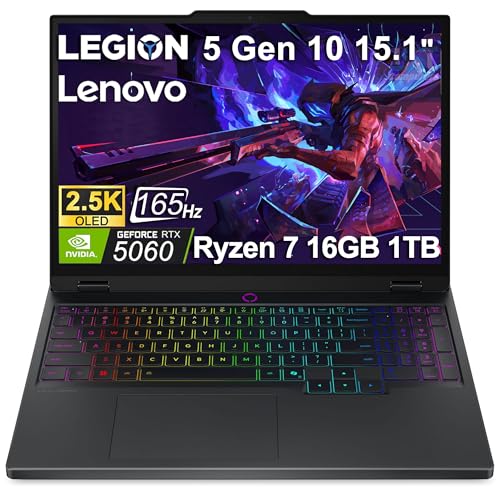
This Legion 5 brings the newer RTX 5060 and a sharp 2.5K OLED display to the GIS desk. The colour-rich screen suits cartography, where subtle symbology differences must stay visible, and the eight-core Ryzen 7 with 16GB of DDR5 memory handles mainstream geoprocessing well. Its listed RJ45 Ethernet port is a genuine workflow feature for pulling data from office servers, and the 5MP webcam covers team calls. Choose it when your GIS day mixes analysis with map production and meetings.
Specs
- 15.1-inch 2.5K OLED display, 165Hz with G-SYNC
- AMD Ryzen 7 260 processor
- NVIDIA GeForce RTX 5060 graphics with 8GB memory
- 16GB DDR5 memory
- 1TB SSD storage
- Wi-Fi 7 and RJ45 Ethernet port
- 5MP webcam
- Windows 11 Home
Best for: Cartographers and analysts who split time between analysis and presentation.
Watch out for: OLED panels can show static interface elements for long hours; use the maker’s screen-care settings and a screen timeout if you leave maps open all day.
Acer Nitro 5 AN515-45-R92M

The Nitro 5 is the entry point for lighter GIS work: an eight-core Ryzen 7 5800H, an RTX 3060 with 6GB of graphics memory and 16GB of RAM. That covers ArcGIS Pro coursework, municipal datasets of moderate size and occasional 3D without paying for top-tier parts. The 512GB SSD is the main constraint, so plan external storage for imagery archives from the start. For students and small teams standardising on one affordable GIS machine, it is a rational place to begin.
Specs
- 15.6-inch Full HD IPS display, 144Hz
- AMD Ryzen 7 5800H eight-core processor
- NVIDIA GeForce RTX 3060 laptop graphics with 6GB GDDR6
- 16GB DDR4 memory
- 512GB NVMe SSD storage
- Wi-Fi 6 and RGB backlit keyboard
Best for: Students and small teams with moderate datasets and occasional 3D work.
Watch out for: The 512GB drive fills quickly with GIS data; budget for an external SSD and confirm the exact storage line on the listing before ordering.
Which One Fits Your Situation
You process imagery or regional datasets
Pick the Legion 5i. The 32GB of memory is the specification that decides whether big mosaics and models run comfortably, and the fourteen-core processor shortens long geoprocessing queues. Its RTX 4060 also keeps 3D scenes responsive while the rest of the system is busy.
Your day is cartography as much as analysis
The Legion 5’s 2.5K OLED screen is the cartographer’s tool here, with the RTX 5060 behind it for scene work. The Ethernet port helps when basemaps and shared geodatabases live on office storage rather than on the laptop itself.
You need one GIS laptop for a small team
The TUF A15 balances graphics wattage, a 1TB SSD and a manageable 15.6-inch size. It can anchor a small team’s shared workload, from field-data cleanup to client maps, without the bulk of the 16-inch Legion 5i.
You are a student learning ArcGIS Pro
Start with the Nitro 5 and put the savings into an external SSD and a second monitor. Its RTX 3060 and 16GB of memory cover coursework and moderate projects, and you can reassess when your dissertation data reveals how much power you truly need.
Common Mistakes
- Buying a laptop with integrated graphics only, then discovering 3D scenes and lidar views are painfully slow.
- Choosing 8GB of memory because the processor looked fast, and hitting the ceiling on the first large dataset.
- Ignoring SSD capacity even though GIS projects and imagery archives grow faster than documents.
- Assuming every configuration of a model name is equal instead of checking cores, memory and graphics on the listing.
- Forgetting to compare the graphics card against the published requirements of your exact ArcGIS Pro version.
Frequently Asked Questions
How much memory does ArcGIS Pro need on a laptop?
For full-time GIS work, treat 16GB as the floor and 32GB as the comfortable choice for imagery and large models, which is why the Legion 5i leads this guide. Smaller coursework projects run on 16GB, but memory is the first limit most analysts meet as datasets grow.
Does ArcGIS Pro need a discrete graphics card?
For 2D mapping, integrated graphics can cope, but scenes, 3D analyst work and draped imagery benefit clearly from a discrete card. Every pick here includes an NVIDIA RTX card with dedicated memory. Check the card against the system requirements published for your ArcGIS Pro version before buying.
Can a gaming laptop be a good GIS laptop?
Yes, because the hardware overlaps: multi-core processors, discrete graphics, generous memory and fast SSDs. The Legion, TUF and Nitro models here are gaming-format machines whose listing specs suit geoprocessing and scene rendering. The trade-offs are size, weight and styling rather than capability.
What should I check on the listing before ordering?
Confirm the processor model and core count, the memory size, the graphics card and its dedicated memory, and the SSD capacity for the exact variant. Sellers configure one model name many ways, and GIS performance depends on those four lines more than on the brand badge.
Related guides
- Best Laptops to Play Roblox: From Budget Integrated Graphics to Dedicated GPUs
- Best Laptops for Zoom Teaching: Clear Video, Reliable Audio and All-Day Class Power
- Best Laptops for Video Editing and Music Production: Power, Screen and Storage
- Best Laptops for Network Engineers: Ethernet, RAM for Labs and Ports That Matter
More from Amazon
Programs that pair well with the guide above. Offers and eligibility are set by Amazon and may change.
Free shipping on eligible items, Prime Video and more. Eligible new members can start with a free trial.
Start a Prime free trialAd-free music streaming. Eligible new subscribers can start with a free trial.
Try Music Unlimited freeA Prime membership for ages 18-24 with a trial period. Eligibility is set by Amazon.
See Prime for Young AdultsAudiobooks and podcasts to listen to on the go. Eligible new members can start with a free trial.
Try Audible freeAs an Amazon Associate we earn from qualifying purchases.










Write Your Review
No reviews yet. Be the first to share your experience!