
Key takeaways
- Four laptops you can actually buy on Amazon right now: a thin MacBook Air, two Windows all-rounders, and a budget touchscreen, compared by real specs.
What's inside
As an Amazon Associate I earn from qualifying purchases. This post may contain affiliate links at no extra cost to you.
Choosing a laptop right now is a decision about what is actually on sale today, not what was best six months ago. Listings go out of stock, configurations change, and a model that topped every roundup last year can quietly disappear from shelves while its name keeps showing up in search results. The four laptops below all have live, buyable listings on Amazon at the time of writing, spanning a thin MacBook, two midrange Windows machines, and a budget touchscreen.
This guide is for buyers who need a machine this week: students starting a term, remote workers replacing a dying laptop, and anyone buying a gift who cannot wait for a restock. Each pick is named with the exact configuration sold on Amazon, and every specification comes from its Amazon product page, so you can match the model name, memory size, and storage size before you order.
Quick Picks
As an Amazon Associate we earn from qualifying purchases.
| Product | Best for | Key spec from title |
|---|---|---|
| Apple MacBook Air 13-inch (M4) | Carrying everywhere with long battery life | M4 chip, 16GB unified memory, 512GB SSD |
| Lenovo IdeaPad Slim 3 15-inch | Everyday Windows work and study | Intel Core i5-13420H, 8GB DDR5, 512GB SSD |
| Acer Aspire 3 15.6-inch | A budget laptop with a touchscreen | AMD Ryzen 5 7520U, 8GB RAM, 512GB SSD |
| ASUS Vivobook 15 | Multitasking with 16GB of memory | Intel Core i5-1334U, 16GB RAM, 512GB SSD |
How to Choose
Start with the chip, not the brand badge
The processor decides how the laptop feels day to day, and the names on the box do not tell the whole story. Apple’s M4 chip in the MacBook Air handles heavy browser sessions and creative apps while staying silent, because the machine has no fan to spin up. Among the Windows picks, the Lenovo’s Core i5-13420H is the stronger performer, built for sustained work, while the ASUS Core i5-1334U and the Acer Ryzen 5 7520U are efficient chips tuned for everyday tasks. For documents, video calls, and streaming, any of the four will cope. If you edit large photos or run demanding software with dozens of tabs open, the M4 or the i5-13420H gives you more headroom.
Treat 16GB of memory as the comfort line
Memory is the specification buyers regret skimping on most, because it cannot be fixed with an accessory later. The MacBook Air and the ASUS Vivobook 15 both ship with 16GB, which keeps multitasking smooth when a browser, a video call, and a document editor are all open at once. The Lenovo and the Acer ship with 8GB, which is workable for focused tasks but starts to feel tight once you stack many tabs and apps. Before ordering, read the configuration line on the listing carefully: several of these models are sold in multiple memory sizes, and the wrong variant is an easy mistake to make.
Check the screen and keyboard before the spec sheet
You will look at the display and type on the keyboard far more than you will think about the processor, so those two deserve a real look. The MacBook Air has the sharpest panel here, a 13.6-inch Liquid Retina display in the lightest body. The Lenovo’s 15.3-inch FHD+ screen and full keyboard with a number pad suit spreadsheets and long typing sessions. The Acer and ASUS both add touchscreens, which are handy for scrolling, signing documents, and handing the laptop to a child. Check whether the listing describes a touchscreen at all, since the same model name often covers touch and non-touch versions.
Count the ports and the charger before you buy
A laptop that cannot connect to your monitor, mouse, and drives without a bag of adapters is a daily annoyance. The MacBook Air keeps things minimal with two Thunderbolt 4 ports and a MagSafe 3 charging port, which means USB-A devices and external monitors need an adapter or a hub. The Windows laptops are more generous: the Lenovo lists HDMI, USB-C, and a Copilot key, the Acer lists two USB Type-A ports plus USB-C and HDMI, and the ASUS lists HDMI with USB 2.0 and USB 3.0 ports. Battery claims matter too, so note that the MacBook Air lists up to 18 hours while the Acer lists up to 11, and plan your charger habits around the real number.
The 4 Best Options
Apple MacBook Air 13-inch Laptop with M4 chip

The MacBook Air is the pick for buyers who carry their laptop everywhere and want the lightest machine in this group with the longest battery life. Its M4 chip, 16GB of unified memory, and 512GB of storage handle work, study, and creative projects without a fan, so it stays silent in lectures and meetings. The 13.6-inch Liquid Retina display is the sharpest screen here, and the 12MP Center Stage camera keeps you looking clear on video calls. Touch ID signs you in without a password, and the Sky Blue finish stands out from the usual silver and grey.
Specs
- 13.6-inch Liquid Retina display
- Apple M4 chip with 10-core CPU and 10-core GPU
- 16GB unified memory
- 512GB SSD storage
- 12MP Center Stage camera and Touch ID
- Up to 18 hours of battery life
- Two Thunderbolt 4 ports, MagSafe 3 charging port, Wi-Fi 6E, Bluetooth 5.3
- macOS, Sky Blue finish
Best for: Students and travellers who want a silent, light laptop with long battery life.
Watch out for: There is no USB-A port or HDMI port, so older accessories need an adapter. The same model is sold in 256GB and 512GB versions, and a newer M5 MacBook Air has started appearing, so confirm the listing says M4 and 512GB before ordering.
Lenovo IdeaPad Slim 3 15-inch Laptop
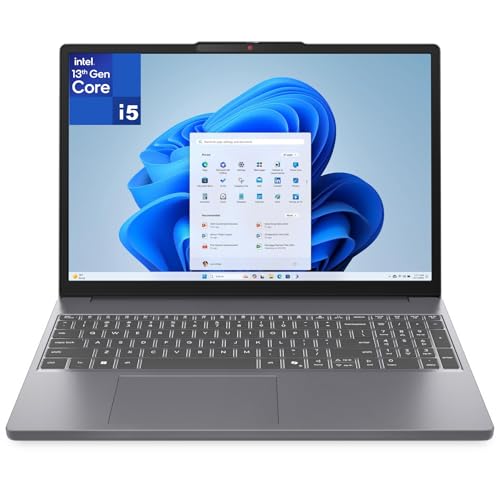
The IdeaPad Slim 3 is the straightforward Windows all-rounder of this group, built around the strongest Windows processor here. Its Core i5-13420H chip has eight cores and twelve threads, which keeps spreadsheets, video calls, and browser multitasking responsive through a long workday. The 15.3-inch FHD+ display gives documents and web pages room to breathe, and the full keyboard with a number pad suits anyone who types numbers all day. Wi-Fi 6 and Bluetooth 5.2 cover modern wireless gear, and the Luna Grey finish keeps the machine looking plain and professional.
Specs
- 15.3-inch FHD+ display
- Intel Core i5-13420H processor, 8 cores and 12 threads, up to 4.6GHz
- 8GB DDR5 RAM
- 512GB PCIe NVMe SSD
- Integrated Intel UHD Graphics
- Wi-Fi 6, Bluetooth 5.2, HDMI, USB-C, Copilot key
- Full keyboard with number pad, Luna Grey finish
- Windows 11 Home
Best for: Office work, study, and everyday Windows multitasking on a larger screen.
Watch out for: This configuration has 8GB of memory, which is the floor for comfortable multitasking, and the listing does not describe a touchscreen. Confirm the configuration line reads 8GB RAM and 512GB SSD, since this model is sold in several memory and storage combinations.
Acer Aspire 3 15.6-inch Laptop

The Aspire 3 is the budget touchscreen pick, and its appeal is simple: a large 15.6-inch Full HD IPS touch display, a Ryzen 5 processor, and 512GB of storage in a machine that covers the basics well. The touchscreen makes scrolling, tapping, and signing documents feel natural, and Wi-Fi 6 keeps wireless connections current. At 3.92 pounds it is the heaviest laptop in this group, but the trade is a full-size screen and a straightforward port selection with two USB Type-A ports, USB-C, and HDMI. It is a sensible choice for a family computer or a first laptop.
Specs
- 15.6-inch Full HD IPS touch display
- AMD Ryzen 5 7520U quad-core processor, 2.8GHz
- 8GB LPDDR5 RAM
- 512GB PCIe Gen4 SSD
- AMD Radeon Graphics
- Wi-Fi 6, Windows 11 Home
- 2 USB Type-A ports, 1 USB Type-C port, 1 HDMI port
- Up to 11 hours of battery life, 3.92 pounds, Steam Blue finish
Best for: Buyers who want a large touchscreen laptop for family use, study, and everyday tasks.
Watch out for: The Ryzen 5 7520U is an older, efficiency-first chip, so heavy creative work will feel slower than on the Lenovo or the MacBook Air. The 8GB of memory is also the minimum for smooth multitasking, so close unused apps and tabs when the machine starts to feel sluggish.
ASUS Vivobook 15 Laptop

The Vivobook 15 is the Windows pick for buyers who want 16GB of memory without stepping up to a premium machine. Its Core i5-1334U processor has ten cores, and the extra memory keeps many browser tabs, documents, and apps open at once without the slowdown that 8GB machines show under the same load. The 15.6-inch Full HD touch display adds tapping and scrolling to the usual keyboard and trackpad, and the Terra Cotta finish is the most distinctive colour in this group. The listing also bundles a TWE mouse pad, which is a small but useful extra for a desk setup.
Specs
- 15.6-inch Full HD (1920 x 1080) touch display, 250 nits, 60Hz
- Intel Core i5-1334U processor, 10 cores, up to 4.6GHz, 12MB cache
- 16GB RAM
- 512GB SSD
- Intel Iris Xe Graphics
- Wi-Fi 6E, Bluetooth 5.3, HDMI, 1 USB 2.0 port, 2 USB 3.0 ports
- Windows 11 Home, Terra Cotta finish
- Bundled TWE mouse pad
Best for: Heavy multitaskers who want 16GB of memory and a touchscreen on a midrange Windows laptop.
Watch out for: The 250-nit display can look dim in bright rooms or near sunny windows, so this laptop suits indoor desks more than outdoor use. Confirm the listing still shows the Terra Cotta finish and the bundled mouse pad, since colour and bundle options vary between listings.
Which One Fits Your Situation
A light laptop for carrying everywhere
Pick the Apple MacBook Air. It is the lightest-feeling machine here, with the longest listed battery life at up to 18 hours, a sharp 13.6-inch display, and silent fanless operation. It suits students and commuters who carry a laptop in a bag all day and work away from a power outlet.
A Windows all-rounder for work and study
Pick the Lenovo IdeaPad Slim 3. Its Core i5-13420H processor is the strongest Windows chip in this group, the 15.3-inch FHD+ screen suits documents and spreadsheets, and the full keyboard with a number pad helps anyone who types numbers daily. It is the safest default choice for office work and study.
A touchscreen laptop on a tight budget
Pick the Acer Aspire 3. It pairs a large 15.6-inch Full HD IPS touch display with a Ryzen 5 processor and 512GB of storage, covering family use, study, and everyday browsing. Accept the 8GB of memory and the older chip in exchange for the touchscreen and the full-size screen, and keep your tab count modest to stay smooth.
A big-screen Windows laptop for heavy multitasking
Pick the ASUS Vivobook 15. Its 16GB of memory is the deciding feature, keeping many tabs and apps open without the slowdown that 8GB machines show under the same load. The 15.6-inch touch display, Wi-Fi 6E, and Bluetooth 5.3 round out a machine built for busy desks, long sessions, and mixed work.
Common Mistakes
- Ordering the wrong configuration of a model that is sold in several memory and storage sizes, especially the MacBook Air in 256GB versus 512GB.
- Choosing 8GB of memory and then running a browser with dozens of tabs alongside video calls and office apps.
- Buying a non-touch version when you wanted a touchscreen, or paying for touch when you will never use it.
- Forgetting that the MacBook Air has no USB-A or HDMI port, then discovering your monitor and accessories need a hub.
- Judging a laptop by its model name alone instead of checking the exact processor, memory, and storage on the listing before ordering.
Frequently Asked Questions
Are these laptops still available to buy?
Each pick was chosen because its Amazon listing was live and buyable at the time of writing, with the exact configuration named in the article. Availability changes quickly, so open the listing and confirm the model name, memory size, and storage size match before ordering.
Should I buy a Mac or a Windows laptop?
It depends on the software you already use. The MacBook Air suits buyers who live in Apple apps, want long battery life, and value a silent machine. The Lenovo, Acer, and ASUS run Windows 11, which suits office software, Windows-only programs, and buyers who share files with Windows colleagues.
Is 8GB of memory enough for a laptop?
For focused work, yes: documents, browsing with a modest number of tabs, and video calls run fine on 8GB. For heavy multitasking with many tabs, large spreadsheets, and creative apps open together, 16GB is noticeably smoother, which is why the MacBook Air and the ASUS Vivobook 15 are the safer choices for busy users.
Do I need a touchscreen on a laptop?
Most buyers do not, and a touchscreen adds cost and weight for a feature many people forget within a week. It earns its place if you sign documents, draw, scroll through long pages by hand, or share the laptop with children. If none of those apply, spend the money on memory or a better processor instead.
Related guides
- Best Laptops to Play Roblox: From Budget Integrated Graphics to Dedicated GPUs
- Best Laptops for Zoom Teaching: Clear Video, Reliable Audio and All-Day Class Power
- Best Laptops for Video Editing and Music Production: Power, Screen and Storage
- Best Laptops for Network Engineers: Ethernet, RAM for Labs and Ports That Matter
More from Amazon
Programs that pair well with the guide above. Offers and eligibility are set by Amazon and may change.
Free shipping on eligible items, Prime Video and more. Eligible new members can start with a free trial.
Start a Prime free trialAd-free music streaming. Eligible new subscribers can start with a free trial.
Try Music Unlimited freeA Prime membership for ages 18-24 with a trial period. Eligibility is set by Amazon.
See Prime for Young AdultsAudiobooks and podcasts to listen to on the go. Eligible new members can start with a free trial.
Try Audible freeAs an Amazon Associate we earn from qualifying purchases.










Write Your Review
No reviews yet. Be the first to share your experience!