
Key takeaways
- Shopping for a laptop right now? Compare five current picks for study, office work, light gaming and creative tasks, with key specs taken from each listing.
What's inside
As an Amazon Associate I earn from qualifying purchases. This post may contain affiliate links at no extra cost to you.
The hardest part of buying a laptop right now is not finding a fast one — it is avoiding the wrong kind of fast. A gaming chip in a heavy chassis, a screen paired with too little memory, or a featherweight body that gives up the ports you use daily will bother you for years. The real decision is which trade-off fits your desk, your bag and your software.
This shortlist is built for four kinds of buyers: students who carry a machine all day, office workers who live in documents and video calls, gamers who want one laptop for play and work, and creators who need a dedicated graphics chip. Every pick below was chosen from the names and specifications on its Amazon product page, so the configurations described here are the ones listed for sale.
Quick Picks
As an Amazon Associate we earn from qualifying purchases.
| Product | Best for | Key spec from title |
|---|---|---|
| Apple MacBook Air 13-inch (M4) | Everyday carry and long battery days | M4 chip, 16GB unified memory, 256GB SSD |
| Microsoft Surface Laptop 13.8-inch (2024) | Windows users who want touch and battery | Snapdragon X Elite, 16GB RAM, 512GB SSD |
| ASUS ROG Zephyrus G14 (2025) | Gaming and creative work in a 14-inch body | Ryzen AI 9 HX 370, RTX 5070 Ti, 32GB RAM |
| Acer Swift Go 14 | Students who want an OLED screen | Core Ultra 5 125H, 14-inch OLED 2880×1800 |
| Lenovo ThinkPad X1 Carbon Gen 13 | Business travel and serious typing | Core Ultra 7 265U, 32GB RAM, 1TB SSD |
How to Choose
Start with the chip, but match it to your software
The processor decides what the laptop feels like three years from now, yet the right chip depends on your programs, not a ranking chart. Apple silicon and Snapdragon X chips sip power and stay quiet for documents, browsing and calls. Intel Core Ultra and AMD Ryzen AI parts run the widest range of Windows software, including older peripherals. A dedicated NVIDIA graphics chip only earns its place if you game, edit video or work in 3D. List your three heaviest programs first, then pick the chip family that runs all three without workarounds.
Treat 16GB of memory as the working minimum
Memory is the spec buyers regret most, because on many thin laptops it is soldered and can never be upgraded. Sixteen gigabytes is the floor for a browser full of tabs, office apps and a video call running together. Writers, students and office users can live well at that level for years. If you edit photos, run virtual machines, keep dozens of tabs open or play modern games, step up to 32GB at checkout rather than planning an upgrade that the chassis may not allow. Storage can be extended with an external drive; memory cannot.
Read the screen spec beyond the inch count
Two 14-inch laptops can feel completely different. Resolution tells you how much fits on screen: 1920×1200 suits documents, while 2880×1800 makes text and photos noticeably crisper. OLED panels give deeper contrast for films and photo work, and a 120Hz refresh rate makes scrolling and games look smoother than the standard 60Hz. Brightness matters if you sit near windows; the listings here range from standard panels to a 500-nit OLED. Touch is worth having only if you will actually tap, scroll and sign documents on the glass.
Weigh the body and count the ports before you commit
A laptop you carry daily should stay near or under three pounds, and every pick below lists its weight on the product page, from 2.17 pounds upward. Then count what you plug in. Some thin models keep two USB-C ports and nothing else, which means a dongle for every projector, card reader or wired mouse. Others keep USB-A, HDMI and a microSD slot built in. Neither approach is wrong, but discover the difference before you buy, not during your first presentation.
The 5 Best Options
Apple MacBook Air 13-inch Laptop with M4 Chip

For most people buying one laptop to do a bit of everything, the MacBook Air with the M4 chip is the safest answer on this page. It pairs 16GB of unified memory with a fanless, silent design, a 13.6-inch Liquid Retina screen and a 12MP Center Stage camera that keeps you framed on calls. The listing rates battery life at up to 18 hours, and at 2.73 pounds it disappears into a bag. It suits students, writers and office workers who value quiet and endurance over gaming power.
Specs
- Apple M4 chip
- 13.6-inch Liquid Retina display, supports 1 billion colors
- 16GB unified memory
- 256GB SSD storage
- 12MP Center Stage camera, Touch ID
- Battery life up to 18 hours (per listing)
- 2.73 pounds, 0.44 inches thin
- Model MW123LL/A, Midnight
Best for: Everyday work, study and travel where battery life and silence come first.
Watch out for: The 256GB SSD fills quickly with photo libraries and offline video, and neither memory nor storage can be upgraded later, so choose the configuration carefully.
ASIN: B0DZD9S5GC
Microsoft Surface Laptop 13.8-inch (2024)

The Surface Laptop is the Windows counterpart for buyers who want the MacBook Air formula with a touchscreen. Its Snapdragon X Elite chip runs Windows 11 as a Copilot+ PC, and the listing promises up to 20 hours of battery life, the longest claim in this roundup. The 13.8-inch touchscreen suits readers and presenters who scroll, annotate and tap through documents, and at 2.96 pounds it is easy to carry between rooms or campuses. It fits office workers and students who live in the browser and Microsoft 365.
Specs
- Snapdragon X Elite (12 core)
- 13.8-inch touchscreen display
- 16GB RAM
- 512GB SSD storage
- Battery life up to 20 hours (per listing)
- 2.96 pounds
- Windows 11, Copilot+ PC
- Model ZGP-00037, Black
Best for: Windows users who want a touchscreen and the longest battery claim on this list.
Watch out for: The Snapdragon chip runs Windows on ARM, so check that your printer drivers, VPN and any older specialist software support it before ordering.
ASIN: B0CXL7LZN1
ASUS ROG Zephyrus G14 (2025)
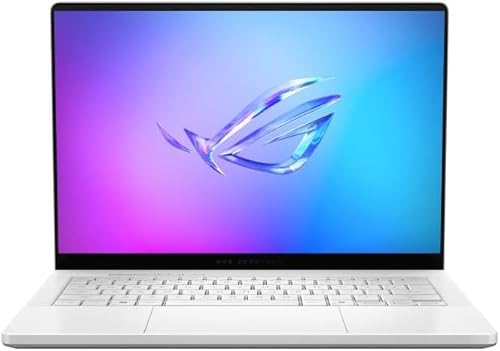
The Zephyrus G14 is the pick for anyone whose laptop has to game at night and work all day. This listing combines a Ryzen AI 9 HX 370 processor with an NVIDIA RTX 5070 Ti graphics chip, 32GB of memory and a 14-inch OLED screen running at 120Hz, hardware that also chews through video editing and 3D coursework. Remarkably, it does this at 3.31 pounds, closer to an ultraportable than a gaming brick. It is the one machine here that covers light gaming, streaming and creative software without a second computer.
Specs
- AMD Ryzen AI 9 HX 370 processor
- NVIDIA GeForce RTX 5070 Ti, 12GB graphics memory
- 32GB LPDDR5X RAM
- 1TB SSD storage
- 14-inch OLED display, 2880×1800, 120Hz, 500 nits
- RGB keyboard
- 3.31 pounds
- Windows 11 Home, Platinum White
Best for: Gamers and creators who want real graphics power in a portable 14-inch chassis.
Watch out for: The memory is onboard LPDDR5X, so the 32GB fitted here is what you keep, and battery life drops sharply while gaming unplugged, as with any dedicated-GPU laptop.
ASIN: B0FC4T1R3K
Acer Swift Go 14

The Swift Go 14 is the student-friendly route to a high-resolution OLED screen. Its 14-inch 2880×1800 OLED panel is the same resolution class as machines far above it, and the aluminum body weighs 2.87 pounds with a 180-degree hinge that lays flat for group work. Port selection is generous for the size: two Thunderbolt 4 USB-C ports, two USB-A ports, HDMI 2.1 and a microSD reader, so older drives and projectors connect without a hub. A fingerprint reader in the power button speeds up sign-ins between classes.
Specs
- Intel Core Ultra 5 125H processor, Intel Arc graphics
- 14-inch OLED WQXGA+ display, 2880×1800
- 8GB onboard LPDDR5 memory
- 512GB PCIe Gen 4 SSD
- Wi-Fi 6E, Bluetooth 5.3
- Fingerprint reader, webcam privacy shutter
- Ports: 2x USB-C (USB4/Thunderbolt 4), 2x USB-A, HDMI 2.1, microSD reader
- Battery life up to 8 hours (per listing)
- 2.87 pounds, 14.9 mm thin, model SFG14-73-58EP
Best for: Students and home users who want an OLED screen and plenty of ports.
Watch out for: The 8GB of memory is onboard and cannot be upgraded, which limits heavy multitasking, and the listing’s battery figure is the most modest in this group.
ASIN: B0D78QPSSC
Lenovo ThinkPad X1 Carbon Gen 13

The X1 Carbon Gen 13 is the business end of this list: the lightest laptop here at a listed starting weight of 2.17 pounds, yet it carries 32GB of memory and a 1TB SSD. The Core Ultra 7 265U processor, 14-inch WUXGA touchscreen with full sRGB coverage and an FHD+ infrared camera for face sign-in are aimed at people who work from airports, client sites and meeting rooms. Windows 11 Pro adds the management and security tools employers expect. It is the choice for professionals whose laptop is their office.
Specs
- Intel Core Ultra 7 265U processor
- 14-inch WUXGA touchscreen, 100% sRGB
- 32GB DDR5 RAM
- 1TB Gen4 NVMe SSD
- FHD+ IR camera
- Wi-Fi 6E, Bluetooth
- Backlit keyboard
- Starting at 2.17 pounds
- Windows 11 Pro, model 21NX
Best for: Business travellers who need maximum memory and storage in the lightest body.
Watch out for: This is a configured listing, so confirm the exact screen and processor variant on the product page before ordering, since X1 Carbon configurations vary widely.
ASIN: B0FS9WHNQJ
Which One Fits Your Situation
You carry the laptop all day, every day
Choose between the MacBook Air and the X1 Carbon. The Air gives you silent, fanless running and the simplest experience for study and office work, while the ThinkPad counters with double the memory and storage, a touchscreen and Windows 11 Pro in an even lighter body. If your software is Windows-only, the Lenovo is the natural pick; if battery life and quiet matter most, take the Apple.
You study, stream and play lighter games
The Acer Swift Go 14 covers lectures, essays and streaming with the best screen here, and its port mix means no dongle bag. For gaming beyond casual titles, though, step up to the Zephyrus G14: the RTX 5070 Ti is the difference between turning settings down and simply playing. Students in shared houses will also appreciate that the G14 looks like a regular laptop in a seminar room.
You work from home and present on calls
The Surface Laptop’s long battery claim and touchscreen make it a strong home-office machine, and its camera and Windows Studio Effects are built for calls. The MacBook Air answers with its 12MP Center Stage camera and 18-hour listing figure. Pick by ecosystem: Microsoft 365 and touch point to the Surface, while iPhone owners who want their laptop and phone to work as one should take the Air.
You edit video, photos or 3D work
The Zephyrus G14 is the only pick here with a dedicated graphics chip, 32GB of memory and a high-refresh OLED panel, which is exactly the combination editing and rendering software asks for. The X1 Carbon can handle photo work and light timelines thanks to its memory and storage, but sustained rendering belongs on the ASUS. Buy the G14 with the storage you need, because its memory cannot grow later.
Common Mistakes
- Buying the strongest chip and the smallest memory: a fast processor with too little RAM still stutters under real multitasking, and soldered memory cannot be fixed later.
- Ignoring the port list until the first presentation, then discovering the laptop has no HDMI or USB-A for the projector and clicker you already own.
- Comparing screen sizes instead of resolution and brightness, so a larger but dimmer, lower-resolution panel ends up harder to read than a smaller OLED.
- Assuming every Windows laptop runs every Windows program, when ARM-based models like the Surface Laptop still need compatibility checks for drivers and older software.
- Choosing storage by today’s files alone, forgetting that photo libraries, game installs and offline video grow faster than expected over three years.
Frequently Asked Questions
How much RAM do I actually need in a laptop bought now?
Sixteen gigabytes is the sensible minimum for study, office work and browsing, and it keeps a machine comfortable for years. Step up to 32GB if you edit video, run virtual machines, play modern games or keep many applications open at once. Because memory is soldered on most thin laptops in this guide, buy the larger amount rather than plan an upgrade the chassis does not support.
Is a Snapdragon Windows laptop safe to buy?
For browsing, documents, streaming and Microsoft 365, yes: the Surface Laptop in this guide is built for exactly that work and claims the longest battery life here. The caution is specialist software. Printer drivers, some VPN clients, older plug-ins and certain games may not run on Windows on ARM, so check the programs you cannot replace. If everything you use is mainstream or web-based, the compatibility worry disappears.
Which of these laptops is best for gaming?
The ASUS ROG Zephyrus G14 is the only true gaming machine in the roundup, thanks to its RTX 5070 Ti graphics chip and 120Hz OLED screen. The integrated graphics in the MacBook Air, Surface Laptop, Swift Go and X1 Carbon handle casual and older titles, plus cloud gaming, but they are not built for demanding new releases. If gaming is a weekly habit, the G14 is the pick.
Should I buy for battery life or for ports?
Decide by where the laptop spends its week. If it moves between classrooms, cafés and meeting rooms, battery life and weight matter most, and the MacBook Air and Surface Laptop lead here. If it mostly sits on one desk driving a monitor, keyboard and drives, a fuller port selection like the Swift Go’s saves daily adapter friction. Most buyers overestimate travel and underestimate desk time.
Related guides
- Best Laptops to Play Roblox: From Budget Integrated Graphics to Dedicated GPUs
- Best Laptops for Zoom Teaching: Clear Video, Reliable Audio and All-Day Class Power
- Best Laptops for Video Editing and Music Production: Power, Screen and Storage
- Best Laptops for Network Engineers: Ethernet, RAM for Labs and Ports That Matter
More from Amazon
Programs that pair well with the guide above. Offers and eligibility are set by Amazon and may change.
Free shipping on eligible items, Prime Video and more. Eligible new members can start with a free trial.
Start a Prime free trialAd-free music streaming. Eligible new subscribers can start with a free trial.
Try Music Unlimited freeA Prime membership for ages 18-24 with a trial period. Eligibility is set by Amazon.
See Prime for Young AdultsAudiobooks and podcasts to listen to on the go. Eligible new members can start with a free trial.
Try Audible freeAs an Amazon Associate we earn from qualifying purchases.










Write Your Review
No reviews yet. Be the first to share your experience!