
Our Short List of 3
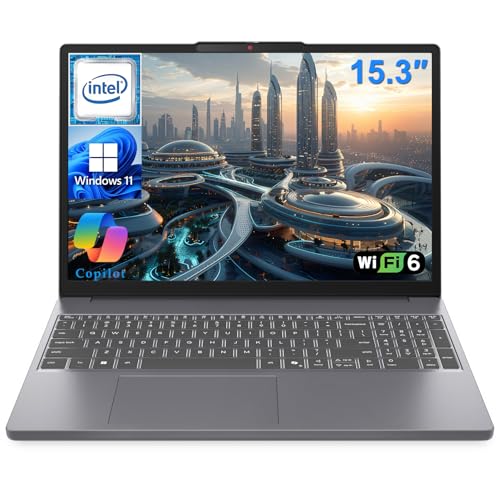
- Best for: A small business owner or bookkeeper who wants one capable machine for daily QuickBooks work and general office tasks.
- Processor: 13th Gen Intel Core i5-13420H, 8 cores / 12 threads
- Memory: 16GB DDR5 RAM
- Storage: 512GB SSD M.2 PCIe NVMe
- Display: 15.3-inch WUXGA (1920 x 1200) IPS, 300 nits, anti-glare, 60Hz
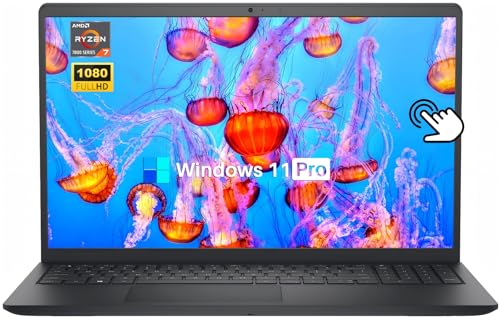
- Best for: A bookkeeper or accountant who works across client sites and wants Windows 11 Pro with a touchscreen.
- Processor: AMD Ryzen 7 7730U, 8 cores
- Memory: 16GB DDR4 3200MHz RAM
- Storage: 512GB PCIe NVMe M.2 SSD
- Display: 15.6-inch Full HD touchscreen, LED-backlit, anti-glare

- Best for: Someone who wants the newest processor here for heavy multitasking during long bookkeeping sessions.
- Processor: Intel Core Ultra 5 125H
- Memory: 16GB DDR5 RAM
- Storage: 512GB SSD
- Display: 15.6-inch Full HD (1920 x 1080) touchscreen, 60Hz
All 3 Picks at a Glance
| Product | Specs | Action |
|---|---|---|
| Lenovo IdeaPad Slim 3 (Core i5-13420H, 16GB RAM, 512GB SSD) |
| Check price on Amazon |
| Dell Inspiron 15 3535 (Ryzen 7 7730U, 16GB RAM, 512GB SSD) |
| Check price on Amazon |
| HP 15.6″ Touchscreen Laptop (Core Ultra 5 125H, 16GB RAM, 512GB SSD) |
| Check price on Amazon |
Key takeaways
- Find the best laptops for QuickBooks Desktop in November 2026: Windows 11 laptops with 16GB RAM, fast SSDs and big screens for daily bookkeeping.
What's inside
As an Amazon Associate I earn from qualifying purchases. This post may contain affiliate links at no extra cost to you.
Choosing a laptop for QuickBooks is a decision about staying inside your books without friction, not about raw speed. The work is ledgers, invoices, payroll runs, and bank reconciliations, and the machine that handles it well keeps a company file open beside a browser full of receipts, a spreadsheet, and an email client without stalling when you switch between them. A slow drive or a cramped screen turns a ten-minute reconciliation into a half-hour chore, so the right laptop is the one that removes those pauses.
This guide is for small business owners, bookkeepers, and accountants who open QuickBooks every day, whether that means a single company file for a side business or several client files open at once. Every laptop below is a Windows 11 machine listed on Amazon, with its processor, memory, storage, screen, and operating system taken from the product page, so you can match the machine to the way you actually work.
Quick Picks
As an Amazon Associate we earn from qualifying purchases.
| Product | Best for | Key spec from title |
|---|---|---|
| Lenovo IdeaPad Slim 3 (Core i5-13420H) | Everyday bookkeeping with room to multitask | 16GB DDR5 RAM, 512GB PCIe SSD |
| Dell Inspiron 15 3535 (Ryzen 7 7730U) | Client work that benefits from Windows 11 Pro and a touchscreen | 16GB RAM, 512GB SSD, Windows 11 Pro |
| HP 15.6″ Touchscreen (Core Ultra 5 125H) | Long ledger sessions on the newest processor here | 16GB DDR5 RAM, 512GB SSD, FHD touchscreen |
| Lenovo IdeaPad Slim 3 (Ryzen 3 7320U) | Light QuickBooks work on a tight budget | 8GB RAM, 256GB SSD, 15.6″ FHD |
How to Choose
Processor and memory for company files and multitasking
QuickBooks itself is not a heavy program, but bookkeeping rarely happens in one window. You will have the company file open while a browser holds a bank portal and a spreadsheet checks a payroll figure, and that is where the processor and memory earn their keep. A modern quad-core processor or better keeps those switches instant, and 16GB of memory is the comfortable level when several applications stay open all day. With 8GB, one company file and a couple of browser tabs run fine, but adding a second client file or a video call can make the machine feel crowded, so treat 8GB as the floor for light use, not the target for a full working day.
Storage: an SSD with room for company files and backups
Every pick in this guide uses a solid-state drive, because an SSD is what makes QuickBooks open quickly and company files save without a wait. The question is size, and 512GB is the sensible default for bookkeeping work. Company files themselves are usually small, but backups, exported reports, scanned receipts, payroll records, and a few years of attachments add up quietly, and a drive that fills past 80 percent slows everything down. A 256GB drive works if you keep archives on an external drive or cloud storage and clear old backups regularly, but if you would rather not think about storage at all, start at 512GB.
A screen and keyboard built for ledgers
Bookkeeping is reading rows, so the screen matters more than it does for most office work. A 15.6-inch Full HD display shows more columns of a register or a profit-and-loss report without horizontal scrolling, and an anti-glare coating keeps numbers readable under office lighting. The keyboard matters just as much: a full keyboard with a dedicated number pad lets you enter figures without reaching for the top row, which adds up across hundreds of transactions. Before buying, check the listing for the number pad and the display resolution, because some otherwise similar laptops drop one or the other, and both are hard to add later.
Windows edition and battery life for working away from the desk
QuickBooks Desktop installs on Windows, so every laptop here ships with Windows 11, and the edition is worth a look. Windows 11 Pro adds business features such as BitLocker device encryption and Remote Desktop, which matter if client financial data lives on the machine or you sometimes sign in from another computer. Windows 11 Home covers the software itself for a single owner-operator. Battery life is the other half of portability: a full charge should carry you through a client visit or a morning at a coffee shop, and a laptop that needs its charger by mid-morning is a poor fit for anyone who reconciles accounts away from a desk.
The 4 Best Options
Lenovo IdeaPad Slim 3 (Core i5-13420H, 16GB RAM, 512GB SSD)
- Best for: A small business owner or bookkeeper who wants one capable machine for daily QuickBooks work and general office tasks.
- Processor: 13th Gen Intel Core i5-13420H, 8 cores / 12 threads
- Memory: 16GB DDR5 RAM
- Storage: 512GB SSD M.2 PCIe NVMe
- Display: 15.3-inch WUXGA (1920 x 1200) IPS, 300 nits, anti-glare, 60Hz
A small business owner or bookkeeper who wants one capable machine for daily QuickBooks work and general office tasks.
The listing describes the display as non-touch in most places, but at least one mirror of the listing calls it a touch display, so confirm the exact configuration on the product page before ordering if a touchscreen matters to you.
This IdeaPad Slim 3 is the balanced pick for most QuickBooks users because it pairs a 13th-generation Intel Core i5 with 16GB of DDR5 memory and a 512GB SSD, which is enough headroom to keep a company file, a browser, and a spreadsheet open together without the machine feeling crowded. The 15.3-inch display uses a taller 1920 x 1200 resolution, so more rows of a register fit on screen, and the full keyboard includes a number pad for fast figure entry. At around 1.59 kg it is also light enough to carry to a client meeting without thinking twice.
Watch out for: The listing describes the display as non-touch in most places, but at least one mirror of the listing calls it a touch display, so confirm the exact configuration on the product page before ordering if a touchscreen matters to you.
Dell Inspiron 15 3535 (Ryzen 7 7730U, 16GB RAM, 512GB SSD)
- Best for: A bookkeeper or accountant who works across client sites and wants Windows 11 Pro with a touchscreen.
- Processor: AMD Ryzen 7 7730U, 8 cores
- Memory: 16GB DDR4 3200MHz RAM
- Storage: 512GB PCIe NVMe M.2 SSD
- Display: 15.6-inch Full HD touchscreen, LED-backlit, anti-glare
A bookkeeper or accountant who works across client sites and wants Windows 11 Pro with a touchscreen.
The listing notes that the original seal is opened for upgrade only, so the box may have been opened to install the advertised memory and storage configuration; confirm what that means for the warranty before buying.
The Inspiron 15 3535 is the pick for bookkeepers who want Windows 11 Pro on a machine built for client work. Its eight-core Ryzen 7 7730U processor and 16GB of DDR4 memory handle several company files and a browser full of bank portals at once, and the 15.6-inch Full HD touchscreen makes scrolling through long registers and tapping through forms feel natural. The listing shows a 2026 model year and a weight of 3.59 lbs, so it travels well between offices, and Windows 11 Pro adds the encryption and remote-access features that matter when client financial data is on the drive.
Watch out for: The listing notes that the original seal is opened for upgrade only, so the box may have been opened to install the advertised memory and storage configuration; confirm what that means for the warranty before buying.
HP 15.6″ Touchscreen Laptop (Core Ultra 5 125H, 16GB RAM, 512GB SSD)
- Best for: Someone who wants the newest processor here for heavy multitasking during long bookkeeping sessions.
- Processor: Intel Core Ultra 5 125H
- Memory: 16GB DDR5 RAM
- Storage: 512GB SSD
- Display: 15.6-inch Full HD (1920 x 1080) touchscreen, 60Hz
Someone who wants the newest processor here for heavy multitasking during long bookkeeping sessions.
The listing pairs this laptop with a cooler bundle, so check the product page to see exactly what is included in the box and whether the cooler is something you will actually use.
This HP 15.6-inch laptop carries the newest processor in this guide, an Intel Core Ultra 5 125H, which gives it the most headroom for the kind of multitasking that bookkeeping turns into by mid-afternoon: QuickBooks, a bank portal, a payroll spreadsheet, and a video call running side by side. The 15.6-inch Full HD touchscreen shows registers clearly at 1920 x 1080, and 16GB of DDR5 memory with a 512GB SSD keeps the whole setup responsive. It ships with Windows 11 Home, and the listing notes a PCO cooler bundle is included in the package.
Watch out for: The listing pairs this laptop with a cooler bundle, so check the product page to see exactly what is included in the box and whether the cooler is something you will actually use.
Lenovo IdeaPad Slim 3 (Ryzen 3 7320U, 8GB RAM, 256GB SSD)
This is the budget pick, and it earns its place by covering the basics well rather than by cutting the parts that matter for bookkeeping. The Ryzen 3 7320U processor and 8GB of memory run a single company file, a browser, and a spreadsheet without complaint, and the 15.6-inch Full HD display and Windows 11 Home keep the experience identical to the more expensive machines for day-to-day entries. A fingerprint reader adds a quick, practical layer of security for a machine that holds financial data, and the slim, military-grade resilient design travels easily.
Specs
- Processor: AMD Ryzen 3 7320U
- Memory: 8GB RAM
- Storage: 256GB SSD
- Display: 15.6-inch Full HD
- Operating system: Windows 11 Home
- Graphics: AMD Radeon 610M
- Features: Fingerprint reader, full-function Type-C port, Rapid Charge Boost
- Model: 82XQ001GUS; model year: 2023; color: Arctic Grey
- Ratings: ENERGY STAR rated, EPEAT Silver-registered
Best for: A sole trader or small business owner with one company file who wants the lowest-cost way into a capable QuickBooks machine.
Watch out for: 8GB of memory and 256GB of storage are the floor, not the ceiling, so if you open several client files at once or keep years of attachments on the drive, expect to manage storage and close unused applications.
Which One Fits Your Situation
You run one small business file from a desk
The Lenovo IdeaPad Slim 3 with the Ryzen 3 processor covers a single company file, a browser, and a spreadsheet at the lowest outlay here, and its 15.6-inch Full HD screen is large enough for comfortable ledger work. If your file grows or you add a second business to the same machine, step up to the Core i5 IdeaPad Slim 3 instead; its 16GB of memory and 512GB SSD remove the limits you would otherwise hit within a year.
You juggle several client files as a bookkeeper
Pick the Dell Inspiron 15 3535. Its eight-core Ryzen 7 processor and 16GB of memory keep multiple company files and bank portals open at once, and Windows 11 Pro adds encryption and remote-access features that suit work involving other people’s financial data. The touchscreen is a bonus for scrolling through long registers, and at 3.59 lbs it is easy to carry between client offices.
You work from client offices, coffee shops, and home
The HP 15.6-inch touchscreen with the Core Ultra 5 processor is the strongest traveller here, with the newest processor for heavy multitasking and a Full HD touchscreen for working through registers on the go. The Dell Inspiron 15 is the alternative if Windows 11 Pro matters more to you than the newer chip, since both machines are light enough to carry daily and both have the memory and storage for a full working day away from a desk.
You want the cheapest machine that still keeps up
Choose the Lenovo IdeaPad Slim 3 with the Ryzen 3 7320U. It is the only pick here with 8GB of memory and 256GB of storage, which is enough for one company file and light multitasking, and it still gives you a 15.6-inch Full HD screen, Windows 11 Home, and a fingerprint reader. Just plan to keep archives off the drive and close applications you are not using, so the smaller memory and storage never become a bottleneck.
Common Mistakes
- Buying a laptop with 4GB of memory or a hard drive instead of an SSD, then wondering why QuickBooks and a browser together feel slow.
- Choosing a Windows 11 Home in S mode machine, which only installs apps from the Microsoft Store and cannot install desktop software until S mode is switched off.
- Picking a small 13-inch screen to save money, then scrolling sideways through registers and reports all day.
- Skipping the number pad, which turns entering hundreds of transactions into slow top-row typing.
- Filling a 256GB drive with years of backups and scanned receipts, then blaming the laptop when everything slows down.
Frequently Asked Questions
Can I run QuickBooks on a Chromebook?
QuickBooks Desktop is a Windows application, so a Chromebook running ChromeOS cannot install it. You can open QuickBooks Online in the Chrome browser on a Chromebook, but if your workflow depends on the desktop version, buy a Windows laptop like the four in this guide and check the listing for Windows 11 before ordering.
How much RAM do I need for QuickBooks?
For one company file with a browser and a spreadsheet open, 8GB is enough, and the Ryzen 3 IdeaPad Slim 3 in this guide covers that. If you keep several client files open, run video calls during the working day, or leave a dozen browser tabs open, 16GB is the safer choice, and three of the four laptops here ship with that amount.
Is a touchscreen useful for bookkeeping?
A touchscreen is a convenience rather than a requirement. It makes scrolling through long registers, tapping through invoice forms, and signing off on-screen feel quicker, which is why the Dell and HP picks here include one. If you mostly type figures on a number pad, a standard display like the one on the Core i5 IdeaPad Slim 3 does the same job for less.
Do I need a dedicated graphics card for QuickBooks?
No. QuickBooks is a business application, not a graphics workload, so the integrated graphics in every laptop here are more than enough. Spend the money on memory, a fast SSD, and a good screen instead, since those are the parts that change how bookkeeping feels day to day.
Related guides
More from Amazon
Programs that pair well with the guide above. Offers and eligibility are set by Amazon and may change.
Free shipping on eligible items, Prime Video and more. Eligible new members can start with a free trial.
Start a Prime free trialAd-free music streaming. Eligible new subscribers can start with a free trial.
Try Music Unlimited freeA Prime membership for ages 18-24 with a trial period. Eligibility is set by Amazon.
See Prime for Young AdultsAudiobooks and podcasts to listen to on the go. Eligible new members can start with a free trial.
Try Audible freeAs an Amazon Associate we earn from qualifying purchases.










Write Your Review
No reviews yet. Be the first to share your experience!