
Our Short List of 3

- Display: 16-inch WUXGA 1920 x 1200 IPS touchscreen, 300 nits, anti-glare
- Processor: AMD Ryzen AI 5 340, 6 cores and 12 threads
- Graphics: Integrated AMD Radeon 840M
- Memory: 16GB DDR5

- Display: 15.6-inch Full HD 1920 x 1080, anti-glare, NanoEdge bezels
- Processor: AMD Ryzen 3 3250U
- Graphics: Integrated AMD Radeon graphics
- Memory: 8GB
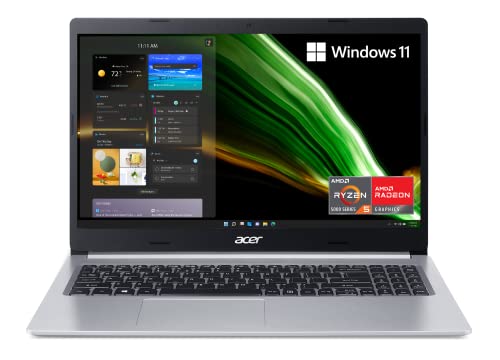
- Display: 15.6-inch Full HD IPS
- Processor: AMD Ryzen 5 5500U, hexa-core
- Graphics: AMD Radeon graphics
- Memory: 8GB DDR4
All 3 Picks at a Glance
| Product | Specs | Action |
|---|---|---|
| 1. Lenovo IdeaPad Slim 5 16-Inch Touchscreen Laptop |
| Check price on Amazon |
| 3. ASUS Vivobook 15 M515DA Laptop |
| Check price on Amazon |
| 4. Acer Aspire 5 A515-45-R74Z Slim Laptop |
| Check price on Amazon |
Key takeaways
- Compare the best laptops for studying on battery life, weight, keyboard comfort and durability, with specs taken from each Amazon listing.
What's inside
As an Amazon Associate I earn from qualifying purchases. This post may contain affiliate links at no extra cost to you.
As an Amazon Associate we earn from qualifying purchases.
Studying makes specific demands of a laptop. Most of the day is spent reading, writing essays, building slides, joining video classes and moving between lectures, libraries and home. Raw power matters less than four practical things: battery life that survives a full day away from a socket, a weight your bag can carry without complaint, a keyboard that stays comfortable through long writing sessions, and a build that tolerates daily travel in a backpack.
This guide is for general studying and everyday student life, from school pupils to undergraduates. It is not aimed at specialist postgraduate research workloads, gaming or professional media work. Every laptop below is a standard laptop, and every specification is taken from its Amazon listing, so you can check the same details on the product page before you decide.
The four picks cover different study styles: a large touchscreen for long reading sessions, a folding 2-in-1 for annotating documents, a simple light option for writing-heavy courses, and a straightforward larger-screen laptop for desk and library study.
Disclosure: This article contains affiliate links. If you buy through a link on this page, the site may earn a commission at no additional cost to you.
Quick Picks
- Best for long study days: Lenovo IdeaPad Slim 5 16-inch touchscreen laptop — a large 1920 x 1200 touch display, 16GB of memory and a battery claim in the listing title aimed at a full day of classes.
- Best for notes and flexibility: Dell Inspiron 14 7445 2-in-1 — a folding 14-inch touchscreen, a listed battery life of up to 10 hours and a weight of 3.77 pounds.
- Best simple writing laptop: ASUS Vivobook 15 M515DA — a 15.6-inch Full HD screen, a full-size keyboard with number keys and a reinforced chassis listed at 3.9 pounds.
- Best straightforward desk option: Acer Aspire 5 A515-45-R74Z — a 15.6-inch Full HD IPS display, a six-core Ryzen 5 processor and a backlit keyboard.
1. Lenovo IdeaPad Slim 5 16-Inch Touchscreen Laptop
- Display: 16-inch WUXGA 1920 x 1200 IPS touchscreen, 300 nits, anti-glare
- Processor: AMD Ryzen AI 5 340, 6 cores and 12 threads
- Graphics: Integrated AMD Radeon 840M
- Memory: 16GB DDR5
The Lenovo IdeaPad Slim 5 in this listing is built around a 16-inch WUXGA display with a 1920 x 1200 resolution, an IPS panel and touch input. That taller 16:10 shape shows more of a document or textbook page at once than a standard widescreen panel, which helps when you read PDFs, compare sources side by side or keep notes open next to a lecture recording. The listing gives a brightness figure of 300 nits and an anti-glare finish, both useful in bright classrooms and libraries.
Performance comes from an AMD Ryzen AI 5 340 processor with six cores and twelve threads, paired with integrated AMD Radeon 840M graphics, 16GB of DDR5 memory and a 512GB SSD. For studying, that combination is aimed at the everyday mix: many browser tabs, word processing, spreadsheets, slides and video calls running at the same time. The 512GB drive gives reasonable room for course files, downloaded readings and recorded lectures without forcing you to manage storage every week.
Battery is central to this pick. The listing title states an 11-hour battery life, and the technical details list a 60Wh battery. Treat any battery figure as a listing claim rather than a promise, because brightness, video calls and background sync all change the result. Even so, a larger battery paired with an efficient processor is the right starting point for a student who charges overnight and studies in several places during the day.
Study comfort details are well covered. The keyboard is backlit, which helps in dim lecture halls. The camera is an FHD 1080p unit with infrared face sign-in and a privacy shutter, so online seminars look clear and you can cover the lens when class ends. Wi-Fi 7 is listed, alongside Bluetooth, HDMI, USB ports and a microSD slot. The speakers are stereo units with Dolby Audio according to the listing.
Key specifications from the listing:
Pros:
Cons:
See the Lenovo IdeaPad Slim 5 on Amazon
2. Dell Inspiron 14 7445 2-in-1 Touchscreen Laptop
The Dell Inspiron 14 7445 is a 2-in-1 laptop, which means its 360-degree hinge lets it work as a normal laptop, fold into a tent shape for watching lectures, or lie flat as a tablet for reading and annotation. For students who mark up PDFs, sketch diagrams or read long documents away from a desk, that flexibility is the main reason to choose it. The listing describes the display as a 14-inch FHD+ IPS touchscreen at 1920 x 1200, with an anti-glare finish.
Inside, the listing specifies an AMD Ryzen 5 8640HS processor with six cores, 16GB of DDR5 memory and a 512GB SSD. That is a comfortable specification for studying: research tabs, documents, reference managers and video classes can stay open together. Integrated AMD Radeon graphics handle everyday display work, presentations and media playback.
Portability is a strength here. The listing gives a weight of 3.77 pounds and a thickness of 0.62 inches, so it suits a daily carry between home, campus and the library. The battery is a 54Wh unit, and the listing states a battery life of up to 10 hours. As with every laptop in this guide, your own runtime will depend on brightness and how much video calling you do, but the listed figures point to a machine designed for a normal study day with a charger left at home on lighter days.
The details list reads like a checklist for student life. The keyboard is backlit and includes a Copilot key. There is a fingerprint reader for quick sign-in between classes and an FHD webcam with dual microphones for seminars and group calls. The port selection in the listing includes HDMI, USB Type-A, two USB Type-C ports with Power Delivery and DisplayPort support, an SD card reader and a universal audio jack, which makes it easy to connect a library monitor, a headset or a memory card from a camera. Stereo speakers with Dolby Audio processing are also listed.
Key specifications from the listing:
- Display: 14-inch FHD+ 1920 x 1200 IPS touchscreen, anti-glare
- Design: 2-in-1 with a 360-degree hinge for laptop, tent, stand and tablet modes
- Processor: AMD Ryzen 5 8640HS, 6 cores
- Graphics: Integrated AMD Radeon graphics
- Memory: 16GB DDR5
- Storage: 512GB SSD
- Battery: 54Wh, listed at up to 10 hours
- Weight: 3.77 pounds
- Keyboard: Backlit, with fingerprint reader for sign-in
- Camera: FHD 1080p webcam with dual microphones
- Connectivity: Wi-Fi 6 class wireless per the technical details, HDMI, USB Type-A, USB Type-C, SD card reader, audio jack
- Operating system: Windows 11 Pro
Pros:
- Folding touchscreen design suits annotation, reading and shared viewing
- Light enough for daily carrying, with a listed battery life for a study day
- Strong port mix, including an SD card reader and a universal audio jack
- Fingerprint sign-in and an FHD webcam are useful for classes and calls
Cons:
- The 14-inch screen shows less at once than the 16-inch option above
- Tablet mode adds hinge flexibility that some students may never use
- Windows 11 Pro features are more than many students strictly need
See the Dell Inspiron 14 7445 on Amazon
3. ASUS Vivobook 15 M515DA Laptop
- Display: 15.6-inch Full HD 1920 x 1080, anti-glare, NanoEdge bezels
- Processor: AMD Ryzen 3 3250U
- Graphics: Integrated AMD Radeon graphics
- Memory: 8GB
The ASUS Vivobook 15 in this listing, model M515DA-WS33, is the simplest machine in this guide, and that is exactly its appeal for writing-heavy study. It has a 15.6-inch Full HD display at 1920 x 1080 with an anti-glare coating and slim NanoEdge bezels, an AMD Ryzen 3 3250U processor, integrated AMD Radeon graphics, 8GB of memory and a 128GB SSD, running Windows 11 Home in S Mode.
That specification is aimed at core study tasks: writing essays, reading, web research, email, slides and video classes. It is not the pick for heavy multitasking, and the 128GB SSD fills faster than the larger drives above, so students who download many recorded lectures should plan on cloud storage or an external drive. For a focused workload of documents and browser-based tools, the listed hardware covers the basics.
The keyboard deserves attention because studying often means typing for hours. The listing describes an ergonomically designed full-size keyboard with number keys and 1.4 mm of key travel, tuned for comfortable typing. A number pad helps with spreadsheets, statistics exercises and data entry. At 3.9 pounds according to the listing, the laptop is described as thin and light for its screen size, which matters if your study day involves carrying it between rooms or buildings.
Durability is mentioned directly in the listing, which describes a metal support-reinforced chassis and shock dampening intended to protect data from bumps, along with a one-year manufacturer limited warranty. No laptop should be treated roughly, but a reinforced design is a sensible feature for a machine that lives in a school or university bag. Connectivity in the listing includes USB-A, USB-C, HDMI, a 3.5mm audio jack and a microSD card reader, plus Wi-Fi 5 and Bluetooth. A front webcam and microphone are listed for video calls.
Key specifications from the listing:
Pros:
Cons:
See the ASUS Vivobook 15 on Amazon
4. Acer Aspire 5 A515-45-R74Z Slim Laptop
- Display: 15.6-inch Full HD IPS
- Processor: AMD Ryzen 5 5500U, hexa-core
- Graphics: AMD Radeon graphics
- Memory: 8GB DDR4
The Acer Aspire 5 listing, model A515-45-R74Z, describes a slim 15.6-inch laptop with a Full HD IPS display, an AMD Ryzen 5 5500U hexa-core processor, AMD Radeon graphics, 8GB of DDR4 memory and a 256GB NVMe SSD, running Windows 11 Home. For studying, the six-core processor is the headline: it gives the machine comfortable headroom for documents, research tabs, reference software and video calls running together.
The Full HD IPS panel suits long reading and writing sessions, because IPS panels are chosen for consistent viewing from different seating positions, which helps when you share a screen during group work or study at an angle in a lecture seat. The listing also specifies Wi-Fi 6 for wireless connectivity and a backlit keyboard, which supports evening study and dim rooms.
This is the most straightforward pick in the guide. It does not fold, it does not lead with touch features, and the listing keeps the focus on the core specification: screen, processor, memory, storage, wireless and keyboard. Students who mostly study in one or two places, such as a desk at home and a library table, often need exactly that. The 256GB SSD sits between the other picks in this guide, so it holds a normal library of documents, readings and coursework with room to spare, while very large media collections still belong on external or cloud storage.
Key specifications from the listing:
Pros:
Cons:
See the Acer Aspire 5 on Amazon
How to Choose a Laptop for Studying
Start with battery life, because it decides where you can study. Look for the battery capacity and any battery life figure in the listing, and treat that figure as a best-case claim. Video calls, high brightness and background updates shorten real runtime, so a machine listed for a full study day gives you margin for a heavier day.
Next, weigh the laptop, literally. Half a pound sounds small at a desk and feels large after a day of carrying books and a charger. For daily campus travel, the 14-inch class here is easier to carry. A 15.6-inch or 16-inch screen is nicer for split-screen reading and spreadsheets, but check the listed weight and your bag size first.
Then judge the keyboard, because studying is mostly typing. A backlit keyboard helps in dim rooms, a full-size layout with a number pad helps for data work, and key travel figures, where a listing gives them, are a useful clue to typing comfort.
Memory and storage set your multitasking ceiling. For general studying, 8GB handles documents and browser work, while 16GB gives more headroom for many tabs, reference tools and video calls at once. For storage, 256GB is a sensible minimum, 512GB is comfortable for recorded lectures, and 128GB calls for cloud or external storage discipline.
Finally, check durability and the small details: a reinforced chassis, a camera privacy shutter, a fingerprint reader and a good webcam all sound minor until you use the laptop every day. Confirm each one in the listing for the exact configuration you are buying.
FAQs
How much memory does a laptop for studying need?
For documents, web research and video classes, 8GB is workable and 16GB is more comfortable. If you keep many tabs and several applications open together, the 16GB models here give you more headroom.
Is a touchscreen useful for studying?
It helps if you annotate PDFs, sketch diagrams or read in tablet mode. If you type almost everything and read at a desk, a standard screen is fine.
What screen size is best for studying?
A 14-inch screen balances portability and workspace for most students. A 15.6-inch or 16-inch screen shows more of a document and works better for split-screen study, at the cost of more bag space and usually more weight.
How important is battery life for students?
Very important if you move between classes, libraries and cafes. Use the listing battery figure as a guide rather than a guarantee, and remember that brightness and video calls are the biggest drains during a study day.
Can these laptops handle video classes and group calls?
Yes, each pick lists a webcam and microphone suitable for online classes. The Lenovo and Dell listings specify FHD webcams, while the ASUS listing describes a front webcam and microphone for video calls.
Conclusion
The best laptop for studying is the one that disappears into your routine: charged in the morning, light in your bag, comfortable to type on and quick to open when a class starts. Choose the Lenovo IdeaPad Slim 5 if you want a large touchscreen and the strongest all-round study specification here. Choose the Dell Inspiron 14 7445 if folding modes and annotation matter to you. Choose the ASUS Vivobook 15 if your course is writing-heavy and you value a full-size keyboard and a reinforced build. Choose the Acer Aspire 5 if you want a simple, capable larger-screen laptop for desk and library study. Whichever you pick, confirm the exact configuration on the Amazon listing before you order, because storage, memory and battery details vary between variants of the same model range.
Related guides
More from Amazon
Programs that pair well with the guide above. Offers and eligibility are set by Amazon and may change.
Free shipping on eligible items, Prime Video and more. Eligible new members can start with a free trial.
Start a Prime free trialAd-free music streaming. Eligible new subscribers can start with a free trial.
Try Music Unlimited freeA Prime membership for ages 18-24 with a trial period. Eligibility is set by Amazon.
See Prime for Young AdultsAudiobooks and podcasts to listen to on the go. Eligible new members can start with a free trial.
Try Audible freeAs an Amazon Associate we earn from qualifying purchases.









Write Your Review
No reviews yet. Be the first to share your experience!