
Our Short List of 3

- Best for: A home business owner who wants one powerful machine for office work, calls, and client files.
- Processor: Intel Core Ultra 7 255H, 16 cores
- Memory: 16GB DDR5 RAM
- Storage: 1TB PCIe NVMe M.2 SSD
- Display: 16-inch screen

- Best for: Invoicing, email, and video calls from a fixed desk at home.
- Processor: Intel Core i5-1334U, 10 cores, up to 4.6 GHz
- Memory: 16GB DDR4 RAM
- Storage: 512GB PCIe NVMe SSD
- Display: 15.6-inch Full HD display
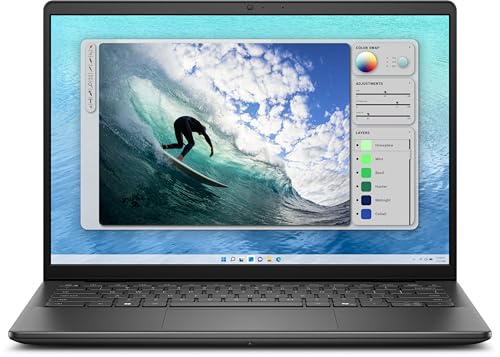
- Best for: A compact home office where a sharp 14-inch screen and a portable frame matter more than a numeric keypad.
- Processor: Intel Core i5-1334U, 10 cores, up to 4.6 GHz
- Memory: 16GB DDR5 SDRAM, 4800 MHz
- Storage: 512GB PCI-E NVMe SSD
- Display: 14-inch WUXGA (1920 x 1200) IPS anti-glare display
All 4 Picks at a Glance
| Product | Specs | Action |
|---|---|---|
| Lenovo ThinkPad E16 Gen 3 |
| Check price on Amazon |
| HP 250 G10 |
| Check price on Amazon |
| Dell Inspiron 14 i5440 |
| Check price on Amazon |
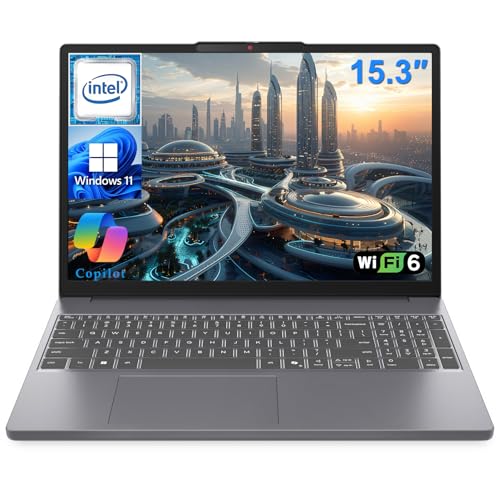 Lenovo IdeaPad Slim 3 |
| Check price on Amazon |
Key takeaways
- Find a laptop that keeps invoices, video calls, and spreadsheets moving from your home office. Compare business-ready models by CPU, memory, and ports.
What's inside
As an Amazon Associate I earn from qualifying purchases. This post may contain affiliate links at no extra cost to you.
Choosing a laptop for a home business is a decision about staying reachable and organized through a long workday, not about chasing the fastest chip on the shelf. A home office machine juggles invoices, client calls, a browser full of tabs, and the accounting file that must never freeze at the wrong moment. When one of those threads stalls, the whole afternoon stalls with it, so steady multitasking and a keyboard you can type on for hours matter more than headline speed.
This guide is for freelancers, sole traders, and small teams who run the business from a spare room or a kitchen table. It covers five laptops with the memory, storage, and connectivity a home office actually uses, and every specification below comes from the product title or the Amazon product page for that model.
Quick Picks
As an Amazon Associate we earn from qualifying purchases.
| Product | Best for | Key spec from title |
|---|---|---|
| Lenovo ThinkPad E16 Gen 3 | A full workday of heavy multitasking | Intel Ultra 7 255H, 16GB DDR5, 1TB PCIe SSD |
| HP 250 G10 | Number-heavy work on a larger screen | Intel Core i5-1334U, 16GB RAM, 512GB PCIe SSD |
| Dell Inspiron 14 i5440 | A compact desk setup with a sharp screen | Intel i5-1334U, 16GB DDR5, 512GB SSD |
| ASUS Vivobook 16 F1605VA-ES56 | A big screen for documents and calls | Intel Core i5-13420H, 16GB Memory, 512GB Storage |
| Lenovo IdeaPad Slim 3 | A slim machine that moves between rooms | Intel i5-13420H, 16GB DDR5 RAM, 512GB PCIe SSD |
How to Choose
Match the processor to your real workload
A home business laptop spends its day on office software, video meetings, email, and a browser that never seems to close. A modern multi-core processor such as an Intel Core i5-1334U or i5-13420H handles that mix without drama, keeping a spreadsheet responsive while a call runs in the background. Step up to a chip like the Intel Core Ultra 7 255H when your day adds large data files, photo editing, or several demanding programs at once. The practical test is simple: count the programs you keep open at the same time, and buy the processor that treats that load as routine rather than a stretch.
Buy enough memory to keep every tab open
Memory decides whether switching between applications feels instant or sluggish, and 16GB is the sensible floor for a business machine in 2026. With 16GB, a home business owner can leave the inbox, the accounting package, a client portal, and a dozen browser tabs open without the system constantly shuffling data in and out. DDR5 memory adds headroom for the next few years, while DDR4 still copes with everyday office work. What matters most is avoiding 8GB, because a machine that starts the day fine can slow to a crawl once meetings, documents, and research pile up together.
Pick storage you will not outgrow in a year
A 512GB solid-state drive covers documents, presentations, and a growing archive of client files for most home businesses, and it also keeps the machine starting quickly each morning. Moving to 1TB makes sense when you store product photos, video recordings of calls, or years of project folders locally instead of in the cloud. Check whether the listing names a PCIe NVMe drive, since that type reads and writes faster than older storage and shortens the wait when opening large files. A drive that fills up forces awkward clean-ups, so treat spare capacity as part of the purchase.
Screen, keyboard, and ports decide daily comfort
A home business laptop is a desk companion first, so the screen and keyboard shape every working hour. A 14-inch display suits a small desk and a bag, while a 15.6-inch or 16-inch panel shows more of a spreadsheet and makes long documents easier to scan. A numeric keypad earns its keep for anyone who types figures all day, and a backlit keyboard helps when evening work stretches past sunset. Ports matter just as much: a USB-C connection that supports charging and an external display, spare USB-A ports for a mouse and headset, and an HDMI output for a second monitor turn one laptop into a proper workstation.
The 5 Best Options
Lenovo ThinkPad E16 Gen 3
- Best for: A home business owner who wants one powerful machine for office work, calls, and client files.
- Processor: Intel Core Ultra 7 255H, 16 cores
- Memory: 16GB DDR5 RAM
- Storage: 1TB PCIe NVMe M.2 SSD
- Display: 16-inch screen
A home business owner who wants one powerful machine for office work, calls, and client files.
Confirm the exact configuration on the listing before ordering, because ThinkPad E16 Gen 3 models ship in several memory and storage combinations.
The ThinkPad E16 Gen 3 suits a home business owner who treats the laptop as the main computer and wants it to cope with everything from bookkeeping to client presentations. Its 16-inch screen gives spreadsheets room to breathe, and the full-size keyboard with a numeric keypad makes entering figures far less fiddly than on a cramped layout. Windows 11 Pro adds business features such as BitLocker device encryption and Remote Desktop, which help when client data needs proper protection. Thunderbolt 4 support also means a single cable can connect a dock, a monitor, and charging at a desk.
Watch out for: Confirm the exact configuration on the listing before ordering, because ThinkPad E16 Gen 3 models ship in several memory and storage combinations.
HP 250 G10
- Best for: Invoicing, email, and video calls from a fixed desk at home.
- Processor: Intel Core i5-1334U, 10 cores, up to 4.6 GHz
- Memory: 16GB DDR4 RAM
- Storage: 512GB PCIe NVMe SSD
- Display: 15.6-inch Full HD display
Invoicing, email, and video calls from a fixed desk at home.
The listing uses DDR4 memory rather than DDR5, so check whether that matters for the software you plan to run over the next few years.
The HP 250 G10 is a straightforward business laptop for owners who spend most of the day in documents, email, and video calls. Its 15.6-inch Full HD display is large enough for side-by-side windows, and the numeric keypad suits invoicing and bookkeeping without reaching for a separate number pad. The Intel Core i5-1334U processor, with ten cores and a boost clock up to 4.6 GHz, keeps office software and meeting apps running together without fuss. Windows 11 Pro is included, so small-business tools such as BitLocker encryption and domain joining are available when the business grows into them.
Watch out for: The listing uses DDR4 memory rather than DDR5, so check whether that matters for the software you plan to run over the next few years.
Dell Inspiron 14 i5440
- Best for: A compact home office where a sharp 14-inch screen and a portable frame matter more than a numeric keypad.
- Processor: Intel Core i5-1334U, 10 cores, up to 4.6 GHz
- Memory: 16GB DDR5 SDRAM, 4800 MHz
- Storage: 512GB PCI-E NVMe SSD
- Display: 14-inch WUXGA (1920 x 1200) IPS anti-glare display
A compact home office where a sharp 14-inch screen and a portable frame matter more than a numeric keypad.
The 14-inch layout has no numeric keypad, so frequent spreadsheet work may call for an external number pad.
The Dell Inspiron 14 i5440 fits a home business where desk space is tight but the screen needs to show documents clearly. Its 14-inch WUXGA IPS display packs 1920 x 1200 pixels into a compact frame, so text stays crisp and a second window fits alongside the main one. Inside, the Intel Core i5-1334U processor and 16GB of DDR5 memory handle the usual office mix of email, spreadsheets, and video calls, while the 512GB NVMe drive keeps files close at hand. A backlit keyboard and a 1080p camera round out a machine built for a spare room, a kitchen table, or a corner of the living room.
Watch out for: The 14-inch layout has no numeric keypad, so frequent spreadsheet work may call for an external number pad.
ASUS Vivobook 16 F1605VA-ES56
The ASUS Vivobook 16 F1605VA-ES56 gives a home business a large 16-inch workspace without the weight of a workstation-class machine. Its WUXGA display shows 1920 x 1200 pixels, which fits more rows of a spreadsheet and more lines of a document than a standard Full HD panel. The Intel Core i5-13420H processor and 16GB of memory keep office programs and browser tabs moving, and the 512GB SSD stores client files locally with fast access. A 180-degree lay-flat hinge lets the screen sit flat for sharing it with someone across the table, and the camera includes a privacy shutter for days when calls end early.
Specs
- Processor: Intel Core i5-13420H
- Memory: 16GB DDR4 memory
- Storage: 512GB SSD
- Display: 16-inch WUXGA (1920 x 1200), 60Hz
- Graphics: Intel Iris Xe Graphics
- Camera: HD camera with privacy shutter
- Battery: Up to 8 hours of battery life
- Operating system: Windows 11 Home
Best for: Reading long documents and working with wide spreadsheets on a large, affordable screen.
Watch out for: This configuration ships with Windows 11 Home rather than Pro, so business features such as BitLocker and Remote Desktop are not included.
Lenovo IdeaPad Slim 3
- Best for: Moving between rooms, client visits, and a home desk without carrying a heavy machine.
- Processor: Intel Core i5-13420H, 8 cores, up to 4.6 GHz
- Memory: 16GB DDR5 RAM
- Storage: 512GB SSD M.2 PCIe NVMe
- Display: 15.3-inch WUXGA (1920 x 1200) IPS anti-glare display
Moving between rooms, client visits, and a home desk without carrying a heavy machine.
The listing describes a non-backlit keyboard on some configurations, so check the keyboard details before buying if you often work in dim light.
The Lenovo IdeaPad Slim 3 suits a home business owner who works in more than one room and wants a machine that is easy to carry. At 15.3 inches it still fits a full keyboard with a number pad, which keeps invoicing and data entry comfortable, while its slim profile slips into a bag for a client visit or a co-working day. The Intel Core i5-13420H processor, 16GB of DDR5 memory, and a 512GB PCIe SSD cover office apps, video calls, and browser research. A 720p webcam with a privacy shutter and Wi-Fi 6 round out a laptop ready for meetings wherever the work happens.
Watch out for: The listing describes a non-backlit keyboard on some configurations, so check the keyboard details before buying if you often work in dim light.
Which One Fits Your Situation
You run the whole business from one desk
Pick the Lenovo ThinkPad E16 Gen 3. Its larger screen, numeric keypad, 1TB of storage, and Windows 11 Pro cover invoicing, client files, and video calls from a single machine. Thunderbolt 4 also makes it easy to add a monitor and dock later, so the desk setup can grow without replacing the laptop.
You mostly type figures and answer email
Pick the HP 250 G10. The 15.6-inch display and numeric keypad suit bookkeeping and order processing, while the Core i5 processor and 16GB of memory handle office software without slowing down. Windows 11 Pro adds useful business features for a growing operation, and the larger screen keeps invoices and email side by side through the day.
Your desk is small and you value a sharp screen
Pick the Dell Inspiron 14 i5440. The 14-inch WUXGA IPS display is crisp for its size, and the compact frame leaves room on a crowded desk. Backlit keys, a 1080p camera, and a card reader make it a capable all-rounder for calls and documents, while the DDR5 memory keeps multitasking smooth.
You want the biggest screen for the least fuss
Pick the ASUS Vivobook 16 F1605VA-ES56 or the Lenovo IdeaPad Slim 3. The Vivobook suits a fixed desk with its 16-inch display and lay-flat hinge, while the Slim 3 is the better choice when the laptop also travels between rooms. Both handle everyday office work, so the deciding factor is whether portability or screen size matters more.
Common Mistakes
- Buying 8GB of memory for a business machine, then watching it slow down once email, meetings, and spreadsheets run together.
- Choosing a laptop with Windows 11 Home and later discovering that a business feature such as BitLocker or Remote Desktop needs the Pro edition.
- Picking a small screen to save space, then struggling to read spreadsheets that need two windows side by side.
- Ignoring ports and buying a machine with no USB-C display output, which makes adding a second monitor awkward.
- Forgetting the webcam and microphone, which matter every day when client meetings happen over video from home.
Frequently Asked Questions
How much memory does a home business laptop need?
16GB is the practical minimum for a home business laptop in 2026. It leaves room for email, accounting software, a client portal, and many browser tabs at the same time. Machines with 8GB can feel fine at first, then slow down as the working day piles on more open programs.
Is Windows 11 Pro worth it for a home business?
Windows 11 Pro is worth it when the business handles client data or needs remote access. It adds BitLocker encryption, Remote Desktop, and domain joining, which Home does not include. For a simple setup with no sensitive data and no remote logins, Windows 11 Home covers the basics.
What screen size works best for working from home?
A 15.6-inch or 16-inch screen suits a fixed home desk because it shows more of a spreadsheet and keeps text comfortable to read. A 14-inch screen works better on a small desk or when the laptop moves between rooms. The right size depends on desk space and how much of the day is spent reading documents.
Do I need a numeric keypad on a business laptop?
A numeric keypad helps anyone who enters figures often, from invoicing to stock counts, because it speeds up number entry and reduces typing errors. If the work is mostly writing and email, a standard keyboard is fine. Compact 14-inch laptops often leave the keypad out, so add an external one when needed.
Related guides
More from Amazon
Programs that pair well with the guide above. Offers and eligibility are set by Amazon and may change.
Free shipping on eligible items, Prime Video and more. Eligible new members can start with a free trial.
Start a Prime free trialAd-free music streaming. Eligible new subscribers can start with a free trial.
Try Music Unlimited freeA Prime membership for ages 18-24 with a trial period. Eligibility is set by Amazon.
See Prime for Young AdultsAudiobooks and podcasts to listen to on the go. Eligible new members can start with a free trial.
Try Audible freeAs an Amazon Associate we earn from qualifying purchases.










Write Your Review
No reviews yet. Be the first to share your experience!