
Key takeaways
- Best laptops for Sims 3 based on listed CPU, graphics, memory, and SSD specs that comfortably exceed the game's published 2009-era system requirements.
What's inside
As an Amazon Associate I earn from qualifying purchases. This post may contain affiliate links at no extra cost to you.
As an Amazon Associate we earn from qualifying purchases.
Disclosure: This article contains affiliate links. If you buy through a link on this page, we may earn a commission at no extra cost to you.

Introduction
The Sims 3 is a beloved life simulator from 2009, and that age is good news for laptop buyers. Its published system requirements come from a much earlier hardware era, calling for a modest processor, a small amount of memory by modern standards, and basic graphics support. Any sensibly specified modern laptop clears those published minimums by a wide margin on paper, which means you do not need a gaming laptop with a dedicated graphics card to enjoy this classic. What you need is a balanced everyday machine with a modern processor, integrated graphics, at least 8GB of memory, and solid-state storage.
That last point matters more than many players expect. The Sims 3 loads neighborhoods, households, and — for players who own them — expansion and stuff packs. A solid-state drive helps those loading moments feel shorter than they would on an older mechanical drive, and enough storage space keeps the base game, expansions, downloads, and saved households together on one machine. A clear Full HD screen also improves the experience, because so much of the game is reading menus, browsing build and buy catalogs, and watching small details in a busy household.
This guide compares three Windows laptops whose listed specifications comfortably exceed the game’s published requirements. The comparison is based on the specifications in each product listing and on the game’s published requirements — not on benchmark claims or frame-rate promises, because performance in an older game also depends on settings, installed packs, and saved-game size. Read the reasoning for each pick, match it to how you play, and confirm the exact configuration on the linked listing before you buy.
Quick Picks
- Best simple pick for Sims 3: Lenovo IdeaPad Slim 3 — AMD Ryzen 3 7320U, Radeon 610M integrated graphics, 8GB of memory, and a 256GB SSD on a 15.6-inch Full HD screen.
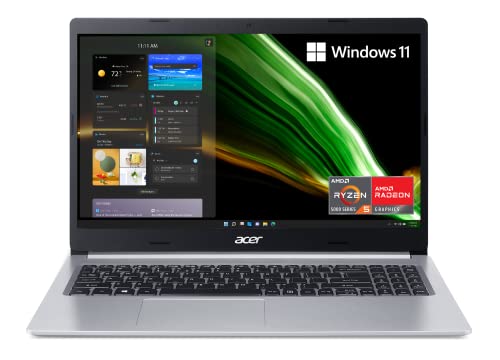
- Best step-up performance: Acer Aspire 5 A515-45-R74Z — six-core AMD Ryzen 5 5500U with Radeon graphics, 8GB of memory, and a 256GB NVMe SSD.
- Best for packs and a bigger screen: ASUS VivoBook 16 — AMD Ryzen 5 7530U, Radeon graphics, 8GB of memory, a 512GB SSD, and a 16-inch 1920 x 1200 display.
1. Lenovo IdeaPad Slim 3
The IdeaPad Slim 3 is the straightforward answer for a dedicated Sims 3 laptop. Its listing describes an AMD Ryzen 3 7320U processor, AMD Radeon 610M integrated graphics, 8GB of LPDDR5 memory, and 256GB of SSD storage, running Windows 11 Home. Set against the game’s published requirements from 2009, every one of those figures is comfortably ahead: the processor is a modern multi-core design, the memory is several times the published minimum amount, and the integrated graphics are a modern solution rather than the basic graphics hardware the game originally targeted.
The 15.6-inch Full HD display at 1920 x 1080 gives the game room to breathe. Menus, the build and buy catalogs, and household panels are easier to read at this size than on a small screen, and the anti-glare finish listed for this model helps in bright rooms. The listing also describes a slim, lightweight design, which suits a laptop that moves between a desk, a couch, and a family member’s room — a common life for a Sims machine.
Storage deserves one honest note. The 256GB SSD is enough for the base game, a selection of expansions, and saved households, but enthusiastic collectors with many packs and a large downloads folder should watch free space and archive old saves. If your library is very large, the VivoBook 16 below doubles that storage.
Specifications
- Display: 15.6-inch Full HD, 1920 x 1080, anti-glare as listed
- Processor: AMD Ryzen 3 7320U
- Graphics: AMD Radeon 610M integrated graphics
- Memory: 8GB LPDDR5
- Storage: 256GB SSD
- Operating system: Windows 11 Home
Pros
- Listed specs comfortably exceed the game’s published requirements
- Full HD 15.6-inch screen suits menus, catalogs, and household play
- SSD storage for the game and saves instead of a mechanical drive
- Slim, portable design for playing in different rooms
Cons
- 256GB is the smallest storage in this guide for pack collectors
- 8GB of memory is adequate here but leaves less multitasking headroom
- Integrated graphics are matched to this older game, not to demanding modern titles
2. Acer Aspire 5 A515-45-R74Z
The Aspire 5 is the step-up pick for players who want more processor headroom while staying with an everyday, non-gaming laptop. The listing specifies an AMD Ryzen 5 5500U hexa-core processor with AMD Radeon integrated graphics, 8GB of DDR4 memory, and a 256GB NVMe SSD. Compared with the published requirements for The Sims 3, that six-core processor and modern integrated graphics provide a wide specification margin, which is a sensible way to think about an older game that can become heavier as expansions, custom content, and long-running saves are added.
The 15.6-inch Full HD IPS display is another practical strength. IPS panels are valued for consistent viewing angles, and the listing also mentions narrow borders, a backlit keyboard, Wi-Fi 6, and a battery life figure stated by the manufacturer of up to 11 hours. A backlit keyboard is a small but real comfort for evening play sessions, and the full port selection in the listing — including USB-C, USB-A, HDMI, and Ethernet — makes it easy to add a mouse, which many Sims players prefer for precise building and camera control.
Like the Lenovo above, this configuration carries 256GB of storage, so the same advice applies: fine for the game and a healthy set of packs, tighter for a huge downloads archive. The listing also notes an available hard drive bay in the product description, but confirm any upgrade plans against the exact listing and Acer documentation rather than assuming parts are included, because no extra drive is part of this configuration as sold.
Specifications
- Display: 15.6-inch Full HD IPS, 1920 x 1080
- Processor: AMD Ryzen 5 5500U, 6 cores, up to 4.0 GHz as listed
- Graphics: AMD Radeon integrated graphics
- Memory: 8GB DDR4
- Storage: 256GB NVMe SSD
- Operating system: Windows 11 Home
Pros
- Six-core processor gives the widest CPU headroom in the first two picks
- Full HD IPS screen with narrow borders for comfortable long sessions
- Backlit keyboard and broad port selection, including Ethernet
- Modern integrated graphics well beyond the game’s published graphics needs
Cons
- 256GB SSD still requires space discipline with many packs
- 8GB of memory, while sufficient for this game, is not generous for heavy multitasking
- Larger everyday chassis is less portable than slim ultraportable models
3. ASUS VivoBook 16 M1605YA-ES52
The VivoBook 16 is the pick for players who want the biggest screen and the most storage in this guide. Its listing describes a 16-inch WUXGA display at 1920 x 1200 in a 16:10 aspect ratio, an AMD Ryzen 5 7530U processor, AMD Radeon graphics, 8GB of memory, and a 512GB SSD, running Windows 11 Home. The taller 16:10 screen shows a little more of the game interface at once, which suits a title built around panels, catalogs, and a wide view of a lot or neighborhood.
On specifications, this model sits comfortably beyond the game’s published requirements in the same way as the other picks, with the added practical benefit of double the storage of the two models above. That 512GB SSD is the better home for a complete pack collection, custom content, screenshots, and multiple saved households. A fingerprint sensor is also listed, a small convenience for a shared family laptop.
One caution applies to this pick in particular: because it is an older model year configuration, double-check the exact listing at purchase time to confirm the processor, memory, and storage still match the description used here, and that the configuration is the M1605YA-ES52 variant named in the listing title. Model families often include several similar variants, and the variant code is what ties your order to these specifications.
Specifications
- Display: 16-inch WUXGA, 1920 x 1200, 16:10 aspect ratio as listed
- Processor: AMD Ryzen 5 7530U
- Graphics: AMD Radeon integrated graphics
- Memory: 8GB
- Storage: 512GB SSD
- Operating system: Windows 11 Home
Pros
- Largest and tallest screen in this guide for interface-heavy play
- 512GB SSD gives the most room for packs, downloads, and saves
- Ryzen 5 processor provides comfortable headroom over published requirements
- Fingerprint sensor listed for quick sign-in on a shared laptop
Cons
- Bigger 16-inch body is the least portable option here
- 8GB of memory matches the others but does not exceed them
- Older model year, so verify the exact variant and configuration at purchase
How to Choose a Laptop for Sims 3
Start from the game’s published requirements, not from gaming-laptop marketing. The Sims 3 dates from 2009, and its published minimums describe hardware far below any laptop in this guide. That means your decision should be based on comfort and longevity rather than chasing high-end graphics hardware. A modern multi-core processor, integrated graphics from a current processor family, and 8GB of memory form a sensible baseline on specifications alone.
Storage is the second decision. The base game alone is modest, but expansions, stuff packs, store content, custom downloads, screenshots, and saved households add up. A 256GB SSD works for a focused installation, while 512GB is the calmer choice for collectors. Solid-state storage is strongly preferable to a mechanical drive for loading screens and neighborhood transitions, based on the general speed difference between those storage types.
Screen and input come next. A 15.6-inch or 16-inch Full HD screen makes menus and catalogs easier to read during long sessions, and a taller 1920 x 1200 panel shows slightly more interface at once. Most players also prefer a mouse for building and camera control, so check that the laptop has the USB ports you need, and consider a backlit keyboard if you play in the evening.
Finally, manage expectations about an older game on a modern system. The Sims 3 is a 32-bit era title, and very large saves or heavy custom content can strain the game itself regardless of how modern the laptop is. Sensible in-game settings, periodic save backups, and keeping some storage free help any of these laptops do their job. Always confirm the exact configuration — processor, memory, storage, and variant code — on the linked listing before ordering.
FAQs
Do I need a gaming laptop for The Sims 3?
No. The game’s published requirements date from 2009 and are far below the specifications of the modern everyday laptops in this guide. A balanced laptop with a modern processor, integrated graphics, 8GB of memory, and an SSD is a specification match for this title without gaming-class hardware.
How much storage does The Sims 3 need?
The base game is modest in size, but expansions, stuff packs, downloads, and saved households grow the installation over time. A 256GB SSD suits a focused setup, while 512GB, as in the VivoBook 16 here, gives collectors more room to keep everything on one drive.
Is integrated graphics enough for Sims 3?
Based on the game’s published requirements, yes. The published graphics requirements describe basic hardware from the game’s era, and the integrated Radeon graphics listed for all three laptops here are modern solutions that exceed those published figures on specification. Settings and installed content still affect how the game feels.
Will The Sims 3 run on Windows 11?
These laptops run Windows 11, and the game is commonly installed on modern Windows systems through its current digital storefronts. Because the game is an older title, follow the storefront’s current installation guidance, keep your saves backed up, and expect that very large saves or heavy custom content can affect the game itself.
Which pick is best if I own many expansion packs?
The ASUS VivoBook 16 is the natural choice for pack collectors because its 512GB SSD doubles the storage of the other two picks and its 16-inch screen shows more of the interface. If your collection is smaller, the Lenovo and Acer models keep things simpler and more portable.
Conclusion
The best laptops for Sims 3 are balanced everyday machines, not gaming rigs. The Lenovo IdeaPad Slim 3 covers the game’s published requirements with room to spare in a slim Full HD package, the Acer Aspire 5 adds six-core processor headroom and an IPS screen with a backlit keyboard, and the ASUS VivoBook 16 brings the biggest screen and double the storage for pack collectors. Compare their listed specifications against how much content you own and where you like to play, confirm the exact configuration on the linked listing, and you will have a comfortable home for your households for years of relaxed play.
Related guides
More from Amazon
Programs that pair well with the guide above. Offers and eligibility are set by Amazon and may change.
Free shipping on eligible items, Prime Video and more. Eligible new members can start with a free trial.
Start a Prime free trialAd-free music streaming. Eligible new subscribers can start with a free trial.
Try Music Unlimited freeA Prime membership for ages 18-24 with a trial period. Eligibility is set by Amazon.
See Prime for Young AdultsAudiobooks and podcasts to listen to on the go. Eligible new members can start with a free trial.
Try Audible freeAs an Amazon Associate we earn from qualifying purchases.









Write Your Review
No reviews yet. Be the first to share your experience!