
Our Short List of 3

- Best for: Students who want the lightest bag and the longest battery life for library days.
- Apple M4 chip with 10-core CPU
- 16GB unified memory
- 256GB SSD storage
- 13.6-inch Liquid Retina display
- Best for: Windows users who want a large, tall screen for split-screen reading and writing.
- Intel Core i5-13420H processor, 8 cores, up to 4.6 GHz
- 16GB DDR5 RAM
- 512GB PCIe NVMe SSD
- 15.3-inch FHD (1920 x 1200) anti-glare display

- Best for: Students who want a touchscreen and a numeric keypad for notes, data entry, and long writing sessions.
- Intel Core i5-13420H processor, 13th Gen
- 16GB LPDDR5 memory
- 512GB PCIe Gen 4 SSD
- 15.6-inch FHD (1920 x 1080) IPS touch display
All 3 Picks at a Glance
| Product | Specs | Action |
|---|---|---|
| Apple 2025 MacBook Air 13-inch Laptop with M4 chip |
| Check price on Amazon |
| Lenovo IdeaPad Slim 3 15.3-inch Laptop |
| Check price on Amazon |
| Acer Aspire 5 15 Slim Laptop (A515-58PT-50UJ) |
| Check price on Amazon |
Key takeaways
- The 4 best laptops for graduate students in November 2026: long battery life, comfortable keyboards, and 16GB of RAM for research, writing, and campus.
What's inside
As an Amazon Associate I earn from qualifying purchases. This post may contain affiliate links at no extra cost to you.
Choosing a laptop for graduate school is a decision about surviving long days away from an outlet, not about chasing the fastest processor on the shelf. A graduate student writes for hours, keeps dozens of browser tabs and PDFs open at once, runs statistics or reference software in the background, and carries the machine between seminars, the library, and a lab. The laptop that wins is the one that stays comfortable at the end of a ten-hour day and still has charge left when the seminar runs over.
This guide is for master’s and doctoral students who need a reliable daily machine for research, thesis writing, and coursework, including students who run discipline-specific software and students who present in seminars. Every laptop below is a current listing on Amazon with 16GB of memory, and each one was picked for a different balance of weight, battery life, screen size, and keyboard comfort.
Quick Picks
As an Amazon Associate we earn from qualifying purchases.
| Product | Best for | Key spec from title |
|---|---|---|
| Apple 2025 MacBook Air 13-inch Laptop with M4 chip | All-day library sessions and the lightest bag | M4 chip, 16GB unified memory, 256GB SSD |
| Lenovo IdeaPad Slim 3 15.3-inch Laptop | Big-screen research on a Windows machine | Intel Core i5-13420H, 16GB DDR5 RAM, 512GB SSD |
| Acer Aspire 5 15 Slim Laptop (A515-58PT-50UJ) | Touchscreen note-taking with a full-size keyboard | Intel Core i5-13420H, 16GB LPDDR5, 512GB Gen 4 SSD |
| Dell Inspiron 14 7445 2-in-1 Touchscreen Laptop | Annotating papers and presenting in tablet mode | AMD Ryzen 5 8640HS, 16GB DDR5 RAM, 512GB SSD |
How to Choose
RAM and multitasking for research work
Graduate work is multitasking work. A typical session means a word processor, a reference manager, a PDF reader with several papers open, a browser full of tabs, and maybe a statistics package or a code editor running at the same time. That is why 16GB of memory is the baseline in this guide, and why it matters more than a slightly faster processor. With 8GB, the machine starts swapping to the drive once the tab count climbs, and everything stutters at exactly the moment a deadline is near. Check whether the memory is soldered, too: on several laptops here the RAM is fixed at purchase, so the configuration you buy is the configuration you keep for the whole degree.
Keyboard comfort for thesis writing
A graduate student types more than almost any other kind of buyer, and a shallow, cramped keyboard turns a writing day into a chore. Look for a full-size layout with a numeric keypad if you work with data, a backlit keyboard for dim libraries and late-night writing, and keys with enough travel that your fingers do not bottom out harshly. The 15-inch machines in this guide have room for a proper keypad, while the 13- and 14-inch models trade that for portability. If you can, try the keyboard in a store before ordering, because comfort is personal and no specification sheet measures it well.
Battery life for a day without an outlet
Library desks near power outlets are contested territory, and a seminar room rarely has one outlet per seat. A laptop that lasts a full working day changes how you plan your schedule, because you stop hunting for plugs and start working wherever there is a free chair. Treat the battery figure on a listing as an optimistic maximum measured under light use: real research work with a bright screen and many tabs will deliver less. The fanless MacBook Air in this guide is the strongest performer here, while the Windows machines are honest all-day machines only if you keep brightness moderate and close unused apps.
Weight and size for carrying across campus
A laptop’s weight matters twice a day, every day, because it rides in a bag already full of books, a charger, and a water bottle. The difference between a 2.7-pound machine and a 3.5-pound one sounds small on paper and feels large by the third building of the afternoon. A 13- or 14-inch laptop fits easily on a crowded seminar table and in a small bag, while a 15-inch screen is kinder to tired eyes when two documents sit side by side. Decide which you will notice more: the extra half pound on your shoulder, or the extra inch of screen when you are comparing a draft with its sources.
The 4 Best Options
Apple 2025 MacBook Air 13-inch Laptop with M4 chip
- Best for: Students who want the lightest bag and the longest battery life for library days.
- Apple M4 chip with 10-core CPU
- 16GB unified memory
- 256GB SSD storage
- 13.6-inch Liquid Retina display
Students who want the lightest bag and the longest battery life for library days.
The 256GB of storage fills fast once papers, datasets, and photos accumulate, and neither the memory nor the storage can be upgraded later, so buy the configuration you will need in your final year. There are only two USB-C ports and no USB-A or HDMI port, so a hub is almost mandatory.
The MacBook Air is the easiest laptop in this guide to carry and the hardest to run flat. Its fanless design means it stays silent in a quiet library, the M4 chip handles writing, research, and light data work without breaking a sweat, and the battery lasts through a full day of classes and evening writing. Students who already use an iPhone or iPad will find the handoff between devices convenient, and the 13.6-inch Liquid Retina display is sharp enough for long reading sessions without eye strain.
Watch out for: The 256GB of storage fills fast once papers, datasets, and photos accumulate, and neither the memory nor the storage can be upgraded later, so buy the configuration you will need in your final year. There are only two USB-C ports and no USB-A or HDMI port, so a hub is almost mandatory.
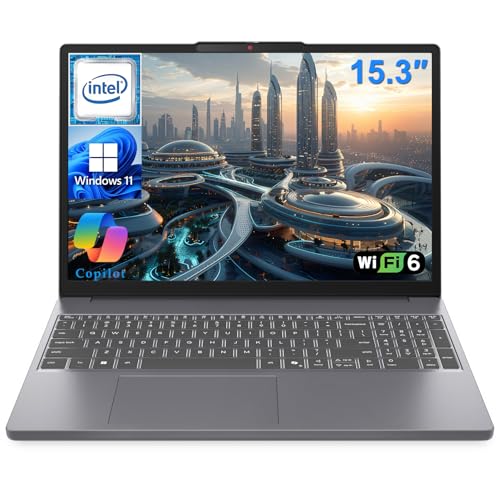
Lenovo IdeaPad Slim 3 15.3-inch Laptop
- Best for: Windows users who want a large, tall screen for split-screen reading and writing.
- Intel Core i5-13420H processor, 8 cores, up to 4.6 GHz
- 16GB DDR5 RAM
- 512GB PCIe NVMe SSD
- 15.3-inch FHD (1920 x 1200) anti-glare display
Windows users who want a large, tall screen for split-screen reading and writing.
This is the heaviest laptop in the guide, so it suits a bag with a padded laptop compartment rather than a slim sleeve. The listing title mentions Office 365, so confirm exactly what software is included before ordering rather than assuming a full subscription is included.
The IdeaPad Slim 3 is the big-screen Windows option for students who do most of their work at a desk or a library table and want room to spread out. Its 15.3-inch display uses a taller 1920 x 1200 resolution, which shows more lines of a thesis draft and more rows of a spreadsheet than a standard 15.6-inch screen, and the 13th Gen Intel Core i5-13420H with 16GB of DDR5 memory keeps research software, browsers, and documents running side by side. At 3.5 pounds it is still light enough to carry, and the fast-charge support helps when you do find an outlet between classes.
Watch out for: This is the heaviest laptop in the guide, so it suits a bag with a padded laptop compartment rather than a slim sleeve. The listing title mentions Office 365, so confirm exactly what software is included before ordering rather than assuming a full subscription is included.
Acer Aspire 5 15 Slim Laptop (A515-58PT-50UJ)
- Best for: Students who want a touchscreen and a numeric keypad for notes, data entry, and long writing sessions.
- Intel Core i5-13420H processor, 13th Gen
- 16GB LPDDR5 memory
- 512GB PCIe Gen 4 SSD
- 15.6-inch FHD (1920 x 1080) IPS touch display
Students who want a touchscreen and a numeric keypad for notes, data entry, and long writing sessions.
The 16GB of LPDDR5 memory is soldered, so it cannot be upgraded later. The ports list shows no USB-C port, which is unusual at this size, so check your accessories and dongles before ordering. Intel UHD Graphics is fine for office and research software but is not built for heavy video editing or 3D work.
The Aspire 5 pairs a full-size 15.6-inch touchscreen with a backlit keyboard and a numeric keypad, which makes it a strong fit for students who take notes by hand on screen and type long documents in the same session. The 13th Gen Intel Core i5-13420H and 16GB of LPDDR5 memory handle the usual graduate workload, while the 512GB PCIe Gen 4 SSD leaves room for a growing library of papers and datasets. The 720p HD camera uses Acer’s TNR technology for clearer video in dim rooms, and PurifiedVoice with AI Noise Reduction helps seminar calls sound cleaner.
Watch out for: The 16GB of LPDDR5 memory is soldered, so it cannot be upgraded later. The ports list shows no USB-C port, which is unusual at this size, so check your accessories and dongles before ordering. Intel UHD Graphics is fine for office and research software but is not built for heavy video editing or 3D work.
Dell Inspiron 14 7445 2-in-1 Touchscreen Laptop
The Inspiron 14 7445 is the convertible of the group: its 360-degree hinge folds the 14-inch touchscreen flat into tablet mode, which is genuinely useful for annotating PDFs with a stylus, reading papers like a book, or presenting slides in tent mode during a seminar. The AMD Ryzen 5 8640HS with 16GB of DDR5 memory and a 512GB SSD is a capable combination for research software, and Windows 11 Pro with Copilot adds features that some university IT departments prefer. The backlit keyboard and fingerprint reader round out a machine built for moving between rooms all day.
Specs
- AMD Ryzen 5 8640HS processor, 6 cores, 12 threads, up to 4.9 GHz, 16MB L3 cache
- 16GB DDR5-4800MHz RAM
- 512GB NVMe PCIe M.2 SSD
- 14-inch FHD+ (1920 x 1200) IPS touchscreen with 360-degree hinge
- Windows 11 Pro 64-bit with Copilot
- Backlit keyboard with fingerprint reader
- 1080p webcam
- Ports: 2 USB-C 3.2 Gen 2, 2 USB-A 3.2 Gen 1, HDMI 1.4, SD card reader, audio jack
- Wi-Fi 6E and Bluetooth
- Battery life up to 10.20 hours
- Weight: just over 3 pounds
Best for: Students who annotate papers, sketch diagrams, or present in seminars and want one device that works as both laptop and tablet.
Watch out for: The listing discloses that the computer was resealed to upgrade the memory, so read the seller’s warranty terms carefully before ordering. The listing also contains conflicting fields, so verify the exact configuration, operating system, and included accessories on the product page before buying.
Which One Fits Your Situation
Writing a thesis and living in the library
Pick the MacBook Air. Its silent, fanless design suits quiet reading rooms, the battery outlasts the longest library day, and at 2.7 pounds it disappears into a bag already full of books. The only real compromise is the 256GB of storage, so keep large datasets and archives on an external drive or in cloud storage and the machine will serve for the whole degree.
Running statistics or lab software on Windows
Pick the Lenovo IdeaPad Slim 3. Most discipline-specific Windows software runs without workarounds, the taller 15.3-inch display shows more of a spreadsheet or a code editor at once, and the 512GB SSD leaves room for datasets and virtual machines. It is the heaviest pick here, but if your day is mostly desk-based, the screen space is worth the extra weight.
Annotating papers and presenting in seminars
Pick the Dell Inspiron 14 7445 2-in-1. Folding the screen flat turns it into a reading tablet for marking up PDFs, and tent mode makes it easy to show slides to a small group without a projector stand. The 14-inch size fits on crowded seminar tables, and the fingerprint reader means fast, secure sign-in between sessions.
The biggest screen for split-screen research
Pick the Acer Aspire 5. Its 15.6-inch touchscreen and full-size keyboard with a numeric keypad make it comfortable for comparing a draft with its sources side by side, and the touch display is handy for scrolling through long documents. Just remember the memory cannot be upgraded, so the 16GB configuration you buy is the one you will use for years.
Common Mistakes
- Buying 8GB of RAM to save money, then watching the laptop slow down once a browser, a reference manager, and statistics software are all open at once.
- Choosing the cheapest 256GB drive and discovering a year later that datasets, lecture recordings, and a thesis archive no longer fit.
- Picking a heavy 15-inch laptop for a program that has you walking between buildings all day, then leaving it at home because the bag is too heavy.
- Ignoring the keyboard and buying purely on processor speed, even though typing comfort decides how you feel at the end of every writing day.
- Assuming any laptop runs your department’s software, without checking whether a required program is Windows-only or needs a specific operating system version.
Frequently Asked Questions
Is 16GB of RAM enough for graduate school?
Yes, 16GB is the right baseline for most graduate work. It comfortably handles a word processor, a reference manager, dozens of browser tabs, and a statistics package running at the same time. Students working with very large datasets, virtual machines, or heavy video editing may need more, but for reading, writing, and analysis, 16GB will last the length of a degree.
Do graduate students need a dedicated graphics card?
Most do not. Integrated graphics handle writing, research, video calls, and presentations without trouble, and every laptop in this guide relies on integrated graphics. A dedicated graphics card only matters for students doing 3D rendering, heavy video editing, or machine learning work on the machine itself, and those students should look at a workstation-class laptop instead.
MacBook or Windows laptop for graduate school?
It depends on your department’s software. A MacBook Air suits students whose work is writing, reading, and web-based tools, and it wins on battery life and weight. A Windows laptop is the safer choice when your program requires Windows-only software for statistics, engineering, or lab instruments, so check your department’s requirements before deciding.
Is 256GB of storage enough for a graduate student?
It can be, but only with discipline. Papers and drafts are small, so 256GB covers writing and reading easily. It gets tight once you add lecture recordings, datasets, and photos, and the MacBook Air’s storage cannot be upgraded later. If you expect large files, choose a 512GB model or plan on an external drive from the start.
Related guides
More from Amazon
Programs that pair well with the guide above. Offers and eligibility are set by Amazon and may change.
Free shipping on eligible items, Prime Video and more. Eligible new members can start with a free trial.
Start a Prime free trialAd-free music streaming. Eligible new subscribers can start with a free trial.
Try Music Unlimited freeA Prime membership for ages 18-24 with a trial period. Eligibility is set by Amazon.
See Prime for Young AdultsAudiobooks and podcasts to listen to on the go. Eligible new members can start with a free trial.
Try Audible freeAs an Amazon Associate we earn from qualifying purchases.










Write Your Review
No reviews yet. Be the first to share your experience!