
Key takeaways
- Best laptops for pictures compared by display resolution, color coverage, and storage — for viewing, organizing, and lightly editing personal photo libraries.
What's inside
As an Amazon Associate I earn from qualifying purchases. This post may contain affiliate links at no extra cost to you.
As an Amazon Associate we earn from qualifying purchases.
Disclosure: This article contains affiliate links. If you buy through a link on this page, we may earn a commission at no extra cost to you.


Introduction
When people search for the best laptops for pictures, they usually mean something specific and everyday: a laptop for viewing family photos, organizing a growing personal library, sorting downloads and phone backups, and making light edits such as cropping, straightening, and adjusting brightness. That job is different from professional color grading, and it is also different from gaming or video production. The screen and the storage matter most, followed by enough memory and processing power to keep large libraries responsive.
A good picture laptop should show photos accurately enough that what you see matches what you share or print. That means a Full HD resolution or higher, a panel type known for stable viewing angles, and, where a listing states it, wide color coverage. Storage matters just as much. Phone photos and scanned family archives grow quietly until a small drive is full, so a larger solid-state drive gives you room to keep a library on the machine instead of constantly moving files around. Finally, everyday software for organizing and editing photos runs comfortably on modern mid-range processors with 8GB to 16GB of memory.
This guide compares three laptops that approach pictures from different angles. One leads with an OLED display and a large drive, one offers a bright Retina display in a very portable body, and one pairs a large touchscreen with the biggest storage in this list. Every specification below comes from the product listing for that exact model, so you can match the claims to the linked page before you buy.
Quick Picks
- Best display for pictures: ASUS Zenbook 14 OLED — 14-inch OLED at 1920 x 1200, listed with 100% DCI-P3 color coverage and 500 nits HDR brightness, plus a 1TB SSD.
- Best portable pick: Apple MacBook Air 13-inch with M3 — 13.6-inch Liquid Retina display listed as supporting 1 billion colors, with a 512GB SSD in a thin, light body.
- Best for a large library: Lenovo IdeaPad Slim 3 15ABR8 — 15.6-inch Full HD touchscreen, 16GB of memory, and a 1TB NVMe SSD for keeping big collections on the laptop.
1. ASUS Zenbook 14 OLED
The Zenbook 14 OLED is the strongest picture-first choice in this guide because its listing leads with the display. The 14-inch Lumina OLED touch panel runs at 1920 x 1200, is listed with 100% DCI-P3 color coverage, and reaches 500 nits of HDR brightness. For viewing and editing personal photos, that combination means fine detail, deep contrast, and color that is described in the listing in concrete, checkable terms rather than vague marketing language. OLED panels also keep contrast consistent when you tilt the screen on a couch or share photos with someone sitting next to you.
Performance is well matched to photo work. The listing pairs an Intel Core Ultra 7 255H processor with 16GB of DDR5 memory, Intel Arc 140T integrated graphics, and a 1TB SSD. Sorting, importing, and applying edits to large batches of images is the kind of task where 16GB of memory and fast solid-state storage make the machine feel responsive day to day. Windows 11 Pro, Wi-Fi 7, two Thunderbolt 4 ports, USB-A, and HDMI 2.1 round out a modern port selection, and the listed weight of 2.66 pounds makes it easy to carry between rooms or on trips where many photos are taken.
Specifications
- Display: 14-inch OLED touch, 1920 x 1200, listed 100% DCI-P3, 500 nits HDR
- Processor: Intel Core Ultra 7 255H
- Graphics: Intel Arc 140T integrated graphics
- Memory: 16GB DDR5
- Storage: 1TB SSD
- Operating system: Windows 11 Pro
- Weight: 2.66 pounds, as listed
Pros
- OLED display with listed wide color coverage for photo viewing and editing
- 1TB SSD holds a large personal library without immediate offloading
- 16GB of memory suits batch imports and multitasking
- Lightweight body for a laptop with this display and storage
Cons
- 1920 x 1200 is sharp at 14 inches but not the highest resolution available in larger laptops
- Glossy display finish, as listed, can reflect room light
- Integrated graphics are fine for photo work but this is not a gaming-focused machine
2. Apple MacBook Air 13-inch with M3
The MacBook Air with M3 suits picture lovers who live in the Apple ecosystem and want a screen that makes photos look vivid straight from a phone backup. Its 13.6-inch Liquid Retina display is listed as supporting 1 billion colors, which is the detail that matters when you are judging skin tones, skies, and subtle shading in personal photos. The M3 chip, with an 8-core CPU and 10-core GPU as described in the listing, handles photo organization and editing apps with ease, and macOS includes built-in tools for managing a photo library that many iPhone owners already know.
This configuration carries 8GB of unified memory and a 512GB SSD. That storage size fits a substantial personal library, though households backing up several phones may still want an archiving routine. The listing highlights a thin, lightweight design, up to 18 hours of battery life as stated by the manufacturer, two Thunderbolt ports, Wi-Fi 6E, and Touch ID. For viewing pictures on the move — reviewing a trip in a cafe or showing family photos while traveling — portability and battery life are genuine advantages, not extras.
One practical note: check that your preferred photo software runs on macOS before choosing this model, especially if your library currently lives in a Windows-only application. If you are already using iPhone backups and Apple photo tools, that concern disappears and the workflow becomes simpler.
Specifications
- Display: 13.6-inch Liquid Retina, listed as supporting 1 billion colors
- Processor: Apple M3, 8-core CPU and 10-core GPU as listed
- Memory: 8GB unified memory
- Storage: 512GB SSD
- Operating system: macOS
- Color of this listing: Silver
Pros
- Liquid Retina display described with 1 billion colors for rich photo viewing
- Very portable design for reviewing photos anywhere
- Long manufacturer-stated battery life for travel and family visits
- Natural fit for iPhone photo backups and Apple photo software
Cons
- 8GB of memory is the smallest amount in this guide
- 512GB of storage fills faster than the 1TB options here
- macOS only, so Windows-only photo tools will not carry over
3. Lenovo IdeaPad Slim 3 15ABR8
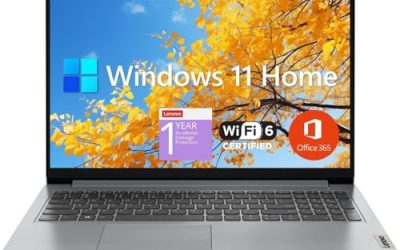
The IdeaPad Slim 3 15ABR8 is the library keeper of this group. Its listing describes a 15.6-inch Full HD touchscreen at 1920 x 1080 with 300 nits brightness and 45% NTSC color coverage, driven by an AMD Ryzen 7 5825U eight-core processor, 16GB of DDR4 memory, and a 1TB NVMe SSD. That storage and memory pairing is exactly what a large, messy photo collection needs: room for years of phone backups, scans, and exports, plus enough memory to search, sort, and tag without the machine feeling sluggish.
The larger 15.6-inch screen gives photos more physical size than the 14-inch and 13.6-inch models above, which helps when you are comparing similar shots side by side or showing pictures to family around a table. Touch input can also make quick sorting sessions feel more direct. The listing notes this is a custom-configured model, meaning the seller states the original packaging may have been opened to install the advertised upgrades, so read that part of the listing carefully and confirm the delivered configuration matches the description.
On color, be realistic about the trade-off. The listed 45% NTSC coverage is narrower than the Zenbook OLED coverage above, so this Lenovo is better framed as a spacious, comfortable organizer and viewer than as the most color-focused editor in the guide. For many personal libraries, that balance is sensible: big screen, big drive, and straightforward performance.
Specifications
- Display: 15.6-inch Full HD touchscreen, 1920 x 1080, listed 300 nits and 45% NTSC
- Processor: AMD Ryzen 7 5825U, 8 cores, up to 4.5 GHz as listed
- Graphics: AMD Radeon integrated graphics
- Memory: 16GB DDR4
- Storage: 1TB NVMe SSD
- Operating system: Windows 11 Home
Pros
- 1TB SSD and 16GB of memory suit very large photo libraries
- Largest screen in this guide for side-by-side comparing and sharing
- Touchscreen supports direct, practical sorting
- Eight-core processor keeps organizing and light editing responsive
Cons
- Listed color coverage is narrower than the OLED pick above
- Custom-configured listing, so verify the delivered specs against the page
- Bigger and heavier than the two portable picks in this guide
How to Choose a Laptop for Pictures
Start with the display, because it decides how truthful your photos look. Resolution of 1920 x 1080 or higher keeps individual images crisp, and at smaller screen sizes a slightly taller resolution such as 1920 x 1200 adds useful room for toolbars in editing apps. Panel type matters too: OLED and good IPS-style panels hold color and contrast at wider viewing angles than basic panels, which helps when more than one person is looking at the screen. Where a listing states color coverage or brightness, use those stated figures to compare models instead of relying on names alone.
Next, size your storage honestly. Add up your current photo library, then assume it keeps growing with every phone upgrade and family event. A 512GB drive suits a moderate library with a tidy archiving habit, while 1TB gives breathing room for households that back up several devices or keep scanned archives. Solid-state storage also makes importing and searching feel faster than older mechanical drives.
Memory and processor come third. For viewing, organizing, and light editing, 8GB can work, but 16GB is the more comfortable choice when a browser, a photo app, and a backup tool are open together. Any modern mid-range processor in these listings is comfortably matched to this workload, so do not pay for gaming-class graphics you will not use for pictures.
Finally, think about how you will actually use the machine. A light 13-inch or 14-inch laptop gets carried to family gatherings and on trips. A 15.6-inch model stays mostly at home but shows photos bigger. Check the operating system against your current photo software, confirm the ports match your card readers and drives, and always re-read the exact listing configuration — size, memory, and storage — before ordering, because similar model names can hide different specifications.
FAQs
What screen is best for looking at photos?
Look for at least Full HD resolution, a panel with stable viewing angles, and, where stated, wide color coverage and decent brightness. In this guide, the Zenbook 14 OLED lists the most detailed display figures, including 100% DCI-P3 coverage, while the MacBook Air lists a Liquid Retina display supporting 1 billion colors.
How much storage do I need for a photo library?
It depends on the size of your collection and how fast it grows. A 512GB SSD fits many personal libraries, while a 1TB SSD is safer for households backing up multiple phones, keeping scanned family archives, or storing lots of short video clips alongside still photos.
Is 8GB of memory enough for photo editing?
For viewing, organizing, and light edits, 8GB can be workable, as the MacBook Air configuration here shows. If you keep many applications open, import large batches, or plan to keep the laptop for many years, 16GB gives more headroom and usually feels smoother over time.
Do I need a dedicated graphics card for pictures?
No. Viewing, organizing, and lightly editing personal photos runs well on the integrated graphics in these listings. A dedicated graphics card matters more for gaming and heavy video work than for everyday photo tasks.
Should I choose Windows or macOS for photos?
Choose the system that matches your phone and your current photo software. iPhone owners often find the MacBook Air workflow simplest, while Windows laptops offer the widest range of screen sizes, touch options, and storage configurations, as the ASUS and Lenovo picks here illustrate.
Conclusion
The best laptops for pictures are not the most powerful laptops overall — they are the ones with a screen you can trust, storage that respects how fast a family library grows, and performance matched to viewing, organizing, and light editing. Choose the ASUS Zenbook 14 OLED for the strongest listed display and a 1TB drive in a light body, the MacBook Air with M3 for a portable Retina screen and a simple iPhone-friendly workflow, or the Lenovo IdeaPad Slim 3 15ABR8 for the biggest screen and storage-first approach. Whichever you pick, confirm the exact configuration on the linked listing before you buy, and your next photo sort will be a far more pleasant job.
Related guides
More from Amazon
Programs that pair well with the guide above. Offers and eligibility are set by Amazon and may change.
Free shipping on eligible items, Prime Video and more. Eligible new members can start with a free trial.
Start a Prime free trialAd-free music streaming. Eligible new subscribers can start with a free trial.
Try Music Unlimited freeA Prime membership for ages 18-24 with a trial period. Eligibility is set by Amazon.
See Prime for Young AdultsAudiobooks and podcasts to listen to on the go. Eligible new members can start with a free trial.
Try Audible freeAs an Amazon Associate we earn from qualifying purchases.









Write Your Review
No reviews yet. Be the first to share your experience!