
Our Short List of 3

- Processor: Intel Processor N100 (quad-core, up to 3.4 GHz)
- Memory: 4 GB LPDDR5
- Storage: 64 GB eMMC
- Display: 11.6-inch HD (1366 x 768) anti-glare

- Processor: Intel Celeron N4500 (dual-core, up to 2.8 GHz)
- Memory: 4 GB LPDDR4X
- Storage: 64 GB eMMC
- Display: 14-inch HD (1366 x 768) LED anti-glare
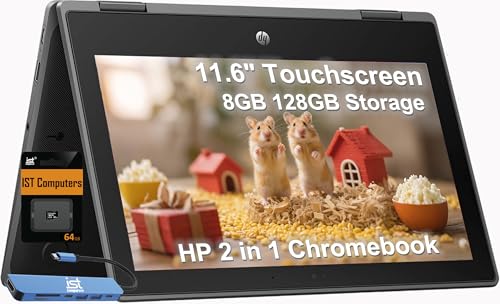
- Processor: Intel Celeron N5100 (quad-core, up to 2.8 GHz)
- Memory: 8 GB
- Storage: 64 GB eMMC plus 64 GB memory card included
- Display: 11.6-inch HD (1366 x 768) touchscreen, Corning Gorilla Glass, 360-degree hinge
All 3 Picks at a Glance
| Product | Specs | Action |
|---|---|---|
| ASUS Chromebook CR11 — Budget |
| Check price on Amazon |
| Samsung Galaxy Chromebook Go — Budget |
| Check price on Amazon |
| HP Pro x360 Fortis 11 — Mid-Range |
| Check price on Amazon |
Key takeaways
- Rugged laptops and Chromebooks for kids under 10 with spill-resistant keyboards, drop-tested bodies, parental controls and all-day battery life.
What's inside
As an Amazon Associate I earn from qualifying purchases. This post may contain affiliate links at no extra cost to you.
A first laptop for a child under 10 has a very different job from a laptop for a teenager. It does not need power for editing software or a big screen for long essays. It needs to survive being dropped off a sofa, shrug off a spilled juice box, stay simple enough that a six-year-old can open it and get straight to a reading app or a maths game, and give parents real control over what can be seen and for how long. Every pick in this guide is a proper laptop or Chromebook with a real keyboard — no tablets — chosen for drop resistance, spill-resistant keyboards, long battery life, and a size and weight that small hands can actually carry.
This guide is fenced tightly to younger children. If you are shopping for an older student, the priorities shift toward performance and screen space, and those machines are covered in separate roundups. Here, durability and simplicity come first, and every model below was originally built for elementary classrooms, which is exactly the environment a young child’s laptop has to survive at home.
As an Amazon Associate, we earn from qualifying purchases.
What Matters Most at This Age
Three things decide whether a child’s first laptop lasts a school year or a school term. The first is the body: rubber bumpers, reinforced corners and hinges, and a chassis that has passed drop testing matter far more than raw speed. The second is the keyboard, because small spills are a certainty, not a risk — a spill-resistant deck that channels liquid away from the electronics turns a disaster into a quick wipe-down. The third is control: ChromeOS machines let a parent manage the device through a supervised account, approving apps, filtering content and setting daily limits, which is far easier than policing a fully open system. Battery life rounds out the list, since a laptop that runs all day removes the daily charger hunt and keeps the machine away from trailing cables.
ASUS Chromebook CR11 — Budget
- Processor: Intel Processor N100 (quad-core, up to 3.4 GHz)
- Memory: 4 GB LPDDR5
- Storage: 64 GB eMMC
- Display: 11.6-inch HD (1366 x 768) anti-glare
The ASUS Chromebook CR11 is built around one idea: a small laptop that treats rough handling as normal. Its chassis carries military-grade durability certification, with rubber bumpers around the edges and a design meant to absorb the knocks that happen when a child carries a laptop by one corner or knocks it off a low table. For children under 10, that toughness is the single most valuable feature on this list, and ASUS pairs it with a spill-resistant keyboard that can tolerate a tipped drink without the liquid reaching the main board.
Inside, an Intel Processor N100 and a fanless design keep the machine silent and cool, which suits shared family spaces and quiet reading time. The 11.6-inch anti-glare screen is the right scale for small laps and short arms, and the whole machine weighs under three pounds, so a young child can move it from desk to sofa without help. ChromeOS keeps the experience simple: sign in, and the launcher presents a short row of parent-approved apps with nothing complicated to configure. Automatic updates run for years, so the device stays current long after the novelty wears off. For a first laptop that will be treated roughly and used for learning apps, school platforms and video calls with family, the CR11 is the straightforward starting point.
Tier: Budget
Samsung Galaxy Chromebook Go — Budget
- Processor: Intel Celeron N4500 (dual-core, up to 2.8 GHz)
- Memory: 4 GB LPDDR4X
- Storage: 64 GB eMMC
- Display: 14-inch HD (1366 x 768) LED anti-glare
Some children under 10 are all legs and long arms, and for them the Samsung Galaxy Chromebook Go offers a bigger 14-inch screen in a slim, light body that is still easy to carry around the house. The larger display makes shared activities easier — a parent and child can follow a recipe video, a drawing tutorial or a video call with grandparents side by side without squinting at a small panel. Samsung built the Go with a shock-resistant body and a spill-resistant keyboard, so the bigger footprint does not come with bigger fragility.
The Intel Celeron N4500 processor and modest memory are matched to what young children actually do: browser-based learning platforms, streaming, simple games and Google’s suite of apps. Storage is generous enough for downloaded shows and offline work on car journeys. Battery life stretches across a full day of mixed use, and the slim profile slides into a backpack or a kitchen drawer without dominating either. Because it runs ChromeOS, parents get the same supervised-account controls as the other picks here, with content filtering and screen-time limits managed from the parent’s own phone. Choose the Go if your child is at the older end of this age range, reads for longer stretches, or will mostly use the laptop at a table where the extra screen space earns its keep.
Tier: Budget
Lenovo 100e Chromebook Gen 4 — Mid-Range
Lenovo’s 100e line exists for one purpose: surviving elementary school. The Gen 4 model wraps its components in a chassis with rubber bumpers, reinforced ports and hinges, and a keyboard designed to resist both spills and determined key-picking — a detail any parent of a curious seven-year-old will appreciate. It has passed military-grade drop and durability testing, and the top cover resists the scratches and scuffs that come from being slid across tables and floors.
This configuration steps up to 8 GB of memory and a touchscreen, and both matter for younger users. The extra memory keeps several learning apps and browser tabs open at once without slowdowns when a child bounces between a phonics game and a video lesson. The touchscreen is arguably even more important: children under 10 navigate by tapping long before they master a trackpad, and a screen that responds to a finger makes early learning apps feel natural rather than frustrating. The Intel Processor N100 keeps everything responsive, the 11.6-inch size keeps the weight low enough for small hands, and the battery is sized to run well beyond a school day. A camera privacy shutter adds a simple physical safeguard parents can see and control. If you want one machine that covers the whole under-10 span, from first taps to early homework, this is the most balanced pick here.
Specs
- Processor: Intel Processor N100 (quad-core, up to 3.4 GHz)
- Memory: 8 GB LPDDR5
- Storage: 64 GB eMMC
- Display: 11.6-inch HD (1366 x 768) touchscreen, anti-glare
- Weight: About 2.7 lb
- Battery: 47 Wh, all-day runtime
- Durability: MIL-STD 810H tested, rubber bumpers, spill-resistant keyboard with anti-pry keys, reinforced ports and hinges
- Connectivity: Wi-Fi 6E, Bluetooth, USB-C, USB-A, HDMI, webcam privacy shutter
- Operating system: ChromeOS
Tier: Mid-Range
HP Pro x360 Fortis 11 — Mid-Range
- Processor: Intel Celeron N5100 (quad-core, up to 2.8 GHz)
- Memory: 8 GB
- Storage: 64 GB eMMC plus 64 GB memory card included
- Display: 11.6-inch HD (1366 x 768) touchscreen, Corning Gorilla Glass, 360-degree hinge
The HP Pro x360 Fortis 11 takes the rugged school formula and adds a hinge that folds a full 360 degrees. For children under 10 that flexibility is genuinely useful: folded flat, the machine behaves like a chunky reading slate for story apps; propped in tent mode, it becomes a stable little screen for watching a lesson or following a dance-along video; opened normally, it is a proper laptop with a full keyboard for early typing practice. The touchscreen is protected by Corning Gorilla Glass, and the body is built to the same education durability standards as the rest of this guide, with a spill-resistant keyboard and reinforced construction.
This listing pairs 8 GB of memory with a two-part storage arrangement — internal eMMC storage plus an included memory card — which gives a family room for downloaded videos, photos and offline app content without any setup beyond switching the machine on. Performance from the Intel processor is aimed squarely at browser-based schoolwork, video calls and light creative apps, which is the correct target for this age group. Battery life is rated to cover a full school day of use. Parents manage everything through the usual ChromeOS supervision tools, approving each new app before it appears. Pick the x360 Fortis if your child splits time between tapping, watching and typing, and you want one device that changes shape to match the activity instead of forcing the activity to match the device.
Tier: Mid-Range
HP Fortis 11 G10 Chromebook — Premium
The HP Fortis 11 G10 is the heavy-duty option, built for institutions that hand laptops to young students and expect them back in working order years later. It has been put through an extensive battery of military-standard durability tests, carries dust and moisture resistance, and uses a keyboard engineered to resist spills and to make its keycaps hard for small fingers to prise off. The hinge opens flat to 180 degrees, which reduces stress damage when a child pushes the screen back too far — one of the most common ways young users kill a laptop.
The Intel Processor N100 and fast LPDDR5 memory keep ChromeOS feeling quick, and the touchscreen suits the tap-first way younger children work. Storage is the modest part of the specification, but for a child whose work lives in cloud-based school platforms and a handful of apps, it is sufficient, and a memory card slot or cloud storage covers the rest. What you are paying for in this tier is the depth of the durability engineering and the long update runway: automatic ChromeOS updates continue for years, so a machine bought for a six-year-old can still be a safe, current device when that child approaches double figures. For families who would rather buy once and buy tough — or who know their child is especially hard on belongings — the Fortis 11 G10 is the pick most likely to still be working when it is handed down to a younger sibling.
Specs
- Processor: Intel Processor N100 (quad-core, up to 3.4 GHz)
- Memory: 4 GB LPDDR5
- Storage: 32 GB eMMC
- Display: 11.6-inch HD (1366 x 768) touchscreen
- Weight: About 2.9 lb
- Battery: Long-life battery rated for a full school day
- Durability: MIL-STD 810 tested, IP51 dust and moisture resistance, spill-resistant keyboard with pick-resistant keycaps, 180-degree lay-flat hinge
- Connectivity: Wi-Fi 6, Bluetooth, USB-C, USB-A, HDMI
- Operating system: ChromeOS
Tier: Premium
How to Choose
Start with size. For children aged roughly five to eight, an 11.6-inch machine around three pounds or less is the sweet spot: big enough to read comfortably, small enough to carry safely in two hands. The 14-inch Samsung earns its place only for older or larger children who will mostly work at a table. Next, decide on touch. Younger children navigate by tapping, so a touchscreen — fitted to the Lenovo and both HP models here — removes a real barrier; children nearer ten who are learning to type may be perfectly happy with the simpler non-touch ASUS or Samsung.
Then weigh memory and storage. Four gigabytes of memory handles one or two learning apps at a time, which is all most under-10s need; the 8 GB configurations keep more tabs and apps open and will feel fresher in a few years. Storage matters less than parents expect, because school platforms and media mostly stream from the cloud, but a card slot or bundled card helps for downloaded videos on long trips. Check the update horizon as well: every pick here receives automatic ChromeOS updates for years, and a longer runway means better security for a child browsing under supervision.
Finally, set up the controls before handing the laptop over. Create a supervised child account through Google’s family tools, approve the first set of apps together, set a daily time limit, and turn on safe search and content filters. Ten minutes of setup on day one prevents most of the problems parents worry about, and every machine in this guide supports the same simple process.
Frequently Asked Questions
Is a Chromebook a good first laptop for a child under 10?
Yes — for this age group a Chromebook is usually the best fit. It starts in seconds, has almost nothing to configure or break in software, updates itself automatically, and works with the browser-based platforms most elementary schools already use. The supervised account system also gives parents app approval, content filtering and time limits without extra software, which is exactly the level of control a first laptop needs.
What size laptop suits a young child best?
An 11.6-inch laptop weighing around three pounds or less suits most children under 10. It is large enough for reading apps and school platforms, yet light enough for small hands to carry safely and small enough to use on a lap or a kitchen table. A 14-inch model only makes sense for an older, bigger child who will mostly use it sitting at a desk or table.
How do parental controls work on these laptops?
Each machine here runs ChromeOS, so a parent creates a supervised account for the child using Google’s family management tools. From a phone or another computer, the parent can approve or block apps and websites, set daily screen-time limits and a bedtime lock, and see activity summaries. The controls are built into the system rather than added on, so they apply across the browser and apps alike.
How long should a kids’ laptop last before it needs replacing?
A rugged model from this guide should physically last several years, and the software runway is long: these Chromebooks receive automatic updates for years after purchase, so a laptop bought for a six-year-old can remain safe and current into the later elementary years. In practice, families usually replace the machine when the child’s schoolwork outgrows the small screen and modest storage, not because the laptop has failed.
Final Verdict
For most families, the Lenovo 100e Chromebook Gen 4 is the best first laptop for a child under 10: it combines classroom-grade toughness, a touchscreen that suits tap-first learners, and enough memory to stay responsive for years. The ASUS Chromebook CR11 is the value pick, matching the durability brief at the lowest commitment, while the Samsung Galaxy Chromebook Go suits the older child who wants a bigger screen. The HP Pro x360 Fortis 11 adds shape-shifting flexibility for mixed activities, and the HP Fortis 11 G10 is the buy-once option for children who are hardest on their belongings. Whichever you choose, set up the supervised account before the first session, and the laptop will be a tool you manage rather than a worry you monitor.
Product and ASIN Reference
| Product | ASIN |
|---|---|
| ASUS Chromebook CR11 (CR1104CGA-AS44) | B0DZZBGNJN |
| Samsung Galaxy Chromebook Go (XE340XDA-KA2US) | B09S3HNMHF |
| Lenovo 100e Chromebook Gen 4 (83G80001US) | B0CZ4GM3C2 |
| HP Pro x360 Fortis 11 | B0FX3X76KM |
| HP Fortis 11 G10 Chromebook (9R3B0UT#ABA) | B0DBX47FZW |
Related guides
More from Amazon
Programs that pair well with the guide above. Offers and eligibility are set by Amazon and may change.
Free shipping on eligible items, Prime Video and more. Eligible new members can start with a free trial.
Start a Prime free trialAd-free music streaming. Eligible new subscribers can start with a free trial.
Try Music Unlimited freeA Prime membership for ages 18-24 with a trial period. Eligibility is set by Amazon.
See Prime for Young AdultsAudiobooks and podcasts to listen to on the go. Eligible new members can start with a free trial.
Try Audible freeAs an Amazon Associate we earn from qualifying purchases.

Write Your Review
No reviews yet. Be the first to share your experience!