
Our Short List of 3
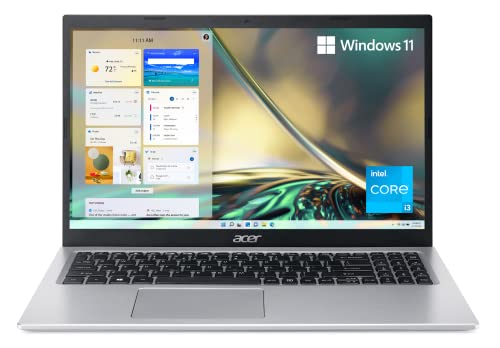
- Best for: Students and home users who want a proven, no-fuss everyday laptop.
- 15.6-inch Full HD IPS display
- Intel Core i3-1115G4 processor
- 8GB RAM
- 128GB SSD storage

- Best for: Home users who want a touchscreen and the largest drive in this group.
- 15.6-inch HD touchscreen display
- AMD Ryzen 5 7520U processor
- 8GB RAM
- 512GB SSD storage

- Best for: Light users who browse, stream, and write documents without demanding apps.
- 15.6-inch Full HD display
- Intel dual-core processor
- 8GB RAM
- 128GB SSD plus 128GB eMMC storage
All 3 Picks at a Glance
| Product | Specs | Action |
|---|---|---|
| Acer Aspire 5 A515-56-347N |
| Check price on Amazon |
| HP Laptop 15-fc0499nr |
| Check price on Amazon |
| Lenovo IdeaPad 1 15IJL7 |
| Check price on Amazon |
Key takeaways
- Compare five everyday laptops for browsing, documents, streaming, and video calls, with solid screens, enough memory, and fast storage.
What's inside
As an Amazon Associate I earn from qualifying purchases. This post may contain affiliate links at no extra cost to you.
An everyday laptop has a simple job: open fast, run a browser without stuttering, handle documents and video calls, and stream films in the evening. It does not need a gaming graphics card or a creator’s screen, but it does need enough memory, a solid-state drive, and a display that stays comfortable through a full day. The difference between a good everyday laptop and a frustrating one is rarely the processor. It is usually the memory, the storage, and the screen, the three parts you notice every time you use the machine.
This guide is for students, home workers, and families who want one reliable laptop for daily tasks. Every pick below was chosen from the processor, memory, storage, and display details listed on its Amazon product page, with everyday comfort weighed above raw performance.
Quick Picks
As an Amazon Associate we earn from qualifying purchases
| Product | Best for | Key spec from title |
|---|---|---|
| Acer Aspire 5 A515-56-347N | A dependable all-rounder | Intel Core i3-1115G4, 8GB RAM |
| Lenovo IdeaPad Slim 3 15 | Everyday use with more storage | Ryzen 3 7320U, 256GB SSD |
| HP Laptop 15-fc0499nr | Touchscreen browsing and media | Ryzen 5 7520U, 512GB SSD |
| ASUS VivoBook 15 F1504VA | A slim everyday laptop | 13th Gen Intel Core, 8GB RAM |
| Lenovo IdeaPad 1 15IJL7 | Light use and maximum simplicity | Intel dual-core, 8GB RAM |
How to Choose
Memory decides how smooth the day feels
Eight gigabytes of memory is the right amount for an everyday laptop. It lets you keep a browser with a dozen tabs, a document, and a video call open at the same time without the machine slowing down. Four gigabytes struggles with that workload, and the slowdown appears at the worst moments, like a frozen video call or a browser that reloads tabs. Memory is soldered in place on most laptops in this group, so buy the amount you need on day one rather than planning an upgrade.
A solid-state drive is not optional
Every laptop in this guide uses a solid-state drive, and that is the single biggest reason they feel fast. A solid-state drive opens the operating system in seconds and launches apps without the spinning-disk delay that made older budget laptops feel slow. Size matters too: 128GB is tight once Windows, apps, and photos accumulate, so 256GB is the safer floor and 512GB is comfortable for years. If your files live mostly in the cloud, a smaller drive works, but check the listing for whether the drive can be replaced later.
The screen is where you spend all day
A 15.6-inch Full HD IPS display is the standard for everyday laptops, and it is worth holding out for. IPS panels keep colors steady when you tilt the screen or share it with someone beside you, while dimmer panels wash out at an angle. A touchscreen adds convenience for scrolling and tapping, though it is not essential for most users. Check the listing for the panel type and resolution, because some listings in this class still use lower-resolution screens that make text look soft.
Weight, battery, and ports decide the daily routine
An everyday laptop earns its keep when it moves between rooms, classes, and meetings, so weight and battery life matter more than benchmark scores. Machines around 1.7 kg carry well in a backpack, and a battery that survives a full morning of classes without a charger removes a daily worry. Ports matter too: at least one USB-C port, a couple of USB-A ports, and an HDMI output cover a monitor, a mouse, and a phone charger without a dongle. Check the listing for the port list before you buy.
The 5 Best Options
Acer Aspire 5 A515-56-347N
- Best for: Students and home users who want a proven, no-fuss everyday laptop.
- 15.6-inch Full HD IPS display
- Intel Core i3-1115G4 processor
- 8GB RAM
- 128GB SSD storage
Students and home users who want a proven, no-fuss everyday laptop.
The 128GB drive fills quickly with local files, and S mode limits you to Microsoft Store apps until you switch out of it.
The Acer Aspire 5 is the dependable all-rounder in this group, built around an Intel Core i3-1115G4 with 8GB of memory and a 128GB solid-state drive behind a 15.6-inch Full HD IPS display. Wi-Fi 6 keeps video calls and streaming stable, the backlit keyboard suits evening work, and the Aspire line has a long record as a sensible everyday machine. The 128GB drive is the weak point, so this pick suits users whose files live in the cloud or on an external drive. It ships with Windows 11 Home in S mode, which runs Microsoft Store apps only until you switch out of S mode.
Watch out for: The 128GB drive fills quickly with local files, and S mode limits you to Microsoft Store apps until you switch out of it.
Lenovo IdeaPad Slim 3 15
The Lenovo IdeaPad Slim 3 15 is the balanced pick here, pairing a Ryzen 3 7320U with 8GB of memory and a 256GB solid-state drive behind a 15.6-inch Full HD display. The 256GB drive is twice the storage of the Aspire 5, which gives you room for apps, photos, and offline files without constant cleanup. Lenovo describes it as an everyday laptop in the listing itself, and the slim chassis carries well in a bag. It is the pick if you want a straightforward machine with enough storage for a few years of daily use.
Specs
- 15.6-inch Full HD display
- AMD Ryzen 3 7320U processor
- 8GB RAM
- 256GB SSD storage
- Windows 11 Home
Best for: Anyone who wants a simple everyday laptop with roomier storage.
Watch out for: The Ryzen 3 handles everyday tasks well but slows down with heavy multitasking or demanding apps, so keep expectations in line with the chip.
HP Laptop 15-fc0499nr
- Best for: Home users who want a touchscreen and the largest drive in this group.
- 15.6-inch HD touchscreen display
- AMD Ryzen 5 7520U processor
- 8GB RAM
- 512GB SSD storage
Home users who want a touchscreen and the largest drive in this group.
The display is HD resolution rather than Full HD, so text looks slightly softer than on the Full HD panels in this guide.
The HP Laptop 15-fc0499nr is the most capable everyday machine here, with a Ryzen 5 7520U, 8GB of memory, and a 512GB solid-state drive behind a 15.6-inch HD touchscreen. The touchscreen makes scrolling, tapping, and pinch-zooming natural, and the 512GB drive is the largest in this group, holding years of files without an external disk. The Ryzen 5 has more cores than the processors in the other picks, which helps when you keep many tabs and apps open. It is the pick if you want the most headroom for everyday use.
Watch out for: The display is HD resolution rather than Full HD, so text looks slightly softer than on the Full HD panels in this guide.
ASUS VivoBook 15 F1504VA
The ASUS VivoBook 15 F1504VA is the slim option in this group, a 15.6-inch Full HD laptop with a 13th Gen Intel Core processor, 8GB of memory, and a 512GB solid-state drive. The VivoBook line is known for light, portable designs with a clean look, and the Full HD display keeps text sharp for long reading sessions. Wi-Fi 6E support, when present on the configuration, adds a faster wireless connection for video calls and streaming. It suits buyers who carry their laptop daily and want a modern, slim machine for everyday tasks.
Specs
- 15.6-inch Full HD display
- 13th Gen Intel Core processor
- 8GB RAM
- 512GB SSD storage
- Windows 11 Home
Best for: Commuters and students who want a slim, light everyday laptop.
Watch out for: The evidence for this configuration comes from a comparison site rather than a direct Amazon listing, so verify the exact processor, memory, and storage on the product page before ordering.
Lenovo IdeaPad 1 15IJL7
- Best for: Light users who browse, stream, and write documents without demanding apps.
- 15.6-inch Full HD display
- Intel dual-core processor
- 8GB RAM
- 128GB SSD plus 128GB eMMC storage
Light users who browse, stream, and write documents without demanding apps.
The dual-core processor and eMMC storage limit this machine to light work, and it will feel slow with many tabs or heavy apps open.
The Lenovo IdeaPad 1 15IJL7 is the simplest machine here, built for light everyday use with an Intel dual-core processor, 8GB of memory, and a combination of a 128GB solid-state drive and 128GB of eMMC storage. It handles browsing, documents, email, and streaming well, and its low weight makes it easy to carry. The dual-storage setup is unusual, so treat the eMMC as overflow space rather than primary storage, and keep important files on the solid-state drive or in the cloud. It is the pick when the workload is light and simplicity matters most.
Watch out for: The dual-core processor and eMMC storage limit this machine to light work, and it will feel slow with many tabs or heavy apps open.
Which One Fits Your Situation
You want one laptop for everything at home
Choose the HP Laptop 15-fc0499nr. The Ryzen 5 processor, 512GB drive, and touchscreen cover browsing, documents, video calls, and streaming with room to spare, and it is the most capable machine in this group. The touchscreen makes scrolling and tapping natural for everyone in the house, and the large drive holds years of photos and documents without an external disk.
You mostly browse and write documents
Choose the Lenovo IdeaPad Slim 3 15. The Ryzen 3 with 8GB of memory and a 256GB drive handles everyday tasks smoothly, and the slim chassis carries well between rooms and classes. The Full HD display keeps text sharp for long reading sessions, and the 256GB drive gives you room for apps and files without constant cleanup.
You carry your laptop everywhere
Choose the ASUS VivoBook 15 F1504VA. It is the slimmest design here, the Full HD display keeps text sharp, and the 512GB drive holds your files without an external disk. The slim body fits a standard laptop bag and stays comfortable on a commute, and the Full HD screen keeps reading easy on the train or in a cafe. Verify the configuration on the listing first.
You need the simplest possible machine
Choose the Lenovo IdeaPad 1 15IJL7 or the Acer Aspire 5. The IdeaPad 1 is the lightest option for basic tasks, while the Aspire 5 adds a backlit keyboard and Wi-Fi 6 for a more complete everyday setup. Both keep things simple, with no extra software to manage, and both handle browsing, email, documents, and streaming without demanding anything from you.
Common Mistakes
- Buying a laptop with 4GB of memory and wondering why video calls freeze with a browser open.
- Choosing a spinning hard drive over a solid-state drive, which makes even a fast processor feel slow.
- Accepting a low-resolution screen to save money, then straining to read text all day.
- Picking a 128GB drive for a Windows laptop and running out of space after a few months of updates.
- Forgetting to check whether the laptop ships in S mode, which limits you to Microsoft Store apps until you switch out.
Frequently Asked Questions
How much memory does an everyday laptop need?
Eight gigabytes is the right amount for browsing, documents, streaming, and video calls. Four gigabytes struggles once you open a second app, and sixteen gigabytes is more than most everyday users need. Since memory is usually soldered in place on these laptops, buy eight gigabytes from the start.
Is a touchscreen worth it on an everyday laptop?
It depends on how you use the machine. A touchscreen makes scrolling, tapping, and zooming natural, and it helps with note-taking and photo browsing. If you mostly type and use a mouse, a standard screen is fine and usually costs less.
What is Windows S mode?
S mode is a locked-down version of Windows that only runs apps from the Microsoft Store, which keeps the machine safer and faster. You can switch out of S mode for free through the Microsoft Store settings, but the switch is one-way, so make sure you need it first.
Can an everyday laptop handle video calls and streaming?
Yes, easily. Video calls and streaming need a stable wireless connection and a decent webcam far more than raw processing power. All five laptops here handle those tasks well, though the HP with its Ryzen 5 and the Lenovo Slim 3 with Wi-Fi support are the most comfortable picks for long calls.
Related guides
More from Amazon
Programs that pair well with the guide above. Offers and eligibility are set by Amazon and may change.
Free shipping on eligible items, Prime Video and more. Eligible new members can start with a free trial.
Start a Prime free trialAd-free music streaming. Eligible new subscribers can start with a free trial.
Try Music Unlimited freeA Prime membership for ages 18-24 with a trial period. Eligibility is set by Amazon.
See Prime for Young AdultsAudiobooks and podcasts to listen to on the go. Eligible new members can start with a free trial.
Try Audible freeAs an Amazon Associate we earn from qualifying purchases.









Write Your Review
No reviews yet. Be the first to share your experience!