
Our Short List of 3
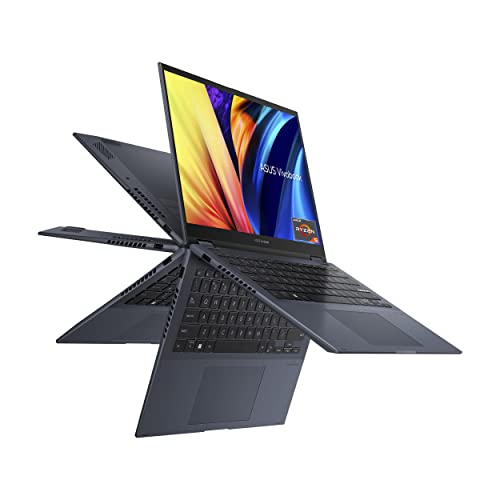
- Best for: Everyday carry, typing, and streaming in a compact flip design. Watch out for: The WUXGA panel is a step below full HD sharpness, so text is slightly less crisp.
- Specs:
- AMD Ryzen 5 5600H processor
- 8GB RAM
- 512GB SSD storage

- Best for: School and work users who want a taller screen and professional Windows features. Watch out for: The listing is light on processor and memory details, so confirm the exact configuration before ordering.
- Specs:
- 14-inch FHD+ touchscreen
- Windows 11 Pro
- Best for: School and work users who want a taller screen and professional Windows features.

- Best for: Light, everyday use where the flip screen matters more than raw power. Watch out for: This is an older-generation machine, so performance and battery life lag behind the newer picks here.
- Specs:
- Intel Core i5 processor
- 14-inch touchscreen display
- Best for: Light, everyday use where the flip screen matters more than raw power.
All 3 Picks at a Glance
| Product | Specs | Action |
|---|---|---|
| ASUS Vivobook S 14 Flip |
| Check price on Amazon |
| Dell Inspiron 14 7440 2-in-1 |
| Check price on Amazon |
| Acer Spin 3 14 |
| Check price on Amazon |
Key takeaways
- Find the best flip laptops under 500 for school, notes, and everyday work — flexible 2-in-1 designs with touchscreens and solid battery life.
What's inside
As an Amazon Associate I earn from qualifying purchases. This post may contain affiliate links at no extra cost to you.
A flip laptop earns its keep when one device has to be a notebook in the morning and a tablet in the afternoon. The hinge is the whole point: fold the screen back to take handwritten notes, tent it up to watch a lecture, or use it flat like a normal laptop for essays and spreadsheets. A stiff hinge, a dim screen, or a pen that lags will annoy you every single day, so the details matter more than the spec sheet suggests.
This guide is for students, commuters, and anyone who wants one affordable machine that bends to the task instead of forcing you to adapt. Every pick below is a true 2-in-1 with a touchscreen, chosen from its name and specifications on the Amazon product page, with an eye on the screen, the hinge, and the everyday performance you actually use.
Quick Picks
As an Amazon Associate we earn from qualifying purchases.
| Product | Best for | Key spec from title |
|---|---|---|
| Lenovo IdeaPad Flex 5i 14 | Note-taking with a stylus | Intel Core i5-1235U, 8GB RAM, 512GB SSD, stylus included |
| Samsung Galaxy Book4 360 | Big-screen study sessions | 15.6-inch display, Core i7 150U, 16GB RAM |
| ASUS Vivobook S 14 Flip | Everyday carry and typing | Ryzen 5 5600H, 14-inch WUXGA touch, fingerprint reader |
| Dell Inspiron 14 7440 2-in-1 | Work and school in one machine | 14-inch FHD+ touch display, Windows 11 Pro |
| Acer Spin 3 14 | A simple, affordable flip | Intel Core i5, 14-inch touch display |
How to Choose
The hinge and screen decide the experience
A flip laptop is only as good as its hinge, so look for a design that moves smoothly through the full range and holds its angle in tent and tablet modes without wobbling. The touchscreen should respond to fingers and a stylus without lag, and a bright panel matters because you will use it in classrooms, libraries, and cafes with uneven light. Resolution affects text sharpness when you read for hours, so a full HD panel is the minimum worth accepting. If the listing mentions stylus support, check whether the pen is included or sold separately, because that changes the real cost of note-taking.
Performance should match real student work
Most school and office work needs far less power than gaming, but a sluggish machine still ruins your day. A modern Core i5 or Ryzen 5 processor with 8GB of memory handles browsers full of tabs, video calls, and office apps without complaint, while 16GB gives you headroom for heavier multitasking and future semesters. Storage matters too: a 512GB SSD holds your files, apps, and a media library with room to spare, while a smaller drive forces constant cleanup. Fast storage also means the laptop wakes and loads apps quickly between classes, which adds up to real time saved.
Battery life and weight decide whether it leaves the house
A flip laptop that dies before lunch stays on your desk, so look for battery claims that cover a full school day of mixed use, and treat optimistic numbers with healthy skepticism. Weight is the other half of portability: a 14-inch machine usually lands in a comfortable range for a backpack, while a 15.6-inch model trades a bigger screen for extra bulk. Charging matters as well, since USB-C charging lets you top up from a phone charger in a pinch. Check the port selection before you buy, because a missing USB port or headphone jack can mean carrying dongles forever.
Keyboard, speakers, and webcam round it out
You will type on this machine for hours, so a comfortable keyboard with decent key travel and a responsive touchpad is not a luxury. The webcam and microphones matter more than they used to, since classes and meetings now happen on video calls, so look for a 1080p camera and noise-reduction microphones in the listing. Speakers make a difference for lectures and films in tent mode, and a fingerprint reader saves you from typing passwords in front of a room. None of these features sells a laptop on its own, but together they decide whether you enjoy using it.
The 5 Best Options
Lenovo IdeaPad Flex 5i 14
The Lenovo IdeaPad Flex 5i 14 is the most complete note-taking machine in this roundup, built around an Intel Core i5-1235U processor with 8GB of memory and a 512GB SSD. Its 14-inch full HD touchscreen folds all the way back, and the included stylus makes handwritten notes, sketches, and annotations feel natural. Thunderbolt 4 gives you a fast connection for external displays and storage, which is rare in this class, and the compact 14-inch frame slips easily into a backpack. It is a strong all-rounder for students who want one device for lectures, essays, and everything in between.
- Specs:
- Intel Core i5-1235U processor
- 8GB RAM
- 512GB SSD storage
- 14-inch FHD touchscreen
- Stylus included
- Thunderbolt 4 port
- Best for: Students who take handwritten notes and want a stylus in the box.
- Watch out for: 8GB of memory can feel tight if you keep dozens of browser tabs open during research.
ASIN: B0DF8RXDP3
Samsung Galaxy Book4 360
The Samsung Galaxy Book4 360 brings a large 15.6-inch display to the flip category, powered by an Intel Core i7 150U processor with 16GB of memory and a 512GB SSD. The bigger screen makes split-screen research and writing comfortable, and the extra memory keeps heavy multitasking smooth across long study sessions. It folds flat for tablet use and tents nicely for watching lectures, so the large panel works in every mode. If you mostly use your laptop at a desk and want the roomiest screen in this group, this is the one to look at first.
- Specs:
- Intel Core i7 150U processor
- 16GB RAM
- 512GB SSD storage
- 15.6-inch display
- Best for: Students who want the biggest screen and the most memory for multitasking.
- Watch out for: The larger frame is heavier to carry, so it suits a desk-first routine better than constant travel.
ASIN: B0DK7R3ZZ1
ASUS Vivobook S 14 Flip
- Best for: Everyday carry, typing, and streaming in a compact flip design. Watch out for: The WUXGA panel is a step below full HD sharpness, so text is slightly less crisp.
- Specs:
- AMD Ryzen 5 5600H processor
- 8GB RAM
- 512GB SSD storage
Everyday carry, typing, and streaming in a compact flip design. Watch out for: The WUXGA panel is a step below full HD sharpness, so text is slightly less crisp.
The WUXGA panel is a step below full HD sharpness, so text is slightly less crisp.
The ASUS Vivobook S 14 Flip is a practical everyday 2-in-1, running a Ryzen 5 5600H processor with 8GB of memory and a 512GB SSD behind a 14-inch WUXGA touchscreen. The six-core processor handles office work, streaming, and light creative tasks without fuss, and the fingerprint reader lets you sign in with a touch. Its 14-inch size is the sweet spot for carrying around campus, and the flip hinge turns it into a tablet for reading and a tent for films. It is the sensible pick if you want solid performance without paying for features you will not use.
Dell Inspiron 14 7440 2-in-1
- Best for: School and work users who want a taller screen and professional Windows features. Watch out for: The listing is light on processor and memory details, so confirm the exact configuration before ordering.
- Specs:
- 14-inch FHD+ touchscreen
- Windows 11 Pro
- Best for: School and work users who want a taller screen and professional Windows features.
School and work users who want a taller screen and professional Windows features. Watch out for: The listing is light on processor and memory details, so confirm the exact configuration before ordering.
The listing is light on processor and memory details, so confirm the exact configuration before ordering.
The Dell Inspiron 14 7440 2-in-1 is a straightforward flip laptop that covers school and work with a 14-inch FHD+ touchscreen and Windows 11 Pro. The taller FHD+ display shows more of a document or web page at once, which helps when you write long essays or work in spreadsheets. Windows 11 Pro adds business features such as BitLocker and remote desktop, which matter if your school or employer manages devices. It is a no-nonsense choice for someone who wants a reliable 2-in-1 that simply works, day after day.
Acer Spin 3 14
- Best for: Light, everyday use where the flip screen matters more than raw power. Watch out for: This is an older-generation machine, so performance and battery life lag behind the newer picks here.
- Specs:
- Intel Core i5 processor
- 14-inch touchscreen display
- Best for: Light, everyday use where the flip screen matters more than raw power.
Light, everyday use where the flip screen matters more than raw power. Watch out for: This is an older-generation machine, so performance and battery life lag behind the newer picks here.
This is an older-generation machine, so performance and battery life lag behind the newer picks here.
The Acer Spin 3 14 is the simplest flip laptop in this group, built around an Intel Core i5 processor with a 14-inch touchscreen in a compact convertible frame. It covers the basics well: web browsing, documents, video calls, and streaming, with the flexibility to fold into tablet mode for reading. It is best suited to lighter workloads and shorter sessions rather than heavy multitasking, so set your expectations accordingly. For a student or casual user who mainly needs a flexible screen and a keyboard in one affordable package, it gets the job done.
Which One Fits Your Situation
You take handwritten notes every day
Choose the Lenovo IdeaPad Flex 5i 14. The included stylus and responsive touchscreen make note-taking feel natural, and the Thunderbolt 4 port lets you hook up a monitor at your desk. Keep the pen charged and store it where you will not lose it, because a missing stylus turns a note-taking machine back into an ordinary laptop.
You study with many windows open
Pick the Samsung Galaxy Book4 360. Its 16GB of memory keeps research tabs, documents, and video calls running at once, and the 15.6-inch screen gives you room to see them all. It works best on a desk or in a library, where the larger frame is an advantage rather than a burden.
You carry your laptop everywhere
Go with the ASUS Vivobook S 14 Flip or the Lenovo IdeaPad Flex 5i 14. Both are 14-inch machines that fit easily in a backpack and hold up to a full day of classes. The Vivobook is the lighter, simpler choice, while the Flex adds the stylus and Thunderbolt for heavier use.
You need one machine for school and a part-time job
Take the Dell Inspiron 14 7440 2-in-1. Windows 11 Pro covers workplace requirements, and the FHD+ screen makes documents and spreadsheets comfortable to read for long shifts. Confirm the processor and memory of the exact configuration you order, since the listing leaves those details vague, and check that your employer’s software runs on it.
Common Mistakes
- Buying a flip laptop without checking whether the stylus is included, then discovering it costs extra.
- Choosing the cheapest screen and regretting the dim, washed-out panel in bright classrooms.
- Filling a small drive with files and apps, then spending weekends deleting things to make room.
- Ignoring battery life and ending up hunting for outlets between classes.
- Forgetting to check the hinge design and ending up with a screen that wobbles in tent mode.
Frequently Asked Questions
Are flip laptops good for school?
Yes, flip laptops work well for school because one device covers typing, reading, and handwritten notes. You can fold the screen back for tablet-style annotation, tent it for video lectures, and use it as a normal laptop for essays. The key is choosing a model with a responsive touchscreen and a hinge that holds its position.
Do I need a stylus for a flip laptop?
A stylus is worth having if you take handwritten notes, sketch diagrams, or annotate PDFs, because it is far more precise than a finger. Some models include one in the box, while others sell it separately, so check the listing before you buy. If you only type and tap, you can skip the pen entirely.
How much RAM does a student laptop need?
Eight gigabytes is enough for browsing, documents, video calls, and streaming, which covers most schoolwork. Sixteen gigabytes is the better choice if you multitask heavily, run demanding software, or want the laptop to last through several years of study. More memory also means fewer slowdowns when many apps are open at once.
Is a 15.6-inch flip laptop too big to carry?
A 15.6-inch flip laptop is heavier than a 14-inch model, but it is still portable in a backpack, and the larger screen is a real advantage for split-screen work. It suits students who mostly use the laptop at a desk or in a library. If you walk between buildings all day, a 14-inch model is the more comfortable carry.
Related guides
More from Amazon
Programs that pair well with the guide above. Offers and eligibility are set by Amazon and may change.
Free shipping on eligible items, Prime Video and more. Eligible new members can start with a free trial.
Start a Prime free trialAd-free music streaming. Eligible new subscribers can start with a free trial.
Try Music Unlimited freeA Prime membership for ages 18-24 with a trial period. Eligibility is set by Amazon.
See Prime for Young AdultsAudiobooks and podcasts to listen to on the go. Eligible new members can start with a free trial.
Try Audible freeAs an Amazon Associate we earn from qualifying purchases.









Write Your Review
No reviews yet. Be the first to share your experience!