
Our Short List of 3

- Processor: Apple M4 (10-core CPU, 8-core GPU)
- Memory: 16GB unified memory
- Storage: 256GB SSD
- Display: 13.6-inch Liquid Retina, 2560 x 1664, 500 nits
- Processor: AMD Ryzen 7 7730U (8 cores, up to 4.5 GHz)
- Memory: 16GB DDR4
- Storage: 512GB PCIe Gen4 NVMe SSD
- Display: 15.6-inch Full HD (1920 x 1080) IPS

- Processor: AMD Ryzen 7 5825U (8 cores, up to 4.5 GHz)
- Memory: 16GB DDR4
- Storage: 512GB PCIe NVMe SSD
- Display: 15.6-inch Full HD (1920 x 1080) touchscreen
All 4 Picks at a Glance
| Product | Specs | Action |
|---|---|---|
| 1. Apple MacBook Air 13-inch (M4) |
| Check price on Amazon |
| 2. Acer Aspire Go 15 (Ryzen 7 7730U) |
| Check price on Amazon |
| 3. Lenovo IdeaPad Slim 3 15 (Ryzen 7 5825U) |
| Check price on Amazon |
 4. ASUS Vivobook Go 15 (Ryzen 5 7520U) |
| Check price on Amazon |
Key takeaways
- Compare the best laptops for online college courses, chosen for sharp webcams, clear microphones, all-day battery life and fast, reliable Wi-Fi.
What's inside
As an Amazon Associate I earn from qualifying purchases. This post may contain affiliate links at no extra cost to you.
Online college runs on a different schedule than a campus degree. Your classroom is a video call, your library is a browser with dozens of research tabs open, and your group project meets in a shared document at midnight. The laptop that carries all of that needs a camera and microphone that make you look and sound present in seminars, battery life that survives a full day of lectures away from an outlet, and Wi-Fi that holds a stable connection through back-to-back live sessions. Raw gaming power matters far less than those everyday reliability points.
This guide is written for college students taking courses online, whether that means a fully remote degree, a hybrid program, or a semester of virtual classes from a dorm room or apartment. It is not aimed at younger school pupils with supervised, locked-down coursework; college work involves heavier multitasking, longer writing and research sessions, proctored exams, and software that varies by major. Every pick below is a full laptop that handles video classes, learning platforms such as Canvas and Blackboard, office documents, and research without slowing down, and each one was chosen with camera quality, audio, battery, and wireless performance in mind first.
As an Amazon Associate, we earn from qualifying purchases.
1. Apple MacBook Air 13-inch (M4)
- Processor: Apple M4 (10-core CPU, 8-core GPU)
- Memory: 16GB unified memory
- Storage: 256GB SSD
- Display: 13.6-inch Liquid Retina, 2560 x 1664, 500 nits
Tier: Premium
The MacBook Air with the M4 chip is the easiest laptop to recommend for online college because it removes friction from every part of a remote study day. Its 12MP Center Stage camera is the sharpest built-in webcam in this roundup, and it keeps you framed as you shift in your chair during a long seminar. The three-mic array uses directional beamforming, so your voice stays clear in discussions even in a room with background noise. Apple rates the battery for up to 18 hours of video playback, which in practice means a full day of streamed lectures, note taking, and writing without hunting for an outlet.
Performance is never a concern for coursework. The M4 chip with 16GB of unified memory keeps a video lecture, a spreadsheet, a PDF reader, and a browser full of research tabs running smoothly at the same time, and the fanless design means the machine stays silent in quiet study spaces and libraries. Wi-Fi 6E gives it the fastest, least congested wireless connection in this group, which helps on crowded dorm and apartment networks. At 2.7 pounds it disappears into a backpack, and the 13.6-inch Liquid Retina display is bright and easy on the eyes during long reading sessions. Students already using an iPhone get extra convenience from features like iPhone Mirroring and universal copy and paste, though the Air works perfectly well on its own.
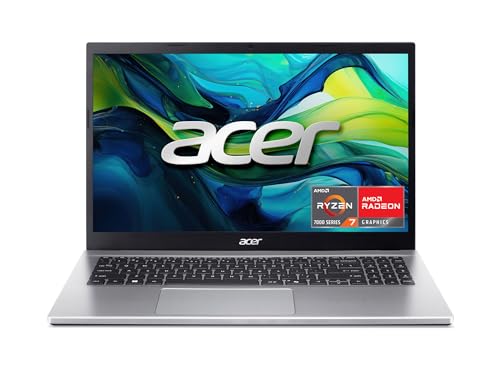
2. Acer Aspire Go 15 (Ryzen 7 7730U)
- Processor: AMD Ryzen 7 7730U (8 cores, up to 4.5 GHz)
- Memory: 16GB DDR4
- Storage: 512GB PCIe Gen4 NVMe SSD
- Display: 15.6-inch Full HD (1920 x 1080) IPS
Tier: Mid-range
The Aspire Go 15 is built around the two things online students complain about most: sounding muffled on calls and running out of ports. Acer pairs its HD webcam with temporal noise reduction, which cleans up grainy video in dim dorm lighting, and its PurifiedVoice technology filters background noise out of your microphone feed, so a roommate’s music or a hallway conversation does not follow you into a seminar. The 15.6-inch Full HD IPS screen gives you room to keep a lecture on one side and your notes on the other, which is how most online coursework actually gets done.
Inside, the eight-core Ryzen 7 7730U and 16GB of memory are more than enough for learning platforms, office suites, statistical tools, and dozens of browser tabs, and the 512GB SSD loads everything quickly. Wi-Fi 6 keeps connections steady during streamed classes, and the port selection covers the accessories students actually own, including USB-C, USB-A, HDMI for a second monitor or TV, and a headphone jack for late-night study. Acer rates the battery for long runtimes away from the charger, and AcerSense software makes it simple to check battery health and system status. At just under four pounds it is a desk-first machine, but it still travels fine between home, the library, and a study group.
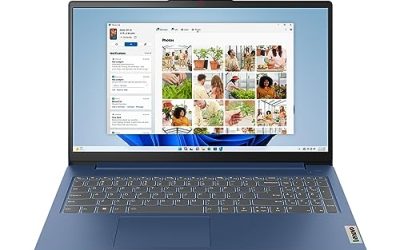
3. Lenovo IdeaPad Slim 3 15 (Ryzen 7 5825U)
- Processor: AMD Ryzen 7 5825U (8 cores, up to 4.5 GHz)
- Memory: 16GB DDR4
- Storage: 512GB PCIe NVMe SSD
- Display: 15.6-inch Full HD (1920 x 1080) touchscreen
Tier: Mid-range
The IdeaPad Slim 3 is the pick for students who like to work by touch. Its 15.6-inch Full HD touchscreen makes scrolling through long readings, annotating slides, and tapping through learning-platform menus feel natural, and the slim chassis keeps the weight low enough for daily carrying. The 720p HD camera covers lectures, office hours, and proctored exams without fuss, and Lenovo’s software noise cancellation helps your voice come through clearly on the dual microphones.
The Ryzen 7 5825U is an eight-core processor that handles the classic online-college workload, a video call plus a word processor plus a browser with many tabs, without breaking a sweat. Sixteen gigabytes of memory is the right amount for that kind of multitasking, and the 512GB SSD holds a semester of downloaded readings, recorded lectures, and project files with room to spare. Wi-Fi 6 with a 2×2 antenna setup holds a stable link for live classes, and the 47Wh battery supports Rapid Charge Boost, so a short top-up between classes buys hours of extra use. A physical privacy shutter on the camera is a thoughtful touch for anyone who shares a room. For students who want a big screen, strong performance, and touch input in one reasonably portable package, this is a well-balanced choice.
4. ASUS Vivobook Go 15 (Ryzen 5 7520U)
- Processor: AMD Ryzen 5 7520U (4 cores, up to 4.3 GHz)
- Memory: 16GB LPDDR5
- Storage: 512GB M.2 NVMe PCIe SSD
- Display: 15.6-inch Full HD (1920 x 1080) IPS-level anti-glare
Tier: Budget
The Vivobook Go 15 covers the essentials of online college at the friendliest tier in this roundup, and it does not cut the corners that matter for remote classes. You still get a 720p HD webcam with a physical privacy shield for video sessions, Wi-Fi 6E for a fast and stable connection to your home or campus network, and a full-size keyboard with a numeric keypad that makes long essays and spreadsheet assignments more comfortable. The 15.6-inch anti-glare Full HD display is easy to read under bright room lighting, which suits kitchen-table and coffee-shop study sessions.
The Ryzen 5 7520U is a four-core processor aimed at everyday work, and paired with 16GB of fast LPDDR5 memory it runs learning platforms, video calls, documents, and research browsing smoothly. That memory figure is generous for this tier and is the main reason the machine stays responsive when a lecture stream and a stack of tabs are open together. Storage is a proper 512GB SSD rather than the small drives often found at this level, so there is space for recorded classes and course files. The 42Wh battery supports fast charging that refills a large share of the battery in under an hour, handy between back-to-back classes, and at about 3.6 pounds the Vivobook Go 15 is light enough to carry around the house or across campus.
5. HP Pavilion 15.6-inch Touchscreen (Ryzen 5 7520U)
Tier: Budget
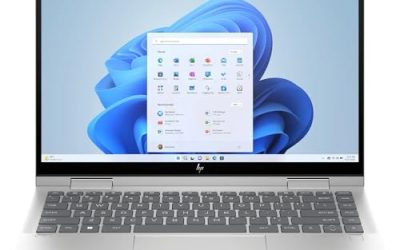
This HP Pavilion configuration is a practical pick for students who want a touchscreen, a full keyboard with a numeric keypad, and Windows 11 Pro features without moving up a tier. The 15.6-inch Full HD touchscreen makes navigating course portals and annotating documents straightforward, and the built-in webcam and dual microphones handle lectures, virtual office hours, and group video calls as a standard part of the package. Wi-Fi 6 keeps the connection stable during live sessions, and the port mix, USB-C, USB-A, HDMI, and a headphone and microphone combo jack, covers headsets, external drives, and a second display.
The Ryzen 5 7520U and 16GB of memory deliver the same smooth everyday performance as the other budget pick here, so the choice between them comes down to features: this HP adds the touchscreen, the numeric keypad for data-heavy coursework, and Windows 11 Pro, which some students want for its extra security and management tools. The 512GB SSD provides fast boot times and enough room for a growing library of course materials. Battery life is sized for a day of mixed classes and study, and the silver chassis keeps a low profile in shared spaces. For online students who type numbers often, such as business, accounting, and statistics majors, the keypad alone can justify this pick.
Specs
- Processor: AMD Ryzen 5 7520U (4 cores, up to 4.3 GHz)
- Memory: 16GB LPDDR5
- Storage: 512GB PCIe SSD
- Display: 15.6-inch Full HD touchscreen
- Webcam: HD webcam
- Microphone: Dual built-in microphones
- Wireless: Wi-Fi 6, Bluetooth
- Ports: USB-C, 2 x USB-A, HDMI, headphone/microphone combo jack
- Operating system: Windows 11 Pro
How to Choose
Start with the camera and microphone, because they are your presence in the classroom. A 1080p webcam is the ideal, and the MacBook Air’s 12MP Center Stage camera sits above everything else here, but a clean 720p camera with good noise reduction, like the ones on the Acer and Lenovo, is perfectly serviceable for lectures and office hours. Microphone noise canceling matters more than most buyers expect: dorms, shared apartments, and family homes are rarely quiet, and software that strips out background noise keeps you understandable in discussions and presentations.
Battery life should cover your longest day away from your desk. Look at manufacturer ratings as a ceiling rather than a promise, since live video calls drain batteries faster than document work, and favor machines with fast charging if your schedule is a chain of back-to-back sessions in different places. Weight matters for the same reason: anything under about three pounds vanishes into a backpack, while a 15.6-inch machine near four pounds is better suited to a mostly fixed study spot.
For wireless, Wi-Fi 6 is the sensible minimum and Wi-Fi 6E is better still on crowded networks, because the extra band avoids congestion from dozens of nearby devices. On performance, an eight-core processor and 16GB of memory is the comfortable target for heavy multitasking, while a modern four-core chip with 16GB of memory still handles typical coursework well. Avoid dropping to 8GB of memory if you can; a video call, a browser full of research tabs, and a word processor will push past it. Storage of 256GB works if you stream and save to the cloud, but 512GB is the safer choice for recorded lectures and large project files. Finally, check your program’s requirements before buying: a few majors and proctored-exam systems specify Windows or particular software, and macOS students should confirm that every required application runs on Apple silicon.
Frequently Asked Questions
How much RAM does a laptop need for online college courses?
Sixteen gigabytes is the comfortable target for online study. It lets you run a live video class, a browser full of research tabs, a word processor, and a PDF reader at the same time without slowdowns. Eight gigabytes can work for light coursework on a tight budget, but it leaves little headroom, and heavy multitasking is exactly what online college involves every day.
Is a 720p webcam good enough for online classes and proctored exams?
Yes, for most purposes. Proctoring services and video platforms generally accept a 720p camera, and a clean 720p feed with decent lighting looks fine in lectures and office hours. A 1080p or better camera, such as the MacBook Air’s Center Stage camera, gives a noticeably sharper image for presentations and interviews, but it is an upgrade rather than a requirement.
Should online students choose Windows or macOS?
Either works for the major learning platforms, browsers, and office suites used in online programs. Choose based on your major’s software list: some engineering, business, and exam-proctoring tools are Windows-only, while media and design courses often lean toward macOS. Check your syllabus and your school’s IT guidance first, then pick the machine that runs everything on that list.
How important is battery life for a student who studies at home?
It matters more than it first appears. Studying at home still means moving between rooms, the library, and group sessions, and a battery that lasts a full day means never losing work or missing a class because you forgot a charger. Fast charging is the other half of the equation: a short top-up between classes can carry you through an evening of coursework.
Final Verdict
For most online college students, the Apple MacBook Air with the M4 chip is the strongest overall choice: it has the best camera and microphones in this roundup, the longest battery life, fast Wi-Fi 6E, and a light, silent design that suits studying anywhere. Windows users who want a big screen and strong value should look at the Acer Aspire Go 15 and the Lenovo IdeaPad Slim 3, both of which pair eight-core performance with call-friendly audio and video features. On a tighter budget, the ASUS Vivobook Go 15 and the HP Pavilion touchscreen still deliver 16GB of memory, roomy SSD storage, and the connectivity online coursework demands. Match the pick to your program’s software requirements and your study habits, and any of these five will carry a degree’s worth of video classes, research, and writing.
Product and ASIN Reference
| Product | ASIN |
|---|---|
| Apple MacBook Air 13-inch (M4, 16GB, 256GB, Starlight) | B0DZDCPMGK |
| Acer Aspire Go 15 AG15-42P-R9FW (Ryzen 7 7730U, 16GB, 512GB) | B0FT3NRVL6 |
| Lenovo IdeaPad Slim 3 15ABR8 (Ryzen 7 5825U, 16GB, 512GB) | B0F2MLQPL3 |
| ASUS Vivobook Go 15 E1504FA (Ryzen 5 7520U, 16GB, 512GB) | B0G5PHGDQQ |
| HP Pavilion 15.6-inch Touchscreen (Ryzen 5 7520U, 16GB, 512GB) | B0FRMKBGG6 |
Related guides
More from Amazon
Programs that pair well with the guide above. Offers and eligibility are set by Amazon and may change.
Free shipping on eligible items, Prime Video and more. Eligible new members can start with a free trial.
Start a Prime free trialAd-free music streaming. Eligible new subscribers can start with a free trial.
Try Music Unlimited freeA Prime membership for ages 18-24 with a trial period. Eligibility is set by Amazon.
See Prime for Young AdultsAudiobooks and podcasts to listen to on the go. Eligible new members can start with a free trial.
Try Audible freeAs an Amazon Associate we earn from qualifying purchases.

Write Your Review
No reviews yet. Be the first to share your experience!