
Our Short List of 3
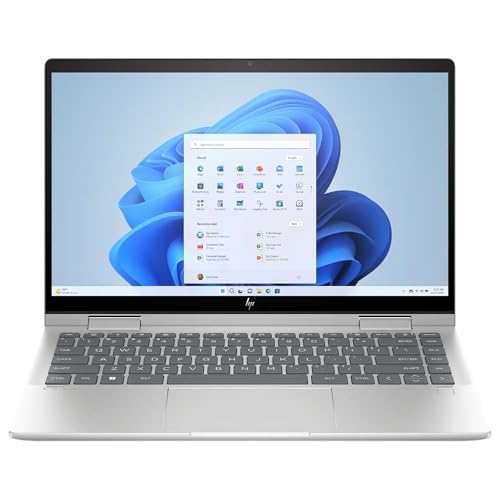
- Best for: Students and office workers who want a reliable everyday convertible.
- 14-inch Full HD 1920 x 1080 touchscreen display
- Intel Core 5 120U 10-core processor
- 8GB DDR4 memory
- 512GB SSD storage

- Best for: Buyers who want a proven 2-in-1 design for work, study, and media.
- 14-inch touchscreen display
- 360-degree folding hinge for tablet, tent, and stand modes
- Backlit keyboard
- Windows 11 Home

- Best for: Media lovers and creators who want OLED color in a folding laptop.
- 14-inch OLED touchscreen display
- 360-degree flip hinge for tablet mode
- Slim and light convertible body
- Backlit keyboard
All 3 Picks at a Glance
| Product | Specs | Action |
|---|---|---|
| HP Envy x360 14 Core 5 |
| Check price on Amazon |
| HP Envy x360 14 |
| Check price on Amazon |
| ASUS Vivobook S 14 Flip OLED |
| Check price on Amazon |
Key takeaways
- The 5 best touchscreen tablet laptops, 2-in-1 laptops that fold into tablet mode, from the HP Envy x360 and Lenovo Yoga 7i to the ASUS Vivobook Flip and Dell Inspiron 2-in-1.
What's inside
As an Amazon Associate I earn from qualifying purchases. This post may contain affiliate links at no extra cost to you.
A touchscreen tablet laptop, the 2-in-1 kind, is a laptop first and a tablet second, and that order matters. The machine has a full keyboard, a trackpad, and a hinge that folds the screen all the way back, so it works at a desk like any laptop and in the hand like a tablet. The mistake is buying one for the tablet mode alone, because the weight, the battery life, and the keyboard quality still decide whether it is pleasant to use for a full working day.
This article is for students, note-takers, and mobile workers who want a laptop with a touchscreen and a folding hinge, so they can type, draw, and read on the same machine. The five laptops below were picked from their names and specifications on the Amazon product page, all of them 2-in-1 laptops with touchscreens, not tablets with optional keyboards.
Quick Picks
As an Amazon Associate we earn from qualifying purchases
| Product | Best for | Key spec from title |
|---|---|---|
| HP Envy x360 14 Core 5 | Everyday 2-in-1 use with a sharp screen | 14-inch FHD touchscreen, Intel Core 5 |
| HP Envy x360 14 | A proven convertible for work and study | 14-inch touchscreen, 360-degree hinge |
| Lenovo Yoga 7i 14 | A bright 2.2K touch display | 14-inch 2.2K touchscreen, Intel Core Ultra |
| ASUS Vivobook S 14 Flip OLED | Vivid OLED color in tablet mode | 14-inch OLED touchscreen, flip hinge |
| Dell Inspiron 14 2-in-1 | A flexible all-rounder for school | 14-inch touchscreen, 2-in-1 design |
How to Choose
Decide how much tablet mode matters to you
Every 2-in-1 in this list folds into tablet, tent, and stand modes, but the experience depends on weight and thickness. A 14-inch convertible weighs more than a tablet, so holding it in one hand for a long reading session gets tiring. If tablet mode is only for occasional note-taking or presenting, any of these models works. If you plan to hold the machine as a tablet for hours, choose the lightest model and check whether it supports a stylus, since a pen makes handwriting and drawing far more practical.
Look at the screen before the processor
The screen is what you touch, read, and draw on, so its resolution and brightness matter more than small processor differences. A 2.2K or OLED panel shows sharper text and richer color than a basic Full HD panel, and a brighter screen stays readable near a window. Check whether the display supports a stylus and whether the hinge holds the screen steady in tent mode, because a screen that wobbles while you write is frustrating no matter how fast the chip inside is.
Check the keyboard and trackpad as well as the hinge
A 2-in-1 still spends most of its life as a laptop, so the keyboard and trackpad decide daily comfort. A backlit keyboard helps in dim rooms, and a large trackpad makes the touchscreen less necessary for routine work. When the screen folds back into tablet mode, the keys should lock so they do not press by accident, and the bottom should feel flat in the hand. If you type for hours, prioritize keyboard feel over a slightly faster processor. Test the hinge in a store if you can, because a loose hinge makes the screen drift while you write.
Think about battery life and weight together
A 2-in-1 carries a touchscreen, a hinge, and a battery in a slim body, so battery life varies more than the headline numbers suggest. Touchscreens and bright displays use more power, and a machine that lasts all day on documents may run out faster when the screen is at full brightness in tablet mode. Check the weight as well, because a convertible that is light on paper can still feel heavy in a bag once the charger is added. Lower the brightness and switch off the touchscreen when you do not need it to stretch the battery further.
The 5 Best Options
HP Envy x360 14 Core 5
- Best for: Students and office workers who want a reliable everyday convertible.
- 14-inch Full HD 1920 x 1080 touchscreen display
- Intel Core 5 120U 10-core processor
- 8GB DDR4 memory
- 512GB SSD storage
Students and office workers who want a reliable everyday convertible.
Some listings for this model come from third-party sellers with upgraded storage, so confirm the seller and the exact configuration before buying.
The HP Envy x360 14 with an Intel Core 5 processor is the everyday 2-in-1 pick, pairing a 14-inch Full HD touchscreen with 8GB of memory and a 512GB SSD. Its 360-degree hinge folds the screen into tablet, tent, and stand modes, and the backlit keyboard, fingerprint reader, and 5MP camera cover work and video calls. It suits students and office workers who want a convertible that handles documents, browsing, and streaming without fuss.
Watch out for: Some listings for this model come from third-party sellers with upgraded storage, so confirm the seller and the exact configuration before buying.
HP Envy x360 14
- Best for: Buyers who want a proven 2-in-1 design for work, study, and media.
- 14-inch touchscreen display
- 360-degree folding hinge for tablet, tent, and stand modes
- Backlit keyboard
- Windows 11 Home
Buyers who want a proven 2-in-1 design for work, study, and media.
The exact processor and memory vary by listing, so check the configuration on the Amazon product page before ordering.
The HP Envy x360 14 is the proven convertible pick, a 2-in-1 with a 14-inch touchscreen, a folding hinge, and a backlit keyboard that has been a steady choice for work and study. It opens flat for sharing a screen, folds into tent mode for watching video, and closes into tablet mode for reading and notes. The design is familiar and practical, with the ports and keyboard layout that laptop users expect, and the touchscreen adds a natural way to scroll, zoom, and tap through documents.
Watch out for: The exact processor and memory vary by listing, so check the configuration on the Amazon product page before ordering.
Lenovo Yoga 7i 14
The Lenovo Yoga 7i 14 is the bright-screen pick, with a 14-inch 2.2K touchscreen that shows sharper text and more detail than a standard Full HD panel. Its Intel Core Ultra processor, 16GB of memory, and 512GB SSD handle multitasking and creative work, and the 360-degree hinge folds the machine into tablet mode for handwriting with a stylus. It suits students and creators who read, draw, and edit on the same screen and want a display that stays crisp at any angle.
Specs
- 14-inch 2.2K touchscreen display
- Intel Core Ultra processor
- 16GB memory
- 512GB SSD storage
- 360-degree hinge with stylus support
Best for: Note-takers and creators who want a sharp touch display and a folding design.
Watch out for: The Yoga 7i name covers several configurations, so confirm the processor, memory, and screen resolution on the listing.
ASUS Vivobook S 14 Flip OLED
- Best for: Media lovers and creators who want OLED color in a folding laptop.
- 14-inch OLED touchscreen display
- 360-degree flip hinge for tablet mode
- Slim and light convertible body
- Backlit keyboard
Media lovers and creators who want OLED color in a folding laptop.
OLED screens can show static images as a faint ghost over time, so vary what is on screen during long sessions.
The ASUS Vivobook S 14 Flip OLED is the vivid-color pick, with a 14-inch OLED touchscreen that shows deep blacks and rich color in both laptop and tablet mode. The flip hinge folds the screen all the way back, so the machine works as a tablet for reading and drawing, and the OLED panel makes photos and video look noticeably better than a standard display. It suits buyers who care about screen quality first and want a convertible that doubles as a media device.
Watch out for: OLED screens can show static images as a faint ghost over time, so vary what is on screen during long sessions.
Dell Inspiron 14 2-in-1
The Dell Inspiron 14 2-in-1 is the flexible all-rounder pick, a 14-inch touchscreen convertible with a folding hinge, a comfortable keyboard, and the ports students and office workers need every day. It folds into tablet mode for reading and notes, stands in tent mode for video, and works as a normal laptop for typing and spreadsheets. It is a practical choice for buyers who want one machine that covers school, work, and entertainment without a premium price.
Specs
- 14-inch touchscreen display
- 360-degree hinge for laptop, tablet, and tent modes
- Comfortable backlit keyboard
- Windows 11 Home
- Full set of everyday ports
Best for: Students and families who want one flexible laptop for school, work, and media.
Watch out for: Some listings for this model come from third-party sellers with upgraded storage, so confirm the seller and the exact configuration before buying.
Which One Fits Your Situation
You want a reliable everyday convertible
Choose the HP Envy x360 14 Core 5. Its Full HD touchscreen, backlit keyboard, and fingerprint reader cover work and study, and the 512GB SSD holds a full library of files. Confirm the seller and configuration, since some listings are third-party bundles. The 5MP camera and fingerprint reader cover video calls and quick sign-in, and the 360-degree hinge folds the screen into tent mode for watching video hands-free.
You take handwritten notes and draw on the screen
Choose the Lenovo Yoga 7i 14. Its 2.2K touchscreen is sharper than the Full HD panels in this list, and the stylus support makes handwriting practical. Check the exact configuration, because the Yoga 7i name covers several models. The bright 2.2K display stays readable near a window, and the 16GB of memory keeps many browser tabs and documents open at the same time without slowing down.
You care most about screen quality
Choose the ASUS Vivobook S 14 Flip OLED. The OLED panel shows richer color and deeper blacks than the other screens here, which makes photos and video look better in both laptop and tablet mode. The flip hinge folds the screen all the way back for reading in tablet mode, and the slim body makes the machine easy to carry between classes, meetings, and the couch.
You want one flexible machine for the whole family
Choose the Dell Inspiron 14 2-in-1. It folds into every mode, has the ports and keyboard for daily work, and covers school, office, and media without a premium price. Confirm the seller before ordering. The full set of everyday ports means no extra adapters for a mouse, a drive, or a display, and the comfortable keyboard suits long typing sessions at a desk or a kitchen table.
Common Mistakes
- Buying a 2-in-1 for tablet mode alone, then finding it too heavy to hold in one hand for long reading sessions.
- Choosing a Full HD screen for drawing, when a sharper 2.2K or OLED panel shows finer detail.
- Ignoring the stylus, and discovering too late that the model you bought does not support a pen.
- Assuming every listing with the same model name has the same processor and memory, when configurations vary widely.
- Forgetting that a touchscreen and a bright display drain the battery faster in tablet mode.
Frequently Asked Questions
Is a 2-in-1 laptop as good as a tablet for reading?
A 2-in-1 works well for reading in tablet mode, but it is heavier than a dedicated tablet. For short reading and note-taking sessions it is comfortable, while a dedicated tablet is better for holding in one hand for hours. A tablet is also thinner, so it slips into a smaller bag and rests more comfortably in the hand.
Do I need a stylus for a touchscreen laptop?
Not always, but a stylus makes handwriting, drawing, and precise tapping much easier. Check whether the model supports a pen before buying one, because not every touchscreen laptop includes stylus support. A pen also helps with signing documents and marking up PDFs, which is awkward with a fingertip, and many 2-in-1 models store the stylus in a slot or a magnetic dock.
Can a 2-in-1 replace a normal laptop?
Yes, for most people it can. A 2-in-1 has a full keyboard, trackpad, and ports, so it works exactly like a normal laptop, with the added option of folding into tablet mode when that suits the task. The only real difference is weight and thickness, since the hinge and touchscreen add a little bulk compared with a plain clamshell laptop.
Does the keyboard lock in tablet mode?
Yes, on most 2-in-1 laptops the keys lock automatically when the screen folds past 180 degrees, so they do not press by accident while you hold the machine as a tablet. The palm rejection also improves in tablet mode, so resting your hand on the screen while writing does not move the cursor or tap the wrong button.
Related guides
More from Amazon
Programs that pair well with the guide above. Offers and eligibility are set by Amazon and may change.
Free shipping on eligible items, Prime Video and more. Eligible new members can start with a free trial.
Start a Prime free trialAd-free music streaming. Eligible new subscribers can start with a free trial.
Try Music Unlimited freeA Prime membership for ages 18-24 with a trial period. Eligibility is set by Amazon.
See Prime for Young AdultsAudiobooks and podcasts to listen to on the go. Eligible new members can start with a free trial.
Try Audible freeAs an Amazon Associate we earn from qualifying purchases.









Write Your Review
No reviews yet. Be the first to share your experience!