
Our Short List of 3
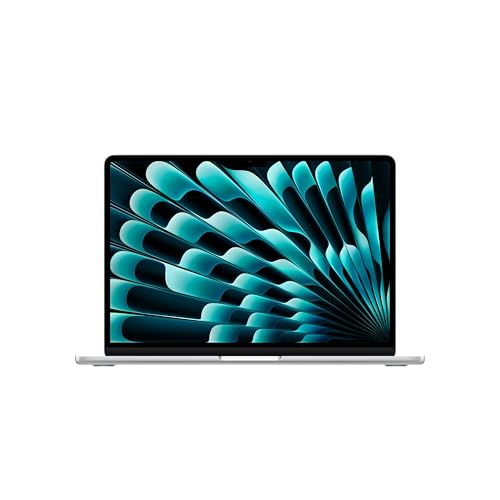
- Best for: Students who want the lightest MacBook that still handles a full day of classes, essays, and research.
- M5 chip with 10-core CPU and 8-core GPU in this 512GB configuration
- 13.6-inch Liquid Retina display, 2560 by 1664 resolution
- 16GB unified memory
- 512GB SSD storage

- Best for: Students who work with two windows open at once and want the biggest screen in a silent, fanless MacBook.
- M5 chip with 10-core CPU and 10-core GPU
- 15.3-inch Liquid Retina display
- 16GB unified memory
- 1TB SSD storage

- Best for: Film, design, architecture, and engineering students who render, compile, or edit for hours at a time.
- M5 Pro chip with 15-core CPU and 16-core GPU
- 14.2-inch Liquid Retina XDR display
- 24GB unified memory
- 1TB SSD storage
All 3 Picks at a Glance
| Product | Specs | Action |
|---|---|---|
| Apple 2026 MacBook Air 13-inch Laptop with M5 chip |
| Check price on Amazon |
| Apple 2026 MacBook Air 15-inch Laptop with M5 chip |
| Check price on Amazon |
| Apple 2026 MacBook Pro Laptop with M5 Pro chip |
| Check price on Amazon |
Key takeaways
- Compare the best Apple laptops for college students: the MacBook Air M5 in 13 and 15 inches plus the MacBook Pro M5 Pro for heavier coursework.
What's inside
As an Amazon Associate I earn from qualifying purchases. This post may contain affiliate links at no extra cost to you.
Choosing an Apple laptop for college is a decision about four years of daily carrying, not about chasing the fastest chip on a spec sheet. A machine that feels light in a backpack at the start of the semester still has to feel light in week fourteen, last through a full day of lectures without hunting for an outlet, and keep up when a research paper, a dozen browser tabs, and a video call are open at once. The wrong choice is usually not a slow laptop; it is a laptop bought for the wrong workload.
This guide is for students who have settled on macOS and need the right MacBook for their major and habits. It covers the portable everyday machine, the bigger-screen version for split-screen work, and the heavier-duty option for video editing, 3D work, or large codebases. Every pick below is a current MacBook listed on Amazon, chosen from the configuration named in the listing.
Quick Picks
As an Amazon Associate we earn from qualifying purchases
| Product | Best for | Key spec from title |
|---|---|---|
| Apple 2026 MacBook Air 13-inch Laptop with M5 chip | Everyday classes and carrying all day | M5 chip, 16GB unified memory, 512GB SSD |
| Apple 2026 MacBook Air 15-inch Laptop with M5 chip | Split-screen essays and larger workspace | M5 chip, 16GB unified memory, 1TB SSD |
| Apple 2026 MacBook Pro Laptop with M5 Pro chip | Video editing, design, and heavy coursework | M5 Pro chip, 24GB unified memory, 1TB SSD |
How to Choose
Start with the size you will actually carry
A 13-inch MacBook Air weighs about 2.7 pounds and disappears into a backpack alongside textbooks, while the 15-inch Air adds roughly half a pound and a wider footprint for a roomier screen. That difference sounds small on paper, but it shows up every time you pull the laptop out on a crowded lecture desk or carry it across campus between classes. Students who walk everywhere and work in tight spaces should default to the 13-inch model. Students who mostly work at a dorm desk or a library table, and who keep two windows open side by side, will feel the extra screen space of the 15-inch model every day.
Match memory and storage to your major, not to a habit
Sixteen gigabytes of unified memory handles essays, spreadsheets, research with many browser tabs, and video calls without strain, and it is the right starting point for most majors. Students in film, architecture, engineering, or data-heavy fields should step up to 24GB, because their software holds far more in memory at once and memory cannot be added later. Storage follows the same logic: a 512GB drive is enough for documents, lecture recordings, and a modest photo library, but video projects, virtual machines, and large design files fill it fast. When in doubt, buy more storage than you think you need, because an external drive is a workaround, not a fix, for a drive that is always full.
Check the ports before you assume your accessories fit
The MacBook Air gives you MagSafe charging, two Thunderbolt 4 ports, and a headphone jack, which covers a charger, an external display, and wired headphones with one port to spare. The MacBook Pro adds a third Thunderbolt port, an HDMI port, and an SD card slot, so photographers and video students can plug in a camera card and a monitor without carrying a hub. Before buying, list the things you plug in during a normal week: a second monitor, a USB flash drive from a classmate, a wired mouse, a camera. If the list needs more than two ports at once, or an SD card reader you would otherwise buy separately, the Pro earns its keep in convenience alone.
Understand what the fanless Air gives up and what it gains
The MacBook Air has no fan, so it stays silent in a quiet library and never blows warm air across your hands during an exam. That silence comes with a trade: under a long, sustained heavy load such as a lengthy video export, the Air slows down to stay cool, while the Pro spins up its fans and holds full speed. For writing, browsing, coding, and short bursts of editing, the difference never appears. It only matters for students who regularly render video, compile large projects, or run simulations for extended stretches. If your heaviest task is a forty-minute export once a week, the Air is fine; if it is a daily render queue, the Pro is the honest choice.
The 3 Best Options
Apple 2026 MacBook Air 13-inch Laptop with M5 chip
- Best for: Students who want the lightest MacBook that still handles a full day of classes, essays, and research.
- M5 chip with 10-core CPU and 8-core GPU in this 512GB configuration
- 13.6-inch Liquid Retina display, 2560 by 1664 resolution
- 16GB unified memory
- 512GB SSD storage
Students who want the lightest MacBook that still handles a full day of classes, essays, and research.
The Amazon listing title does not state the GPU core count, so confirm on the listing that the configuration is the 512GB build with the 8-core GPU; the 1TB build uses the 10-core GPU instead. Storage cannot be upgraded later, so be sure 512GB fits your files.
This is the default MacBook for college, and it earns that position by getting the everyday details right. The M5 chip handles a full student workload — writing, research, streaming lectures, and light photo work — without hesitation, and the fanless design means it never makes a sound in a silent study room. At about 2.7 pounds with a 13.6-inch Liquid Retina display, it is the machine you stop noticing in your bag, and the battery is rated to last through a full day of classes. It is the right pick for the large majority of majors, from humanities to business to the sciences.
Watch out for: The Amazon listing title does not state the GPU core count, so confirm on the listing that the configuration is the 512GB build with the 8-core GPU; the 1TB build uses the 10-core GPU instead. Storage cannot be upgraded later, so be sure 512GB fits your files.
Apple 2026 MacBook Air 15-inch Laptop with M5 chip
- Best for: Students who work with two windows open at once and want the biggest screen in a silent, fanless MacBook.
- M5 chip with 10-core CPU and 10-core GPU
- 15.3-inch Liquid Retina display
- 16GB unified memory
- 1TB SSD storage
Students who work with two windows open at once and want the biggest screen in a silent, fanless MacBook.
The wider body fits fewer small lecture desks and tight backpack sleeves, so measure your bag and your usual seat before ordering. Confirm the listing names the 1TB storage configuration, since the same model is sold in several memory and storage combinations.
The 15-inch Air is the same idea as the 13-inch model with more room to work. The larger 15.3-inch Liquid Retina display makes split-screen research genuinely comfortable: a journal article on one side and your notes on the other, without constant switching. It keeps the fanless silence, the M5 chip, and the all-day battery of its smaller sibling, and this configuration doubles the storage to 1TB, which suits students who keep large photo libraries or video projects on the machine itself. It is heavier at about 3.33 pounds, but for students who work mostly at a desk or a library table, the screen is worth the extra weight.
Watch out for: The wider body fits fewer small lecture desks and tight backpack sleeves, so measure your bag and your usual seat before ordering. Confirm the listing names the 1TB storage configuration, since the same model is sold in several memory and storage combinations.
Apple 2026 MacBook Pro Laptop with M5 Pro chip
- Best for: Film, design, architecture, and engineering students who render, compile, or edit for hours at a time.
- M5 Pro chip with 15-core CPU and 16-core GPU
- 14.2-inch Liquid Retina XDR display
- 24GB unified memory
- 1TB SSD storage
Film, design, architecture, and engineering students who render, compile, or edit for hours at a time.
It is heavier than either Air and it has fans, so it is audible under heavy load in a quiet room. The extra power only pays off if your coursework actually uses it; for essays and browsing alone, it is more machine than the work requires.
The 14-inch MacBook Pro is the pick for students whose coursework is the workload itself: editing multi-track video, building 3D models, running virtual machines, or compiling large codebases. The M5 Pro chip with a 15-core CPU and 16-core GPU holds full speed under sustained loads because the Pro has fans to cool it, and the 14.2-inch Liquid Retina XDR display shows far more contrast and brightness than the Air screens, which matters for photo and video work. With 24GB of unified memory, a 1TB SSD, an HDMI port, and an SD card slot, it is the only machine here that needs no dongles for a typical creative setup.
Watch out for: It is heavier than either Air and it has fans, so it is audible under heavy load in a quiet room. The extra power only pays off if your coursework actually uses it; for essays and browsing alone, it is more machine than the work requires.
Which One Fits Your Situation
You walk across campus all day with a full backpack
Pick the 13-inch MacBook Air M5. At about 2.7 pounds it is the lightest machine here, it stays silent in lectures, and its battery is rated to cover a full day of classes without a charger in your bag. The 512GB drive holds documents, lecture recordings, and a normal photo library, and the 13.6-inch screen is big enough for writing and research once you stop comparing it to a desk monitor.
You write long papers with sources open beside your draft
Pick the 15-inch MacBook Air M5. The 15.3-inch display keeps a journal article and your notes visible at the same time, which cuts the constant window switching that slows down research writing. The 1TB drive gives you room for a growing library of readings and recordings, and the fanless design keeps it silent in the library during long writing sessions.
Your major means video editing, 3D work, or big codebases
Pick the 14-inch MacBook Pro M5 Pro. Its fans let the chip hold full speed through long exports and compiles, the XDR display shows the contrast and color your creative work needs, and 24GB of memory keeps large projects responsive. The HDMI port and SD card slot also mean you can connect a monitor and read a camera card without carrying extra adapters.
You want one MacBook to last all four years
Pick the 15-inch MacBook Air M5 if your work is mostly writing and research, or the 14-inch MacBook Pro M5 Pro if your major is creative or technical. The deciding factor is storage and memory headroom: the 1TB drive and, on the Pro, 24GB of memory give you room to grow into heavier coursework in your junior and senior years, when projects get bigger and your files accumulate.
Common Mistakes
- Buying the smallest storage to save money, then spending the next three years managing a nearly full drive instead of doing coursework.
- Choosing the 15-inch Air for portability without checking whether it fits your backpack sleeve and your lecture desk.
- Paying for the MacBook Pro when the heaviest software you run is a word processor and a web browser.
- Ignoring the port layout and discovering on the first day of class that your flash drive, monitor, and charger cannot all connect at once.
- Ordering without confirming the exact configuration on the listing, since the same MacBook model is sold in several memory and storage combinations.
Frequently Asked Questions
Is the MacBook Air M5 powerful enough for college?
Yes, for most majors. The M5 chip handles writing, research with many browser tabs, spreadsheets, video calls, and light photo and video work without strain. Only students who regularly edit long video projects, render 3D scenes, or compile large codebases will feel the limits of the fanless Air, and those students are better served by the MacBook Pro.
Should a college student buy the 13-inch or 15-inch MacBook Air?
Choose the 13-inch model if you carry the laptop everywhere and work in lecture halls, since it is lighter and fits smaller desks. Choose the 15-inch model if you mostly work at a desk or library table and keep two windows open side by side, since the larger screen makes split-screen research far more comfortable.
How much storage does a college student need on a MacBook?
A 512GB drive is enough for documents, lecture recordings, and a modest media library, which covers most students. Students in film, photography, design, or engineering should choose 1TB, because video files, raw photos, and project assets fill a smaller drive quickly and storage cannot be upgraded after purchase.
Can a MacBook run the software my classes require?
Most common college software runs on macOS, including office suites, browsers, and many coding and design tools. Before buying, check your department or course syllabus for any Windows-only software, since that may require a virtual machine or a lab computer. When a required program is Windows-only, confirm the plan for running it before committing to a Mac.
Related guides
More from Amazon
Programs that pair well with the guide above. Offers and eligibility are set by Amazon and may change.
Free shipping on eligible items, Prime Video and more. Eligible new members can start with a free trial.
Start a Prime free trialAd-free music streaming. Eligible new subscribers can start with a free trial.
Try Music Unlimited freeA Prime membership for ages 18-24 with a trial period. Eligibility is set by Amazon.
See Prime for Young AdultsAudiobooks and podcasts to listen to on the go. Eligible new members can start with a free trial.
Try Audible freeAs an Amazon Associate we earn from qualifying purchases.










Write Your Review
No reviews yet. Be the first to share your experience!