
Our Short List of 3

- Best for: Students who want a compact 14-inch laptop with a true anti-glare screen for daily classes.
- Display: 14-inch Full HD (1920 x 1080), 250 nits, anti-glare, 45% NTSC, ComfyView, 60Hz, thin-bezel LCD
- Processor: Intel Core i3-N305, base 1.7GHz, up to 3.8GHz
- Memory: 8GB DDR5 SDRAM, 4800MHz
- Storage: 128GB NVMe M.2 solid state drive

- Best for: Students who study in bright rooms and want a touchscreen for annotating slides and diagrams.
- Display: 14-inch Full HD (1920 x 1080) IPS, 300 nits, anti-glare, 100% sRGB, touchscreen
- Processor: AMD Ryzen 7 5700U, 8 cores, 16 threads, 1.8GHz up to 4.3GHz
- Memory: 8GB DDR4-3200, soldered
- Storage: 512GB M.2 2242 PCIe solid state drive
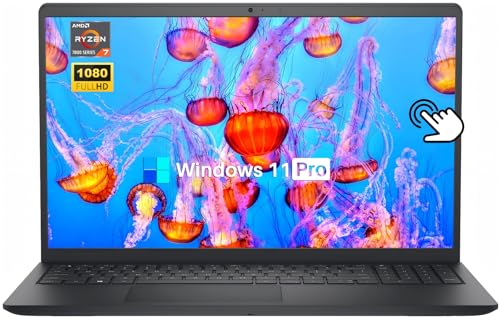
- Best for: Students who want a large anti-glare touchscreen for group projects and split-screen research.
- Display: 15.6-inch Full HD (1920 x 1080), touchscreen, WVA LED-backlit, anti-glare, 60Hz
- Processor: AMD Ryzen 7 7730U, 8 cores, up to 4.5GHz
- Memory: 16GB DDR4, 3200MHz
- Storage: 512GB PCIe NVMe M.2 solid state drive
All 4 Picks at a Glance
| Product | Specs | Action |
|---|---|---|
| Acer Aspire 3 14″ (A314-36P-3772) |
| Check price on Amazon |
| Lenovo IdeaPad 5 14″ (82LM00UEUS) |
| Check price on Amazon |
| Dell Inspiron 15 3535 Touchscreen |
| Check price on Amazon |
 HP 15.6″ Laptop (Intel N150) |
| Check price on Amazon |
Key takeaways
- Compare four anti-glare laptops for students that stay readable in lecture halls and libraries, from compact 14-inch models to a 15.6-inch touchscreen.
What's inside
As an Amazon Associate I earn from qualifying purchases. This post may contain affiliate links at no extra cost to you.
Choosing an anti-glare laptop for student life is a decision about where you will read, not about raw speed. Lecture halls with windows, library tables under ceiling lights, and outdoor benches between classes all throw reflections onto a glossy screen, and once glare lands on a paragraph, you end up tilting the lid or hunting for shade instead of following the lecture. The coating matters more than any other single feature here, because it decides whether the screen stays readable where you study every day.
This guide is for students who read and write for hours, take notes in lectures, join video calls from study spaces, and carry one machine between classes. Every laptop below comes from its Amazon listing, and each listing states an anti-glare screen in its own words. The four picks cover a compact 14-inch everyday machine, a brighter touchscreen for annotating slides, a large touchscreen for group work, and a basic model for essays and lectures.
Quick Picks
As an Amazon Associate we earn from qualifying purchases
| Product | Best for | Key spec from title |
|---|---|---|
| Acer Aspire 3 14″ (A314-36P-3772) | Everyday classes in a compact bag | 14″ FHD anti-glare display, Intel Core i3-N305 |
| Lenovo IdeaPad 5 14″ (82LM00UEUS) | Bright rooms and touchscreen note-taking | 14″ FHD anti-glare touchscreen, AMD Ryzen 7 5700U |
| Dell Inspiron 15 3535 Touchscreen | Group projects on a large touchscreen | 15.6″ FHD anti-glare touchscreen, AMD Ryzen 7 7730U |
| HP 15.6″ Laptop (Intel N150) | Essays, email, and video lectures | 15.6″ HD anti-glare display, Intel Processor N150 |
How to Choose
Anti-glare coating is not the same on every panel
Start with the exact words on the listing, because sellers use several phrases for the same idea. Acer calls its finish ComfyView, Dell lists anti-glare coating on its WVA panels, HP writes anti-glare next to micro-edge, and Lenovo states anti-glare with a brightness figure. Look for a listing naming the coating in the display description, not a title that only says the screen looks clear. If the listing says glossy or mirror finish, or nothing about reflections, treat that panel as reflective even when the laptop looks matte in a photo. A factory coating is part of the panel, so it stays consistent across the screen, while a stick-on film can bubble, peel at the edges, and dull touch response.
Brightness decides whether anti-glare actually helps outdoors
A coating cuts reflections, but it cannot add light, so brightness decides whether the screen stays readable outside or beside a window. The picks in this guide list 250 nits or 300 nits, and that gap is noticeable in direct daylight. A 250-nit panel works well indoors and in shade, while a 300-nit panel holds up better near glass and on a bright courtyard bench. Check the nits figure before you compare two laptops, because two screens can both say anti-glare while one is clearly easier to read in sunlight. If most of your study time happens outdoors, put the brighter panel first and accept a shorter battery trade-off rather than choosing the dimmer screen.
Resolution and colour coverage for reading and coursework
Resolution shapes how much text fits on screen and how sharp it stays during long reading sessions. A Full HD panel at 1920 by 1080 keeps two documents side by side without cramped lines, which matters when you compare a lecture slide with your own notes. The one HD panel in this guide, at 1366 by 768, shows the same material with less room and softer text, so it suits shorter sessions rather than all-day writing. Colour coverage matters too: the Lenovo pick lists 100% sRGB, which keeps photos and diagrams looking natural for design and media coursework, while the 45% NTSC panels in the other picks are fine for documents, spreadsheets, and video lectures but wash out saturated images.
Weight, battery, and ports for a full day on campus
A student laptop spends its day moving, so the daily carry matters as much as the screen. A 14-inch machine slips into a smaller bag and leaves room for books, while a 15.6-inch model gives you a larger keyboard with a numeric keypad and more room for split-screen work. Check the battery figure and remember that manufacturers test under gentle conditions, so a quoted video playback figure will run shorter once Wi-Fi, brightness, and video calls are involved. Ports deserve the same attention: a USB-C port that supports charging and an external display saves you from carrying a separate hub, and an HDMI port plugs straight into a lecture hall projector or a dorm monitor without an adapter.
The 4 Best Options
Acer Aspire 3 14″ (A314-36P-3772)
- Best for: Students who want a compact 14-inch laptop with a true anti-glare screen for daily classes.
- Display: 14-inch Full HD (1920 x 1080), 250 nits, anti-glare, 45% NTSC, ComfyView, 60Hz, thin-bezel LCD
- Processor: Intel Core i3-N305, base 1.7GHz, up to 3.8GHz
- Memory: 8GB DDR5 SDRAM, 4800MHz
- Storage: 128GB NVMe M.2 solid state drive
Students who want a compact 14-inch laptop with a true anti-glare screen for daily classes.
The 128GB drive fills quickly once lecture recordings, projects, and apps pile up, so plan on cloud storage or an external drive from the start.
The Aspire 3 14 is the straightforward pick for a student who wants a compact Windows laptop with a genuinely anti-glare screen. Its 14-inch Full HD ComfyView panel is listed at 250 nits with an anti-glare finish, which keeps lecture slides readable under ceiling lights and beside windows without the mirror effect of a glossy display. The Intel Core i3-N305 handles essays, research tabs, and video lectures without fuss, and the 8GB of DDR5 memory keeps everyday multitasking smooth. At 14 inches it fits bags that a 15.6-inch machine crowds, and the full set of ports keeps a dorm desk setup simple.
Watch out for: The 128GB drive fills quickly once lecture recordings, projects, and apps pile up, so plan on cloud storage or an external drive from the start.
Lenovo IdeaPad 5 14″ (82LM00UEUS)
- Best for: Students who study in bright rooms and want a touchscreen for annotating slides and diagrams.
- Display: 14-inch Full HD (1920 x 1080) IPS, 300 nits, anti-glare, 100% sRGB, touchscreen
- Processor: AMD Ryzen 7 5700U, 8 cores, 16 threads, 1.8GHz up to 4.3GHz
- Memory: 8GB DDR4-3200, soldered
- Storage: 512GB M.2 2242 PCIe solid state drive
Students who study in bright rooms and want a touchscreen for annotating slides and diagrams.
The Amazon listing shows two different weights in different sections, so confirm the weight on the exact configuration before you buy, and note that the 8GB of memory is soldered and cannot be upgraded later.
The IdeaPad 5 14 pairs the brightest anti-glare panel here with a touchscreen, and that combination suits students who annotate slides and sketch diagrams by hand. The listing describes a 14-inch Full HD IPS display at 300 nits with an anti-glare finish and 100% sRGB, so text stays sharp in bright rooms and colours stay true for media coursework. The eight-core Ryzen 7 5700U keeps heavy multitasking, large spreadsheets, and light creative work moving without stutter. A backlit keyboard helps during late library sessions, the webcam has a privacy shutter, and the 512GB solid state drive leaves room for a full degree of files.
Watch out for: The Amazon listing shows two different weights in different sections, so confirm the weight on the exact configuration before you buy, and note that the 8GB of memory is soldered and cannot be upgraded later.
Dell Inspiron 15 3535 Touchscreen
- Best for: Students who want a large anti-glare touchscreen for group projects and split-screen research.
- Display: 15.6-inch Full HD (1920 x 1080), touchscreen, WVA LED-backlit, anti-glare, 60Hz
- Processor: AMD Ryzen 7 7730U, 8 cores, up to 4.5GHz
- Memory: 16GB DDR4, 3200MHz
- Storage: 512GB PCIe NVMe M.2 solid state drive
Students who want a large anti-glare touchscreen for group projects and split-screen research.
The listing notes the factory seal is opened for upgrades, so check the seller details and warranty terms on the exact offer, and confirm the panel is the touchscreen anti-glare version, since Dell also lists this model with a non-touch panel.
The Inspiron 15 3535 is the large-screen pick, built for students who do group work around one laptop and want touch input with an anti-glare coating. Its 15.6-inch Full HD touchscreen uses a WVA LED-backlit panel with an anti-glare finish, so several people can read the same document from different angles. The Ryzen 7 7730U processor, 16GB of DDR4 memory, and a 512GB NVMe drive give it headroom for research with dozens of tabs, computing coursework, and large media files. Windows 11 Pro adds features that suit students who also work part-time, and the numeric keypad speeds up data entry for accounting and science coursework.
Watch out for: The listing notes the factory seal is opened for upgrades, so check the seller details and warranty terms on the exact offer, and confirm the panel is the touchscreen anti-glare version, since Dell also lists this model with a non-touch panel.
HP 15.6″ Laptop (Intel N150)
- Best for: Students who mainly write essays, attend online lectures, and need a simple anti-glare laptop for everyday study.
- Display: 15.6-inch HD (1366 x 768), micro-edge, anti-glare, 250 nits, 45% NTSC
- Processor: Intel Processor N150, quad-core
- Memory: 4GB LPDDR5 SDRAM
- Storage: 128GB UFS plus a bundled 512GB SD card
Students who mainly write essays, attend online lectures, and need a simple anti-glare laptop for everyday study.
The headline storage figure counts a bundled 512GB SD card, so the built-in storage is only 128GB of UFS, and the HD resolution shows less on screen at once than the Full HD picks; also confirm the 4GB of memory is enough for the apps your course requires.
The HP 15.6-inch laptop is the basic pick for students whose coursework is mostly writing, reading, and video lectures rather than demanding software. Its 15.6-inch HD micro-edge display carries an anti-glare coating, so the screen stays readable under classroom lights even though the resolution is lower than the Full HD picks above. The Intel N150 processor, 4GB of memory, and 128GB of UFS storage cover essays, email, streaming lectures, and video calls without strain. It also includes a one-year Microsoft 365 Personal subscription, a privacy shutter on the camera, a microphone mute key, and a full-size keyboard with a numeric keypad, which cover the everyday tools a first-year student needs.
Watch out for: The headline storage figure counts a bundled 512GB SD card, so the built-in storage is only 128GB of UFS, and the HD resolution shows less on screen at once than the Full HD picks; also confirm the 4GB of memory is enough for the apps your course requires.
Which One Fits Your Situation
Studying beside a window or outdoors between classes
Pick the Lenovo IdeaPad 5 14. Its 300-nit anti-glare panel is the brightest in this guide, so it holds up near glass and in a sunny courtyard better than the 250-nit screens. The 14-inch size also travels well, and the touchscreen lets you tap through slides while standing. If your campus has more shade than sun, the Acer Aspire 3 14 saves bulk with the same anti-glare idea at a lower brightness.
Long reading and writing sessions in the library
Pick the Lenovo IdeaPad 5 14 again, this time for its 100% sRGB IPS panel and backlit keyboard. Text stays crisp and colours stay natural during long sessions, and the backlight helps when the library dims its lights in the evening. The 512GB drive also means years of essays and readings fit without juggling external storage. The Acer Aspire 3 14 is the fallback if you prefer a smaller machine and mostly read documents rather than images.
Group projects around one screen
Pick the Dell Inspiron 15 3535. Its 15.6-inch touchscreen gives the whole group a readable surface, and the anti-glare coating keeps reflections down when people sit at different angles. The 16GB of memory and 512GB drive handle shared documents, presentation files, and research tabs at the same time. Bring a charger for long sessions, since the 41 Watt Hour battery is the smallest here.
Essays, email, and video lectures on a simple setup
Pick the HP 15.6-inch laptop. Its anti-glare HD screen, full-size keyboard, and included Microsoft 365 subscription cover the core tools for writing and online classes without extra setup. Keep expectations modest: the 4GB of memory and HD resolution suit focused work rather than heavy multitasking. Check that your course software runs on this configuration before the term starts.
Common Mistakes
- Assuming a screen is anti-glare because it looks matte in a photo; only the listing wording confirms the coating.
- Choosing an HD 1366 by 768 panel for all-day split-screen reading, then finding two documents no longer fit side by side.
- Ignoring the brightness figure and discovering a 250-nit screen washes out beside a sunny window.
- Picking 4GB of memory for a course that needs several heavy apps open at once, such as a browser, a writing tool, and a video call.
- Buying a touchscreen without checking that the exact configuration still lists anti-glare, since touch panels are often glossy.
Frequently Asked Questions
Does anti-glare mean the screen is matte?
Yes, in practice the two words describe the same idea on laptop listings: a matte coating that scatters incoming light instead of reflecting it like a mirror. Sellers may call it anti-glare, matte, ComfyView, or anti-glare coating, but the effect is the same. Always check the listing itself, because a laptop can look matte in a photo while the panel underneath is glossy.
Is 250 nits bright enough for studying outside?
A 250-nit anti-glare screen works well indoors, in shade, and beside a window on a cloudy day. In direct sunlight it can still look washed out, because the coating removes reflections but cannot add brightness. If you study outdoors often, choose a 300-nit panel like the IdeaPad 5 in this guide, or sit where a wall or tree shades the screen.
Do anti-glare screens help with eye strain?
An anti-glare coating helps by cutting the reflections that make your eyes work harder to separate text from glare, and many students notice less squinting in bright rooms. It does not fix strain on its own, so keep sensible habits too: match the screen brightness to the room, take short breaks from close reading, and sit at a comfortable distance from the display.
Can I add an anti-glare screen protector instead of buying an anti-glare laptop?
A stick-on film reduces reflections and costs little, but it is not the same as a factory coating. Films can trap dust, peel at the edges, soften text slightly, and interfere with touch response on a touchscreen. They suit a laptop you already own, while a factory anti-glare panel is the better choice when you are buying a new machine for bright study spaces.
Related guides
More from Amazon
Programs that pair well with the guide above. Offers and eligibility are set by Amazon and may change.
Free shipping on eligible items, Prime Video and more. Eligible new members can start with a free trial.
Start a Prime free trialAd-free music streaming. Eligible new subscribers can start with a free trial.
Try Music Unlimited freeA Prime membership for ages 18-24 with a trial period. Eligibility is set by Amazon.
See Prime for Young AdultsAudiobooks and podcasts to listen to on the go. Eligible new members can start with a free trial.
Try Audible freeAs an Amazon Associate we earn from qualifying purchases.










Write Your Review
No reviews yet. Be the first to share your experience!