
Key takeaways
- Most gaming laptops cannot swap their internal GPU, so the real upgrade is an external GPU enclosure or all-in-one eGPU. Three laptop-ready picks inside.
What's inside
As an Amazon Associate I earn from qualifying purchases. This post may contain affiliate links at no extra cost to you.
Choosing a graphics card for a gaming laptop is a decision about the port on the side of your machine, not about picking the fastest desktop card on a shelf. Most gaming laptops have their graphics chip soldered to the motherboard, so there is no slot to drop a new card into. The realistic upgrade is an external GPU setup: a box or dock that holds a desktop graphics card and connects to your laptop over a fast cable.
This guide is for three kinds of buyers: owners of thin laptops with weak built-in graphics, owners of older gaming laptops whose internal GPU no longer keeps up, and anyone who wants one machine for travel and a stronger setup at a desk. Every option below is a laptop-compatible external GPU enclosure or all-in-one eGPU, chosen from its Amazon listing details.
Quick Picks
As an Amazon Associate we earn from qualifying purchases.
| Product | Best for | Key spec from title |
|---|---|---|
| Razer Core X V2 | A modern Thunderbolt 5 laptop with a desktop card you already own | Thunderbolt 5, 4-slot wide cards, 140W PD via USB-C |
| Sonnet eGPU Breakaway Box 750ex | A Thunderbolt 3 laptop that also needs USB ports and Ethernet at a desk | Thunderbolt 3, 750W PSU, 4x USB and Gigabit Ethernet |
| GIGABYTE AORUS RTX 5060 Ti AI Box | A ready-to-play setup with the graphics card already inside | RTX 5060 Ti 16GB GDDR7, Thunderbolt 5, 100W PD |
How to Choose
Start with the port on your laptop
The port decides everything, so check it before you look at any enclosure. Thunderbolt 3, Thunderbolt 4, Thunderbolt 5, and USB4 ports can carry an external GPU, while a plain USB-C port that only handles data and charging cannot. Look for the lightning symbol next to the port, or check the laptop specifications page for the words Thunderbolt or USB4 with external graphics support. A laptop with only an OCuLink port needs an OCuLink dock instead, and a laptop with no high-speed port at all cannot use an external GPU. Buying the enclosure first and discovering the port problem later is the most expensive mistake in this category.
Enclosure or all-in-one eGPU
An enclosure is an empty box: you buy a desktop graphics card and, in some models, a power supply separately, then install them yourself. That route suits anyone who already owns a desktop card or wants to choose the exact card and upgrade it later. An all-in-one eGPU arrives with the graphics card built in, so you connect one cable and install drivers. That route suits buyers who want the simplest path and never plan to open the box. The trade-off is clear: enclosures cost less up front but demand more parts and assembly, while all-in-one units cost more and lock you to the card inside.
Power supply, card size, and cooling
An external GPU is only as strong as the power and space behind it. Check the enclosure wattage against the card you plan to install, remembering that high-end cards need far more than the enclosure rating alone suggests, since the box also powers its own fan and laptop charging. Measure the card too: enclosures list a maximum length, height, and slot width, and a card that is one slot too thick simply will not fit. Cooling matters because the box sits on a desk and runs for hours; a single large fan with vented steel panels handles sustained gaming better than a sealed plastic shell. Confirm the power connectors as well, since some cards need two 8-pin leads.
Laptop charging, ports, and desk setup
A good external GPU setup should simplify your desk, not add a tangle of chargers. Many enclosures deliver power to the laptop over the same cable that carries graphics data, so check the wattage: 85W covers many thin laptops, while larger gaming laptops may still need their own charger connected. Extra ports are worth real attention if the box will live on a desk. USB ports for a keyboard and mouse, an Ethernet port for stable online play, and a place to plug the monitor directly into the graphics card all remove separate adapters. Finally, measure the desk: these boxes are roughly the size of a small desktop tower and need clear airflow on at least two sides.
The 3 Best Options
Razer Core X V2
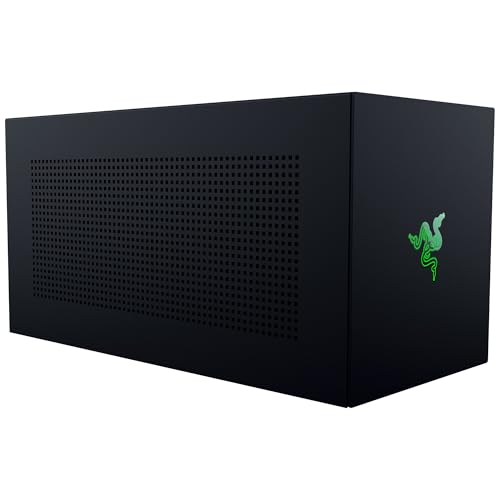
The Razer Core X V2 is the most forward-looking enclosure here, built around Thunderbolt 5 with support for Thunderbolt 4 and USB4 laptops. It accepts full-length desktop graphics cards up to four slots wide, so most current NVIDIA and AMD cards fit without a fight, and it charges a compatible laptop with up to 140W over the same USB-C cable. A 120 mm fan and vented steel housing keep the card cool during long sessions. The enclosure ships with a Thunderbolt 5 cable, but the graphics card and power supply are sold separately, so budget for both.
Specs
- Connection: Thunderbolt 5, compatible with Thunderbolt 4 and USB4
- Bandwidth: Up to 80 Gbps over Thunderbolt 5
- GPU support: Up to 4-slot wide, full-length PCI-Express graphics cards
- Laptop power delivery: Up to 140W via USB-C
- Cooling: 120 mm fan with vented steel housing
- Included cable: Thunderbolt 5 cable, 1.0 m
- Dimensions: 16.59 x 8.51 x 7.76 inches
- Weight: 8.64 lb
- Model number: RC21-02270200-R3U1
Best for: Owners of a Thunderbolt 4, Thunderbolt 5, or USB4 laptop who already own a desktop graphics card and want the fastest current connection.
Watch out for: The graphics card and power supply are sold separately, and Mac devices with M1 or later chipsets do not support eGPUs.
Sonnet eGPU Breakaway Box 750ex

The Sonnet eGPU Breakaway Box 750ex is the practical choice for older Thunderbolt 3 laptops, doubling as a complete desk hub. Its built-in 750W power supply supports cards drawing up to 375W, and the box adds four USB ports and a Gigabit Ethernet port, so keyboard, mouse, and wired network connect through one unit. It fits full-length cards up to 312 mm long and charges the laptop with up to 85W. Thunderbolt 3 is slower than Thunderbolt 5, so very high-end cards lose some headroom, but for mid-range cards and older laptops the balance of power, ports, and value is hard to beat.
Specs
- Connection: Thunderbolt 3
- Power supply: 750W built in
- GPU power support: Cards up to 375W
- Maximum GPU length: 312 mm
- Laptop power delivery: Up to 85W
- Extra ports: 4x USB 3.2 Gen 1, 1x Gigabit Ethernet
- Expansion slot: 1x PCIe 3.0 x16, full-length, full-height
- Model number: GPU-750WEX-TB3
Best for: Thunderbolt 3 laptop owners who want an enclosure with its own power supply plus USB and Ethernet for a permanent desk setup.
Watch out for: The graphics card is sold separately, and M1 Macs are not supported; confirm your card needs no more than two 8-pin power leads.
GIGABYTE AORUS RTX 5060 Ti AI Box
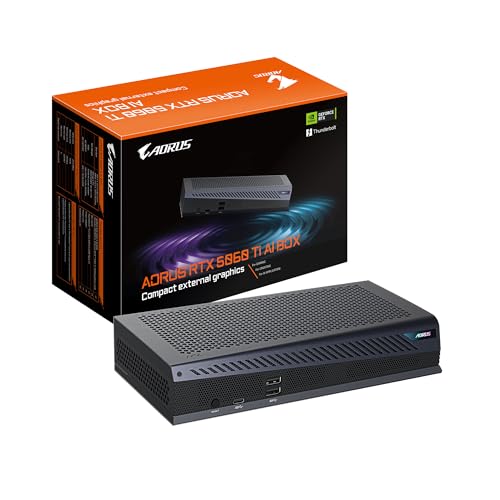
The GIGABYTE AORUS RTX 5060 Ti AI Box is the only pick here that needs no extra shopping: the RTX 5060 Ti graphics card is already installed inside a compact box. It connects over Thunderbolt 5 with up to 80 Gbps of bandwidth, charges a laptop with up to 100W, and includes DisplayPort 2.1b, HDMI 2.1b, and an Ethernet port. The WINDFORCE cooling system uses Hawk fans and server-grade thermal gel, and a magnetic stand lets the box sit horizontally or vertically. This is the simplest route to desktop-class graphics on a compatible laptop, though the card inside cannot be swapped later.
Specs
- Graphics card: GeForce RTX 5060 Ti with NVIDIA Blackwell architecture
- Graphics memory: 16 GB GDDR7, 128-bit
- Connection: Thunderbolt 5, up to 80 Gbps
- Laptop power delivery: Up to 100W
- Cooling: WINDFORCE cooling system with Hawk fans and server-grade thermal gel
- Video outputs: DisplayPort 2.1b, HDMI 2.1b
- Extra port: High-speed Ethernet
- Included: Thunderbolt 5 cable, magnetic stand
- Model number: GV-N506TIXEB-16GD
- Warranty: 3 Year Manufacturer
Best for: Buyers who want a complete, ready-to-connect external GPU with no separate card or power supply to buy.
Watch out for: The graphics card is not user-replaceable, and full performance needs a Thunderbolt 5 port; it falls back to lower bandwidth on Thunderbolt 4.
Which One Fits Your Situation
You have a newer Thunderbolt 4 or 5 laptop and a spare desktop card
Pick the Razer Core X V2. Its Thunderbolt 5 link and four-slot clearance make the most of a card you already own, and 140W charging can replace the laptop charger at the desk. Just remember to add a compatible ATX power supply, since the box ships without one, and check that your card fits the length limit before ordering.
Your laptop only has Thunderbolt 3 and you want a full desk setup
Pick the Sonnet eGPU Breakaway Box 750ex. The built-in 750W supply means no separate power supply purchase, and the USB and Ethernet ports turn the enclosure into the hub for the whole desk. Thunderbolt 3 limits the ceiling for the fastest cards, so pair it with a mid-range card rather than a flagship.
You want to plug in one box and start playing
Pick the GIGABYTE AORUS RTX 5060 Ti AI Box. The card is already installed, the Thunderbolt 5 cable is in the box, and setup is a driver install away. It suits buyers who value simplicity over future upgrades, since the card inside cannot be replaced when a newer generation arrives.
You mostly travel and only dock the laptop at home
Pick the Razer Core X V2 if your laptop has Thunderbolt 4, Thunderbolt 5, or USB4, or the AORUS AI Box if you want the smallest footprint with nothing to assemble. Either way, keep the laptop charger in your travel bag: external GPU charging covers desk use, but the box stays home when you do.
Common Mistakes
- Buying a desktop graphics card first and discovering the laptop has no Thunderbolt, USB4, or OCuLink port to connect it through.
- Choosing an enclosure that is too small or too weak for the card, then finding the card will not fit or the power supply cannot feed it.
- Assuming every USB-C port supports external graphics; only Thunderbolt and USB4 ports with external graphics support work.
- Forgetting that most enclosures ship without a graphics card, and some ship without a power supply too.
- Expecting full desktop performance: the cable link always costs some speed, so the gain is large but never identical to the same card inside a desktop.
Frequently Asked Questions
Can I replace the graphics card inside my gaming laptop?
In most cases, no. The graphics chip in nearly all modern gaming laptops is soldered to the motherboard, with no removable card or slot. A small number of older or workstation-class laptops used removable MXM modules, but those are rare, expensive, and model-specific. For the vast majority of owners, an external GPU enclosure or all-in-one eGPU is the only practical graphics upgrade.
Does an external GPU work with any laptop?
No. The laptop needs a Thunderbolt 3, Thunderbolt 4, Thunderbolt 5, or USB4 port with external graphics support, or an OCuLink port for OCuLink docks. A standard USB-C port without Thunderbolt or USB4 cannot carry an external GPU. Check the laptop specifications or look for the Thunderbolt symbol beside the port before buying any enclosure.
Will an external GPU match the same card in a desktop?
Not quite. The cable link between the box and the laptop is narrower than the slot inside a desktop, so the same card usually delivers somewhat less performance externally, with the gap growing at higher resolutions and frame rates. The improvement over a laptop’s built-in graphics is still large, but buyers should expect desktop-class play rather than an exact desktop match.
Do I need to buy a graphics card separately for an eGPU enclosure?
For enclosures such as the Razer Core X V2 and the Sonnet Breakaway Box 750ex, yes: the box holds the card, but the card itself is a separate purchase, and the Razer model also needs a separate power supply. All-in-one units such as the GIGABYTE AORUS RTX 5060 Ti AI Box include the card already installed, so nothing else is needed except a compatible laptop and a monitor cable.
Related guides
- Best Laptops to Play Roblox: From Budget Integrated Graphics to Dedicated GPUs
- Best Laptops for Zoom Teaching: Clear Video, Reliable Audio and All-Day Class Power
- Best Laptops for Video Editing and Music Production: Power, Screen and Storage
- Best Laptops for Network Engineers: Ethernet, RAM for Labs and Ports That Matter
More from Amazon
Programs that pair well with the guide above. Offers and eligibility are set by Amazon and may change.
Free shipping on eligible items, Prime Video and more. Eligible new members can start with a free trial.
Start a Prime free trialAd-free music streaming. Eligible new subscribers can start with a free trial.
Try Music Unlimited freeA Prime membership for ages 18-24 with a trial period. Eligibility is set by Amazon.
See Prime for Young AdultsAudiobooks and podcasts to listen to on the go. Eligible new members can start with a free trial.
Try Audible freeAs an Amazon Associate we earn from qualifying purchases.










Write Your Review
No reviews yet. Be the first to share your experience!