
Key takeaways
- Two laptops that fit most college majors, from essays to data work. See how the Aspire 3 and Vivobook 15 match each major's real workload before you buy.
What's inside
As an Amazon Associate I earn from qualifying purchases. This post may contain affiliate links at no extra cost to you.
Choosing a laptop for college is really a decision about what your major asks the machine to do every day, not about buying the fastest laptop on the shelf. A history major lives in documents, PDFs, and research tabs, while an engineering student may run simulation software and a design student may juggle large image files, so the right choice follows the workload rather than the brand or the spec sheet.

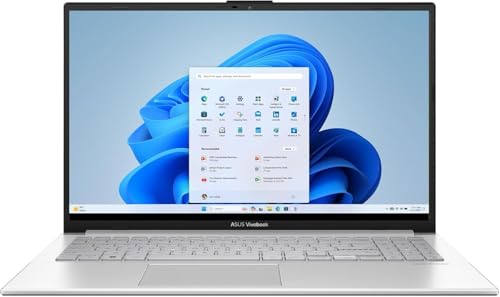
This guide covers the two laptops below as starting points for most majors, then maps each field of study to the specs that matter for it. Both picks come from the names and specifications on their Amazon product pages, and the sections that follow explain how to match them to humanities, business, science, design, and technical majors. The goal is a machine that still fits in your third year, not one you outgrow after the first semester of demanding courses.
Quick Picks
As an Amazon Associate we earn from qualifying purchases.
| Product | Best for | Key spec from title |
|---|---|---|
| Acer Aspire 3 A315-24P-R7VH | Everyday writing, research, and classes | AMD Ryzen 3 7320U, 8GB RAM, 128GB SSD |
| ASUS Vivobook 15 E1504FA-WH56 | Heavier multitasking and data work | AMD Ryzen 5 7520U, 16GB RAM, 512GB SSD |
How to Choose
Match the processor and memory to your major’s software
Start by listing the programs your courses actually require, because that list decides the processor and memory you need. Word processing, spreadsheets, and browser research run comfortably on a modern quad-core chip with 8GB of memory, which covers most humanities, social science, and business coursework. Majors that add statistics packages, large datasets, virtual machines, or photo and video editing need more headroom, and 16GB of memory with a stronger multi-core processor keeps those tasks from slowing to a crawl. Check whether your department publishes minimum specs for its software before you buy, since a machine that meets the course requirements on day one saves you from an expensive replacement in your second year.
Weight and battery life decide how the laptop actually gets used
A laptop that stays in a dorm room because it is heavy or dies by midday is a poor college laptop no matter how strong its specs look. Most students carry their machine between lectures, the library, and study groups, so a weight under four pounds and a full day of light use make a real difference to how often the laptop is actually open. Check the listed weight rather than the screen size alone, since two 15.6-inch laptops can differ by a pound or more, and remember that a charger, a notebook, and textbooks share the same bag. If your timetable has long gaps between outlets, battery life outranks a slightly faster processor.
Screen size, keyboard, and ports for long study days
Long essays and problem sets punish a cramped keyboard and a dim screen, so treat comfort as a buying criterion rather than a luxury. A 15.6-inch Full HD display gives you room for a document beside a source, while an IPS panel keeps text readable from the angles you actually sit at in a lecture hall. A backlit keyboard matters for late library sessions, and a full-size layout with a number pad helps business and accounting students who enter figures all day. Count the ports too: a USB-C port, at least one or two USB-A ports, and an HDMI output cover a second monitor, a presentation, and a borrowed flash drive without a dongle.
Storage, operating system, and the software your courses require
Storage fills faster than most first-year students expect, because lecture recordings, project files, and software installers pile up alongside the operating system. A 128GB drive works when most of your files live in the cloud and your coursework is mostly text, but a 512GB SSD gives science, media, and design students room for datasets, raw footage, and project archives without constant cleanup. Confirm the operating system your courses expect as well: most majors work fine on Windows 11, but some departments standardize on specific tools, and Windows 11 Home in S mode only runs apps from the Microsoft Store until you switch out of it, so confirm that detail before the first week of classes.
The 2 Best Options
Acer Aspire 3 A315-24P-R7VH
The Aspire 3 suits students whose coursework is built from reading, writing, research, and presentations rather than heavy computation. Its Ryzen 3 processor and 8GB of memory handle a browser full of sources, a word processor, and a video call at the same time, and the 15.6-inch Full HD IPS display keeps long documents readable. This is the pick for majors where the laptop is a writing and research tool first, and its slim design and light weight make it easy to carry across campus all day.
Specs
- 15.6-inch Full HD IPS display
- AMD Ryzen 3 7320U quad-core processor
- AMD Radeon integrated graphics
- 8GB LPDDR5 onboard memory
- 128GB NVMe SSD storage
- Wi-Fi 6 wireless connectivity
- Windows 11 Home in S mode
- Backlit keyboard
Best for: Humanities, social science, and business majors who mainly write, research, and present.
Watch out for: The 8GB of memory is soldered and cannot be upgraded, and the 128GB drive fills quickly, so confirm you are comfortable with cloud storage before buying.
ASUS Vivobook 15 E1504FA-WH56
The Vivobook 15 fits majors that ask more of a laptop than essays and slides, because its 16GB of DDR5 memory and 512GB SSD give statistics work, large spreadsheets, and photo editing room to breathe. The Ryzen 5 processor keeps dozens of tabs and a dataset open without the stutter that a lighter machine shows under the same load, and the 15.6-inch Full HD display suits long sessions of reading and analysis. It is the stronger all-rounder of the two picks for students who are unsure how demanding their later courses will become.
Specs
- 15.6-inch Full HD display, 1920 x 1080 resolution
- AMD Ryzen 5 7520U processor, up to 4.3 GHz
- AMD Radeon integrated graphics
- 16GB DDR5 onboard memory
- 512GB SSD storage
- Windows 11 Home operating system
- USB-C, USB-A, HDMI, and combo audio ports
Best for: Science, data, and business majors who multitask across datasets, spreadsheets, and research.
Watch out for: The display is rated at 250 nits with a 45% NTSC color gamut, so it is not the right screen for color-critical design work.
Which One Fits Your Situation
Humanities, social sciences, and education majors
Your days are reading, note-taking, essays, and presentations, so portability and a comfortable keyboard matter more than raw speed. The Acer Aspire 3 covers this workload with room to spare, and its lighter demands mean you can spend your attention on the quality of the screen and keyboard rather than the processor. Keep your sources in the cloud, since the 128GB drive rewards tidy file habits and regular backups.
Business, economics, and accounting majors
Spreadsheets, presentations, and group projects define this workload, and a full-size keyboard with a number pad earns its keep during long accounting sessions. The Aspire 3 handles the core work, but the Vivobook 15 is the better choice once your courses add large datasets, financial modeling, or several heavy applications open at once. Pick the Vivobook if you expect your spreadsheet work to grow heavier each year.
Science, math, and data-heavy majors
Statistics packages, lab data, and programming assignments reward memory above all, because a dataset that does not fit in RAM slows everything down. The Vivobook 15 with 16GB of memory is the pick here, and its 512GB drive holds project files and datasets without forcing you to delete work every month. The Aspire 3 can manage introductory courses, but you will outgrow it sooner once lab work gets serious.
Design, media, engineering, and computer science majors
This group splits in two, so be honest about your actual software. Coding, web work, and light media editing run well on the Vivobook 15, and its memory and storage suit most computer science coursework. Design students who need accurate color should look beyond both picks toward a screen with wider color coverage, and engineering students running CAD or simulation software need a discrete graphics card, which neither laptop here offers.
Common Mistakes
- Buying the most powerful laptop available instead of matching the machine to what your major actually runs, which wastes money on performance you never use.
- Ignoring the memory limit: 8GB is fine for writing and research but tight for datasets, virtual machines, and media work.
- Choosing a heavy laptop that ends up left in the dorm because carrying it across campus is a chore.
- Forgetting to check whether your department requires specific software, an operating system, or Windows out of S mode.
- Picking a small drive and discovering too late that lecture recordings, project files, and software leave no room to work, forcing constant cleanup during exam weeks.
Frequently Asked Questions
What laptop specs matter most for a humanities major?
Writing, research, and reading matter most, so prioritize a comfortable keyboard, a clear Full HD display, enough battery life for a day of classes, and a light body you will actually carry. A modern quad-core processor with 8GB of memory handles documents, PDFs, and browser research comfortably, and cloud storage covers the smaller drive found on lighter laptops, so you rarely run out of room.
Do engineering majors need a different laptop from other students?
Often, yes, because engineering courses can require CAD, simulation, or modeling software that leans on a discrete graphics card and more memory. Coding-heavy engineering work runs fine on a strong general laptop such as the Vivobook 15, but check your department’s published software requirements before buying, since a machine that cannot run a required tool is the wrong machine.
Is 8GB of memory enough for college?
It is enough for most humanities, social science, business, and education coursework, where the work is documents, spreadsheets, and browser research. Science, data, design, and media majors should treat 16GB as the safer starting point, because datasets, editing tools, and virtual machines use memory quickly, and some laptops solder the memory in place so it cannot be upgraded later.
Should I buy a laptop before I know my major?
Buy for the workload you know you will have in your first year, which is mostly writing, research, and general coursework for nearly every student. A solid all-rounder with 16GB of memory and a 512GB drive leaves room to grow into a demanding major later, while a lighter machine is the better value if you are confident your studies will stay text-based and cloud-friendly.
Related guides
More from Amazon
Programs that pair well with the guide above. Offers and eligibility are set by Amazon and may change.
Free shipping on eligible items, Prime Video and more. Eligible new members can start with a free trial.
Start a Prime free trialAd-free music streaming. Eligible new subscribers can start with a free trial.
Try Music Unlimited freeA Prime membership for ages 18-24 with a trial period. Eligibility is set by Amazon.
See Prime for Young AdultsAudiobooks and podcasts to listen to on the go. Eligible new members can start with a free trial.
Try Audible freeAs an Amazon Associate we earn from qualifying purchases.










Write Your Review
No reviews yet. Be the first to share your experience!