
Key takeaways
- Looking for the best performing affordable laptops? Compare five strong everyday laptops with fast processors, solid memory, and SSD storage for work and study.
What's inside
As an Amazon Associate I earn from qualifying purchases. This post may contain affiliate links at no extra cost to you.
Best Performing Affordable Laptops
Finding the best performing affordable laptops is about balance. A laptop in this category should open apps quickly, keep several browser tabs and documents running at the same time, and still feel responsive after a full day of work or study. It does not need a flagship processor or a premium metal body. It needs the right combination of a capable processor, enough memory, fast storage, and a clear, comfortable display.


The quick answer: start with a modern Ryzen 5 or Core i5 processor, at least 8GB of memory, and a 256GB or larger SSD. That combination covers everyday productivity, video calls, streaming, and light creative work without the lag that makes a cheap laptop frustrating. The five laptops below all meet that bar, and each one leans into a different strength, from touchscreen convenience to dedicated graphics for heavier visual work.
This guide explains what to look for, compares the five picks side by side, and walks through each model in detail so you can match the laptop to the way you actually work.
Quick Picks
Our Short List of 3
All 5 Picks at a Glance
| Product | Specs | Action |
|---|---|---|
| Lenovo IdeaPad Slim 3 (Ryzen 5 7520U) (B0C6BQ21D7) | Check price on Amazon | |
| Lenovo IdeaPad Slim 3 (Ryzen 7 7730U, Touchscreen) (B0G1NDKQRZ) | Check price on Amazon | |
 Acer Aspire 5 A515-57G-735F (B09ZVFHPPV) | Check price on Amazon | |
 ASUS Vivobook Go 15 (E1504FA-AS54) (B0CWJB9ZC6) | Check price on Amazon | |
 Lenovo IdeaPad 5 14″ (Ryzen 7 5700U) (B0CB6ZJJM3) | Check price on Amazon |
How to Choose
Processor: The Engine Behind Everyday Speed
The processor decides how quickly a laptop responds when you open programs, switch between tasks, or work with large files. For affordable laptops, a modern Ryzen 5, Ryzen 7, Core i5, or Core i7 from a recent generation is the sweet spot. Older or entry-level chips can handle one task at a time, but they tend to slow down when browser tabs, video calls, and documents pile up. Look for a processor with at least four cores, and favor newer generations over higher model numbers from several years ago. A Ryzen 7 7730U or Core i7-1260P, for example, gives you headroom for demanding days, while a Ryzen 5 7520U is a solid match for typical office and study workloads.
Memory: How Much Multitasking the Laptop Can Handle
Memory, or RAM, determines how many things a laptop can keep open at once without slowing down. For the best performing affordable laptops, 8GB is the practical minimum. With 8GB, you can run a browser with a dozen tabs, a word processor, email, and a video call together. With 16GB, that same workload feels smoother, and you can add photo editing, spreadsheets with large data sets, or a second monitor without the system struggling. If you plan to keep the laptop for several years, 16GB is worth prioritizing, since many slim laptops have memory that cannot be upgraded later.
Storage: Why an SSD Matters More Than Capacity Alone
An SSD is one of the biggest factors in how fast a laptop feels day to day. Compared with an older hard drive, an SSD starts the system faster, opens applications sooner, and moves files more quickly. A 256GB SSD is enough for documents, a modest app library, and cloud-based files. A 512GB SSD gives you room for larger projects, offline media, and installed software, while a 1TB SSD suits people who keep years of photos, videos, and course materials on the machine itself. Check the storage type, not just the number: a PCIe NVMe SSD is the standard to look for in this category.
Display: Size, Sharpness, and Comfort for Long Sessions
Most affordable performance laptops use a 15.6-inch Full HD display, which is a good balance of screen space and portability for desk work and study. A 14-inch display, like the one on the Lenovo IdeaPad 5 below, trades a little screen space for a lighter, more portable machine. Full HD resolution (1920 x 1080) keeps text sharp and video clear, and an IPS panel generally offers better viewing angles and color than a basic TN panel. A touchscreen adds flexibility for scrolling, note-taking, and presentations, but it is a convenience rather than a necessity. If you spend long hours reading or writing, anti-glare coating and comfortable brightness matter more than a touchscreen.
Graphics: Integrated Versus Dedicated
Most affordable laptops rely on integrated graphics built into the processor, which is fine for office work, streaming, video calls, and light photo editing. A dedicated graphics card, like the NVIDIA GeForce RTX 2050 in the Acer Aspire 5 below, adds real capability for video editing, 3D work, and casual gaming. It also raises power consumption and weight, so it only makes sense if your work actually uses the extra graphics power. For general productivity, a modern integrated GPU from AMD or Intel is enough, and the money is better spent on memory or storage.
Battery Life and Portability: Performance You Can Carry
A fast laptop is less useful if it needs a charger by midday. Look for a machine that can get through a typical work or school session away from a wall outlet, and check the weight before buying. Laptops in this roundup sit in the everyday portable range: light enough to carry in a bag between rooms or to class, but not ultrabooks built for extreme thinness. If you commute or move between locations often, a 14-inch model or a slimmer 15.6-inch design is easier to live with. Also check the ports: USB-C, USB-A, and HDMI cover most accessories, docks, and external displays without adapters.
Build and Keyboard: The Parts You Touch Every Day
Performance numbers do not tell the whole story. You will spend hours with the keyboard, trackpad, and screen, so a comfortable layout and a solid hinge matter. A backlit keyboard helps in dim rooms and evening work, and a numeric keypad is useful for spreadsheets and data entry. Look for a machine with a firm keyboard deck, a responsive trackpad, and a webcam with a privacy shutter if you take frequent video calls. These details do not show up in benchmark charts, but they shape whether a laptop is pleasant to use over the years you own it.
The Best Best Performing Affordable Laptops Reviewed
Lenovo IdeaPad Slim 3 (Ryzen 5 7520U) (B0C6BQ21D7)
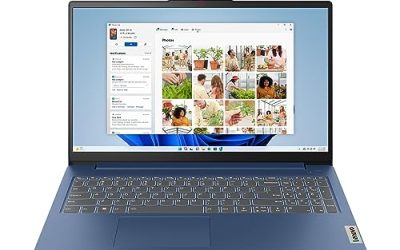
The Lenovo IdeaPad Slim 3 with the AMD Ryzen 5 7520U is the straightforward pick for everyday productivity. Its 15.6-inch Full HD display gives you room for side-by-side windows, and the combination of 8GB of memory and a 256GB SSD handles documents, spreadsheets, email, streaming, and video calls without fuss. Windows 11 comes installed, and the slim Arctic Grey or Abyss Blue chassis keeps the machine portable enough for daily carrying.
Who it suits: students and office workers who want a reliable, no-nonsense laptop for writing, research, spreadsheets, and video meetings. It is a good fit as a first laptop or as a replacement for an aging machine that has become slow to start and slow to switch between apps.
Who should skip it: anyone who keeps very large photo or video libraries on the laptop itself, since 256GB of storage fills up faster than 512GB, and anyone who regularly edits video or runs virtual machines, where 16GB of memory would be a better starting point.
Lenovo IdeaPad Slim 3 (Ryzen 7 7730U, Touchscreen) (B0G1NDKQRZ)
This version of the IdeaPad Slim 3 steps up the performance considerably. The AMD Ryzen 7 7730U has eight cores, which gives it the headroom for heavier multitasking, and it is paired with 16GB of memory and a 1TB SSD. That combination means you can keep dozens of browser tabs open, run demanding applications, and store a large library of files locally without the system feeling crowded. The 15.6-inch Full HD touchscreen adds a direct way to scroll, tap, and navigate, and the backlit keyboard makes evening work easier.
Who it suits: people who multitask heavily and want one laptop to cover work, study, and media for several years. The large storage capacity suits students with years of coursework, researchers with big document libraries, and anyone who prefers local files to cloud storage.
Who should skip it: buyers who want the lightest possible machine, since a 15.6-inch touchscreen laptop is a full-size device, and anyone whose workload is light enough that the Ryzen 5 model above would already feel fast.
Acer Aspire 5 A515-57G-735F (B09ZVFHPPV)
The Acer Aspire 5 A515-57G-735F is the most capable machine in this roundup for visual work. It pairs a 12th-generation Intel Core i7-1260P processor with an NVIDIA GeForce RTX 2050 graphics card, 16GB of DDR4 memory, and a 512GB SSD. The 15.6-inch Full HD IPS display keeps images and video looking clear from a range of angles, and the laptop includes Wi-Fi 6, Thunderbolt 4, a fingerprint reader, and a backlit keyboard. The dedicated graphics card is the key difference here: it handles video editing, photo work, and casual gaming far more comfortably than integrated graphics alone.
Who it suits: creators and students who edit photos or video, work with design software, or play games in their downtime, and who want that capability without moving into a dedicated gaming laptop. It also suits anyone who runs graphics-heavy applications alongside normal office work.
Who should skip it: buyers who only need a laptop for writing, browsing, and video calls, since the dedicated graphics add weight and power draw that a lighter integrated-graphics machine would avoid. It is also worth skipping if portability matters more than graphics performance.
ASUS Vivobook Go 15 (E1504FA-AS54) (B0CWJB9ZC6)
The ASUS Vivobook Go 15 is a slim, practical laptop built around the AMD Ryzen 5 7520U processor, with 8GB of memory and a larger 512GB SSD. The extra storage over the base IdeaPad Slim 3 is its main advantage: you get room for more applications, projects, and offline files without relying on external drives. It runs Windows 11 Home, carries a 15.6-inch Full HD display, and is built to a military-grade durability standard, with fast charging and a webcam shield for privacy.
Who it suits: students, commuters, and everyday users who want a light, durable laptop with enough storage for a full set of apps and files. The 512GB SSD makes it a better fit than the 256GB models for people who install a lot of software or keep media locally.
Who should skip it: heavy multitaskers who would benefit from 16GB of memory, and anyone who needs a touchscreen or a numeric keypad for frequent data entry, since this model keeps the focus on slim portability rather than extra features.
Lenovo IdeaPad 5 14″ (Ryzen 7 5700U) (B0CB6ZJJM3)
The Lenovo IdeaPad 5 is the compact performer of the group. Its 14-inch 1080p touchscreen display makes it the easiest laptop here to carry, while the AMD Ryzen 7 5700U processor with eight cores and 16 threads delivers strong multitasking performance. It comes with 8GB of memory, a 512GB SSD, a backlit keyboard, and Windows 11 Home, so it covers office work, study, streaming, and light creative tasks in a smaller footprint than the 15.6-inch models.
Who it suits: people who travel, commute, or move between classrooms and meeting rooms and want real processing power in a smaller bag. The touchscreen and compact size make it a good fit for note-taking, presentations, and working in tight spaces like trains or lecture halls.
Who should skip it: buyers who want a large screen for side-by-side documents or spreadsheets, since the 14-inch display shows less at once than a 15.6-inch panel, and anyone who needs 16GB of memory for sustained heavy multitasking.
What to Check Before You Buy
Before choosing one of the best performing affordable laptops, confirm the exact configuration on the listing. Laptop model names cover many variants, and two machines with the same name can differ in processor, memory, storage, and screen. Match the processor, RAM, and SSD size to the listing, and check whether the memory is soldered or upgradeable if you plan to extend the laptop’s life later.
Check the display details too: resolution, panel type, and whether the screen is touch-capable. A Full HD IPS display is a good baseline, and a touchscreen is worth having only if you will use it. Confirm the operating system version, since some listings ship with Windows 11 Home and others with Windows 11 Pro or Windows 11 in S Mode, which limits the apps you can install until you switch out of it.
Think about the ports and connectivity you need. USB-C, USB-A, HDMI, Wi-Fi 6, and Bluetooth cover most setups, but if you use an external monitor, a wired network connection, or an SD card reader, make sure the laptop has the port or that you are comfortable using an adapter. Finally, check the return policy and warranty terms before ordering, and keep the packaging until you have confirmed the laptop starts up, connects to Wi-Fi, and runs your usual applications as expected.
FAQ
What makes a laptop “affordable” and still high performing?
An affordable high-performing laptop pairs a modern mid-range processor, such as a Ryzen 5, Ryzen 7, Core i5, or Core i7, with at least 8GB of memory and an SSD. That combination delivers fast everyday responsiveness without the cost of flagship processors, premium materials, or high-end displays.
Is 8GB of RAM enough for an affordable performance laptop?
For most everyday work, yes. With 8GB you can browse with multiple tabs, write documents, join video calls, and stream media at the same time. If you edit photos or video, run virtual machines, or keep very large files open, 16GB gives you more headroom and is worth choosing.
Do I need a dedicated graphics card?
Most buyers do not. Integrated graphics in a modern Ryzen or Intel processor handle office work, streaming, video calls, and light photo editing. A dedicated card like the RTX 2050 in the Acer Aspire 5 is useful for video editing, 3D work, and gaming, but it adds weight and power consumption.
Is a 256GB SSD enough storage?
It depends on how you store files. A 256GB SSD works well if you keep most documents in the cloud and install a modest set of apps. A 512GB or 1TB SSD is a better choice if you keep large media libraries, install many programs, or want room to grow without managing storage constantly.
Should I choose a 14-inch or a 15.6-inch laptop?
A 15.6-inch laptop gives you more screen space for side-by-side work and usually includes a numeric keypad, which suits desk-based work. A 14-inch laptop is lighter and easier to carry, which suits commuting, travel, and working in small spaces. Both sizes can deliver the same level of performance.
Bottom Line
The best performing affordable laptops prove that you do not need to overspend to get a fast, responsive machine. Start with a modern processor, at least 8GB of memory, and an SSD, then choose the model that matches your habits. The Lenovo IdeaPad Slim 3 with the Ryzen 5 7520U is the sensible everyday choice, the Ryzen 7 touchscreen version is the pick for heavy multitaskers who want room to grow, and the Acer Aspire 5 with the RTX 2050 is the one to choose if visual work or casual gaming matters. The ASUS Vivobook Go 15 adds storage and portability at a slim profile, while the 14-inch Lenovo IdeaPad 5 packs eight-core performance into the most portable machine in this roundup. Pick the one that fits your workload and your bag, and check the exact configuration on the listing before you order.
Disclosure: As an Amazon Associate, we may earn from qualifying purchases.
Related guides
More from Amazon
Programs that pair well with the guide above. Offers and eligibility are set by Amazon and may change.
Free shipping on eligible items, Prime Video and more. Eligible new members can start with a free trial.
Start a Prime free trialAd-free music streaming. Eligible new subscribers can start with a free trial.
Try Music Unlimited freeA Prime membership for ages 18-24 with a trial period. Eligibility is set by Amazon.
See Prime for Young AdultsAudiobooks and podcasts to listen to on the go. Eligible new members can start with a free trial.
Try Audible freeAs an Amazon Associate we earn from qualifying purchases.








Write Your Review
No reviews yet. Be the first to share your experience!