
Our Short List of 3

- Best for: Students and home workers who want Office ready on day one with generous memory.
- 15.6-inch Full HD IPS display, 1920 x 1080 pixels
- Intel Processor N150, 4 cores, up to 3.7 GHz boost
- 16GB RAM, 256GB NVMe SSD
- 1-year Microsoft 365 Personal subscription included, with 1TB of OneDrive cloud storage
- Best for: Everyday home and family use where Office, browsing and video calls are the main jobs.
- 15.6-inch display, 1366 x 768 pixels
- Intel Processor N200, 4 cores, up to 3.7 GHz
- 16GB DDR4 RAM, 128GB SSD
- 1-year Microsoft Office 365 included

- Best for: Students and home workers who want a lifetime Office licence and Windows 11 Pro without a renewal.
- 15.6-inch Full HD display
- Intel Core i3-N305 processor, 8 cores, up to 3.8 GHz
- 8GB LPDDR5 RAM, 4800 MHz, 512GB PCIe NVMe SSD
- Microsoft Office 2024 with lifetime licence, activated without needing a product key
All 4 Picks at a Glance
| Product | Specs | Action |
|---|---|---|
| Acer Aspire Lite 15 |
| Check price on Amazon |
| HP 15.6″ Business Laptop |
| Check price on Amazon |
| Lenovo 15.6″ Student Slim Laptop |
| Check price on Amazon |
 HP 15.6″ Business Laptop with Touchscreen |
| Check price on Amazon |
Key takeaways
- Four affordable laptops whose Amazon listings state a Microsoft Office licence is included, compared on licence type, memory, storage and screen.
What's inside
As an Amazon Associate I earn from qualifying purchases. This post may contain affiliate links at no extra cost to you.
Choosing an affordable laptop with Microsoft Office included is a decision about the licence first and the hardware second. A machine that arrives with Word, Excel and PowerPoint ready to open saves a separate purchase and a separate setup step, but only when the listing states exactly which Office edition is included and for how long. Some listings bundle a one-year Microsoft 365 subscription, others promise a lifetime Office licence, and the difference decides whether the apps keep working after the first year or stop until a renewal is arranged.
This guide is for students, home workers and families who want a laptop that is ready for documents, spreadsheets and schoolwork on the first day, without paying for Office separately. Every laptop below was picked from its Amazon listing, and every specification comes from that listing. Read the licence wording on the listing itself before ordering, because the same model name can appear in several bundles with different Office terms.
Quick Picks
As an Amazon Associate we earn from qualifying purchases
| Product | Best for | Key spec from title |
|---|---|---|
| Acer Aspire Lite 15 | Students who want Office and generous memory | 15.6″ FHD display, 16GB RAM, 256GB SSD, Office 365 included |
| HP 15.6″ Business Laptop | Everyday home use with a one-year Office bundle | 15.6″ display, 16GB RAM, 128GB SSD, 1-year Microsoft Office 365 |
| Lenovo 15.6″ Student Slim Laptop | Buyers who want a lifetime Office licence and Windows 11 Pro | 15.6″ FHD display, Intel i3-N305, 8GB RAM, 512GB SSD, Office 2024 lifetime licence |
| HP 15.6″ Business Laptop with Touchscreen | Heavy multitaskers who keep many files on the machine | 15.6″ HD touchscreen, Intel i3-1215U, 32GB RAM, 2TB SSD, Office lifetime licence |
How to Choose
Read the licence wording before anything else
The Office bundle is the whole point of this search, so it deserves the first check. A listing that says “1-year Microsoft 365” gives a subscription covering Word, Excel, PowerPoint, OneNote and Outlook, plus cloud storage, for one person, and the apps and the extra cloud allowance need an active subscription once that year ends. A listing that says “lifetime licence” promises Office without a renewal, but the wording matters: check whether the title and the description name the same edition, whether a key is needed, and whether the listing warns against installing a different Office edition. If the title names one year and the description names another, treat the listing as unclear and ask the seller before ordering.
Match the processor and memory to Office work, not to gaming
Office apps, a browser full of tabs and a video call run comfortably on a modern entry-level processor with enough memory, and that is the workload these laptops are built for. A quad-core Intel N150 or N200 handles documents, spreadsheets and streaming without strain, while an eight-core i3-N305 or a six-core i3-1215U leaves more headroom when several large files and many tabs are open at once. Memory matters more than most buyers expect: 16GB keeps Windows, Office and a browser responsive together, while 8GB is workable for lighter days but fills up faster. Do not judge a laptop by its processor name alone; the memory figure beside it decides how smooth ordinary days feel.
Separate real storage from combined totals
Storage figures on affordable laptop listings need careful reading, because some totals combine different kinds of storage. A 256GB or 512GB NVMe SSD is fast local storage where Windows and Office live, and it opens files quickly. A listing that adds a memory card or a cloud allowance to reach a bigger total is describing something different: the card is slower removable storage, and the cloud allowance depends on the subscription staying active. Check the listing for the words SSD, eMMC or UFS, and for any note that the total includes a card. A small SSD fills up fast once documents, photos and downloads accumulate, so favour a genuine SSD over a larger combined figure.
Check the screen, the keyboard and the Windows edition
The screen is where every working hour is spent, so a 15.6-inch Full HD panel with 1920 by 1080 pixels shows sharper text than a 1366 by 768 panel of the same size, and that difference is easy to feel in spreadsheets. A numeric keypad helps anyone who enters figures regularly, and a touchscreen is useful for some buyers but adds glare and fingerprints for others. The Windows edition matters too: Windows 11 Home in S mode only installs apps from the Microsoft Store until it is switched out, while Windows 11 Pro adds features some workplaces require. Confirm the edition on the listing, not just the model name.
The 4 Best Options
Acer Aspire Lite 15
- Best for: Students and home workers who want Office ready on day one with generous memory.
- 15.6-inch Full HD IPS display, 1920 x 1080 pixels
- Intel Processor N150, 4 cores, up to 3.7 GHz boost
- 16GB RAM, 256GB NVMe SSD
- 1-year Microsoft 365 Personal subscription included, with 1TB of OneDrive cloud storage
Students and home workers who want Office ready on day one with generous memory.
The listing is a one-year Microsoft 365 subscription, not a lifetime licence, so the apps and the extra cloud storage need a renewal after the first year. Also note that the listing elsewhere mentions a maximum memory figure that conflicts with the processor maker’s own stated limit, so do not plan on upgrading memory beyond the 16GB supplied.
The Acer Aspire Lite 15 is the most balanced pick in this guide, because it pairs a one-year Microsoft 365 Personal subscription with 16GB of memory and a 256GB NVMe SSD, a combination that is unusual at this level. Its 15.6-inch Full HD display gives spreadsheets room to breathe, and the full-size keyboard includes a numeric keypad for data entry. The Intel N150 processor is entry-level and runs in single-channel memory mode, so this is a machine for documents, browsing and video calls rather than demanding creative work, and within that envelope it covers a student or home worker well.
Watch out for: The listing is a one-year Microsoft 365 subscription, not a lifetime licence, so the apps and the extra cloud storage need a renewal after the first year. Also note that the listing elsewhere mentions a maximum memory figure that conflicts with the processor maker’s own stated limit, so do not plan on upgrading memory beyond the 16GB supplied.
HP 15.6″ Business Laptop
- Best for: Everyday home and family use where Office, browsing and video calls are the main jobs.
- 15.6-inch display, 1366 x 768 pixels
- Intel Processor N200, 4 cores, up to 3.7 GHz
- 16GB DDR4 RAM, 128GB SSD
- 1-year Microsoft Office 365 included
Everyday home and family use where Office, browsing and video calls are the main jobs.
The listing states that the original factory seal is opened by the seller’s engineers for upgrade purposes and that the one-year warranty is provided by the seller rather than the manufacturer. Also confirm the display resolution before ordering, because a Full HD version of this HP 15 configuration is listed elsewhere with the same memory and storage figures.
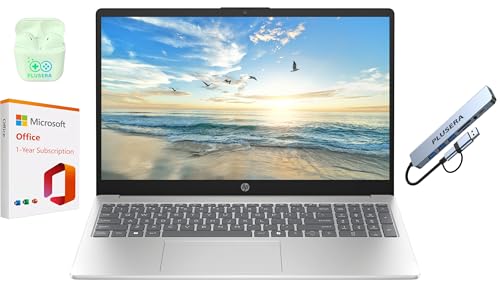
This HP 15.6-inch business laptop is the straightforward choice for everyday home use, with a one-year Microsoft 365 subscription, 16GB of memory and a 128GB SSD built around the quad-core Intel N200 processor. The large screen and the included earphones and hub in the bundle suit a shared family machine that moves between the kitchen table and a desk, and Windows 11 keeps the setup familiar. Its limits are plain: the 128GB SSD is small once files accumulate, and the display resolution on the listing is 1366 by 768 pixels, so text is less sharp than on a Full HD panel.
Watch out for: The listing states that the original factory seal is opened by the seller’s engineers for upgrade purposes and that the one-year warranty is provided by the seller rather than the manufacturer. Also confirm the display resolution before ordering, because a Full HD version of this HP 15 configuration is listed elsewhere with the same memory and storage figures.
Lenovo 15.6″ Student Slim Laptop
- Best for: Students and home workers who want a lifetime Office licence and Windows 11 Pro without a renewal.
- 15.6-inch Full HD display
- Intel Core i3-N305 processor, 8 cores, up to 3.8 GHz
- 8GB LPDDR5 RAM, 4800 MHz, 512GB PCIe NVMe SSD
- Microsoft Office 2024 with lifetime licence, activated without needing a product key
Students and home workers who want a lifetime Office licence and Windows 11 Pro without a renewal.
The USB-C port is for data transfer only, with no display output or charging, so a monitor or charger must use the other ports. The keyboard is not backlit, which matters for late-night work, and the lifetime licence wording should be confirmed on the listing itself before ordering, since the licence is installed by the seller’s bundle rather than by Lenovo.
The Lenovo student slim laptop is the pick for buyers who would rather have a lifetime Office licence than a subscription to renew. Its listing states a free Microsoft Office 2024 licence with lifetime use, activated without needing a product key, alongside Windows 11 Pro and a 512GB PCIe NVMe SSD. The eight-core Intel i3-N305 processor and 8GB of LPDDR5 memory handle Office work and study tasks comfortably, and the Full HD display and Wi-Fi 6 cover lectures and video calls. At around 3.41 pounds it is also the lightest machine in this guide.
Watch out for: The USB-C port is for data transfer only, with no display output or charging, so a monitor or charger must use the other ports. The keyboard is not backlit, which matters for late-night work, and the lifetime licence wording should be confirmed on the listing itself before ordering, since the licence is installed by the seller’s bundle rather than by Lenovo.
HP 15.6″ Business Laptop with Touchscreen
- Best for: Heavy multitaskers who keep years of documents and media on the laptop and want touch input.
- 15.6-inch HD touchscreen display, 1366 x 768 pixels
- Intel Core i3-1215U processor, 6 cores, up to 4.4 GHz
- 32GB DDR4 RAM, 2TB PCIe NVMe SSD
- Free Microsoft Office lifetime licence, pre-installed and activated, no key needed
Heavy multitaskers who keep years of documents and media on the laptop and want touch input.
The listing itself is inconsistent about the Office edition: the title says Office 2024 with a lifetime licence, while the description names Office LTSC Professional Plus 2021 with a lifetime licence and warns that installing Office 365 invalidates it. Confirm with the seller which edition will actually arrive, and do not install a different Office edition on this machine.
This HP 15.6-inch touchscreen laptop is the heavy-duty option of the four, with 32GB of memory and a 2TB PCIe NVMe SSD beside a six-core Intel i3-1215U processor, so large files and many open apps are well within its reach. Its listing promises a free Microsoft Office lifetime licence, and Windows 11 Pro suits buyers whose workplace or school asks for the Pro edition. The HD touchscreen is the weak point: at 1366 by 768 pixels it is less sharp than the Full HD panels here, so this machine trades screen clarity for memory, storage and touch input.
Watch out for: The listing itself is inconsistent about the Office edition: the title says Office 2024 with a lifetime licence, while the description names Office LTSC Professional Plus 2021 with a lifetime licence and warns that installing Office 365 invalidates it. Confirm with the seller which edition will actually arrive, and do not install a different Office edition on this machine.
Which One Fits Your Situation
A student who needs Office from the first day of term
Pick the Acer Aspire Lite 15. Its one-year Microsoft 365 subscription covers Word, Excel, PowerPoint, OneNote and Outlook immediately, with cloud storage for coursework, and the 16GB of memory keeps research tabs and documents open together. Set a reminder for the renewal date so the subscription never lapses mid-term, and keep essays backed up in the cloud.
A home worker who never wants to think about a renewal
Pick the Lenovo student slim laptop. Its listing states a lifetime Office 2024 licence with no key to manage, and Windows 11 Pro covers workplace requirements that Home edition sometimes misses. The 512GB SSD holds years of documents without juggling external drives, and the Full HD screen keeps long working days comfortable.
Someone replacing an old laptop and keeping years of files
Pick the HP touchscreen laptop. Its 32GB of memory and 2TB SSD swallow a large photo library and years of documents, and the touchscreen suits quick scrolling through files. Before ordering, confirm the Office edition with the seller, since the listing names two different editions, and check that the HD screen is sharp enough for your eyes.
A shared family machine for homework, browsing and calls
Pick the HP 15.6-inch business laptop. Its 16GB of memory and one-year Microsoft 365 bundle cover homework and household documents, and the large screen suits shared use at the table. Plan for the small 128GB SSD by keeping big media files on an external drive or in the cloud, and note the renewal date for the Office subscription.
Common Mistakes
- Assuming every “Office included” listing means the same thing: a one-year subscription and a lifetime licence behave very differently after the first year.
- Trusting a combined storage total without checking whether it counts a memory card or cloud allowance alongside the real SSD.
- Choosing a laptop by processor name alone while ignoring the memory figure, which decides how smooth Office and browsing feel together.
- Buying a Windows 11 Home in S mode machine without realising it only installs apps from the Microsoft Store until switched out.
- Installing a different Office edition on a machine whose listing warns that doing so invalidates the bundled lifetime licence.
Frequently Asked Questions
Does “Microsoft Office included” mean the licence lasts forever?
Not always. Some listings bundle a one-year Microsoft 365 subscription, which needs a renewal to keep the desktop apps and extra cloud storage working. Others promise a lifetime Office licence with no renewal. Read the title and the description together, because a listing can name a subscription in one place and a lifetime licence in another.
Is a lifetime Office licence from a seller bundle safe to rely on?
It depends on the listing. A lifetime licence that arrives pre-installed and activated can work well, but it is installed by the seller’s bundle rather than the manufacturer, so keep the listing wording and the seller’s messages as your record. Never install a different Office edition on the same machine if the listing warns that it invalidates the bundled licence.
How much memory and storage do I need for Office work?
For documents, spreadsheets and browsing, 8GB of memory is workable and 16GB is comfortable when many tabs are open. For storage, a genuine 256GB SSD is a sensible minimum, while 128GB fills up quickly once photos and downloads accumulate. Favour a real SSD over a larger total that includes a memory card or a cloud allowance.
What should I check on the listing before I order?
Confirm the Office edition and whether it is a one-year subscription or a lifetime licence, the memory and the real SSD size, the display resolution, and the Windows edition. Also check whether the listing says the factory seal was opened for upgrades and who provides the warranty, since some bundles carry a seller warranty instead of the manufacturer’s.
Related guides
More from Amazon
Programs that pair well with the guide above. Offers and eligibility are set by Amazon and may change.
Free shipping on eligible items, Prime Video and more. Eligible new members can start with a free trial.
Start a Prime free trialAd-free music streaming. Eligible new subscribers can start with a free trial.
Try Music Unlimited freeA Prime membership for ages 18-24 with a trial period. Eligibility is set by Amazon.
See Prime for Young AdultsAudiobooks and podcasts to listen to on the go. Eligible new members can start with a free trial.
Try Audible freeAs an Amazon Associate we earn from qualifying purchases.










Write Your Review
No reviews yet. Be the first to share your experience!