
Key takeaways
- The best laptops just to run microsoft office are affordable, fast-enough machines for Word, Excel and PowerPoint — no gaming GPU needed. See five picks.
What's inside
- Quick Picks
- 1. Lenovo IdeaPad 1 15IJL7 — Cheapest Office-Ready Pick
- 2. HP 15 (15-FD000) — Best Overall for Heavy Word and Excel Use
- 3. Acer Aspire 3 (A315-24PT-R90Z) — Best Touchscreen Value
- 4. ASUS Vivobook Go 15 (E1504FA-AS54) — Best Portable Everyday Office Laptop
- 5. Dell Inspiron 15 3535 — Best for Large Spreadsheets and Windows 11 Pro
- Buying Guide: What Actually Matters for Microsoft Office
- Frequently Asked Questions
- Conclusion
As an Amazon Associate I earn from qualifying purchases. This post may contain affiliate links at no extra cost to you.
If all you need is a laptop that opens Word, Excel, and PowerPoint without fuss, you do not need a gaming machine, a creator workstation, or a flagship ultrabook. Microsoft Office is a light workload by modern standards: documents, spreadsheets, slide decks, email, and a browser full of research tabs. What matters is a comfortable keyboard, a clear screen, enough memory to keep several apps open at once, and fast storage so files open in seconds rather than minutes. The best laptops just to run microsoft office are therefore affordable, practical machines — the kind you buy for the work itself, not for the specifications on the box. This guide compares five such laptops, explains which specifications actually matter for Office, and helps you avoid paying for power you will never use.


As an Amazon Associate, we earn from qualifying purchases made through links on this page, at no extra cost to you.
Quick Picks
Our Short List of 3
All 5 Picks at a Glance
| Product | Specs | Action |
|---|---|---|
| 1. Lenovo IdeaPad 1 15IJL7 — Cheapest Office-Ready Pick | Check price on Amazon | |
| 2. HP 15 (15-FD000) — Best Overall for Heavy Word and Excel Use | Check price on Amazon | |
 3. Acer Aspire 3 (A315-24PT-R90Z) — Best Touchscreen Value | Check price on Amazon | |
 4. ASUS Vivobook Go 15 (E1504FA-AS54) — Best Portable Everyday Office Laptop | Check price on Amazon | |
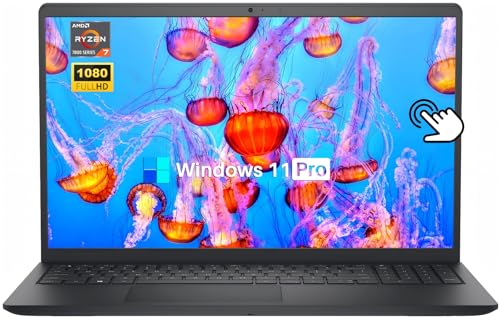 5. Dell Inspiron 15 3535 — Best for Large Spreadsheets and Windows 11 Pro | Check price on Amazon |
1. Lenovo IdeaPad 1 15IJL7 — Cheapest Office-Ready Pick
The Lenovo IdeaPad 1 is the most straightforward answer to this keyword: a basic, inexpensive laptop built for documents, email, and browsing. According to the Amazon listing, it has a 15.6-inch Full HD display, an Intel dual-core processor, 8GB of RAM, and a combination of 128GB of SSD storage plus 128GB of eMMC storage. It also includes Wi-Fi 6, a webcam, Bluetooth, and Windows 11 Home, and the listing states that one year of Office 365 is included, which makes it an especially neat fit for someone who needs Office from day one without buying a separate subscription straight away.
For Word and PowerPoint, this configuration is enough. Documents open quickly, typing feels responsive, and a Full HD screen keeps text sharp enough for long writing sessions. Excel works well for everyday budgets, lists, and school or household spreadsheets, although very large workbooks with thousands of rows and complex formulas will feel slower here than on the 16GB machines in this guide. The dual-core processor is the main limitation, so the IdeaPad 1 suits one task at a time — a document open, a browser with a handful of tabs, and perhaps a video call — rather than a dozen heavy applications running together.
Choose the IdeaPad 1 if your budget is tight, your Office use is mainly Word documents, simple spreadsheets, and slide decks, and you want the lowest-cost route to a working setup. If you regularly juggle large Excel files, many browser tabs, and video calls at the same time, spend a little more on one of the 16GB picks below instead.
Check the Lenovo IdeaPad 1 on Amazon
2. HP 15 (15-FD000) — Best Overall for Heavy Word and Excel Use
The HP 15 is the pick to choose when Office is not an occasional task but the main thing the laptop does all day. According to the Amazon listing, this 2025 model (15-FD000) has a 15.6-inch Full HD touchscreen display with a resolution of 1920 x 1080, a 10-core Intel Core i5-1334U processor that boosts up to 4.6 GHz, Intel Iris Xe Graphics, 16GB of DDR4 RAM, and a 512GB SSD. It runs Windows 11 Home and includes Wi-Fi 6, Bluetooth 5.3, and a 720p HD camera.
That combination removes the two bottlenecks that make cheap Office laptops feel slow: memory and storage. With 16GB of RAM, you can keep Word, Excel, Outlook, and a browser with many tabs open at once without the machine constantly swapping data to disk. The 512GB SSD gives you room for years of documents, photos, and presentations, and it makes the laptop start up and open files noticeably faster than the small-storage budget models. The i5-1334U is far more than Office needs on its own, but that headroom is exactly what keeps the laptop feeling quick when several Office apps, a video call, and a browser are all running together.
This is also the most future-proof pick in the guide. Office itself will not suddenly demand a faster processor, but Windows updates, browser tabs, and background apps all grow heavier over time, and 16GB of RAM plus a modern i5 gives this laptop a longer useful life than the entry-level options. If you can afford one laptop and want to stop thinking about specifications for several years, this is the one to buy.
3. Acer Aspire 3 (A315-24PT-R90Z) — Best Touchscreen Value
The Acer Aspire 3 has long been one of the most popular budget laptops for everyday work, and this touchscreen version is a strong middle ground between the cheapest IdeaPad 1 and the more powerful HP 15. According to the Amazon listing, it has a 15.6-inch Full HD IPS touchscreen display, an AMD Ryzen 5 7520U processor, 8GB of LPDDR5 memory, a 512GB SSD, and Wi-Fi 6, finished in Steam Blue. The model name listed is A315-24PT-R90Z.
The IPS panel is the standout feature here. Compared with the basic TN-style screens found on some budget laptops, an IPS display keeps colours and contrast steady when you view it from an angle, which matters when you tilt the screen back, share it with someone sitting beside you, or work with the laptop on a low table. Text stays clear and readable, and the touchscreen makes scrolling through long Word documents and PDF handouts feel effortless.
For Office, the Ryzen 5 7520U is a comfortable fit. It handles Word and PowerPoint easily, copes with mid-size Excel workbooks, and keeps up with email, browsing, and video calls running at the same time. The 512GB SSD is generous for an Office laptop — plenty of space for documents, photos, and offline OneDrive files — and it is one of the main reasons this laptop feels faster in daily use than budget models with 128GB or 256GB of storage. The 8GB of RAM is the one limit to keep in mind: it is fine for normal Office work, but if you routinely keep twenty browser tabs open alongside Excel and Teams, the 16GB HP 15 or Dell Inspiron 15 below will feel smoother.
Check the Acer Aspire 3 on Amazon
4. ASUS Vivobook Go 15 (E1504FA-AS54) — Best Portable Everyday Office Laptop
The ASUS Vivobook Go 15 is built for people who carry their Office laptop around: to class, to a café, between rooms at home, or to the office a few days a week. According to the Amazon listing, this model (E1504FA-AS54) has a 15.6-inch Full HD display, an AMD Ryzen 5 7520U processor, 8GB of RAM, a 512GB SSD, and Windows 11 Home, in a Cool Silver finish. The listing also notes military-grade durability, fast charging, and a webcam shield.
It is also easy to carry, with a slim profile, a 180-degree lay-flat hinge for sharing the screen, a webcam shield for privacy on video calls, and fast charging for a quick top-up before a meeting or class.
In terms of Office performance, it sits in the same class as the Acer Aspire 3. The Ryzen 5 7520U, 8GB of RAM, and 512GB SSD handle Word, Excel, and PowerPoint comfortably, along with browsing, email, and video calls. It is not the pick for enormous spreadsheets or for running many heavy apps at once — that is where the 16GB models earn their keep — but for writing, editing, presenting, and everyday admin work, it is more than enough.
Choose the Vivobook Go 15 if you want a laptop that travels well, feels a little more modern and durable than the cheapest budget models, and still costs far less than a premium ultrabook. It is a particularly good fit for students and for anyone whose Office work happens in more than one place.
Check the ASUS Vivobook Go 15 on Amazon
5. Dell Inspiron 15 3535 — Best for Large Spreadsheets and Windows 11 Pro
The Dell Inspiron 15 3535 is the most powerful laptop in this guide, and the right choice if your Office work leans heavily on Excel or if you specifically want Windows 11 Pro. According to the Amazon listing, it has a 15.6-inch Full HD touchscreen display, Windows 11 Pro, an 8-core AMD Ryzen 7 7730U processor, 16GB of 3200MHz RAM, a 512GB SSD, AMD Radeon Graphics, Wi-Fi, and an HD webcam. The model listed is i3535-A813BLK-PUS, part of the Dell Inspiron 15 3535 range.
The Ryzen 7 7730U and 16GB of RAM give this laptop the most headroom of the five. Large Excel workbooks recalculate faster, sorting and filtering big tables feels smoother, and you can keep Word, Excel, PowerPoint, Outlook, Teams, and a browser open together without the slowdowns that appear on 8GB machines. If your spreadsheets have thousands of rows, pivot tables, or linked data, that extra performance is not wasted — it is the difference between waiting and working.
Windows 11 Pro is the other reason to choose this model. It adds business features such as BitLocker device encryption and Remote Desktop hosting, which matter if the laptop is used for work with sensitive documents or if an employer or school requires Pro. For purely personal use, Windows 11 Home is fine, and the HP 15 above offers similar Office performance for less. But if you need Pro, or you simply want the strongest Office laptop in this price class, the Inspiron 15 3535 is the pick.
Check the Dell Inspiron 15 3535 on Amazon
Buying Guide: What Actually Matters for Microsoft Office
How much RAM do you need for Office?
For Word, PowerPoint, and light Excel work, 8GB of RAM is enough. For heavy multitasking — several Office apps plus a browser with many tabs plus Teams or Zoom — 16GB is noticeably smoother and is worth the extra cost if you can afford it. You do not need 32GB for Office alone, and paying for it would be money spent on capacity you will not use.
Which processor is enough?
Any modern processor from the last few years will run Office well. An Intel Core i3 or i5, an AMD Ryzen 3 or Ryzen 5, or even a basic dual-core chip will open Word and PowerPoint without trouble. The processor matters more for large Excel files and for multitasking than for typing a letter. As a rule, a Core i5 or Ryzen 5 is the sweet spot: fast enough for anything Office can throw at it, without the price of a high-end chip.
SSD versus hard drive: do not buy a hard drive
This is the single most important specification in the whole guide. A laptop with an SSD starts in seconds, opens Word almost instantly, and saves large files quickly. A laptop with an old spinning hard drive feels slow from the first day, no matter how good its processor is. Every laptop in this guide has an SSD, and you should treat that as a minimum requirement. Aim for at least 256GB of storage; 512GB is better if you keep photos, videos, or a large OneDrive library on the machine.
Screen size and keyboard
A 15.6-inch Full HD (1920 x 1080) screen is the best fit for most Office users. It shows more of a document or spreadsheet at once than a 14-inch screen, and it usually comes with a full keyboard including a number pad, which is a real time-saver in Excel. Avoid screens below Full HD resolution: at 1366 x 768, text looks soft and you see less of each page.
Do you need Microsoft 365, or is Office a one-time purchase?
Microsoft Office now comes in two forms. Microsoft 365 is a subscription that includes Word, Excel, PowerPoint, and OneDrive cloud storage, and it is the version included for one year with the Lenovo IdeaPad 1 in this guide. A one-time purchase of Office Home and Student gives you the desktop apps without a subscription, but without the ongoing cloud storage. If you already have a Microsoft 365 subscription, any Windows laptop in this guide will work with it.
Battery life, webcam, and ports
For Office work, look for at least six to eight hours of real battery life, a webcam for video calls, and enough ports for a mouse, a USB drive, and an external monitor via HDMI or USB-C. None of the laptops in this guide needs a dedicated graphics card, a high-refresh display, or a gaming keyboard — those features add cost and weight without helping Word or Excel at all.
What to avoid
Avoid laptops with only 4GB of RAM and 64GB of eMMC storage as your main Office machine, unless your budget is extremely tight and your use is very light. They can run Office, but they slow down quickly with updates and multiple apps open. Also avoid Chromebooks if you need the full desktop versions of Word, Excel, and PowerPoint: Chromebooks run the web or Android versions of Office, which lack some desktop features, especially in Excel. Finally, do not buy a gaming laptop just for Office. It will work, but you will pay hundreds of pounds or dollars extra for a graphics card that Word will never use, and you will carry a heavier machine with shorter battery life.
Frequently Asked Questions
Can a cheap laptop run Microsoft Office well?
Yes. Word, Excel, and PowerPoint are light programs, and a basic modern laptop with 8GB of RAM and an SSD runs them well. The Lenovo IdeaPad 1 in this guide is proof of that: it is the cheapest pick here and it handles documents, simple spreadsheets, and presentations without trouble. You only need to spend more if you work with very large Excel files or keep many apps open at once.
How much RAM do I need just for Microsoft Office?
8GB is enough for Word, PowerPoint, and everyday Excel. 16GB is better if you multitask heavily, work with large spreadsheets, or want the laptop to stay fast for several years. For Office alone, you do not need more than 16GB.
Do I need a graphics card to run Microsoft Office?
No. Office runs on the integrated graphics built into every modern processor, and none of the laptops in this guide has a dedicated graphics card. A dedicated GPU only helps with gaming, 3D design, and video editing — not with documents or spreadsheets.
Is a Chromebook good enough for Microsoft Office?
It depends on what you need. A Chromebook runs the web versions of Word, Excel, and PowerPoint, which are fine for basic documents and simple spreadsheets. But they lack some desktop features, especially in Excel, and they do not run the full desktop apps offline. If you need the complete desktop versions of Office, buy a Windows laptop like the ones in this guide instead.
Should I buy Office separately, or does it come with the laptop?
It varies by laptop. Some models, such as the Lenovo IdeaPad 1 in this guide, include a year of Microsoft 365 according to the Amazon listing. Others include a trial or nothing at all, and you buy Microsoft 365 or a one-time Office licence separately. Always check the listing before you buy so you know what is included.
Conclusion
You do not need an expensive laptop just to run Microsoft Office. A basic machine with a Full HD screen, 8GB of RAM, and an SSD handles Word, Excel, and PowerPoint comfortably — and that is exactly what the Lenovo IdeaPad 1, Acer Aspire 3, and ASUS Vivobook Go 15 in this guide offer at affordable prices. If Office is your whole working day, or your spreadsheets are large, step up to 16GB of RAM with the HP 15 or the Dell Inspiron 15 3535, and you will have a machine that stays fast for years without paying for a graphics card you will never use. Pick the laptop that matches how you actually work, check that it includes the version of Office you need, and spend the money you save on something that matters more than specifications.
Related guides
More from Amazon
Programs that pair well with the guide above. Offers and eligibility are set by Amazon and may change.
Free shipping on eligible items, Prime Video and more. Eligible new members can start with a free trial.
Start a Prime free trialAd-free music streaming. Eligible new subscribers can start with a free trial.
Try Music Unlimited freeA Prime membership for ages 18-24 with a trial period. Eligibility is set by Amazon.
See Prime for Young AdultsAudiobooks and podcasts to listen to on the go. Eligible new members can start with a free trial.
Try Audible freeAs an Amazon Associate we earn from qualifying purchases.










Write Your Review
No reviews yet. Be the first to share your experience!