
Key takeaways
- Laptops for DAW work compared on CPU cores, memory, SSD size and quiet running, with specs taken from Amazon US product listings.
What's inside
As an Amazon Associate I earn from qualifying purchases. This post may contain affiliate links at no extra cost to you.
A DAW laptop is chosen by what happens at the worst moment of a session: fifty tracks, a stack of plug-ins and a vocal take running while the buffer sits low. The deciding factors are sustained processor performance, enough memory for sample libraries, fast storage, and, for anyone recording in the same room, how much fan noise the machine makes while it works.
This guide is for producers, beatmakers and home-studio recordists working in software such as Ableton Live, FL Studio, Logic Pro or Pro Tools. The models below were selected from their Amazon listings, and the discussion sticks to what those listings state: cores, memory, storage and graphics. Latency settings, interface connections and cooling behaviour get their own attention too, because they decide whether a powerful-on-paper machine actually behaves inside a real studio day.
Quick Picks
As an Amazon Associate we earn from qualifying purchases.
| Product | Best for | Key spec from title |
|---|---|---|
| Apple MacBook Pro 14 (M4) | Producers who want power with a quiet room | M4 10-core CPU, 16GB memory, 512GB SSD, XDR display |
| Apple MacBook Air 13 (M3) | Recording vocals and acoustic takes in the same room | M3 chip, 16GB unified memory, 256GB SSD, Touch ID |
| Lenovo Legion 5i (RTX 4060) | Windows producers running big plug-in counts | i7-13650HX, RTX 4060 8GB, 32GB RAM, 16-inch QHD 165Hz |
| ASUS ROG Zephyrus G14 (RTX 5070 Ti) | Producers who also create video and travel | Ryzen AI 9 HX 370, RTX 5070 Ti 12GB, 32GB RAM, OLED 3K |
How to Choose
Single-core speed and core count both matter
A DAW spreads plug-ins across cores but each individual track chain still leans on single-core performance, so modern high-clock processors with many cores are the target. The MacBook Pro’s M4 chip lists a 10-core CPU, the Legion 5i lists a 14-core i7-13650HX, and the Zephyrus G14 lists a Ryzen AI 9 HX 370. Older low-power chips with few cores will run a demo project and then struggle with a real arrangement. Compare the exact processor named in the listing, not the brand family on the box.
Memory holds your sample libraries
Sample-based instruments load libraries into RAM, and orchestral or drum libraries are hungry. Sixteen gigabytes is a workable floor for beatmaking and band recording, while 32GB, listed on the Legion 5i and the Zephyrus G14 here, removes most ceiling worries for large templates. Apple’s unified memory is shared with the graphics, so treat the listed figure as the whole pool. Because memory is soldered in most thin laptops, the number in the listing is the number you will produce with for years.
Storage speed and size shape session flow
Projects, sample packs and recorded takes accumulate quickly, and an SSD keeps load times short when a session pulls hundreds of files. A 512GB SSD is the practical minimum for an active producer; 1TB, listed on the Legion and the Zephyrus, is calmer. External drives can hold archives, but the working library should live on the internal SSD. Check the listing for SSD rather than older spinning storage, and remember cloud backups protect work but do not stream samples in real time.
Noise, ports and the recording room
If you record vocals or acoustic instruments near the laptop, fan behaviour matters as much as benchmarks. The MacBook Air in this guide has no fan at all, which is why it appears in a production list despite modest power. The MacBook Pro and Windows models use fans that spin up under export loads. Ports also count: audio interfaces need USB or Thunderbolt, and the ThinkPad-class port sets are rare here, so count the connections in the listing against your interface, controller and drives.
The 4 Best Options
Apple MacBook Pro 14-inch with M4 Chip

The MacBook Pro 14 with M4 lists a 10-core CPU, 16GB of unified memory and a 512GB SSD behind a bright Liquid Retina XDR screen. That specification maps well to Logic Pro and Ableton sessions with many plug-in tracks, and the chassis is built to sustain performance during long exports. It is the balanced pro choice in this group for macOS-based studios. The XDR screen earns its place when the same session moves into video edits or artwork, and the chassis stays composed during long bounce and export runs.
Specs
- Apple M4 chip with 10-core CPU and 10-core GPU
- 14.2-inch Liquid Retina XDR display, up to 1600 nits peak brightness
- 16GB unified memory
- 512GB SSD storage
- Silver finish
Best for: Producers committed to macOS software who record and mix on one machine.
Watch out for: The 512GB SSD will need an external drive partner if your sample library is large.
Apple MacBook Air 13-inch with M3 Chip

The MacBook Air’s fanless design is its production feature: with an M3 chip, 16GB of unified memory and a 256GB SSD, it records in silence because there is no fan to bleed into a microphone. It suits tracking, songwriting and moderate arrangements rather than huge templates. For a bedroom studio where the laptop sits beside the mic, that silence is worth more than extra cores. It also doubles as a clean songwriting machine away from the studio, with the battery and weight to live in a gig bag beside an interface.
Specs
- Apple M3 chip
- 13.6-inch Liquid Retina display
- 16GB unified memory
- 256GB SSD storage
- Backlit keyboard with Touch ID
- Silver finish; model MC8H4LL/A
Best for: Singer-songwriters and podcasters recording where the laptop lives.
Watch out for: The 256GB SSD is small for sample libraries, and sustained heavy mixes will test a fanless chassis.
Lenovo Legion 5i Gaming Laptop with RTX 4060

The Legion 5i lists the strongest Windows specification here for session work: a 14-core i7-13650HX, 32GB of RAM, a 1TB SSD and an RTX 4060 that also helps GPU-accelerated plug-ins and video. The 16-inch QHD screen gives a DAW timeline room to breathe. It is a desk-anchored studio machine rather than a travel companion, and its cooling is built for sustained loads. The larger screen keeps dozens of tracks visible without constant scrolling, and the port set handles interfaces, controllers and external drives at the same desk.
Specs
- Intel Core i7-13650HX 14-core processor
- NVIDIA GeForce RTX 4060 8GB graphics
- 16-inch QHD 165Hz G-SYNC display
- 32GB RAM
- 1TB SSD
- 4-zone RGB backlit keyboard; Windows 11 Home
Best for: Windows producers with large templates who work mainly at one desk.
Watch out for: It is a gaming-class chassis, so expect fan noise under load and check its weight for travel.
ASUS ROG Zephyrus G14 with RTX 5070 Ti
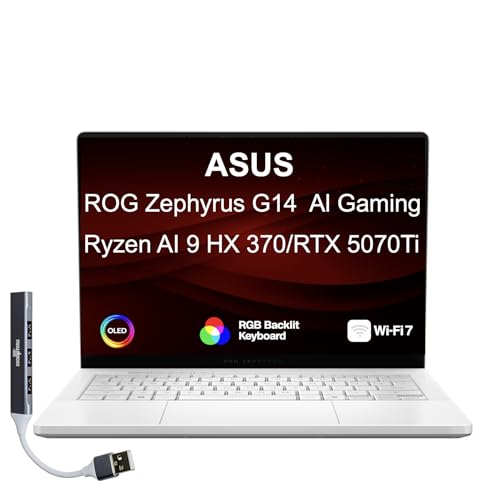
The Zephyrus G14 pairs a Ryzen AI 9 HX 370 with 32GB of LPDDR5X memory, a 1TB SSD and an RTX 5070 Ti in a 14-inch body, which is an unusual amount of session power per inch. The OLED 3K display helps when the same machine edits session video. This is a seller-configured listing, so the configuration in the title is exactly what to verify at checkout. The strong graphics also cover live-streamed sessions and video content around a release, which many independent producers now handle on the same machine.
Specs
- AMD Ryzen AI 9 HX 370 processor
- NVIDIA GeForce RTX 5070 Ti 12GB graphics
- 14-inch 120Hz OLED 3K display, 500 nits, full DCI-P3
- 32GB LPDDR5X memory
- 1TB SSD
- Wi-Fi 7, RGB keyboard, Windows 11 Pro
Best for: Mobile producers who want one compact machine for audio and video work.
Watch out for: Confirm the exact configuration on the listing, as this model sells in several variants.
Which One Fits Your Situation
You record vocals next to the laptop
Choose the MacBook Air M3. Its fanless design removes the main source of machine noise from the room, and 16GB of memory handles tracking sessions and moderate arrangements without the microphone ever hearing the computer. That makes it the natural tracking machine, while a second, stronger computer can still handle mixing if your studio grows.
You mix large sessions on macOS
Take the MacBook Pro 14 with M4. The 10-core chip, XDR display and sustained-performance chassis suit long mix sessions, and an external SSD can extend the 512GB of internal storage when libraries grow. Add a fast external SSD for libraries when the internal drive fills, and the setup stays balanced for years.
You produce on Windows with heavy plug-ins
Pick the Legion 5i. Its listed 32GB of RAM and 1TB SSD give big templates room, and the HX-series processor is built for sustained multi-track loads at a desk-based studio. The 16-inch screen and full port set complete a desk setup that needs no immediate additions beyond your studio interface and monitors.
You tour and produce on the road
Look at the Zephyrus G14. It packs 32GB of memory and a 1TB SSD into a 14-inch body, so a full production setup travels in a backpack, with the RTX graphics covering video work too. Verify the seller configuration before ordering, since this model is sold in several memory and graphics variants.
Common Mistakes
- Choosing a low-core budget chip and discovering the ceiling only when a real mix starts crackling.
- Buying 8GB of memory for sample-heavy work, then watching libraries swap to disk mid-session.
- Recording beside a loud gaming laptop and capturing its fans on every quiet vocal take.
- Filling a small SSD with sample packs until the DAW has nowhere to cache or record.
- Ignoring port counts and finding the interface, controller and drive cannot all connect at once.
Frequently Asked Questions
How many cores does a DAW laptop need?
Modern processors with eight or more performance-capable cores handle most production comfortably, and every model here lists at least a 10-core-class chip except the 8-core-class Air. Track count, plug-in weight and buffer settings decide the real ceiling, so match the chip to your largest typical session, not your smallest.
Is 16GB of RAM enough for music production?
For beatmaking, band recording and moderate plug-in use, 16GB works. Large orchestral templates and many sample instruments justify 32GB, which the Legion 5i and Zephyrus G14 list here. Because memory is rarely upgradeable in these machines, buying headroom now is cheaper than replacing the laptop later.
Mac or Windows for a home studio?
Both run major DAWs well; Logic Pro is macOS-only, while some interfaces and plug-ins favour one side. The two Apple models here suit Logic users and quiet rooms. The Legion and Zephyrus suit Windows studios and producers who also want strong graphics for video.
Does the graphics card matter for audio work?
For pure audio, barely. A discrete GPU like the RTX 4060 or 5070 Ti matters when the same machine edits video, streams, or runs GPU-accelerated plug-ins. If your work is audio only, put the budget into processor, memory and storage first, as the MacBook configurations here do.
Related guides
- Best Laptops to Play Roblox: From Budget Integrated Graphics to Dedicated GPUs
- Best Laptops for Zoom Teaching: Clear Video, Reliable Audio and All-Day Class Power
- Best Laptops for Video Editing and Music Production: Power, Screen and Storage
- Best Laptops for Network Engineers: Ethernet, RAM for Labs and Ports That Matter
More from Amazon
Programs that pair well with the guide above. Offers and eligibility are set by Amazon and may change.
Free shipping on eligible items, Prime Video and more. Eligible new members can start with a free trial.
Start a Prime free trialAd-free music streaming. Eligible new subscribers can start with a free trial.
Try Music Unlimited freeA Prime membership for ages 18-24 with a trial period. Eligibility is set by Amazon.
See Prime for Young AdultsAudiobooks and podcasts to listen to on the go. Eligible new members can start with a free trial.
Try Audible freeAs an Amazon Associate we earn from qualifying purchases.










Write Your Review
No reviews yet. Be the first to share your experience!