
Our Short List of 3

- Best for: Students and lab learners who want a touchscreen and a high-refresh display for multitasking.
- Intel Core 5 320 processor, 6 cores (2P + 4LPE), 6 threads, max turbo up to 4.6GHz, 6MB Intel Smart Cache
- 32GB SODIMM DDR5 RAM, 1TB SSD PCIe NVMe storage
- 15.3-inch 2K WUXGA touchscreen, 120Hz, IPS display
- Integrated Intel Graphics

- Best for: IT learners and multitaskers who want Windows 11 Pro and an eight-core processor for busier labs.
- AMD Ryzen 7 170 processor, 8 cores, 16 threads, 3.20GHz up to 4.7GHz, 16MB cache
- 32GB DDR5 SODIMM RAM, 1TB 2242 PCIe NVMe SSD
- 15.3-inch touchscreen FHD+ display
- AMD Radeon 680M integrated graphics

- Best for: First-time home labs where a wired Ethernet port and a roomy keyboard matter.
- AMD Ryzen 7 5700U processor, 8 cores, 1.8GHz up to 4.3GHz
- 32GB DDR4 SDRAM 3200MHz, 1TB SSD
- 15.6-inch Full HD (1920 x 1080) IPS display
- AMD Radeon Graphics
All 4 Picks at a Glance
| Product | Specs | Action |
|---|---|---|
| Lenovo IdeaPad Slim 3i 15.3″ |
| Check price on Amazon |
| Lenovo IdeaPad Slim 3 Ryzen 7 15.3″ |
| Check price on Amazon |
| Acer Aspire 3 15 |
| Check price on Amazon |
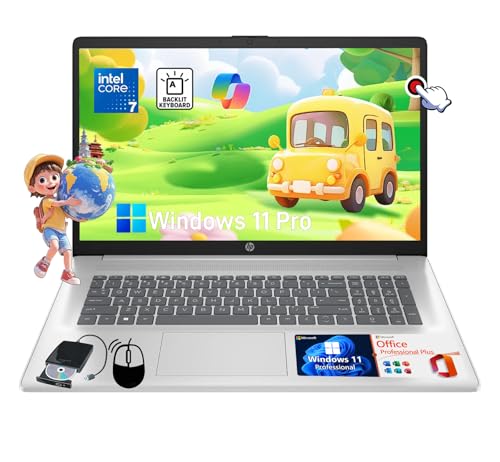 HP Flagship 17″ Touchscreen |
| Check price on Amazon |
Key takeaways
- These affordable laptops for VMware pack the RAM and storage virtual machines need. Compare four value picks for labs, study, and everyday VM work.
What's inside
As an Amazon Associate I earn from qualifying purchases. This post may contain affiliate links at no extra cost to you.
Choosing an affordable laptop for VMware is a decision about memory headroom and processor cores, not about the fastest graphics card or the thinnest chassis. A virtual machine borrows RAM and CPU time from the host, so a laptop that feels quick on its own can still stutter once a guest operating system, a browser full of tabs, and a lab tool are all running at once. The practical question is how much room the machine leaves you after Windows itself has taken its share.
This guide is for students setting up a home lab, IT learners practising with test servers, and anyone who needs to run a second operating system without buying a workstation-class machine. Every laptop below was picked from its Amazon listing for a roomy memory configuration, a multi-core processor, and fast solid-state storage. Check the current price on Amazon before deciding, since listings and configurations change.
Quick Picks
As an Amazon Associate we earn from qualifying purchases
| Product | Best for | Key spec from title |
|---|---|---|
| Lenovo IdeaPad Slim 3i 15.3″ | Touchscreen lab work with a sharp display | Intel Core 5 320, 32GB DDR5 RAM, 1TB SSD |
| Lenovo IdeaPad Slim 3 Ryzen 7 15.3″ | Windows 11 Pro and heavier multitasking | AMD Ryzen 7 170, 32GB DDR5 RAM, 1TB SSD |
| Acer Aspire 3 15 | A first home lab with wired networking | AMD Ryzen 7 5700U, 32GB DDR4 RAM, 1TB SSD |
| HP Flagship 17″ Touchscreen | Long sessions on a large screen | Intel Core 7 150U, 32GB DDR4 RAM, 1TB SSD |
How to Choose
Start With RAM, Because Virtual Machines Share It
Memory is the first bottleneck in almost every VMware setup, because the host operating system and every guest divide the same pool. When the pool runs dry, the host starts swapping to disk and everything slows down, even if the processor is barely busy. That is why every pick in this guide carries 32GB of RAM on its listing: it leaves room for Windows, a guest or two, and the everyday apps around them. Before ordering, read the listing carefully and confirm the memory figure belongs to the exact configuration you are buying, since sellers often list several RAM options under one model name.
Count Cores, Not Just Clock Speed
A guest operating system needs processor time of its own, and it takes that time away from whatever the host is doing. A processor with more cores and threads can hand a guest a couple of cores while the host keeps enough to stay responsive, which matters more for smooth lab work than a high peak clock speed on paper. Look for a modern multi-core chip with eight cores or a strong six-core design, and check the listing for the exact processor model rather than a vague family name. Thermal limits matter too: a thin chassis that throttles under sustained load will feel slower during long VM sessions.
Storage Space and Speed for Virtual Disks
Virtual disks grow as you install operating systems, updates, and lab software inside a guest, so a cramped drive fills up faster than most buyers expect. A 1TB solid-state drive gives a guest room to breathe alongside the host system, your files, and snapshots, while a solid-state drive in general keeps guests booting and resuming far faster than an old spinning drive ever could. Check the listing for the drive type and capacity, and be wary of listings that pair a small flash module with a large hard drive or mention eMMC storage, since those combinations behave very differently from a full-size NVMe SSD.
Ports, Display, and the Corners Value Laptops Cut
Affordable laptops save money somewhere, and the cuts usually show up in the screen, the port selection, or the build rather than in the headline processor. A dim or low-resolution display makes long sessions with several VM windows tiring, and a missing Ethernet port means relying on Wi-Fi for lab networking unless you add an adapter. Count the USB ports, check for HDMI and a card reader if you use them, and look at the keyboard layout if you will spend hours typing in a guest. None of these details decides whether VMware runs, but they decide whether you enjoy using the machine every day.
The 4 Best Options
Lenovo IdeaPad Slim 3i 15.3″
- Best for: Students and lab learners who want a touchscreen and a high-refresh display for multitasking.
- Intel Core 5 320 processor, 6 cores (2P + 4LPE), 6 threads, max turbo up to 4.6GHz, 6MB Intel Smart Cache
- 32GB SODIMM DDR5 RAM, 1TB SSD PCIe NVMe storage
- 15.3-inch 2K WUXGA touchscreen, 120Hz, IPS display
- Integrated Intel Graphics
Students and lab learners who want a touchscreen and a high-refresh display for multitasking.
The listing is sold as a bundle with a USB hub, and sellers list several Slim 3 variants, so confirm the exact RAM, storage, and display configuration on the listing before ordering.
The IdeaPad Slim 3i suits anyone who wants a touchscreen and a sharp display for juggling VM windows, documentation, and a browser side by side. Its 2K touchscreen with a 120Hz refresh rate keeps scrolling and window switching smooth, while the 32GB of DDR5 memory gives a guest plenty of room without starving the host. The Intel Core 5 processor handles everyday lab work comfortably, and the slim chassis stays easy to carry between a desk and a classroom. It is the most display-focused pick in this guide.
Watch out for: The listing is sold as a bundle with a USB hub, and sellers list several Slim 3 variants, so confirm the exact RAM, storage, and display configuration on the listing before ordering.
Lenovo IdeaPad Slim 3 Ryzen 7 15.3″
- Best for: IT learners and multitaskers who want Windows 11 Pro and an eight-core processor for busier labs.
- AMD Ryzen 7 170 processor, 8 cores, 16 threads, 3.20GHz up to 4.7GHz, 16MB cache
- 32GB DDR5 SODIMM RAM, 1TB 2242 PCIe NVMe SSD
- 15.3-inch touchscreen FHD+ display
- AMD Radeon 680M integrated graphics
IT learners and multitaskers who want Windows 11 Pro and an eight-core processor for busier labs.
The listing states the machine was professionally upgraded by the seller, with a one-year warranty from that seller, so check who handles warranty and support before buying. The 1TB SSD is a 2242-size drive, so confirm the replacement drive size if you plan to upgrade storage later.
This Ryzen-powered Slim 3 is the pick for heavier multitasking, thanks to an eight-core processor with sixteen threads and Windows 11 Pro on the listing. Extra threads help when a guest runs services in the background while you keep working on the host, and the Pro edition suits lab setups that rely on business features. The 32GB of DDR5 memory and 1TB SSD match the rest of the guide, and the touchscreen keeps the machine flexible for notes and navigation. It is a strong all-rounder for anyone whose lab keeps growing.
Watch out for: The listing states the machine was professionally upgraded by the seller, with a one-year warranty from that seller, so check who handles warranty and support before buying. The 1TB SSD is a 2242-size drive, so confirm the replacement drive size if you plan to upgrade storage later.
Acer Aspire 3 15
- Best for: First-time home labs where a wired Ethernet port and a roomy keyboard matter.
- AMD Ryzen 7 5700U processor, 8 cores, 1.8GHz up to 4.3GHz
- 32GB DDR4 SDRAM 3200MHz, 1TB SSD
- 15.6-inch Full HD (1920 x 1080) IPS display
- AMD Radeon Graphics
First-time home labs where a wired Ethernet port and a roomy keyboard matter.
The 32GB RAM and 1TB SSD configuration is a seller bundle, while Acer’s own specification page for the base Aspire 3 model in this family lists 16GB of RAM and a 512GB SSD, so confirm the exact shipped configuration on the Amazon listing.
The Aspire 3 is the straightforward choice for a first home lab, pairing an eight-core Ryzen processor with 32GB of RAM and a full-size keyboard in a familiar 15.6-inch body. Its standout detail for VMware work is the wired Ethernet port, which is handy when a lab setup prefers a stable wired connection over Wi-Fi. The Full HD IPS display is easy on the eyes for long sessions, and the bundle adds a USB-C hub, a mouse pad, and a cleaning cloth. It is the most practical pick for buyers who want lab-ready connectivity without extras they will not use.
Watch out for: The 32GB RAM and 1TB SSD configuration is a seller bundle, while Acer’s own specification page for the base Aspire 3 model in this family lists 16GB of RAM and a 512GB SSD, so confirm the exact shipped configuration on the Amazon listing.
HP Flagship 17″ Touchscreen
- Best for: Desk-based lab sessions where a large touchscreen and a full keyboard matter most.
- Intel Core 7 150U processor, 10 cores, up to 5.4GHz
- 32GB DDR4 RAM (maximum 64GB per listing), 1TB SSD
- 17.3-inch HD+ (1600 x 900) BrightView touchscreen display
- Backlit keyboard with numeric keypad, Copilot
Desk-based lab sessions where a large touchscreen and a full keyboard matter most.
The 1600 x 900 resolution is low for a 17.3-inch screen, so text and VM windows look less sharp than on a Full HD display. The listing shows several storage options, so confirm the 1TB configuration is selected, and check who handles warranty, since matching listings describe this as a seller-upgraded configuration.
The HP Flagship 17 trades portability for screen space, giving lab work a large 17.3-inch touchscreen where several VM windows can sit side by side. Its ten-core Intel Core 7 processor and 32GB of RAM handle a host plus guests without fuss, and the 1TB SSD leaves room for multiple virtual disks and snapshots. A backlit keyboard with a numeric keypad suits long typing sessions, and Windows 11 Pro is on the listing. This is the pick for a mostly desk-bound setup where a big display matters more than carrying the machine around.
Watch out for: The 1600 x 900 resolution is low for a 17.3-inch screen, so text and VM windows look less sharp than on a Full HD display. The listing shows several storage options, so confirm the 1TB configuration is selected, and check who handles warranty, since matching listings describe this as a seller-upgraded configuration.
Which One Fits Your Situation
A First Home Lab With Wired Networking
Pick the Acer Aspire 3 15. Its eight-core Ryzen processor and 32GB of RAM cover a host plus a guest comfortably, and the built-in Ethernet port gives lab networking a stable wired connection without an adapter. The Full HD display and full-size keyboard keep long setup sessions comfortable, and the bundled USB-C hub covers extra ports when you need them.
Studying With a Touchscreen and a Sharp Display
Pick the Lenovo IdeaPad Slim 3i 15.3″. The 2K touchscreen with a 120Hz refresh rate makes switching between VM windows, notes, and reference material feel fluid, and 32GB of DDR5 memory keeps the host responsive while a guest runs. It is light enough to carry to class, which matters if your lab moves with you.
A Busy Lab That Needs Windows 11 Pro
Pick the Lenovo IdeaPad Slim 3 Ryzen 7 15.3″. The eight-core, sixteen-thread processor has the most thread headroom in this guide for guests running background services, and Windows 11 Pro on the listing suits setups that use business features. The 1TB SSD and 32GB of DDR5 memory round out a machine built for heavier days.
Long Sessions at a Desk With a Big Screen
Pick the HP Flagship 17″ Touchscreen. The 17.3-inch display fits several VM windows side by side, the backlit keyboard with a numeric keypad suits long typing sessions, and the ten-core processor with 32GB of RAM keeps everything moving. Accept the lower screen resolution in exchange for the sheer workspace, and keep the machine mostly at one desk.
Common Mistakes
- Buying a laptop with too little RAM and expecting the host and guests to share it comfortably once Windows, a browser, and a VM are all open.
- Assuming every listing under one model name has the same memory and storage, when sellers often list several configurations and upgraded variants side by side.
- Picking a small drive or a slow storage type and then running out of room as virtual disks, snapshots, and guest updates grow.
- Forgetting to enable virtualization in the BIOS or UEFI settings, which can stop VMware from starting a 64-bit guest even on a capable machine.
- Judging a laptop only by its processor and ignoring the display, keyboard, and ports you will live with during long lab sessions.
Frequently Asked Questions
Can an affordable laptop run VMware Workstation well?
Yes, for typical lab and study work. A modern multi-core processor with generous RAM and a fast SSD handles a host operating system plus one or two guests smoothly. The limits show up with many heavy guests at once or with demanding 3D workloads inside a guest, which call for a stronger machine than the value picks in this guide.
How much RAM do I need for VMware?
There is no single number that fits every lab, because it depends on how many guests you run and what they do. The 32GB configurations in this guide leave comfortable room for the host plus guests, while lighter setups can get by with less if you run one small guest at a time. Check how much memory your guests will need before choosing.
Do I need a dedicated graphics card for VMware?
Usually not. Most lab, office, and study guests run fine on integrated graphics, since VMware work is usually limited by memory and processor cores rather than the GPU. A dedicated graphics card only starts to matter for guests doing heavy 3D rendering, video work, or gaming, which is outside the scope of these picks.
Should I choose Windows 11 Home or Pro for VMware?
Either edition runs VMware Workstation, so base the choice on your other needs. Windows 11 Pro adds business features that some lab setups use, and two picks in this guide come with Pro on their listings. If you do not need those extras, a Home edition machine with the right memory and processor serves a lab just as well.
Related guides
More from Amazon
Programs that pair well with the guide above. Offers and eligibility are set by Amazon and may change.
Free shipping on eligible items, Prime Video and more. Eligible new members can start with a free trial.
Start a Prime free trialAd-free music streaming. Eligible new subscribers can start with a free trial.
Try Music Unlimited freeA Prime membership for ages 18-24 with a trial period. Eligibility is set by Amazon.
See Prime for Young AdultsAudiobooks and podcasts to listen to on the go. Eligible new members can start with a free trial.
Try Audible freeAs an Amazon Associate we earn from qualifying purchases.










Write Your Review
No reviews yet. Be the first to share your experience!