
Key takeaways
- Find the best new laptops with usb c ports for work, school, and travel. Compare USB-C charging, display output, and everyday performance before you buy.
What's inside
As an Amazon Associate I earn from qualifying purchases. This post may contain affiliate links at no extra cost to you.
The best new laptops with usb c ports make everyday computing simpler: one small reversible connector can charge the machine, move files at high speed, and drive an external display. That is the quick answer, and it is why USB-C has become the port to look for first when you buy a new laptop. A laptop without USB-C can feel dated the moment you try to connect a modern monitor or a fast external drive.

This guide focuses strictly on new laptops that actually include at least one USB-C port. Every pick below is a new laptop, not a tablet, a desktop, or a refurbished machine. The four laptops here cover different needs: a thin premium ultraportable, two practical Windows laptops, and a touchscreen model with more memory. Not every USB-C port does the same job: some support charging and video output, while others handle data only.
Quick Picks
Our Short List of 3
All 3 Picks at a Glance
| Product | Specs | Action |
|---|---|---|
| 1. Apple 2025 MacBook Air 13-inch Laptop with M4 chip (B0DZDCPMGK) | Check price on Amazon | |
| 3. Dell Inspiron 15 3535 Touchscreen Laptop (B0GSTWY3T3) | Check price on Amazon | |
 4. HP 15-FD000 Laptop, 15.6-inch (B0FJFGL5Y4) | Check price on Amazon |
How to Choose
Count the USB-C Ports and Learn What Each One Does
A laptop with one USB-C port can still be a good choice, but two ports give you far more freedom. With two, you can charge through one port while a drive or a display uses the other. With one, a small hub may still be useful on a busy desk. Also check what each port can do: look for Power Delivery, DisplayPort, and Thunderbolt in the specification list. Power Delivery means the port can accept charging from a USB-C charger. DisplayPort over USB-C means the port can send video to a monitor. Thunderbolt means the port supports high-speed data, video, and charging through a single cable. A plain USB-C data port is still useful for storage and peripherals, but it will not charge the laptop or drive a display.
Decide Between USB-C Charging and a Separate Charger
Some new laptops charge only through USB-C, some charge through a separate barrel or magnetic connector and use USB-C for data and video, and some support both. USB-C charging is convenient because one charger can serve a laptop, a phone, and a tablet while travelling. The trade-off is that a low-wattage phone charger may charge a laptop very slowly, so the charger wattage should match the laptop. A 30-watt adapter suits a thin ultraportable, while a larger 15.6-inch Windows laptop usually needs a 45-watt or 65-watt USB-C charger for reliable charging under load. The MacBook Air in this guide charges through its magnetic MagSafe connector with a USB-C cable and adapter, while its two Thunderbolt 4 USB-C ports handle data and displays. Know the arrangement before you buy.
Match the Processor and Memory to Real Daily Work
USB-C is the headline feature of this guide, but the processor and memory decide how pleasant the laptop feels after a month of use. For browsing, email, documents, video calls, and streaming, a modern Core i5 or Ryzen 5 processor with 8GB of memory is a sensible starting point. For heavier multitasking, large spreadsheets, and photo editing, 16GB of memory gives the machine more room. Storage matters too. A 256GB solid-state drive is workable if most files live in cloud storage, but 512GB is the safer choice for people who keep photos, videos, and large applications on the machine itself. All four picks here use solid-state storage, which keeps start-up and loading times quick.
Check Display Size, Touch Support, and Weight Together
Screen size shapes how a laptop fits into daily life. A 13.6-inch laptop such as the MacBook Air is easy to carry and fits on small desks, while a 15.6-inch laptop gives more room for side-by-side windows and a full numeric keypad. Touchscreen models add a way to scroll and tap directly on the screen. If you buy one, check that the display is described as a touchscreen in the listing, because the same model line is often sold in touchscreen and non-touchscreen versions. Weight deserves the same attention: the thin pick here weighs about 2.73 pounds, while the 15.6-inch Windows picks are closer to 3.5 pounds.
Look at the Rest of the Port Selection
USB-C may be the most versatile port on a new laptop, but it is rarely the only one you need. A full-size HDMI port lets you connect a television or a projector without an adapter. USB-A ports still matter for older flash drives, mice, and printers, and a headphone jack is useful if you join video calls with wired earphones. A memory card reader is a bonus for photographers. The best layout for most buyers is a mix: at least one USB-C port, one or two USB-A ports, HDMI, and a headphone jack. The Windows laptops in this guide follow that pattern, so most everyday accessories connect directly.
Confirm the Machine Is New and the Configuration Matches the Listing
This guide is about new laptops, so the condition of the machine matters as much as its ports. Before ordering, read the listing title, configuration details, and condition statement together. Model lines are sold in many configurations, so the processor, memory, storage, screen, and operating system should all match the version you intend to buy. One listing in this guide carries a note worth flagging. The Dell Inspiron 15 listing states that the original seal is opened for upgrade only, to install the upgrades that achieve the advertised specification and to test and inspect the machine. Buyers should read that wording before ordering so they understand how that configuration is prepared. Whenever a listing mentions an opened seal or an upgrade, confirm the configuration, the warranty description, and the return terms on the listing page itself before you complete the purchase.
The Best Best New Laptops With Usb C Ports Reviewed
1. Apple 2025 MacBook Air 13-inch Laptop with M4 chip (B0DZDCPMGK)
The Apple 2025 MacBook Air 13-inch Laptop with M4 chip is the thin and quiet pick in this roundup, and it suits people who want a light machine for writing, browsing, video calls, and everyday creative work. It pairs the Apple M4 chip with 16GB of unified memory and 256GB of solid-state storage, and its 13.6-inch Liquid Retina display is bright and sharp. The laptop weighs about 2.73 pounds, and its fanless design keeps it silent during light work.
USB-C is central to this machine. It has two Thunderbolt 4 USB-C ports, which support high-speed data transfer and external displays, along with Wi-Fi 6E and Bluetooth 5.3. Charging uses a USB-C power adapter and a USB-C to MagSafe 3 cable, so charging runs through the magnetic MagSafe connector rather than through one of the Thunderbolt ports. Note that the USB-C ports are fast and versatile, but the primary charging path is the magnetic connector.
Who it suits: students, writers, office workers, and travellers who want a light, quiet laptop with fast USB-C ports for displays and storage. Who should skip it: people who need a large 15.6-inch screen, a numeric keypad, or a Windows-only application, and buyers who want more than 256GB of built-in storage without using external or cloud storage.
2. Lenovo IdeaPad Slim 3 Laptop, 15.3-inch (B0FZSSC2LG)
The Lenovo IdeaPad Slim 3 in this 15.3-inch configuration is the practical Windows pick for everyday work and study, and it is a strong match for this guide because its USB-C port supports charging as well as video. It runs on a 13th Gen Intel Core i5-13420H processor with eight cores, paired with 8GB of DDR5 memory and a 512GB PCIe solid-state drive, and it ships with Windows 11 Home. The 15.3-inch display gives more room for documents and spreadsheets, and the machine includes a full keyboard with a numeric keypad.
The port list is the reason this model earns its place here. It includes two USB-A ports, one USB-C port with USB Power Delivery 3.0 and DisplayPort 1.2, one HDMI 1.4 port, a headphone and microphone combo jack, a memory card reader, and a power connector. That USB-C port can accept charging from a compatible USB-C charger, send video to an external display, and connect fast storage and peripherals. The 720p camera includes a privacy shutter for video calls.
One listing detail needs a clear flag. The product description states 8GB of DDR5 memory and a 512GB solid-state drive, which is the configuration described in this article. A separate specification field on the same listing shows a different memory figure, so buyers should confirm the memory and storage on the listing page before ordering.
Who it suits: students and office workers who want a larger Windows laptop with USB-C charging, a numeric keypad, and generous storage. Who should skip it: people who need 16GB of memory for heavy multitasking, and buyers who want a touchscreen or a lighter machine for constant travel.
3. Dell Inspiron 15 3535 Touchscreen Laptop (B0GSTWY3T3)
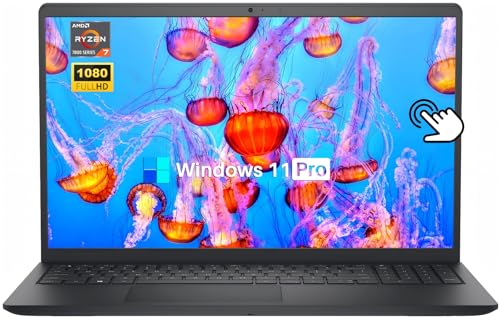
The Dell Inspiron 15 3535 is the touchscreen pick in this roundup, and it suits people who want a large screen, strong memory, and a straightforward Windows laptop for business, study, and entertainment. It uses an AMD Ryzen 7 7730U processor with eight cores, 16GB of DDR4 memory, and a 512GB PCIe NVMe solid-state drive, and it ships with Windows 11 Pro. The 15.6-inch full high-definition touchscreen display has a 1920 by 1080 resolution, and the machine includes an integrated webcam and a memory card slot.
USB-C coverage on this model is simple and clearly stated. The listing describes one USB-C 3.2 Gen 1 port, alongside one USB-A 3.2 Gen 1 port, one USB 2.0 port, one HDMI 1.4 output, a memory card reader, and a headphone and microphone combo jack. That single USB-C port handles data and accessories, while HDMI covers an external display. This listing does not describe USB-C Power Delivery charging, so the supplied power adapter remains the charging route and the USB-C port is best treated as a data and accessory port.
Note the listing statement mentioned earlier: the original seal is opened for upgrade only, to test and inspect the machine and to install the upgrades that achieve the advertised specification.
Who it suits: business users, students, and home users who want a 15.6-inch touchscreen Windows laptop with 16GB of memory and a clear, simple port layout. Who should skip it: travellers who want a light machine, and buyers who need USB-C charging or two USB-C ports for a multi-display desk setup.
4. HP 15-FD000 Laptop, 15.6-inch (B0FJFGL5Y4)
The HP 15-FD000 is the straightforward large-screen Windows pick for home and office use, and it suits buyers who want a familiar 15.6-inch laptop with a capable processor and a USB-C port for modern accessories. It uses a 10-core Intel Core i5-1334U processor, 16GB of DDR4 memory, and a 512GB solid-state drive, and it ships with Windows 11 Home. The 15.6-inch full high-definition touchscreen display measures 1920 by 1080, and the machine includes Wi-Fi 6, Bluetooth 5.3, a 720p camera, and a full-size keyboard with a numeric keypad.
The port list is practical rather than flashy. It includes one USB-C 3.2 Gen 1 port, two USB 3.2 Gen 1 ports, one HDMI 1.4 port, a headphone and microphone combo jack, and a coaxial power jack. The USB-C port supports data transfer, and the HDMI port handles an external display, so the two together cover a typical home-office setup without an adapter. At about 3.52 pounds, it is a desk-friendly laptop that can still be carried in a bag when needed.
Who it suits: home users, students, and office workers who want a 15.6-inch Windows laptop with 16GB of memory, a touchscreen, and a simple USB-C port for modern drives and peripherals. Who should skip it: people who need USB-C charging, Thunderbolt speeds, or a second USB-C port, and buyers who want a lighter laptop for daily travel.
What to Check Before You Buy
Before you order any new laptop with USB-C ports, run through a short checklist on the listing page itself. First, confirm the exact configuration: processor, memory, storage, screen size, touchscreen support, and operating system should all match the version you intend to buy. Second, read the port list line by line and note whether each USB-C port supports Power Delivery, DisplayPort, or Thunderbolt, or whether it is a data-only port. Third, check the condition statement and any notes about an opened seal or an upgrade, and read the warranty description and return terms while you are on the page. Finally, check the charger: if the laptop supports USB-C charging, confirm the wattage it needs; if it charges through a separate connector, keep the supplied charger with the laptop.
FAQ
Do all new laptops with USB-C ports charge through USB-C?
No. Some laptops charge through USB-C with Power Delivery, some charge through a separate barrel or magnetic connector, and some support both. The MacBook Air in this guide charges through its magnetic MagSafe connector with a USB-C cable and adapter, while the Lenovo IdeaPad Slim 3 supports USB-C Power Delivery charging. Always read the port list and the charging description on the listing before you assume a USB-C port can charge the machine.
How many USB-C ports does a new laptop need?
One USB-C port is enough if you mainly connect a drive or a peripheral and charge through a separate connector. Two USB-C ports are better for a desk setup, because you can charge through one port while a display or a drive uses the other. The MacBook Air here has two Thunderbolt 4 USB-C ports, while the three Windows laptops have one USB-C port each.
Is a USB-C port the same as a Thunderbolt port?
No, although Thunderbolt ports use the USB-C connector shape. A Thunderbolt 3 or Thunderbolt 4 port supports very high data speeds, video output, and charging through one cable, while a plain USB-C port may support data only, or data plus video, depending on the model. The MacBook Air has two Thunderbolt 4 USB-C ports, while the Windows laptops here use USB-C 3.2 Gen 1 ports, which suit everyday storage and peripherals.
Can a USB-C port drive an external monitor?
It can if the port supports DisplayPort over USB-C or Thunderbolt. The Lenovo IdeaPad Slim 3 lists DisplayPort 1.2 over its USB-C port, and the MacBook Air supports external displays through its Thunderbolt 4 USB-C ports. If a laptop has a data-only USB-C port, use its HDMI port for an external display instead, and check the display resolution the port supports before you buy a monitor for it.
Should I choose a touchscreen laptop with USB-C ports?
A touchscreen is worth choosing if you scroll, tap, sign, or draw on the screen regularly, and both the Dell Inspiron 15 and the HP 15 in this guide include a touchscreen alongside a USB-C port. If you rarely touch the screen, a non-touchscreen model with the same processor and memory can be a better use of the budget. Confirm touchscreen support in the listing, because the same model line is often sold in touchscreen and non-touchscreen versions with the same name.
Bottom Line
The best new laptops with usb c ports are the ones where the USB-C port matches the way you actually work. If you want a light and quiet laptop with fast ports for displays and storage, the Apple MacBook Air with M4 and its two Thunderbolt 4 USB-C ports is the standout pick, with the note that charging runs through its magnetic connector. If you want a practical Windows laptop where the USB-C port can also charge the machine, the Lenovo IdeaPad Slim 3 is the most versatile choice here, with the caveat that buyers should confirm the memory figure on its listing before ordering. If you want a large touchscreen Windows laptop with 16GB of memory, the Dell Inspiron 15 and the HP 15 are both sensible options, with one USB-C port each and HDMI for an external display. Before you buy, re-read the port list, confirm the configuration, and check that your charger matches the laptop.
Disclosure: As an Amazon Associate, we may earn from qualifying purchases.
Related guides
More from Amazon
Programs that pair well with the guide above. Offers and eligibility are set by Amazon and may change.
Free shipping on eligible items, Prime Video and more. Eligible new members can start with a free trial.
Start a Prime free trialAd-free music streaming. Eligible new subscribers can start with a free trial.
Try Music Unlimited freeA Prime membership for ages 18-24 with a trial period. Eligibility is set by Amazon.
See Prime for Young AdultsAudiobooks and podcasts to listen to on the go. Eligible new members can start with a free trial.
Try Audible freeAs an Amazon Associate we earn from qualifying purchases.









Write Your Review
No reviews yet. Be the first to share your experience!