
Key takeaways
- Durable laptops for online school with clear webcams, all-day battery life and simple setup for K-12 classes, homework and homeschool days at home.
What's inside
- Lenovo 100e Chromebook Gen 4 — Built for Backpacks
- HP Chromebook 14 (14a-nf0009nr) — A Bigger Screen for Daily Classes
- Lenovo Chromebook Duet 11 — The Flexible Two-in-One
- ASUS Vivobook Go 15 — The Windows Option for Mixed Schoolwork
- Apple MacBook Air (M1) — The Long-Term Pick for Older Students
- How to Choose
- Frequently Asked Questions
- Final Verdict
- Product and ASIN Reference
As an Amazon Associate I earn from qualifying purchases. This post may contain affiliate links at no extra cost to you.
Online school puts a laptop at the center of a child’s whole school day. It has to survive backpack trips between rooms, join video classes without fuss, hold a charge from the first morning lesson to the last homework session, and stay simple enough that a parent is not playing tech support between meetings. This guide is written for school-age learners in kindergarten through high school, including homeschool families. It is not a college guide: the picks below favor durability, easy management, and family value over the heavier software demands of university coursework.

The five laptops here cover the main ways families set up online learning. Two are education-grade Chromebooks built to take knocks, one is a larger Chromebook for older students who live in browser-based classrooms, one is a full Windows laptop for households whose school platforms or apps need Windows, and one is a premium option for teens who will carry the same machine for years. Every pick runs the common class platforms families actually use, including Zoom, Google Meet, Google Classroom, and browser-based lesson portals.
As an Amazon Associate, we earn from qualifying purchases.
Lenovo 100e Chromebook Gen 4 — Built for Backpacks
The Lenovo 100e Chromebook Gen 4 is the kind of machine schools themselves buy in bulk, and that tells you most of what a parent needs to know. It is a compact education Chromebook designed around durability first: Lenovo builds it to military-grade durability standards, with reinforced ports, a spill-resistant keyboard, and a chassis meant to shrug off the drops and bumps of daily student life. For a younger child whose laptop will be carried, stacked, and occasionally knocked off a desk, that toughness matters more than raw speed.
Performance is well matched to online classes. The Intel Processor N100 and 8 GB of memory are a step above the entry-level hardware in many budget Chromebooks, so video calls stay smooth while a classroom portal, a document, and a few research tabs are open at once. The 11.6-inch touchscreen suits younger learners who still tap through lessons, and the size keeps the whole machine light enough for small hands and small backpacks. Chrome OS keeps management simple for parents: updates install themselves, every child signs in with their own account, and a reset takes minutes rather than an evening.
Specs
- CPU: Intel Processor N100
- RAM: 8 GB
- Storage: 64 GB eMMC
- Display: 11.6-inch HD (1366 x 768) touchscreen
- Webcam: 720p HD camera
- Weight: about 2.7 lb
- Battery: rated for all-day school use between charges
- Durability: military-grade tested design, spill-resistant keyboard
Tier: budget
HP Chromebook 14 (14a-nf0009nr) — A Bigger Screen for Daily Classes
The HP Chromebook 14 answers the most common complaint about small school Chromebooks: the screen. Its 14-inch Full HD IPS display gives text and lesson videos noticeably more room than an 11.6-inch panel, which makes it a comfortable fit for middle and high school students who read, write, and split their attention between a video call and a document for hours at a time. Wide viewing angles help when a parent or sibling sits alongside to help with a lesson.
Inside, the Intel Processor N100 with 4 GB of memory handles the browser-based workload of online school without drama: Google Classroom, Docs, Meet, and Zoom all run the way students expect. The 720p webcam covers class check-ins and group calls clearly enough for teachers to see expressions and held-up work. Battery life is rated at up to 12 hours, so the charger can stay in one spot at home instead of following the laptop around the house. At about 3.2 lb it is still easy for a student to carry between rooms, and Chrome OS parental controls through a Google family account keep setup and supervision straightforward.
Specs
- CPU: Intel Processor N100
- RAM: 4 GB
- Storage: 64 GB eMMC
- Display: 14-inch Full HD IPS (1920 x 1080)
- Webcam: 720p HD camera
- Weight: about 3.2 lb
- Battery: up to 12 hours
- Operating system: Chrome OS
Tier: budget
Lenovo Chromebook Duet 11 — The Flexible Two-in-One
The Lenovo Chromebook Duet 11 is a detachable two-in-one that works as a small laptop with its included folio keyboard, then pops free as a tablet for reading, drawing apps, and touch-based learning games. That flexibility suits younger students especially well: typing practice and written assignments happen in laptop mode, while reading time and interactive lessons happen in tablet mode without a keyboard in the way. The full kit is light, and the tablet alone is barely over a pound, so it is easy for a child to hold during a read-along session.
The 10.95-inch WUXGA touchscreen is sharper than most school Chromebook displays, and the camera setup is the strongest in this guide. The 5MP front camera with a physical privacy shutter gives teachers a clearer picture during video classes, and the shutter lets families close the lens with a slide when class ends. The 8MP rear camera is genuinely useful for schoolwork: students can photograph worksheets, science projects, and artwork to submit through their classroom app. Lenovo rates the battery at up to 12 hours, the metal chassis is tested to military-grade durability standards, and the MediaTek Kompanio 838 processor with 4 GB of memory keeps everyday class apps responsive.
Specs
- CPU: MediaTek Kompanio 838
- RAM: 4 GB LPDDR4X
- Storage: 128 GB eMMC
- Display: 10.95-inch WUXGA (1920 x 1200) touchscreen, detachable keyboard included
- Webcam: 5MP front camera with privacy shutter, 8MP rear camera
- Weight: 1.12 lb tablet only, about 2.43 lb with keyboard and folio
- Battery: up to 12 hours
- Durability: military-grade tested metal chassis
Tier: mid-range
ASUS Vivobook Go 15 — The Windows Option for Mixed Schoolwork
Some online programs still assume Windows: a specific testing app, a coding environment, or a desktop program a school licenses for its students. The ASUS Vivobook Go 15 covers that ground without moving into gaming-laptop territory. Its AMD Ryzen 5 7520U processor and 8 GB of memory are comfortably ahead of entry-level hardware, so it handles video classes, office documents, and a browser full of tabs at the same time, and the 512 GB solid-state drive gives a family years of room for projects, photos, and downloaded course materials.
The 15.6-inch Full HD screen is the largest in this guide, which helps older students who write essays and work in spreadsheets for long stretches. ASUS builds the Vivobook Go 15 to military-grade durability standards, adds a physical webcam shield so the 720p camera can be covered when it is not needed, and includes fast charging so a short top-up before class restores a useful amount of battery. Family safety tools in Windows let parents set screen-time limits and content filters per child account, which makes this a sensible shared machine for a household with more than one student.
Specs
- CPU: AMD Ryzen 5 7520U
- RAM: 8 GB LPDDR5
- Storage: 512 GB SSD
- Display: 15.6-inch Full HD (1920 x 1080)
- Webcam: 720p HD camera with physical privacy shield
- Weight: about 3.53 lb
- Battery: fast-charge support for quick top-ups between classes
- Operating system: Windows 11 Home
Tier: mid-range
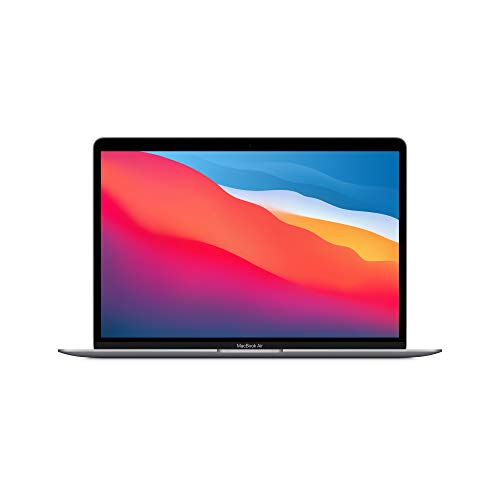
Apple MacBook Air (M1) — The Long-Term Pick for Older Students
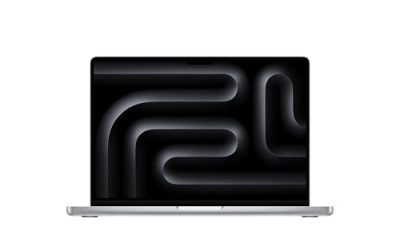
For a high school student who will use the same laptop for years of online classes, essays, presentations, and eventually college applications, the MacBook Air with the Apple M1 chip is the step-up choice in this guide. It is fanless and silent during calls, the 13.3-inch Retina display is sharp and easy on the eyes during long reading sessions, and Apple rates the battery at up to 18 hours of video playback, which in school terms means the charger can simply live on the desk. The aluminum body feels a class above plastic school laptops and holds up well to daily use.
The M1 processor with 8 GB of memory is far more power than online school needs, and that headroom is the point: photo and video projects for class, light creative work, and heavy multitasking all stay smooth, and the machine will still feel capable when a student reaches the end of high school. The 720p FaceTime HD camera handles class calls well in decent light, and macOS works smoothly with the browser-based platforms schools use, plus Microsoft and Google apps for documents and assignments. For families already using iPhones or iPads, setup and supervision through an Apple family account will feel familiar.
Specs
- CPU: Apple M1
- RAM: 8 GB
- Storage: 256 GB SSD
- Display: 13.3-inch Retina (2560 x 1600)
- Webcam: 720p FaceTime HD camera
- Weight: about 2.8 lb
- Battery: up to 18 hours (manufacturer rating)
- Operating system: macOS
Tier: premium
How to Choose
Start with the platform your school actually uses. If classes run in a browser through Google Classroom, a school portal, Zoom, or Meet, a Chromebook is the simplest and most manageable choice, and it is what most of this guide recommends. Choose a Windows or macOS laptop only when a required app demands it, or when the same machine must also serve older students with heavier projects.
Size comes next. Students in elementary grades do best with a small, light 11.6-inch machine they can carry and handle confidently, and durability features such as reinforced ports, spill-resistant keyboards, and military-grade testing matter more at that age than screen size. Middle and high school students read and write for longer stretches, so a 14-inch or larger Full HD screen is kinder to their eyes and posture across a full day of classes.
Webcam quality decides how a student shows up to class. A standard 720p camera is fine for most lessons, but a higher-resolution front camera helps when teachers ask students to hold up written work, and a physical privacy shutter is worth having in any home. For battery, look for a rating that covers the full class schedule with room to spare, so the laptop is not tethered to one outlet in the house. Finally, think about management: Chrome OS and supervised family accounts on any platform let parents set time limits and content controls, and choosing the setup you will actually maintain beats choosing the most powerful machine on the list.
Frequently Asked Questions
Is a Chromebook enough for online school?
For most K-12 students, yes. Online classes, Google Classroom, documents, quizzes, and educational websites all run in a browser, and a Chromebook handles them with less setup and fewer updates for parents to manage. A Windows or macOS laptop only becomes necessary when a school requires a specific desktop app, such as secure testing software or a particular creative program.
How much RAM does a student need for video classes?
A laptop with 4 GB of memory can run a video class and a classroom portal, but 8 GB keeps things smoother when a student has a call, several tabs, and a document open together. If you plan to keep the laptop for several school years, choosing 8 GB now is the safer long-term decision, especially for older students who multitask more.
What screen size works best for younger children?
An 11.6-inch laptop is usually the right size for elementary students: light enough to carry, small enough for a child-sized desk, and sturdy education models are common at that size. Older students who read and write for hours benefit from a 14-inch or 15.6-inch screen, which reduces eye strain and makes split-screen work between a class call and an assignment much easier.
How can parents manage screen time and safety on a school laptop?
Every platform in this guide supports supervised accounts. On Chromebooks and Windows laptops, a Google or Microsoft family account lets parents set daily time limits, approve apps, and filter content; on a Mac, Screen Time does the same job inside an Apple family setup. Pair those tools with simple habits, such as charging the laptop in a shared room overnight and using a webcam cover or shutter when class is over.
Final Verdict
For most families, the Lenovo 100e Chromebook Gen 4 is the easiest recommendation: it is the toughest machine here, simple to manage, and built exactly for student life. The HP Chromebook 14 is the better fit when a bigger, sharper screen matters for a full day of reading and writing. The Lenovo Chromebook Duet 11 adds tablet flexibility and the best cameras in the guide, the ASUS Vivobook Go 15 is the pick when a school program truly needs Windows, and the MacBook Air with M1 is the long-term investment for an older student who will carry one laptop through the rest of high school. Match the machine to your child’s age, your school’s platform, and how long you expect it to last, and any of these five will handle online school well.
Product and ASIN Reference
| Product | ASIN |
|---|---|
| Lenovo 100e Chromebook Gen 4 (83G80001US) | B0CZ4GM3C2 |
| HP Chromebook 14 (14a-nf0009nr) | B0D1548FK1 |
| Lenovo Chromebook Duet 11 (83HH0002US) | B0DTT8726C |
| ASUS Vivobook Go 15 (E1504FA-AS54) | B0CWJB9ZC6 |
| Apple MacBook Air (M1) | B08N5LNQCX |
Related guides
More from Amazon
Programs that pair well with the guide above. Offers and eligibility are set by Amazon and may change.
Free shipping on eligible items, Prime Video and more. Eligible new members can start with a free trial.
Start a Prime free trialAd-free music streaming. Eligible new subscribers can start with a free trial.
Try Music Unlimited freeA Prime membership for ages 18-24 with a trial period. Eligibility is set by Amazon.
See Prime for Young AdultsAudiobooks and podcasts to listen to on the go. Eligible new members can start with a free trial.
Try Audible freeAs an Amazon Associate we earn from qualifying purchases.

Write Your Review
No reviews yet. Be the first to share your experience!