
Our Short List of 3

- Processor: Apple M4 chip with 10-core CPU and 8-core GPU
- Memory: 16GB unified memory
- Storage: 256GB SSD
- Display: 13.6-inch Liquid Retina, 2560 x 1664, P3 wide color

- Processor: Snapdragon X Elite, 12 cores
- Memory: 16GB LPDDR5x RAM
- Storage: 512GB SSD
- Display: 13.8-inch PixelSense Flow touchscreen, 2304 x 1536, 120Hz

- Processor: AMD Ryzen AI 5 340, 6 cores, NPU up to 50 TOPS
- Memory: 16GB LPDDR5X RAM
- Storage: 512GB SSD
- Display: 14-inch WUXGA OLED touchscreen, 1920 x 1200, full DCI-P3 coverage
All 4 Picks at a Glance
| Product | Specs | Action |
|---|---|---|
| Apple MacBook Air 13-inch (M4) — The Effortless All-Rounder |
| Check price on Amazon |
| Microsoft Surface Laptop 7 (13.8-inch) — The Windows Battery Champion |
| Check price on Amazon |
| Lenovo Yoga 7 2-in-1 (14-inch) — The Flexible Creator Pick |
| Check price on Amazon |
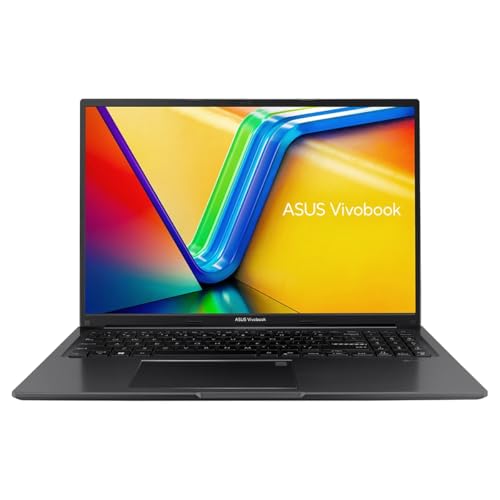 ASUS Vivobook 16 — The Big-Screen Budget Pick |
| Check price on Amazon |
Key takeaways
- Compare the best laptops for millennials for hybrid work, side projects, streaming, and light content creation, with portable picks for every budget tier.
What's inside
- Apple MacBook Air 13-inch (M4) — The Effortless All-Rounder
- Microsoft Surface Laptop 7 (13.8-inch) — The Windows Battery Champion
- Acer Swift Go 14 — The Value Performer
- Lenovo Yoga 7 2-in-1 (14-inch) — The Flexible Creator Pick
- ASUS Vivobook 16 — The Big-Screen Budget Pick
- How to Choose
- Frequently Asked Questions
- Final Verdict
- Product and ASIN Reference
As an Amazon Associate I earn from qualifying purchases. This post may contain affiliate links at no extra cost to you.
Millennials are deep into their careers now, and the laptop that carried you through college is rarely the laptop that fits your life today. The typical millennial workday jumps between a home office desk, a couch, a coffee shop table, and the occasional airport seat. Work itself is just as mixed: video calls and spreadsheets in the morning, a freelance side project or an online shop in the evening, then streaming, photos, and maybe a podcast edit before bed. The best laptops for millennials are the ones that handle all of that without drama — light enough to carry daily, fast enough to feel snappy for years, with a screen that makes both documents and movies look good, and a battery that does not force you to plan your day around outlets.
This guide is written for working adults buying their own machine, not for students shopping for a first semester. Every pick below is a slim, portable all-rounder with at least 16GB of memory and solid-state storage, because those two specs decide how a laptop ages more than almost anything else. The lineup runs from a big-screen budget option to two premium flagships, so there is a sensible choice whether this laptop is a careful value purchase or a long-term investment in your career and creative work.
As an Amazon Associate, we earn from qualifying purchases.
Apple MacBook Air 13-inch (M4) — The Effortless All-Rounder
- Processor: Apple M4 chip with 10-core CPU and 8-core GPU
- Memory: 16GB unified memory
- Storage: 256GB SSD
- Display: 13.6-inch Liquid Retina, 2560 x 1664, P3 wide color
For millennials who want one laptop that simply works everywhere, the MacBook Air with the M4 chip is the easiest recommendation on this list. It is completely silent because it has no fan, it wakes instantly, and the aluminum body still looks sharp in a client meeting or on a café table. The M4 chip handles heavy browser multitasking, large documents, photo editing, and light video work without slowing down, and the 16GB of unified memory in this configuration gives it real headroom for the next several years of software updates.
The 13.6-inch Liquid Retina display is bright and color-accurate, which makes it a pleasure for streaming and a trustworthy screen for editing photos for social posts or a small business. The 12MP Center Stage camera keeps you framed during video calls even when you shift in your chair, and battery life stretches through a full workday of mixed use with room to spare. If your phone, tablet, and earbuds already live in the Apple ecosystem, the handoff features between them save small amounts of time every single day.
The main trade-offs are the 256GB of storage, which fills up if you keep large video projects locally, and a port selection that leans on USB-C. Cloud storage or a small external drive solves the first issue for most people. For everyone else, this is the laptop to buy when you want to stop thinking about your laptop.
Microsoft Surface Laptop 7 (13.8-inch) — The Windows Battery Champion
- Processor: Snapdragon X Elite, 12 cores
- Memory: 16GB LPDDR5x RAM
- Storage: 512GB SSD
- Display: 13.8-inch PixelSense Flow touchscreen, 2304 x 1536, 120Hz
The Surface Laptop 7 is the Windows answer for millennials who love the MacBook Air idea but live in Microsoft 365, Teams, and Windows-only work software. Its Snapdragon X Elite processor delivers fast everyday performance with remarkable efficiency, and Microsoft rates the 13.8-inch model for up to 20 hours of local video playback, which translates into genuinely long days away from a charger. It is also a Copilot+ PC, so it supports the current wave of on-device AI features in Windows 11.
The 13.8-inch PixelSense Flow touchscreen runs at a smooth 120Hz refresh rate and uses a taller 3:2 aspect ratio, a small detail that makes a big difference when you spend your day reading documents, contracts, and web pages. The machined aluminum chassis comes in colors with some personality, the keyboard and oversized touchpad are excellent, and at just under three pounds it disappears into a tote or backpack. Video calls look crisp thanks to the 1080p camera and studio microphones.
One consideration: because it runs Windows on ARM, a few older specialized programs and some printer or VPN drivers may not be fully compatible yet. Mainstream apps — Office, browsers, Slack, Zoom, Adobe’s core tools — run well. If your work depends on a niche legacy application, confirm compatibility before choosing it.
Acer Swift Go 14 — The Value Performer
The Acer Swift Go 14 is the pick for millennials who want serious speed without paying flagship prices. Its AMD Ryzen 7 8845HS processor is a genuinely powerful chip with strong integrated Radeon 780M graphics, so it shrugs off multitasking, handles photo editing and 4K video timelines in light creator apps, and can even manage casual gaming after hours. The generous 1TB solid-state drive is the quiet star here: you can keep your photo library, work archive, and side-project files on the machine instead of juggling cloud folders.
The 14-inch touchscreen has a sharp 1920 x 1200 resolution with a taller 16:10 shape that suits documents and spreadsheets, and the 1440p webcam is noticeably clearer than the 720p cameras still found on many laptops in this class — a real advantage when your professional image depends on video calls. At about 3.1 pounds it is easy to carry, and the port selection includes full-size USB and HDMI, so connecting an external monitor at a home desk takes no dongle.
Specs
- Processor: AMD Ryzen 7 8845HS, 8 cores, with Radeon 780M graphics
- Memory: 16GB LPDDR5X RAM
- Storage: 1TB PCIe Gen 4 SSD
- Display: 14-inch touchscreen, 1920 x 1200, 16:10 aspect ratio
- Weight: About 3.1 pounds
- Battery: 65Wh battery with fast charging support
- Camera: 1440p QHD webcam with privacy shutter
- Tier: Mid-range
Battery life is good rather than class-leading, and the styling is more businesslike than beautiful. As an overall package of performance, storage, and screen for the money, though, it is very hard to beat.
Lenovo Yoga 7 2-in-1 (14-inch) — The Flexible Creator Pick
- Processor: AMD Ryzen AI 5 340, 6 cores, NPU up to 50 TOPS
- Memory: 16GB LPDDR5X RAM
- Storage: 512GB SSD
- Display: 14-inch WUXGA OLED touchscreen, 1920 x 1200, full DCI-P3 coverage
The Yoga 7 2-in-1 is built for millennials whose laptop doubles as a creative canvas. The 360-degree hinge flips the 14-inch OLED touchscreen into tent mode for watching videos in a small apartment kitchen, or flat into tablet mode for marking up PDFs, sketching ideas, and signing documents. The OLED panel covers the full DCI-P3 color range with deep blacks, so streaming shows and editing photos both look noticeably richer than on a standard LCD screen.
Inside, the AMD Ryzen AI 5 340 processor pairs six capable cores with a neural processing unit rated up to 50 TOPS, which speeds up AI-assisted features in photo editors and video apps while keeping fan noise low. Sixteen gigabytes of memory and a 512GB solid-state drive match the needs of hybrid work, and the 70Wh battery is large for a convertible this size, supporting long stretches of untethered work. At roughly three pounds it remains an easy daily carry.
Convertibles carry small compromises: the hinge design adds a little thickness, and OLED screens draw more power at maximum brightness. For buyers who split their time between typing, presenting, media, and light creative work, the flexibility is well worth it.
ASUS Vivobook 16 — The Big-Screen Budget Pick
- Processor: AMD Ryzen 7 7730U, 8 cores
- Memory: 16GB DDR4 RAM
- Storage: 512GB SSD
- Display: 16-inch WUXGA, 1920 x 1200, 16:10 aspect ratio
Not everyone wants a tiny laptop. The ASUS Vivobook 16 gives millennials working from a home desk a large 16-inch display that makes side-by-side documents, wide spreadsheets, and budget-tracking apps far more comfortable, while keeping the total cost firmly in budget territory. The AMD Ryzen 7 7730U processor is an eight-core chip that handles office work, browser multitasking, streaming, and light photo tasks smoothly, and 16GB of memory means it will not choke when your day involves a dozen open tabs plus a video call.
The 16:10 screen shape adds vertical room that is genuinely useful for reading and writing, and the full-size keyboard includes a numeric keypad — a small joy for anyone who manages household budgets, freelance invoices, or data entry for a side business. At about 4.1 pounds it is more of a desk-first machine than a daily commuter, but it still moves easily between rooms or to a weekend trip.
The trade-offs are a plastic-forward build and a smaller battery than the premium picks, so heavy travelers should look higher on this list. As a home-base laptop for work, life admin, and entertainment, it delivers the most screen and memory for the least money here.
How to Choose
Start with how you actually work. If your laptop travels daily between home, office, and cafés, prioritize weight and battery life: the MacBook Air, Surface Laptop 7, and Yoga 7 all stay near three pounds with batteries built for long days. If your laptop mostly lives on one desk, the Vivobook 16 trades portability for a bigger screen and a lower cost, and the Swift Go 14 splits the difference with extra power and storage.
Memory and storage matter more than processor bragging rights for most millennial workloads. Sixteen gigabytes of RAM is the comfortable floor for modern multitasking — video calls, chat apps, a browser full of tabs, and a document editor all at once — and it is the single best insurance against a laptop feeling old in three years. For storage, 512GB suits most people; choose 1TB, like the Swift Go 14 offers, if you keep large photo libraries, video projects, or game installs on the machine itself.
Think about your screen and your software. OLED panels, like the one on the Yoga 7, look best for media and color-sensitive creative work, while taller 3:2 and 16:10 screens show more of your documents. On software, the MacBook Air suits Apple-ecosystem households and creative apps, the Surface Laptop 7 is ideal for Microsoft-centered remote work, and the Ryzen-powered Windows picks avoid any app-compatibility questions entirely. Finally, match the machine to your side projects: podcast and video editing benefit from stronger processors and more storage, while writing, design mockups, and shop management run happily on any pick here.
Frequently Asked Questions
How much RAM does a millennial professional really need in a laptop?
Sixteen gigabytes is the sweet spot for hybrid work and side projects. It keeps video calls, browsers, office apps, and light creative software running together smoothly, and it extends the useful life of the machine by years compared with an 8GB configuration that already feels tight today.
Is a MacBook or a Windows laptop better for remote and hybrid work?
Both platforms handle mainstream remote work well, so the better choice is the one that matches your software and other devices. Choose the MacBook Air if you use an iPhone and Apple services or creative apps optimized for Apple silicon. Choose a Windows laptop if your employer relies on Microsoft 365 administration tools, Windows-only business software, or if you prefer a touchscreen or convertible design.
Can these laptops handle content creation like video editing and podcasting?
Yes, for light to moderate creation. Every pick here can edit photos, cut short-form video, and record or edit podcasts comfortably thanks to modern processors and 16GB of memory. If you regularly edit long 4K projects or work in heavy 3D software, step up to a machine with a dedicated graphics card, but for social content, freelance work, and small-business marketing, these all-rounders are well matched.
How long should a laptop bought today last before it needs replacing?
A well-chosen laptop with 16GB of memory and a solid-state drive should stay fast and useful for five years or more of work and everyday use. Battery wear is usually the first thing to age, so models with larger batteries and efficient processors, like the Surface Laptop 7 and MacBook Air, tend to feel fresh the longest.
Final Verdict
Every laptop on this list respects the way millennials actually live: one machine for the job, the side project, and the sofa. The MacBook Air M4 is the best default for most buyers — silent, fast, long-lasting, and easy to live with. The Surface Laptop 7 matches it closely for the Windows world with outstanding battery life and a superb screen. The Acer Swift Go 14 is the value champion, pairing a powerful processor with a roomy 1TB drive. The Lenovo Yoga 7 2-in-1 adds a gorgeous OLED touchscreen and convertible flexibility for creative types, and the ASUS Vivobook 16 proves you do not need to spend premium money to get a big, capable screen for home work. Pick the one that fits your platform, your commute, and your projects, and it should serve you well for years.
Product and ASIN Reference
| Product | ASIN |
|---|---|
| Apple MacBook Air 13-inch Laptop with M4 Chip (16GB Memory, 256GB SSD, Midnight) | B0DZD9S5GC |
| Microsoft Surface Laptop 7, 13.8-inch (Snapdragon X Elite, 16GB RAM, 512GB SSD, Black) | B0CXL7LZN1 |
| Acer Swift Go 14 Laptop SFG14-63T-R1F4 (Ryzen 7 8845HS, 16GB RAM, 1TB SSD) | B0CZP2YZH6 |
| Lenovo Yoga 7 2-in-1 14-inch Laptop (Ryzen AI 5 340, 16GB RAM, 512GB SSD) | B0FM8DL52K |
| ASUS Vivobook 16 Laptop M1605YA-RB71 (Ryzen 7 7730U, 16GB RAM, 512GB SSD) | B0FWTHHQ7P |
Related guides
More from Amazon
Programs that pair well with the guide above. Offers and eligibility are set by Amazon and may change.
Free shipping on eligible items, Prime Video and more. Eligible new members can start with a free trial.
Start a Prime free trialAd-free music streaming. Eligible new subscribers can start with a free trial.
Try Music Unlimited freeA Prime membership for ages 18-24 with a trial period. Eligibility is set by Amazon.
See Prime for Young AdultsAudiobooks and podcasts to listen to on the go. Eligible new members can start with a free trial.
Try Audible freeAs an Amazon Associate we earn from qualifying purchases.









Write Your Review
No reviews yet. Be the first to share your experience!