
Our Short List of 3
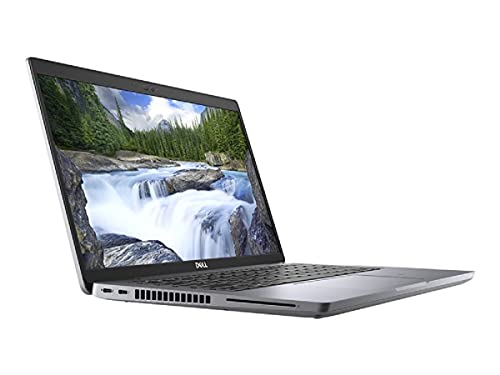
- Best for: IT-managed office setups and long Teams call days.
- 14-inch Full HD display (1920 x 1080)
- Intel Core i7-1355U processor, 10 cores
- 16GB memory
- 512GB SSD storage
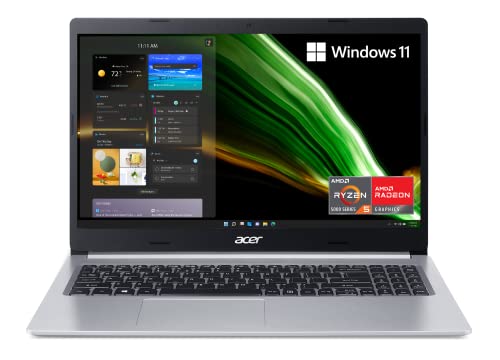
- Best for: Big-screen spreadsheets on a tighter budget.
- 15.6-inch Full HD IPS display (1920 x 1080)
- AMD Ryzen 5 5500U processor, up to 4.0 GHz, 6 cores
- 8GB DDR4 memory
- 256GB NVMe SSD storage

- Best for: Premium Teams calls, Copilot features, and travel.
- 13.8-inch PixelSense Flow touchscreen, 3:2 ratio
- Intel Core Ultra 7 266V processor
- Intel AI Boost NPU, up to 48 TOPS
- 16GB LPDDR5X memory
All 3 Picks at a Glance
| Product | Specs | Action |
|---|---|---|
| Dell Latitude 5440 |
| Check price on Amazon |
| Acer Aspire 5 A515-45-R74Z |
| Check price on Amazon |
| Microsoft Surface Laptop 7th Edition |
| Check price on Amazon |
Key takeaways
- Find the best laptops for Office 365 daily work: fast Word, Excel, Outlook and Teams, sharp webcams for calls, and Windows 11 Pro options for office life.
What's inside
As an Amazon Associate I earn from qualifying purchases. This post may contain affiliate links at no extra cost to you.
Choosing a laptop for Office 365 sounds simple until the workday starts. Word, Excel, Outlook, and Teams all run at once, OneDrive syncs files in the background, and a video call can start with one click. The right laptop keeps every app responsive, holds a charge through a full day of meetings, and shows your face clearly on camera. The wrong one stutters when you switch between a spreadsheet and a call, and that friction adds up across a week.
This guide covers office workers, remote staff, and students who live in Microsoft 365 every day. It suits people who write long documents, build large spreadsheets, answer mail all day, and join video calls from home or the office. The five laptops below were picked from the names and specifications shown on their Amazon product pages, with a focus on memory, screen quality, webcams, and Windows 11 Pro where it matters for managed work.
Quick Picks
As an Amazon Associate we earn from qualifying purchases
| Product | Best for | Key spec from title |
|---|---|---|
| Lenovo ThinkPad E14 Gen 6 | Keyboard-heavy Word and Outlook days | 14-inch WUXGA display |
| HP ProBook 445 G11 | Carrying between home and office | Windows 11 Pro |
| Dell Latitude 5440 | Long Teams call days | Intel Core i7-1355U processor |
| Acer Aspire 5 A515-45-R74Z | Big-screen spreadsheets | 15.6-inch Full HD IPS display |
| Microsoft Surface Laptop 7th Edition | Premium calls and travel | 13.8-inch PixelSense touchscreen |
How to Choose
Pick 16GB of RAM for real multitasking
Office 365 work rarely means one app at a time. A typical morning runs Word for a report, Excel for a budget, Outlook for mail, Teams for a call, and a browser with a dozen tabs open. With 8GB of memory, that mix can slow down when Teams shares a screen or Excel recalculates a large sheet. With 16GB, switching stays smooth and the laptop keeps up when a call starts mid-task. If your day regularly stacks four or five apps, treat 16GB as the starting point and keep 8GB only for light, single-task days.
Choose Windows 11 Pro when work is managed
The Office 365 apps themselves run the same on Windows 11 Home and Windows 11 Pro, so the edition matters only when your workplace manages the machine. Pro adds BitLocker device encryption, the ability to join a company domain, Remote Desktop hosting, and group policy controls that IT teams use to keep work data safe. If your employer issues the laptop or requires encrypted storage, Pro is the safer pick. If the laptop is yours alone and no IT policy applies, Home does the job and leaves more room in the budget for memory or storage.
Put the webcam and microphones first for Teams calls
A laptop can run Teams perfectly and still make you look bad on camera. A 720p webcam softens your face, and a single microphone picks up keyboard noise and room echo. Look for a 1080p full HD camera, dual-array microphones with noise reduction, and a privacy shutter you can slide closed between calls. The Acer in this guide, for example, pairs an HD webcam with dual microphones tuned to filter typing noise, while the Surface Laptop adds a sharper camera and studio microphones built for calls. Test the camera in daylight before an important meeting, not during one.
Match the screen and keyboard to long document days
Office work means hours of reading and typing, so the screen and keyboard deserve as much attention as the processor. A 14-inch WUXGA panel with a taller 16:10 shape shows more lines of a Word document than a standard 16:9 screen, and a 15.6-inch full HD panel gives spreadsheets room to breathe. Backlit keys help in dim rooms, and a full keyboard with a number pad speeds up data entry in Excel. If you type all day, a firm keyboard with clear key travel matters more than a thin chassis, and a bright screen with an anti-glare finish keeps text readable near a window.
The 5 Best Options
Lenovo ThinkPad E14 Gen 6
The ThinkPad E14 Gen 6 is the classic office workhorse in this group, built around the keyboard and durability that ThinkPad buyers expect. Its AMD Ryzen 5 7535U processor and 16GB of memory handle Word, Excel, Outlook, and Teams running together, and the 14-inch WUXGA display shows more of a document at once thanks to its taller shape. At 3.17 pounds it travels well between home and office, and the 256GB SSD keeps boot times and file opens quick. It is the safe pick for anyone who types all day and wants a machine that simply gets on with the job.
Specs
- 14-inch WUXGA display (1920 x 1200)
- AMD Ryzen 5 7535U processor
- 16GB memory
- 256GB SSD storage
- 3.17 pounds
- 12.3 x 8.6 x 0.71 inches
Best for: Keyboard-heavy Word and Outlook days.
Watch out for: The listing does not spell out the Windows edition, so confirm Windows 11 Pro on the product page before checkout if your workplace requires it.
HP ProBook 445 G11
The ProBook 445 G11 is the lightest machine in this guide, and that matters when the laptop moves between a desk, a meeting room, and home every day. Its Ryzen 5 7535U processor and 16GB of memory keep Office apps responsive, while Windows 11 Pro covers BitLocker encryption and domain joining for managed work. The 14-inch WUXGA screen is sharp enough for long documents, and the aluminum body feels more durable than the usual plastic office laptop. The 256GB of storage is the one limit to plan around, since large OneDrive folders fill it faster than expected.
Specs
- 14-inch WUXGA display (1920 x 1200)
- AMD Ryzen 5 7535U processor, Radeon 660M graphics
- 16GB memory
- 256GB SSD storage
- Windows 11 Pro
- 3.06 pounds
- 12.5 x 8.8 x 0.67 inches
Best for: Carrying between home and office every day.
Watch out for: The 256GB drive fills up fast with large OneDrive folders, so check your synced folder sizes first.
Dell Latitude 5440
- Best for: IT-managed office setups and long Teams call days.
- 14-inch Full HD display (1920 x 1080)
- Intel Core i7-1355U processor, 10 cores
- 16GB memory
- 512GB SSD storage
IT-managed office setups and long Teams call days.
The listing’s weight figure looks unusually low for a 14-inch business laptop, so confirm the carry weight on the product page before buying for travel.
The Latitude 5440 is the IT-friendly pick, built for companies that manage fleets of laptops and need reliable security and support. Its Intel Core i7-1355U processor and 16GB of memory run heavy Excel workbooks and Teams calls without hesitation, and the 512GB SSD gives OneDrive room to sync large folders. Windows 11 Pro comes standard, and the listing includes four years of ProSupport, which matters when a work laptop is also a business-critical tool. It is heavier on paper than the rest here, so it suits a desk-first routine more than constant travel.
Watch out for: The listing’s weight figure looks unusually low for a 14-inch business laptop, so confirm the carry weight on the product page before buying for travel.
Acer Aspire 5 A515-45-R74Z
- Best for: Big-screen spreadsheets on a tighter budget.
- 15.6-inch Full HD IPS display (1920 x 1080)
- AMD Ryzen 5 5500U processor, up to 4.0 GHz, 6 cores
- 8GB DDR4 memory
- 256GB NVMe SSD storage
Big-screen spreadsheets on a tighter budget.
It ships with 8GB of memory and Windows 11 Home, so it suits personal Office work better than a managed office setup with heavy multitasking.
The Aspire 5 is the value pick for people who want a big screen for spreadsheets without paying business-laptop prices. Its 15.6-inch full HD IPS display shows wide Excel sheets and two documents side by side, and the Ryzen 5 5500U processor with 8GB of memory handles everyday Office work well. The backlit keyboard helps in dim rooms, the HD webcam and dual microphones with Purified Voice keep Teams calls clear, and the battery lasts up to 11 hours on the listing. Windows 11 Home is the trade-off, so it fits personal use better than managed office work.
Watch out for: It ships with 8GB of memory and Windows 11 Home, so it suits personal Office work better than a managed office setup with heavy multitasking.
Microsoft Surface Laptop 7th Edition
- Best for: Premium Teams calls, Copilot features, and travel.
- 13.8-inch PixelSense Flow touchscreen, 3:2 ratio
- Intel Core Ultra 7 266V processor
- Intel AI Boost NPU, up to 48 TOPS
- 16GB LPDDR5X memory
Premium Teams calls, Copilot features, and travel.
The 256GB drive is small for the price, so keep large OneDrive folders set to files-on-demand.
The Surface Laptop 7th Edition is the premium pick, and the one that feels most at home in a Microsoft 365 world. Its 13.8-inch PixelSense touchscreen uses a taller 3:2 shape that fits documents and web pages, and the Intel Core Ultra 7 processor with an AI Boost NPU powers Copilot features on the device. Windows 11 Pro comes standard, the battery lasts up to 22 hours on the listing, and the dedicated Copilot key puts the assistant one press away. It is the lightest-feeling machine here for travel, though the 256GB of storage needs a OneDrive plan that keeps large files in the cloud.
Watch out for: The 256GB drive is small for the price, so keep large OneDrive folders set to files-on-demand.
Which One Fits Your Situation
You live in Word and Outlook all day
Pick the ThinkPad E14 Gen 6. Its keyboard is the most comfortable here for long typing sessions, the 16GB of memory keeps Word and Outlook open together without slowdowns, and the taller WUXGA screen shows more of a document at once. The 256GB drive is enough when most files live in OneDrive.
You carry the laptop between home and office
Pick the HP ProBook 445 G11. At 3.06 pounds it is the lightest machine in this guide, and Windows 11 Pro covers the security features a managed workplace expects. The 14-inch screen is big enough for real work, and the aluminum body stands up to daily travel in a bag.
You spend half the day on Teams calls
Pick the Microsoft Surface Laptop 7th Edition. Its sharp touchscreen camera and studio microphones are built for calls, the 13.8-inch screen keeps you visible without a bulky machine, and the long battery life carries you through back-to-back meetings. The Dell Latitude 5440 is the second choice when IT support and ProSupport matter more.
You work with big spreadsheets and want a larger screen
Pick the Acer Aspire 5. Its 15.6-inch full HD IPS display gives Excel the room it needs, and the backlit keyboard helps during late sessions. The 8GB of memory suits single-task spreadsheet work, so keep Teams closed while you build large models or choose one of the 16GB machines above instead.
Common Mistakes
- Buying 8GB of memory and then running Teams, Excel, Outlook, and a browser at the same time.
- Ignoring the Windows edition and discovering too late that a managed work account needs Windows 11 Pro.
- Choosing a laptop with a dim screen or a weak webcam when half the day happens on video calls.
- Filling a 256GB drive with synced OneDrive folders instead of using files-on-demand for large archives.
- Picking the lightest laptop for travel and then missing the number pad and larger screen needed for spreadsheet work.
Frequently Asked Questions
Do I need Windows 11 Pro to run Office 365?
No. The Office 365 desktop apps, including Word, Excel, Outlook, and Teams, run the same on Windows 11 Home and Windows 11 Pro. Pro only matters when your workplace manages the laptop, because it adds BitLocker encryption, domain joining, and Remote Desktop hosting. For personal use, Home is fine, and the money saved can go toward more memory or storage.
Is 8GB of RAM enough for Office 365?
It depends on how you work. For one app at a time, such as writing in Word or answering mail in Outlook, 8GB is enough. Once Teams joins a call while Excel recalculates a large sheet and a browser holds a dozen tabs, 8GB starts to strain. For that everyday mix, 16GB is the safer choice, and it also keeps the laptop useful for longer as apps grow heavier.
Can I use Office 365 offline on these laptops?
Yes. The desktop versions of Word, Excel, and PowerPoint work without an internet connection, and OneDrive keeps local copies of your files so you can keep working. Changes sync back to the cloud when you reconnect. Outlook also stores recent mail locally, so you can read and draft messages offline and send them once you are back online.
What should I look for in a laptop webcam for Teams calls?
Look for a 1080p full HD camera, which shows your face clearly instead of the soft image a 720p camera gives. Dual-array microphones with noise reduction keep your voice clear and cut keyboard sounds, and a physical privacy shutter lets you block the camera between calls. Good lighting matters too, so sit facing a window or a lamp rather than sitting with a bright window behind you.
Related guides
More from Amazon
Programs that pair well with the guide above. Offers and eligibility are set by Amazon and may change.
Free shipping on eligible items, Prime Video and more. Eligible new members can start with a free trial.
Start a Prime free trialAd-free music streaming. Eligible new subscribers can start with a free trial.
Try Music Unlimited freeA Prime membership for ages 18-24 with a trial period. Eligibility is set by Amazon.
See Prime for Young AdultsAudiobooks and podcasts to listen to on the go. Eligible new members can start with a free trial.
Try Audible freeAs an Amazon Associate we earn from qualifying purchases.










Write Your Review
No reviews yet. Be the first to share your experience!