
Key takeaways
- Find the best gaming laptops around 500 for smooth 1080p play — proven GTX and RTX machines with fast screens and solid cooling.
What's inside
As an Amazon Associate I earn from qualifying purchases. This post may contain affiliate links at no extra cost to you.
A gaming laptop in this budget range is about smart trade-offs, not compromises that ruin the experience. The machines that work best here pair a proven graphics card with a fast screen and enough memory to keep games running smoothly, while skipping the extras that add cost without adding frames. Buy the right balance and you get real 1080p gaming; buy the wrong one and you get a laptop that looks fast on paper and stutters in practice.
This guide is for budget gamers who want a dedicated graphics card and a proper gaming screen without stretching to a premium machine. Every pick below was chosen from its name and specifications on the Amazon product page, with a focus on the GPU, the display refresh rate, and the cooling that keeps both running at full speed.
Quick Picks
As an Amazon Associate we earn from qualifying purchases.
| Product | Best for | Key spec from title |
|---|---|---|
| HP Victus 15 | Smooth high-refresh gaming | Intel Core i5-12450H, GTX 1650, 144Hz display |
| ASUS TUF Gaming F15 | The strongest GPU in this group | Intel Core i7-11800H, RTX 3050 Ti, 16GB RAM |
| Lenovo IdeaPad Gaming 3 | A balanced first gaming laptop | Ryzen 5 5600H, GTX 1650, 8GB RAM |
| Acer Nitro 5 AN515-45 | Reliable everyday gaming | Ryzen 5 5600H, GTX 1650 |
| MSI Thin GF63 | A light, portable gaming machine | Intel Core i5-11400H, GTX 1650, 8GB RAM |
How to Choose
The graphics card is the whole decision
On a budget gaming laptop, the GPU decides which games you can play and how well they run, so start there and work outward. A GTX 1650 handles esports titles and older blockbusters smoothly at 1080p, while an RTX 3050 Ti adds headroom for newer games and features such as DLSS upscaling. Compare the exact GPU in the listing, not just the brand name, because two laptops with similar names can hide very different graphics chips. The processor matters too, but a strong CPU cannot rescue a weak GPU, so put your money on graphics first.
Screen refresh rate changes how games feel
A 144Hz display makes fast games feel noticeably smoother than a standard 60Hz panel, and it is one of the best upgrades you can get in this class. Check the listing for the refresh rate and the panel type, since a high refresh rate paired with a dim, washed-out screen is a poor trade. Resolution matters as well: 1080p is the right target for these GPUs, because higher resolutions demand far more graphics power for little visible gain on a 15.6-inch screen. If you play competitive shooters, prioritize refresh rate; if you play story games, prioritize color and brightness.
Memory and storage set your limits
Eight gigabytes of memory is the minimum for gaming today, and it works if you close background apps and stick to one game at a time. Sixteen gigabytes is the safer choice for multitasking and newer titles, so consider it a priority if you stream, run voice chat, or keep a browser open while you play. Storage is the other limit: a 256GB drive holds only a few large games, so a 512GB SSD gives you far more room to breathe. Fast NVMe storage also cuts loading times, which matters every time you launch a game or load a new area.
Cooling and build decide whether it lasts
Budget gaming laptops generate real heat, and a machine with poor cooling will throttle its graphics card just when you need it most. Look for dual-fan designs and rear or side vents in the listing photos, and check reviews for reports of overheating or loud fans. Build quality matters because a gaming laptop gets carried, opened, and closed far more than a desktop, so a sturdy hinge and a solid keyboard deck are worth more than flashy lighting. Battery life will be short during gaming, which is normal, so plan to play plugged in and use the battery only for light tasks.
The 5 Best Options
HP Victus 15

The HP Victus 15 is the best-balanced budget gaming laptop in this roundup, pairing an Intel Core i5-12450H processor with a GTX 1650 graphics card and a 15.6-inch full HD display running at 144Hz. The high-refresh screen makes fast games feel smooth, and the modern processor keeps up with multitasking and newer titles. Victus machines are known for clean, understated styling that works in a classroom or an office as well as at a gaming desk, which is a real advantage if your laptop does double duty. It is the pick that gets the most right for the widest range of players.
- Specs:
- Intel Core i5-12450H processor
- NVIDIA GeForce GTX 1650 graphics
- 15.6-inch FHD display, 144Hz refresh rate
- Best for: Players who want smooth high-refresh gaming and a laptop that looks at home anywhere.
- Watch out for: Check the memory and storage of the exact configuration, since Victus models vary.
ASIN: B0BKTTBR1L
ASUS TUF Gaming F15

The ASUS TUF Gaming F15 brings the strongest graphics in this group, with an Intel Core i7-11800H processor, an RTX 3050 Ti graphics card, 16GB of memory, and a 512GB SSD. The RTX card adds DLSS upscaling, which boosts frame rates in supported games, and the extra memory keeps multitasking smooth while you play. TUF machines are built to military-grade durability standards, with a sturdy chassis and a cooling system designed for long sessions. If you want the most gaming power in this class and a laptop that can take a knock, this is the one to buy.
- Specs:
- Intel Core i7-11800H processor
- NVIDIA GeForce RTX 3050 Ti graphics
- 16GB RAM
- 512GB SSD storage
- 15.6-inch display
- Best for: Players who want the strongest GPU, the most memory, and a tough build in this class.
- Watch out for: The TUF design is heavier and more rugged-looking than slim laptops, so it stands out in formal settings.
ASIN: B0B13Y8LK2
Lenovo IdeaPad Gaming 3

The Lenovo IdeaPad Gaming 3 is a straightforward first gaming laptop, running a Ryzen 5 5600H processor with a GTX 1650 graphics card, 8GB of memory, and a 256GB SSD. The six-core Ryzen chip handles games and everyday work without fuss, and the GTX 1650 covers esports titles and older blockbusters at smooth frame rates. The design is clean and understated for a gaming machine, which makes it easy to carry into school or work. It is a good starting point if you are new to PC gaming and want a machine that covers the essentials well.
- Specs:
- AMD Ryzen 5 5600H processor
- NVIDIA GeForce GTX 1650 graphics
- 8GB RAM
- 256GB SSD storage
- Best for: First-time PC gamers who want a balanced, affordable machine for 1080p play.
- Watch out for: The 256GB drive fills quickly with large games, so plan on adding storage or rotating titles.
ASIN: B08YKHGKTV
Acer Nitro 5 AN515-45
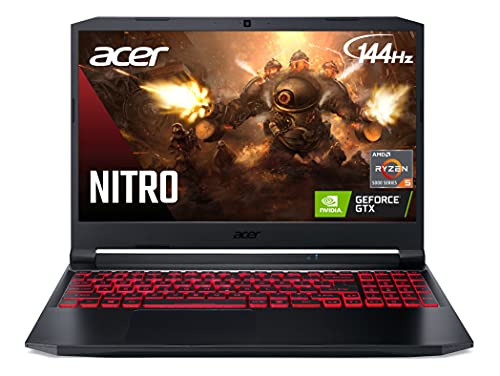
The Acer Nitro 5 AN515-45 is a reliable workhorse in the budget gaming class, pairing a Ryzen 5 5600H processor with a GTX 1650 graphics card in the long-running Nitro chassis. Acer has refined this design over many generations, and it shows in the cooling layout and the comfortable keyboard. The GTX 1650 handles competitive games at high frame rates and story-driven titles at medium settings, which covers most of what a budget gamer actually plays. It is a safe, proven choice when you want a gaming laptop without surprises.
- Specs:
- AMD Ryzen 5 5600H processor
- NVIDIA GeForce GTX 1650 graphics
- 15.6-inch display
- Model: AN515-45-R83Z
- Best for: Players who want a proven, dependable gaming laptop for everyday 1080p play.
- Watch out for: Confirm the memory and storage of the exact configuration, since Nitro models vary widely.
ASIN: B093HP62RN
MSI Thin GF63

The MSI Thin GF63 is the most portable gaming laptop in this group, built around an Intel Core i5-11400H processor and a GTX 1650 graphics card with 8GB of memory and a 256GB SSD. Its thin profile and lighter weight make it the easiest to carry between home, school, and a friend’s house, which matters if your laptop travels every day. The GTX 1650 still covers esports and older games smoothly, and the thin design does not give up the dedicated graphics that make it a real gaming machine. It is the best pick when portability matters as much as performance.
- Specs:
- Intel Core i5-11400H processor
- NVIDIA GeForce GTX 1650 graphics
- 8GB RAM
- 256GB SSD storage
- Best for: Gamers who carry their laptop everywhere and want the thinnest machine in this class.
- Watch out for: Thin laptops run warmer under load, so keep the vents clear and play on a hard surface.
ASIN: B0BMWGFWNX
Which One Fits Your Situation
You want the smoothest gameplay for the money
Choose the HP Victus 15. Its 144Hz display makes competitive games feel noticeably smoother than a standard screen, and the modern processor keeps everything responsive. It is the best all-rounder in this group, and the clean design means it works just as well outside the gaming desk as on it.
You want the most power in this class
Pick the ASUS TUF Gaming F15. The RTX 3050 Ti and 16GB of memory give you the most headroom for newer games, and DLSS upscaling stretches that advantage further. The tough build and strong cooling suit long sessions, so it is the pick for players who push their hardware hard.
You are buying your first gaming laptop
Go with the Lenovo IdeaPad Gaming 3 or the Acer Nitro 5. Both are proven, straightforward machines that cover 1080p gaming without unnecessary extras, and both have earned their reputation over many generations. The IdeaPad is the cleaner, more understated choice, while the Nitro has the longer track record in this class.
You carry your laptop everywhere
Take the MSI Thin GF63. It is the lightest and thinnest machine here, so it fits easily in a backpack and does not weigh you down between classes. Keep the vents clear during long sessions, and remember that thin machines run warmer than thicker ones, so a hard, flat surface helps.
Common Mistakes
- Buying a laptop with integrated graphics and expecting it to play demanding games smoothly.
- Choosing a 60Hz screen for competitive games and wondering why everything feels sluggish.
- Filling a 256GB drive with large games and having no room for updates or new titles.
- Blocking the cooling vents by gaming on a bed or a blanket, then blaming the laptop for throttling.
- Ignoring the exact configuration and ending up with less memory or storage than you assumed.
Frequently Asked Questions
Can a budget gaming laptop run modern games?
Yes, a budget gaming laptop with a GTX 1650 or RTX 3050 Ti runs many modern games well at 1080p, especially with medium settings. Esports titles and older blockbusters run smoothly, while the newest demanding games may need lower settings. Choosing the right graphics card and keeping drivers updated makes the biggest difference.
Is 8GB of RAM enough for gaming?
Eight gigabytes is enough for most games if you close background apps and play one title at a time, and it is the standard in this class. Sixteen gigabytes is better for multitasking, streaming, and newer titles, so it is worth prioritizing if you run voice chat or a browser alongside your games. If the laptop allows a memory upgrade later, you can start with 8GB and add more.
Does a 144Hz screen really matter?
Yes, a 144Hz screen makes motion look smoother and more responsive, which is most noticeable in fast-paced games such as shooters and racing titles. The benefit is smaller in slow, story-driven games, where color and brightness matter more. If you play competitive games, prioritize refresh rate; if you mostly play single-player adventures, a good-quality 60Hz panel can be enough.
How long will a budget gaming laptop last?
A budget gaming laptop usually stays capable for several years if you keep settings realistic and maintain it well. Newer games will gradually need lower settings, but esports titles and older games keep running smoothly for a long time. Cleaning the vents, updating drivers, and adding storage when needed all extend the useful life of the machine.
Related guides
More from Amazon
Programs that pair well with the guide above. Offers and eligibility are set by Amazon and may change.
Free shipping on eligible items, Prime Video and more. Eligible new members can start with a free trial.
Start a Prime free trialAd-free music streaming. Eligible new subscribers can start with a free trial.
Try Music Unlimited freeA Prime membership for ages 18-24 with a trial period. Eligibility is set by Amazon.
See Prime for Young AdultsAudiobooks and podcasts to listen to on the go. Eligible new members can start with a free trial.
Try Audible freeAs an Amazon Associate we earn from qualifying purchases.



Write Your Review
No reviews yet. Be the first to share your experience!