
Key takeaways
- Discover the best laptops to play Sims 3 smoothly in 2026 — budget, everyday, and gaming picks with enough RAM and storage for expansions, mods, and more.
What's inside
- Quick Picks
- 1. Acer Aspire 3 A315-58-56K7 — Best Overall Budget Pick
- 2. HP 15 15-fd0012nr — Best Everyday 13th-Gen Laptop
- 3. MSI Thin GF63 12VE-066US — Best Gaming Value
- 4. Acer Nitro 5 AN515-58-78BT — Best Performance for Expansions and Mods
- Buying Guide: How to Choose a Laptop for Sims 3
- Frequently Asked Questions
- Conclusion
As an Amazon Associate I earn from qualifying purchases. This post may contain affiliate links at no extra cost to you.
The Sims 3 is more than fifteen years old, yet it can still be demanding to run well. Large houses, several expansion packs, custom content, and long legacy saves can cause long loading screens and stuttering when the camera pans across a busy neighbourhood. The original requirements were modest, but a modern laptop still needs the right balance of processor, memory, storage, and graphics.
The good news is that you do not need a flagship gaming machine. A budget laptop with a modern Intel Core i5 processor, 8GB or more of RAM, and a fast SSD can handle the base game comfortably. If you own most expansions, use a lot of custom content, or want higher settings, a dedicated graphics card and 16GB of RAM make a clear difference. This guide focuses on Windows laptops, because The Sims 3 on PC is normally played through the EA App on Windows.
As an Amazon Associate, we earn from qualifying purchases made through links on this page, at no extra cost to you.
Quick Picks
| Laptop | Best For | Processor | RAM / Storage | Graphics |
|---|---|---|---|---|
| Acer Aspire 3 A315-58-56K7 | Best overall budget pick | Intel Core i5-1135G7 | 12GB DDR4 / 512GB SSD | Intel Iris Xe Graphics |
| HP 15 15-fd0012nr | Best everyday 13th-gen laptop | Intel Core i5-1334U | 8GB / 512GB SSD | Intel Iris Xe Graphics |
| MSI Thin GF63 12VE-066US | Best gaming value | 12th Gen Intel Core i7 | 16GB DDR4 / 512GB NVMe SSD | NVIDIA GeForce RTX 4050 |
| Acer Nitro 5 AN515-58-78BT | Best performance for expansions and mods | Intel Core i7-12650H | 16GB DDR5 / 512GB SSD | NVIDIA GeForce RTX 4060, 8GB |
Prices and availability change frequently on Amazon, so check the linked listing for the current price and configuration before you buy. Specifications below are taken from the Amazon listings for the exact configurations linked.
1. Acer Aspire 3 A315-58-56K7 — Best Overall Budget Pick

View the Acer Aspire 3 on Amazon
According to the Amazon listing, the Acer Aspire 3 A315-58-56K7 is a 15.6-inch Full HD laptop with an 11th-generation Intel Core i5-1135G7 processor, Intel Iris Xe Graphics, 12GB of DDR4 memory, and a 512GB SSD. That combination suits The Sims 3 well. The processor is well above the game’s original requirements, 12GB of RAM gives more breathing room than the 8GB on many budget laptops, and the SSD helps with loading times.
The 15.6-inch Full HD display, at 1920 x 1080, is practical for building and managing Sims. Text stays readable, and the larger screen makes it easier to see a whole lot without constantly zooming. According to the Amazon listing, the laptop runs Windows and includes Wi-Fi, a webcam, and ports for a mouse, headphones, and external storage.
Integrated Iris Xe Graphics will not match a dedicated RTX card, but for a 2009 game it is a sensible fit at medium to high settings, especially with a moderate number of expansions. The main trade-off is that this is a general-purpose laptop, not a gaming laptop, so it lacks a high-refresh-rate display and gaming cooling. If you run every expansion at once with hundreds of custom-content files, choose an RTX laptop below. For the base game, a few expansions, and normal custom content, the Aspire 3 offers good value. Confirm the exact configuration on the linked listing, because Acer sells the Aspire 3 in several similar versions.
2. HP 15 15-fd0012nr — Best Everyday 13th-Gen Laptop

According to the Amazon listing, the HP 15 15-fd0012nr is a 15.6-inch laptop with a 13th-generation Intel Core i5-1334U processor, 8GB of RAM, a 512GB SSD, Intel Iris Xe Graphics, and Windows 11 Home. That newer processor is its main advantage over the Aspire 3. It handles The Sims 3, browsing, streaming, and office work without feeling slow.
The 512GB SSD matters for Sims 3 players. The base game needs several gigabytes, and each expansion adds more. A 512GB drive leaves room for the game, expansions, saves, screenshots, and custom content, plus Windows and other programs. An SSD also loads neighbourhoods, lots, and Create-a-Sim faster than an older hard drive.
According to the Amazon listing, the HP 15 has a 15.6-inch HD display rather than Full HD. That is the main compromise. An HD display can still show The Sims 3 clearly, but text and Build Mode details look sharper on Full HD. The 8GB of RAM is adequate for the base game and a few expansions, but it is the minimum to accept in 2026. If you keep many browser tabs open or use a large mods folder, 8GB can feel tight, and the 12GB Aspire 3 or a 16GB gaming laptop will give more headroom. Confirm the processor, RAM, storage, and screen on the linked listing, because HP sells the HP 15 in many configurations.
3. MSI Thin GF63 12VE-066US — Best Gaming Value
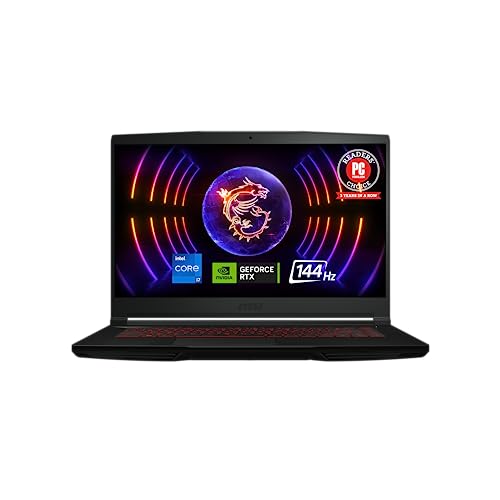
View the MSI Thin GF63 on Amazon
According to the Amazon listing, the MSI Thin GF63 12VE-066US is a 15.6-inch 144Hz gaming laptop with a 12th-generation Intel Core i7 processor, NVIDIA GeForce RTX 4050 graphics, 16GB of DDR4 memory, a 512GB NVMe SSD, and Windows 11 Home. This is the first laptop here with a dedicated graphics card, and for players who want higher settings, smoother camera movement, and room for expansions and mods, that card makes a real difference.
The RTX 4050 is far more powerful than integrated graphics, and it is not working hard on a 2009 game. That headroom helps because Sims 3 frame rates can drop in large, detailed lots or neighbourhoods with many Sims. A dedicated GPU, a faster processor, and 16GB of RAM also make the laptop useful for newer games. According to the Amazon listing, the Thin GF63 has a 144Hz display, MSI’s Cooler Boost cooling, a Type-C port, and a gaming keyboard layout.
The 16GB of RAM is another reason to consider this model. Players who use custom content, script mods, and large saves benefit from extra memory. The main trade-offs are weight, battery life, and price compared with a thin everyday laptop. Gaming laptops are heavier and their fans become audible under load. If you mainly play Sims 3, the Aspire 3 or HP 15 will be cheaper and quieter. If you want higher settings and a laptop for newer games too, the Thin GF63 is strong value. Check the linked listing for the exact configuration, because MSI sells the Thin GF63 in several versions.
4. Acer Nitro 5 AN515-58-78BT — Best Performance for Expansions and Mods

View the Acer Nitro 5 on Amazon
According to the Amazon listing, the Acer Nitro 5 AN515-58-78BT is a 15.6-inch Full HD 165Hz gaming laptop with an Intel Core i7-12650H processor at 2.3GHz, 16GB of DDR5 RAM, a 512GB SSD, NVIDIA GeForce RTX 4060 graphics with 8GB of dedicated memory, and Windows 11 Home. It is the most powerful laptop in this guide, and the best choice for maximum headroom with many expansions, custom content, and mods.
A 10-core Core i7-12650H, 16GB of fast DDR5 memory, and an RTX 4060 give far more performance than Sims 3 needs on paper. In practice, that helps because large saves, detailed lots, many Sims, and a large mods folder can slow the game down. A faster processor and more memory help keep loading and simulation smoother, while the RTX 4060 handles higher settings and smoother camera movement.
According to the Amazon listing, the Nitro 5 has a backlit keyboard, Wi-Fi 6, and Acer’s Cool Boost cooling with twin fans. The 512GB SSD is a good starting point, but players with a very large collection should plan storage carefully. The base game plus all expansions, saves, and custom content can use substantial space. This laptop also suits newer games, which makes it a better long-term purchase if you want one laptop for all gaming. It is heavier and louder under load than a slim everyday laptop, and it costs more than the budget picks. Confirm the processor, RAM, storage, graphics, and operating system on the linked listing, because Acer sells the Nitro 5 in many similar configurations.
Buying Guide: How to Choose a Laptop for Sims 3
Processor and RAM
A modern Intel Core i5 is a good minimum for most Sims 3 players, and a Core i7 gives more headroom for large saves and multitasking. The game was designed for much older processors, but the EA App, Windows background tasks, and the game’s simulation when many Sims are active add extra work. Avoid very low-power Celeron or Pentium chips if you can; they may run the base game, but they are more likely to struggle with expansions and long sessions.
RAM is equally important. According to the Amazon listings in this guide, 8GB is the minimum to accept, 12GB is a useful middle ground, and 16GB is the comfortable choice for heavy expansion and mod users. Windows, the EA App, and a browser use memory at the same time as the game. If you plan to use all expansions, a large custom-content folder, or a long legacy save, choose 16GB from the start, because it is usually simpler than upgrading later.
Storage and graphics
An SSD is essential in 2026. The game loads neighbourhoods, lots, and Create-a-Sim far faster from an SSD than from an older hard drive. Every laptop here has an SSD, and 512GB is a sensible minimum. The base game, expansions, saves, screenshots, and custom content add up quickly, so leave at least 10 to 20 percent of the drive free if you can. A full SSD can slow a laptop down.
Intel Iris Xe Graphics, as listed for the Acer Aspire 3 and HP 15, can handle Sims 3 at medium to high settings for many players. Integrated graphics are quieter, use less power, and keep the laptop cheaper and lighter. A dedicated card, such as the RTX 4050 in the MSI Thin GF63 or the RTX 4060 in the Acer Nitro 5, is better for higher settings, smoother performance in large lots, and headroom for expansions and mods. It is not required for Sims 3, but it is the most noticeable upgrade if you can afford it.
Screen, Windows, and how you play
A 15.6-inch screen is a good size for Sims 3, and every laptop here has one. Full HD, at 1920 x 1080, is the sweet spot: text is sharp and the game looks clear. The HP 15 is listed with an HD display, which is lower than Full HD, so compare that detail if sharpness matters to you. A 144Hz or 165Hz refresh rate can make camera movement feel smoother, but it is a bonus, not a requirement.
The Sims 3 on PC is normally played through the EA App on Windows, and all the laptops here run Windows 11 Home, according to the Amazon listings. Chromebooks and tablets cannot run the full PC version in the same way. Windows 11 may require extra steps, including installing the game through the EA App, applying available patches, and updating graphics drivers. That is normal for an older game on a modern system.
Finally, match the laptop to how you play. Base game plus a few expansions and a small mods folder? A budget Core i5 laptop with 8GB to 12GB of RAM and a 512GB SSD will be enough. Most expansions, a large custom-content folder, and long saves? Choose 16GB of RAM and a dedicated graphics card. Use the laptop on a hard, flat surface and keep the vents clear, because Sims 3 sessions can last for hours.
Frequently Asked Questions
Can you play The Sims 3 on a laptop in 2026?
Yes. The Sims 3 can be played on a modern Windows laptop through the EA App, as long as the laptop meets the game’s requirements and you install the game and any available patches correctly. A modern Intel Core i5 laptop with 8GB of RAM and an SSD is a good starting point, and 16GB of RAM with a dedicated graphics card handles expansions and mods more smoothly.
How much RAM do you need for The Sims 3?
At least 8GB is the sensible minimum in 2026, and 16GB is better if you use expansions, custom content, or mods. Windows, the EA App, and a browser use memory at the same time as the game, and a large save or mods folder adds to the load. According to the Amazon listings in this guide, the HP 15 has 8GB, the Acer Aspire 3 has 12GB, and the MSI Thin GF63 and Acer Nitro 5 have 16GB.
Do you need a gaming laptop to play The Sims 3?
No, not for the base game. A budget laptop with a modern Intel Core i5, Intel Iris Xe Graphics, 8GB or more of RAM, and an SSD can run The Sims 3 well. A gaming laptop is worth it if you own many expansions, use a lot of custom content and mods, want higher settings, or also play newer games.
Will The Sims 3 run with all expansions and mods?
It can, but you need more headroom than the base game alone requires. For a full expansion collection and a large mods folder, choose 16GB of RAM, a dedicated graphics card such as an RTX 4050 or RTX 4060, a fast SSD, and at least 512GB of storage. Keep your mods folder organised, remove content you no longer use, and keep free space on your SSD.
Can you play The Sims 3 on a Chromebook?
No, not in the same way as on a Windows laptop. The full PC version is designed for Windows and is normally installed through the EA App on Windows. A Chromebook cannot run that version directly, and it does not have the same access to expansions, mods, and patches. Choose a Windows laptop, and confirm on the Amazon listing that it runs Windows 11 Home.
Conclusion
The best laptops to play Sims 3 give this older, surprisingly demanding game the resources it needs: a modern processor, enough RAM, a fast SSD, and graphics that match how heavily you play. For most players, the Acer Aspire 3 is the best overall budget pick, with its Core i5 processor, 12GB of RAM, 512GB SSD, and Full HD screen. The HP 15 is a good everyday alternative with a newer 13th-generation processor, while the MSI Thin GF63 and Acer Nitro 5 are better if you want dedicated RTX graphics, 16GB of RAM, and maximum headroom for expansions, custom content, and mods.
Before you order, check the linked Amazon listing for the exact configuration, price, and availability, because similar model names can have different processors, RAM, storage, and screens. Choose the laptop that matches how you actually play, and you will have a machine that loads Sims 3 faster and runs it more smoothly.
Related guides
More from Amazon
Programs that pair well with the guide above. Offers and eligibility are set by Amazon and may change.
Free shipping on eligible items, Prime Video and more. Eligible new members can start with a free trial.
Start a Prime free trialAd-free music streaming. Eligible new subscribers can start with a free trial.
Try Music Unlimited freeA Prime membership for ages 18-24 with a trial period. Eligibility is set by Amazon.
See Prime for Young AdultsAudiobooks and podcasts to listen to on the go. Eligible new members can start with a free trial.
Try Audible freeAs an Amazon Associate we earn from qualifying purchases.




Write Your Review
No reviews yet. Be the first to share your experience!