
Key takeaways
- Find the best laptops with keypad for spreadsheets, accounting and fast data entry, with a verified 15.6-inch pick, keypad sizes and buying checks.
What's inside
As an Amazon Associate I earn from qualifying purchases. This post may contain affiliate links at no extra cost to you.
A built-in numeric keypad changes how fast routine computer work feels. If you enter figures in spreadsheets, process invoices, work in accounting software, or type long strings of numbers for school or office work, reaching for the number row slows you down and increases mistakes. A dedicated keypad puts 0 to 9, plus, minus, multiply, divide, Enter, and decimal point under your right hand, in the same layout used on desktop keyboards. That familiarity matters when accuracy matters as much as speed.
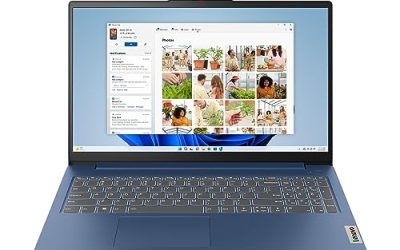
The challenge is that many modern laptops leave the keypad out, even when the screen is large. Thin 14-inch and 15-inch models often use the saved space for speakers or a larger touchpad, while some 16-inch models still ship without a full number block. Screen size alone, therefore, is not a reliable guide. This guide explains what to check on an Amazon listing before you buy, and features a laptop whose listing states a full-size keyboard with a numeric keypad: a 15.6-inch Lenovo IdeaPad Slim 3i.
As an Amazon Associate, we earn from qualifying purchases made through links on this page, at no extra cost to you.
Quick Picks
| Laptop | Screen | Keypad | Processor | RAM and storage | Best for |
|---|---|---|---|---|---|
| Lenovo IdeaPad Slim 3i | 15.6-inch Full HD IPS | Full-size keyboard with numeric keypad | Intel N100, up to 3.4 GHz | 4GB LPDDR5 RAM; 128GB SSD plus 1TB OneDrive as listed | Light office work, study, and everyday number entry on a budget |
Lenovo IdeaPad Slim 3i — Best Budget Laptop With a Keypad for Everyday Office Work
The Lenovo IdeaPad Slim 3i is the featured pick in this guide because its Amazon listing is explicit about the feature that matters most here. According to the Amazon listing, it has a full-size keyboard with a numeric keypad, in US English layout. That wording is important. Some listings use the phrase “numeric keypad” loosely, or describe a touchpad feature, while this listing ties the keypad to the physical keyboard. For data entry, that distinction is the difference between a familiar set of keys and a workaround.
According to the Amazon listing, the laptop has a 15.6-inch Full HD display with a resolution of 1920 x 1080 pixels. The listing describes the panel as an IPS display with a micro-edge, BrightView finish and low blue light certification. In practical terms, a 15.6-inch Full HD screen gives a spreadsheet more room than a 13-inch or 14-inch display, so more columns remain visible without constant scrolling.
The processor is an Intel N100, according to the Amazon listing. The listing states up to 3.4 GHz, four cores, and four threads, with Intel UHD Graphics. This is an entry-level processor, and that sets realistic expectations. It is suited to documents, email, web browsing, video calls, spreadsheets of ordinary size, and streaming. It is not presented here as a machine for heavy video editing, large data modelling, demanding games, or running many heavy applications at once.
Memory and storage need careful reading on this listing. According to the Amazon listing, the laptop has 4GB of LPDDR5 SDRAM and a 128GB SSD. The listing also describes total storage as 1.1TB, made up of the 128GB SSD plus 1TB of OneDrive. That second part is cloud storage, not local storage on the laptop itself, and it is included with a one-year Microsoft 365 bundle described in the listing. Buyers should therefore plan around 128GB of local SSD space, not 1.1TB of local space. That is enough for Windows 11, office applications, and a reasonable set of documents, but it will fill up quickly with large media files or games. The listing also notes a microSD card reader, which gives one way to add removable storage.
The operating system is Windows 11, according to the Amazon listing, with Copilot AI listed as a feature. The bundle described in the listing includes one year of Microsoft 365 and 1TB of OneDrive, plus three months of PC Game Pass. Bundle contents can change between sellers and configurations, so the exact bundle should be checked on the listing at the time of purchase.
Battery life is listed as up to 8 hours, according to the Amazon listing, with Rapid Charge Boost described as giving two hours of runtime from 15 minutes of charging. Battery life figures of this kind are based on controlled conditions and will vary with screen brightness, Wi-Fi use, and video calls. Even so, the stated figure can cover a school day or a working day of light use, with a top-up during a break if needed.
Connectivity is practical for a desk setup. According to the Amazon listing, the laptop has two USB-A 3.2 Gen 1 ports, one USB-C 3.2 Gen 1 port, one HDMI 1.4 port, one headphone and microphone combo jack, and an SD card reader. Wi-Fi 6 and Bluetooth 5.2 are also listed. That covers a mouse, a second monitor through HDMI, headphones, and a memory card.
The webcam and audio features are also relevant for home office and study use. According to the Amazon listing, the laptop has a 720p HD webcam with a physical privacy shutter, Dolby Audio, dual speakers, and AI noise reduction. A 720p webcam is basic, but it is adequate for ordinary video calls. The listing also describes MIL-STD-810H testing and ENERGY STAR 8.0 certification.
According to the Amazon listing, the laptop measures 14.15 x 9.25 x 0.70 inches and weighs 3.42 lbs. That is portable for a 15.6-inch laptop. For a buyer who mainly works at one desk, the size is an advantage, because it leaves room for the keypad.
Who this laptop suits
This laptop suits a buyer who wants a straightforward, affordable Windows laptop with a real numeric keypad for everyday work. It is a sensible fit for students, home office workers who handle invoices and spreadsheets, and anyone who wants a larger screen and a full keyboard without paying for a high-performance processor.
It is less suited to buyers who need to keep many large applications open at once, edit long videos, play demanding games, or store large local media libraries. The 4GB of RAM and 128GB of local SSD storage are the main limits. A buyer in that position should look for a laptop with at least 16GB of RAM and at least 512GB of local SSD storage, and should confirm that the larger configuration still includes a physical numeric keypad, because memory and storage upgrades do not always come with the same keyboard layout.
What to check before you buy this exact configuration
Before buying, check the exact configuration on the Amazon listing. The listing title and product details should match the Intel N100 processor, 4GB of RAM, 128GB SSD, 15.6-inch Full HD display, and full-size keyboard with numeric keypad described here. Check the seller, the included bundle, the return policy, and the delivery details. If a listing shows a different processor, a different amount of RAM, or a different storage figure, treat it as a different configuration, even if the model name looks the same. Model names are reused across configurations, and the keypad, memory, and storage can vary between them.
Check the current price and configuration on Amazon
Buying Guide: How to Choose the Best Laptop With a Keypad
A laptop with a keypad is not one single product type. The keypad can be full-size, slightly compressed, or squeezed into a narrow column. The laptop around it can be a budget office machine, a business laptop, a creator laptop, or a gaming laptop. The right choice depends on how much number entry you do and what else the laptop must do.
1. Confirm that the keypad is physical and full-size
Start with the keyboard description on the Amazon listing. Look for phrases such as “full-size keyboard with numeric keypad”, “full-size numeric keyboard”, or “numeric keypad” listed under special features. Be cautious with phrases such as “NumberPad” on a touchpad, “virtual keypad”, or a keypad shown only in a marketing image. A touchpad keypad can work for occasional entry, but it has no physical key travel, it disappears when the touchpad is used for pointing, and it is easy to trigger by accident. If you type numbers for hours, a physical keypad is the safer choice.
Also check the layout in the product images. A full keypad usually has three columns of numbers plus a fourth column for operations, with a wide zero key and a tall Enter key. If the number keys look much narrower than the letter keys, the keypad is probably compressed, and compressed keypads take more practice.
2. Choose the screen size around the keypad and the work
As a general rule, 15.6-inch, 16-inch, and 17.3-inch laptops are the sizes most likely to include a numeric keypad. Laptops of 13 inches and 14 inches very rarely include one, because there is not enough width for a full keyboard plus a number block. That does not mean every 15.6-inch or larger laptop has a keypad. Some large laptops use the space for speakers, a larger touchpad, or a centred keyboard, so the listing must still be checked.
A 15.6-inch Full HD display is a good starting point for spreadsheets and accounting: large enough to show several columns at once, and still portable. A 16-inch display gives a little more vertical space. A 17.3-inch display gives the most room and the roomiest keypad, but it is heavier and needs a larger bag. For desk work, the larger screen is usually worth the weight; for daily travel, a 15.6-inch or 16-inch model is usually the better compromise.
Full HD, at 1920 x 1080 pixels, is the minimum to look for. It keeps text sharp enough for long sessions. Higher resolutions give sharper text, but they also use more battery and cost more.
3. Match the processor and RAM to the workload
The keypad does not make a slow laptop fast. The processor and RAM decide how smoothly spreadsheets, browsers, and office applications run. For light office work, email, web browsing, and documents, an entry-level processor such as the Intel N100 in the featured Lenovo can be enough, provided the RAM is not overloaded with too many browser tabs and applications.
For regular spreadsheet work with large files or several applications open at once, look for at least 16GB of RAM and a mid-range processor, such as an Intel Core i5 or an AMD Ryzen 5. RAM is often soldered in thin laptops and cannot be upgraded later, so buy enough at the start.
Storage should be a solid-state drive, not a traditional hard drive. A 256GB SSD is workable for light use, 512GB is safer for most office users, and 1TB is better for large files. Check whether the stated storage is local SSD storage or local storage plus cloud storage, as in the featured Lenovo listing, where 1TB of OneDrive sits alongside a 128GB SSD.
4. Check the rest of the keyboard, battery, weight, and ports
A good keypad on a poor keyboard is still a poor typing experience. Check whether the keyboard is backlit, because backlighting helps in dim rooms and evening work. Also check the position of the keys around the keypad. On some laptops, the arrow keys are squeezed under the keypad, the right Shift key is shortened, or the Enter key on the keypad is small. A layout with a clear gap between the main keyboard and the keypad, and a full-size Enter key on the keypad, is usually easier to use at speed.
Battery life figures are usually “up to” figures, based on light use. A laptop listed at up to 8 hours may give fewer hours with video calls and many browser tabs open. For desk work, that matters less, because the laptop can stay plugged in.
Weight matters in the same way. A 15.6-inch laptop at around 3.4 lbs, like the featured Lenovo, is portable for its size. A 17.3-inch laptop can weigh 5 lbs or more, which is noticeable in a bag over a full day. Check the weight and dimensions in the product details, not just the screen size.
Check for USB-A ports for a mouse, USB-C for charging or a dock, HDMI for an external monitor, and a headphone jack if needed. Wi-Fi 6 and Bluetooth are now common. An SD card reader is useful for cameras, and an Ethernet port is useful in offices with wired networks, although it is now rare on thin laptops.
5. Read the exact configuration, not just the model name
This is the most common mistake when buying a laptop with a keypad. A model name such as IdeaPad Slim 3i, HP 15, or Vivobook 16 covers many configurations with different processors, RAM, storage, screens, and sometimes different keyboards. Two listings with the same model name can have different keypads, or one can have a keypad and the other can have a different keyboard layout.
Before buying, match the processor, RAM, storage, screen size, resolution, operating system, and keyboard description with the configuration you want. Check the seller, the return policy, and whether the listing is for a new laptop or a renewed one. If any detail does not match, treat it as a different configuration. That check avoids the cost of returning a laptop that lacks the keypad you bought it for.
Frequently Asked Questions
Do all 15.6-inch laptops have a numeric keypad?
No. Many 15.6-inch laptops do have a numeric keypad, but a large number do not. Some use the space for speakers, a larger touchpad, or a centred keyboard. The same is true for 16-inch and 17.3-inch laptops. According to the Amazon listing for the featured Lenovo IdeaPad Slim 3i, that model does have a full-size keyboard with a numeric keypad, but that does not mean every 15.6-inch laptop has the same layout.
Is a laptop with a keypad better for accounting and spreadsheets?
For most accounting and spreadsheet work, yes, a physical keypad is better than using the number row. The layout matches a desktop keyboard, so the right hand can enter numbers without looking down, and Enter, plus, minus, and decimal point are in familiar positions. A touchpad keypad can help for occasional entry, but it is not a substitute for physical keys if number entry is a daily task.
Can I add a numeric keypad to a laptop that does not have one?
Yes, an external USB or Bluetooth numeric keypad can be added to almost any laptop. It is useful if you already own a laptop without a keypad, or if you need a keypad only at a desk, and it is usually cheaper than buying a new laptop. It does not help when travelling light, though, because it is another item to carry. For daily number entry away from a desk, a built-in keypad is more convenient.
What size laptop should I choose if I want a roomy keypad?
A 17.3-inch laptop usually gives the roomiest keypad. A 15.6-inch laptop, such as the featured Lenovo IdeaPad Slim 3i, can still have a full-size keypad, but the keys may be closer together. A 16-inch laptop is often a good balance of screen space, keypad room, and portability. If the number keys look much smaller than the letter keys, the keypad is compressed, even on a large laptop.
How much RAM and storage do I need in a laptop with a keypad?
For light office work, 8GB of RAM and a 256GB SSD are a workable starting point. For regular spreadsheet work and several applications open at once, 16GB of RAM and a 512GB SSD are safer. The featured Lenovo, according to the Amazon listing, has 4GB of RAM and a 128GB SSD, plus 1TB of OneDrive cloud storage. That suits light use; buyers with larger files should choose more RAM and more local SSD storage.
Conclusion
The best laptop with a keypad is the one that matches the way you enter numbers, not just the one with the largest screen or the fastest processor. A physical, full-size keypad, a comfortable keyboard, a clear Full HD display, enough RAM and local storage for the work, and a configuration that is checked before purchase matter more than any single specification on its own. For light office work, study, and everyday data entry, the Lenovo IdeaPad Slim 3i featured here is a straightforward option, because its Amazon listing states a full-size keyboard with a numeric keypad, a 15.6-inch Full HD IPS display, Windows 11, and a portable 3.42 lb design. Its limits are also clear: 4GB of RAM and 128GB of local SSD storage suit light use, not heavy multitasking or large local media libraries.
If that configuration fits the work, check the exact listing, confirm the processor, RAM, storage, and keypad description, and confirm the included bundle before buying. If the work needs more memory, more local storage, or a larger screen, use the same checks on the next configuration. A few minutes on the keyboard description is the simplest way to end up with a laptop that makes number entry faster and more accurate every day.
Check the Lenovo IdeaPad Slim 3i on Amazon
Related guides
More from Amazon
Programs that pair well with the guide above. Offers and eligibility are set by Amazon and may change.
Free shipping on eligible items, Prime Video and more. Eligible new members can start with a free trial.
Start a Prime free trialAd-free music streaming. Eligible new subscribers can start with a free trial.
Try Music Unlimited freeA Prime membership for ages 18-24 with a trial period. Eligibility is set by Amazon.
See Prime for Young AdultsAudiobooks and podcasts to listen to on the go. Eligible new members can start with a free trial.
Try Audible freeAs an Amazon Associate we earn from qualifying purchases.




Write Your Review
No reviews yet. Be the first to share your experience!