
Key takeaways
- The best laptops to play Roblox compared on published system requirements, processors, integrated and dedicated graphics, RAM and SSD storage, with four picks for every budget.
What's inside
- Quick Picks
- Reading Roblox’s Requirements the Right Way
- 1. Acer Aspire 5 A515-45-R74Z — The Budget Starting Point
- 2. ASUS VivoBook 15 F515 — Integrated Graphics, Bigger SSD
- 3. HP Victus 15 — Dedicated Graphics Without Going Overboard
- 4. Lenovo LOQ 15 — The Longest-Lasting Pick
- How to Choose a Laptop for Roblox
- FAQs
- Conclusion
As an Amazon Associate I earn from qualifying purchases. This post may contain affiliate links at no extra cost to you.
As an Amazon Associate we earn from qualifying purchases.
Roblox is one of the lightest mainstream games a laptop can run, and that single fact should shape how you buy. Roblox publishes its own computer requirements, and they are modest: a 64-bit version of Windows 10 or Windows 11, graphics hardware with DirectX 10 or higher feature level support, a recent processor at 1.6 GHz or better, at least 1 GB of memory as a stated recommendation, and around 300 MB of free space for the installation, with an internet connection of 4 to 8 Mb/s suggested for a single-use household. Roblox also suggests that, for the best performance, a desktop less than five years old with a dedicated video card, or a laptop less than three years old with an integrated video card, is the right kind of machine to aim for.
Every laptop in this guide clears those published requirements by a wide margin on paper. The real choice is about headroom and longevity: a simple integrated-graphics laptop for younger players and everyday experiences, or a gaming laptop with a dedicated graphics card that also handles Roblox Studio, voice chat, a browser full of guides, and more demanding games later. This guide makes no benchmark claims and reports no frame rates, because performance varies by experience, server and settings. Instead, each pick is matched to Roblox’s published requirements using the specifications in its own listing, which is the honest way to shop for a game this light.
Affiliate Disclosure: This article contains affiliate links to products on Amazon. If you buy through one of those links, we may earn a commission at no additional cost to you.
Quick Picks
- Acer Aspire 5 A515-45-R74Z — the budget starting point: a Ryzen 5 5500U with integrated Radeon graphics, 8GB of RAM and an SSD, comfortably above Roblox’s published requirements.
- ASUS VivoBook 15 F515 — the integrated-graphics step up: an Intel Core i5-1135G7 with Iris Xe graphics and a 512GB SSD for play plus schoolwork.
- HP Victus 15 — the dedicated-graphics value pick: a Ryzen 5 7535HS, a GeForce RTX 2050, 16GB of DDR5 RAM and a 144Hz display.
- Lenovo LOQ 15 — the longest-lasting pick: a Ryzen 7 8845HS, a GeForce RTX 4050 with 6GB of graphics memory, 16GB of RAM and a 512GB SSD.
Reading Roblox’s Requirements the Right Way
The published minimums describe a floor, not a target. A laptop that only just meets 1 GB of memory and an old 1.6 GHz processor would be a poor purchase today, because Windows 11, a browser and voice chat all need memory at the same time as the game. A sensible modern baseline for Roblox is a recent quad-core or better processor, integrated graphics from the last few years with DirectX 10 or higher support, 8GB of RAM and an SSD. That baseline describes the first two laptops in this guide, and both pair it with Windows 11, which matches the 64-bit Windows 10 or 11 requirement directly.
Dedicated graphics change the conversation from whether Roblox runs to what else the laptop can do. Roblox suggests a dedicated video card for the best desktop performance, and a gaming laptop with an RTX-class card brings clear headroom for detailed experiences with higher graphics settings, for creating in Roblox Studio, and for other games a player may grow into. It also brings weight, fan noise and a larger charger. For a younger player who only plays Roblox and does homework, that trade is usually unnecessary. For a teenager whose laptop is the main gaming machine, it is often the smarter long-term buy.
Two more listing details matter. An SSD, fitted to every laptop here, keeps Windows, Roblox and everyday apps loading quickly and gives far more room than the roughly 300 MB installation Roblox describes, which matters once screenshots, recordings and other games arrive. A higher refresh rate display, such as the 144Hz panels on the gaming picks, describes how often the screen can update; it is a display specification from the listing, not a promise about the frame rate any particular Roblox experience will reach.
1. Acer Aspire 5 A515-45-R74Z — The Budget Starting Point
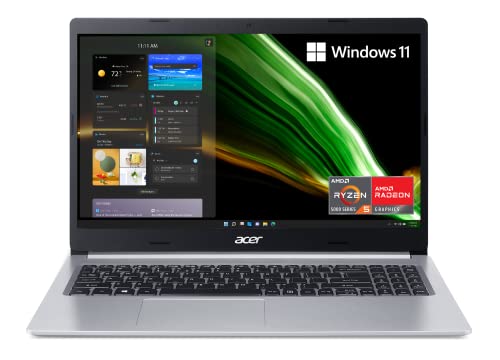
The Aspire 5 shows how little laptop Roblox actually needs when the specification is modern. Its AMD Ryzen 5 5500U is a six-core mobile processor, far beyond the recent 1.6 GHz or better processor Roblox describes, and its integrated AMD Radeon graphics provide the DirectX-capable integrated graphics that Roblox’s own guidance treats as suitable in a recent laptop. This listing includes 8GB of DDR4 RAM and a 256GB NVMe SSD, which together cover Roblox, Windows 11, a browser and school or work apps running alongside the game.
The 15.6-inch Full HD IPS display is a comfortable size for longer sessions and for splitting the screen between a game and a guide or chat window. Wi-Fi 6 support helps on a modern home network, although Roblox’s suggested 4 to 8 Mb/s connection for a single-use household says more about your broadband and router placement than about the laptop. A backlit keyboard is included, which younger players and late-evening users tend to appreciate. There is no dedicated graphics card here, and that is the honest limit of the machine: it is a Roblox and everyday laptop chosen on specifications that exceed the published requirements, not a gaming laptop for demanding titles.
Key specifications
- Processor: AMD Ryzen 5 5500U hexa-core mobile processor
- Graphics: Integrated AMD Radeon graphics
- Memory: 8GB DDR4 RAM
- Storage: 256GB NVMe SSD
- Display: 15.6-inch Full HD IPS
- Connectivity and extras: Wi-Fi 6, backlit keyboard, Windows 11 Home
Pros
- Modern six-core processor and integrated graphics well above the published requirements
- SSD storage and 8GB of RAM suit Roblox plus everyday multitasking
- Full HD IPS screen is comfortable for play and homework alike
Cons
- Integrated graphics only, so demanding games are outside its role
- 256GB of storage is the smallest in this guide
- No high refresh rate display
View the Acer Aspire 5 on Amazon
2. ASUS VivoBook 15 F515 — Integrated Graphics, Bigger SSD

The VivoBook 15 F515 is the pick for a player who wants one slim laptop for Roblox, school and everyday use, with more storage than the Acer. Its Intel Core i5-1135G7 is a quad-core processor running up to 4.2 GHz, and its Intel Iris Xe graphics are a capable integrated solution of exactly the kind Roblox’s guidance points to for a recent laptop. This F515EA-DH55 listing pairs them with 8GB of DDR4 RAM and a 512GB SSD, doubling the Acer’s storage for game recordings, photos, documents and additional lighter games.
The 15.6-inch Full HD display keeps text and game interfaces sharp, and the listing adds a fingerprint sensor, which makes signing in quicker for a shared family laptop. Windows 11 Home matches Roblox’s supported operating systems in its 64-bit form. Judged against the published requirements, the VivoBook clears every line with room to spare: processor, DirectX-capable integrated graphics, memory many times the stated recommendation, and storage far beyond the installation size. Its ceiling is the same as any integrated-graphics laptop, so a player who already knows they want demanding games as well should read the two gaming picks below instead of expecting this machine to stretch.
Key specifications
- Processor: Intel Core i5-1135G7, up to 4.2 GHz, 4 cores
- Graphics: Intel Iris Xe graphics, integrated
- Memory: 8GB DDR4 RAM
- Storage: 512GB SSD
- Display: 15.6-inch Full HD
- Extras: Fingerprint sensor, Windows 11 Home
Pros
- Iris Xe integrated graphics and a modern quad-core processor fit Roblox’s guidance for recent laptops
- 512GB SSD holds Roblox, school files and other light games together
- Slim 15.6-inch design doubles as an everyday school laptop
Cons
- No dedicated graphics card for demanding games
- 8GB of RAM is a sensible baseline rather than long-term headroom
- Standard refresh rate display
View the ASUS VivoBook 15 on Amazon
3. HP Victus 15 — Dedicated Graphics Without Going Overboard

The Victus 15 is where this guide moves from integrated graphics to a dedicated card, and for Roblox that means headroom rather than necessity. This listing combines an AMD Ryzen 5 7535HS processor with an NVIDIA GeForce RTX 2050 graphics card, 16GB of DDR5 RAM and a 512GB PCIe M.2 SSD. Roblox suggests a dedicated video card for the best desktop performance, and this specification follows that suggestion directly, while the 16GB of memory leaves comfortable room for Roblox, voice chat, a browser and recording or streaming tools at the same time.
The 15.6-inch Full HD display runs at 144Hz and the listing includes a backlit keyboard, a webcam, HDMI and Wi-Fi 6, under Windows 11 Home. That port and wireless set covers a headset, an external monitor and a modern home network without adapters for the basics. The Victus is a gaming laptop in build as well as specification, so it is larger and heavier than the two everyday laptops above, and its fans will be audible under load in a way a thin laptop’s usually are not. For a player who plays Roblox today and expects to try more demanding games on the same machine, that is a fair exchange, and the specification gives the laptop a longer useful life than an integrated-only model.
Key specifications
- Processor: AMD Ryzen 5 7535HS
- Graphics: NVIDIA GeForce RTX 2050, dedicated
- Memory: 16GB DDR5 RAM
- Storage: 512GB PCIe M.2 SSD
- Display: 15.6-inch Full HD, 144Hz
- Extras: Backlit keyboard, webcam, HDMI, Wi-Fi 6, Windows 11 Home
Pros
- Dedicated RTX graphics follow Roblox’s own suggestion for best desktop performance
- 16GB of DDR5 RAM supports gaming plus chat, browser and tools together
- 144Hz Full HD display and a full gaming-laptop port set
Cons
- Bigger and heavier than the everyday laptops in this guide
- More graphics power than Roblox alone requires
- Fan noise under load is part of the gaming-laptop trade
View the HP Victus 15 on Amazon
4. Lenovo LOQ 15 — The Longest-Lasting Pick

The LOQ 15 is the strongest specification in this guide and the one to choose when the laptop needs to stay capable for years. Its listing pairs an AMD Ryzen 7 8845HS processor with an NVIDIA GeForce RTX 4050 graphics card with 6GB of graphics memory, 16GB of RAM and a 512GB SSD, running Windows 11 Home on a 15.6-inch Full HD display. Against Roblox’s published requirements, every line is exceeded by a large margin: a recent high-performance processor, dedicated DirectX-capable graphics of the kind Roblox recommends for best performance, memory far above the stated recommendation, and storage far beyond the installation needs.
That headroom is really about everything around Roblox. It covers Roblox Studio for players who build their own experiences, larger and more detailed experiences at higher in-game graphics settings, and a wide range of other games if the player’s interests widen. The LOQ line is Lenovo’s gaming range, so expect a sturdier, heavier chassis than the VivoBook, a backlit keyboard, and cooling designed for sustained gaming loads. It is the least necessary laptop in this guide for Roblox alone, and the most sensible one if the question is really about the next several years of gaming on a single machine. Check the exact configuration on the product page before ordering, because gaming laptops are sold in several specification variants under the same model name.
Key specifications
- Processor: AMD Ryzen 7 8845HS
- Graphics: NVIDIA GeForce RTX 4050, dedicated, 6GB graphics memory
- Memory: 16GB RAM
- Storage: 512GB SSD
- Display: 15.6-inch Full HD
- Operating system: Windows 11 Home
Pros
- Strongest processor and graphics specification in this guide
- Dedicated RTX 4050 gives long-term headroom beyond Roblox
- 16GB of RAM and an SSD suit Studio, multitasking and other games
Cons
- Well beyond what Roblox itself requires, so casual players overspend
- Gaming chassis is heavier to carry every day
- Variants exist, so the exact configuration needs confirming on the page
View the Lenovo LOQ 15 on Amazon
How to Choose a Laptop for Roblox
Begin with Roblox’s own published requirements and treat them as a floor: 64-bit Windows 10 or 11, DirectX 10 or higher graphics support, a recent processor at 1.6 GHz or better, and enough free space for a roughly 300 MB installation. Then buy for the player’s real life around the game. If Roblox is the only game and the laptop also handles homework and video, a modern integrated-graphics machine such as the Acer Aspire 5 or ASUS VivoBook 15 is the proportionate choice, and 8GB of RAM with an SSD is the specification to insist on rather than anything closer to the stated minimums.
If the player creates in Roblox Studio, plays with voice chat and a browser open, or is likely to move on to more demanding games, step up to a dedicated graphics card and 16GB of RAM. The HP Victus 15 is the measured step, and the Lenovo LOQ 15 is the long-term one. In both cases the reasoning is specification headroom, not a promised frame rate, because Roblox experiences differ enormously in how much they ask of a laptop and no listing specification can settle that for every game on the platform.
Finally, do not neglect the connection and the setup. Roblox suggests 4 to 8 Mb/s for a single-use household, so a laptop near the router or wired where possible will feel better than a stronger laptop on a weak signal at the far end of the house. Keep Windows and graphics drivers updated, leave free space on the SSD rather than filling it completely, and use the in-game graphics settings to balance detail and smoothness on whichever laptop you choose. Those habits matter at every level of this guide.
FAQs
Can a laptop with integrated graphics play Roblox?
Based on the published requirements, yes. Roblox requires DirectX 10 or higher graphics support and suggests a recent laptop with an integrated video card for best performance. The Acer Aspire 5 with Radeon graphics and the ASUS VivoBook 15 with Iris Xe graphics both match that description on their listings.
How much RAM should a Roblox laptop have?
Roblox’s published guidance recommends at least 1 GB of memory, but that figure assumes little else running. A practical modern choice is 8GB for play plus everyday apps, or 16GB if the player uses Studio, voice chat and a browser at the same time, as the Victus and LOQ in this guide provide.
Do I need a dedicated graphics card for Roblox?
No. Roblox suggests a dedicated video card for the best desktop performance, but it is a recommendation, not a requirement. A dedicated card such as the RTX 2050 or RTX 4050 in this guide is about headroom for detailed experiences, Studio and other games, not about making Roblox run at all.
Will these laptops run Roblox Studio as well as the game?
Studio runs on Windows and Mac and is more demanding of memory and processor than playing alone. The 16GB gaming picks, the Victus 15 and the LOQ 15, are the more comfortable choices for building, while the 8GB everyday laptops suit lighter editing alongside schoolwork.
What internet speed does Roblox need?
Roblox suggests at least 4 to 8 Mb/s for a single-use household, with more helpful in a busier home. Router position and Wi-Fi quality in the room where the laptop is used will usually matter more than small differences between the laptops in this guide.
Conclusion
Roblox rewards a sensible purchase rather than an expensive one. Its published requirements are low, and the Acer Aspire 5 and ASUS VivoBook 15 both clear them clearly on their listing specifications while doubling as everyday school and family laptops, with the VivoBook adding a larger 512GB SSD. Players who want dedicated graphics, following Roblox’s own suggestion for best desktop performance, should look at the HP Victus 15 with its RTX 2050 and 16GB of DDR5 memory. The Lenovo LOQ 15, with a Ryzen 7 and an RTX 4050, is the choice for a player whose laptop must keep up for years and handle far more than Roblox. Match the laptop to the player’s wider habits, and every pick here is comfortably specified for the game.
Related guides
- Best Laptops for Zoom Teaching: Clear Video, Reliable Audio and All-Day Class Power
- Best Laptops for Video Editing and Music Production: Power, Screen and Storage
- Best Laptops for Network Engineers: Ethernet, RAM for Labs and Ports That Matter
- Best Laptops for Digital Nomads: Light Machines for Working From Anywhere
More from Amazon
Programs that pair well with the guide above. Offers and eligibility are set by Amazon and may change.
Free shipping on eligible items, Prime Video and more. Eligible new members can start with a free trial.
Start a Prime free trialAd-free music streaming. Eligible new subscribers can start with a free trial.
Try Music Unlimited freeA Prime membership for ages 18-24 with a trial period. Eligibility is set by Amazon.
See Prime for Young AdultsAudiobooks and podcasts to listen to on the go. Eligible new members can start with a free trial.
Try Audible freeAs an Amazon Associate we earn from qualifying purchases.









Write Your Review
No reviews yet. Be the first to share your experience!