
Key takeaways
- Explore budget laptop models positioned for simple work, study and browsing, and learn how to judge processors, memory, storage and screens in this class.
What's inside
As an Amazon Associate I earn from qualifying purchases. This post may contain affiliate links at no extra cost to you.
As an Amazon Associate we earn from qualifying purchases.
Disclosure: This article contains affiliate links. If you buy through a link on this page, the site may earn a commission at no extra cost to you.
Introduction
Searching for the best laptops under 300 dollars means entering the most compromise-heavy part of the laptop market. At this end of the range, every specification involves a trade-off. Processors are designed for light tasks rather than speed. Memory is limited. Storage is often small, and sometimes uses slower eMMC flash instead of a faster solid state drive. Screens are usually basic. None of that makes these machines useless. It means they have to be matched honestly to simple jobs: web browsing, email, documents, online learning, video calls and streaming.
It also means expectations need to be set carefully. A budget laptop in this class is not a gaming machine, not a video editing workstation and not a good choice for keeping dozens of heavy applications open at once. It can be a sensible second computer, a first laptop for a student with light coursework, a family machine for browsing and forms, or a dedicated laptop for writing and calls. The value comes from choosing the least limiting compromise for your particular routine, not from expecting performance that this class was never built to deliver.
This guide selects models that are positioned by their makers and listings as budget laptops, with entry level processors, modest memory and small storage that fit this segment. Listings and configurations in this class change often, and the exact configuration behind a familiar model name can differ between listings, so the product sections below describe only what each specific listing states. Always open the linked listing and confirm the processor, memory, storage, screen and operating system for the exact configuration before you order. If a detail matters to you and the listing does not confirm it, treat that detail as unconfirmed rather than assuming the best.
The quick picks give a short route through the choices. The product sections explain who each machine suits and where it will feel limited. The buying guide then walks through the checks that matter most in this segment, because in a budget laptop the difference between a workable purchase and a frustrating one usually comes down to memory, storage type and screen quality rather than brand.
Quick picks
- Best for a large screen on a tight budget brief: ASUS Vivobook 15, model M515DA-WS33 — a fifteen inch Full HD display and a full size keyboard with number keys make long documents and forms easier, with an everyday Ryzen 3 processor for browsing and writing.
- Best for a simple fifteen inch home laptop: Acer Aspire 1 A115-32-C96U — a large Full HD screen, an Intel Celeron N4500 processor and eMMC storage in a slim budget design aimed at browsing, streaming and light documents.
- Best for portability and cloud based tasks: HP Stream 14 — a fourteen inch laptop built around light, cloud friendly use, with Windows 11 Home in S mode, a built-in webcam and a port selection suited to students and casual home use.
1. ASUS Vivobook 15, model M515DA-WS33

The ASUS Vivobook 15 M515DA-WS33 is the most capable feeling option in this budget shortlist because it pairs its entry level positioning with a fifteen inch Full HD screen and a full size keyboard. Its Amazon listing describes a 15.6 inch Full HD laptop with an AMD Ryzen 3 3250U processor, eight gigabytes of memory in the title and product description, a one hundred twenty eight gigabyte solid state drive, and Windows 11 Home in S mode, in Transparent Silver.
That combination matters for daily comfort. The Full HD anti-glare display described in the product text gives sharper text than the HD panels common in this class, which helps when you read for long periods or work through detailed forms and spreadsheets. The keyboard includes number keys, useful for data entry. The manufacturer text puts the weight at about three point nine pounds, which is manageable for moving between rooms even though this is a full size machine.
The Ryzen 3 3250U is an older dual core everyday processor. It is appropriate for browsing, documents, email, video calls and streaming, and the product description presents it as a day-to-day productivity chip. It is not built for demanding multitasking, large creative projects or modern games. Storage is also limited, so this laptop suits someone who keeps documents organised, uses cloud storage for larger libraries, and installs only the applications they actually need. The listed ports include USB-A, USB-C, HDMI, an audio jack and a microSD card reader, and wireless is listed as Wi-Fi 5 with Bluetooth.
Key specifications
- Operating system: Windows 11 Home in S mode, listed as Windows 11 Home
- Processor: AMD Ryzen 3 3250U, up to 3.5 GHz
- Memory: 8GB as described in the listing title and product description
- Storage: 128GB solid state drive
- Display: 15.6 inch Full HD, 1920 by 1080, anti-glare
- Graphics: AMD Radeon Graphics, integrated
- Connectivity: Wi-Fi 5, Bluetooth, USB-A, USB-C, HDMI, microSD card reader
- Weight: about 3.9 pounds in the manufacturer text
Pros
- Full HD screen is sharper than most displays in this budget class
- Full size keyboard with number keys suits documents and data entry
- Solid state storage is preferable to slower flash storage for responsiveness
- Useful port mix, including HDMI and a card reader
Cons
- Older dual core processor limits heavier multitasking
- Storage fills quickly with large local files
- S mode restricts installations to the Microsoft Store until switched out
- Wi-Fi 5 is an older standard than Wi-Fi 6
Check the current listing and configuration on Amazon: ASUS Vivobook 15 on Amazon
2. Acer Aspire 1 A115-32-C96U

The Acer Aspire 1 A115-32-C96U is built around one clear idea: give budget buyers a large screen in a slim body and keep everything else simple. Its listing describes a 15.6 inch Full HD display, an Intel Celeron N4500 processor, four gigabytes of DDR4 memory, one hundred twenty eight gigabytes of eMMC storage, Wi-Fi 5, a Microsoft 365 Personal subscription period included in the listing title, and Windows 11 in S mode, in Silver.
The large Full HD screen is the reason to consider this model. For streaming, reading, online classes and documents, a bigger and sharper display is easier on the eyes than a small basic panel. The Celeron N4500 is an entry level processor intended for light workloads. It can handle browsing, writing, email and video, but it will feel slow if you open many tabs, join a call and run background sync all at once. Four gigabytes of memory reinforces that limit: this is a one-task-at-a-time or few-tasks-at-a-time laptop.
Storage needs the same honest reading. eMMC is flash storage, but it is generally slower than the NVMe solid state drives in step-up models, and one hundred twenty eight gigabytes leaves limited room after Windows and applications. This Acer suits a buyer who works mainly in a browser, stores files in the cloud, and wants the largest possible screen for simple tasks. It does not suit someone who stores a large offline media library or installs many sizeable programs.
Key specifications
- Operating system: Windows 11 in S mode, as described in the listing
- Processor: Intel Celeron N4500
- Memory: 4GB DDR4
- Storage: 128GB eMMC
- Display: 15.6 inch Full HD
- Graphics: integrated graphics
- Connectivity: Wi-Fi 5 listed in the listing title
- Colour: Silver
Pros
- Large Full HD screen is the standout feature at this level
- Slim fifteen inch design suits a home desk or shared family space
- Simple specification is easy to match to browsing and streaming
- Browser and cloud based routines fit its storage and memory well
Cons
- Four gigabytes of memory limits multitasking noticeably
- eMMC storage is slower and small for large local libraries
- Entry level processor is not suited to demanding software
- S mode applies, so check any program you need from outside the Microsoft Store
Check the current listing and configuration on Amazon: Acer Aspire 1 on Amazon
3. HP Stream 14
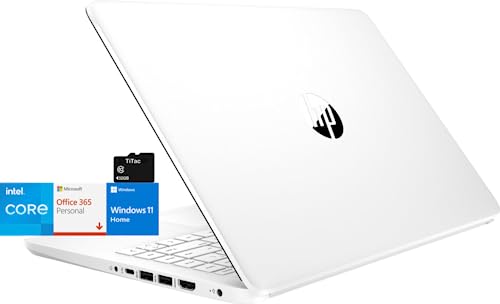
The HP Stream line has long been positioned for light, portable, cloud friendly computing, and the HP Stream 14 configuration in this guide follows that pattern. Listing records for this model describe a fourteen inch HD anti-glare display, an Intel Celeron processor, eight gigabytes of memory in the seller description, sixty four gigabytes of internal storage, Windows 11 Home in S mode, a built-in HD webcam with microphone, and a one year Microsoft 365 inclusion described in the listing text. Buyers should confirm each of those points on the live listing for the exact configuration, because Stream models are sold in many variants.
The fourteen inch size is the practical advantage. It fits smaller desks, school bags and kitchen tables more easily than a fifteen inch machine, and the Stream concept is aimed at people whose work lives mainly online: webmail, documents in a browser, learning platforms, forms, calls and streaming. The port list in the listing description includes USB-C for data transfer, two USB-A ports, HDMI and a headphone and microphone combination jack, which covers a mouse, a flash drive, headphones and an external display without needing a dock for basic use.
The limits are the usual ones for this class, only clearer. Sixty four gigabytes of internal storage is very small once Windows and applications are installed, so cloud storage and careful download habits are not optional extras with this kind of machine; they are part of how it is meant to be used. An HD screen is serviceable for video and documents but less sharp than Full HD. This is a laptop for defined, light routines, and it works best when the buyer accepts that definition from the start.
Key specifications
- Operating system: Windows 11 Home in S mode, as described in listing records
- Processor: Intel Celeron, as described in listing records
- Memory: 8GB as described in the seller listing text; confirm on the live listing
- Storage: 64GB internal storage as described in listing records; confirm on the live listing
- Display: 14 inch HD anti-glare
- Graphics: integrated graphics
- Connectivity: USB-C, USB-A, HDMI and audio combination jack as described in the listing text; built-in webcam and microphone
- Positioning: portable laptop for students and casual home use
Pros
- Fourteen inch size is easy to carry and fits small spaces
- Designed around browser and cloud based routines
- Webcam, microphone and HDMI support calls and simple presenting
- Familiar HP Stream positioning for first laptops and second machines
Cons
- Very small internal storage requires cloud based habits
- HD display is less sharp than the Full HD models in this guide
- Entry level processor is for light tasks only
- Many variants exist, so the exact configuration must be checked carefully
Check the current listing and configuration on Amazon: HP Stream 14 on Amazon
How to choose in this budget class
Begin by writing down the three tasks you will do most often. In this segment, a laptop should be bought for named tasks, not for general hope. If those tasks are browsing, documents and calls, the models above can fit. If they include photo editing with large files, demanding spreadsheets with many calculations, programming with heavy tools, or modern games, this class is the wrong place to shop and a higher specification is the honest answer.
Memory is the first specification to protect. Four gigabytes is workable only for light, patient use with few tabs and applications open. Eight gigabytes gives Windows 11 and a browser far more room and is worth prioritising whenever a listing in this class offers it. Do not assume memory can be added later; many budget laptops have limited or no upgrade path, and listings do not always state upgradeability clearly.
Storage deserves the same scepticism. Look for the type as well as the size. A solid state drive, especially an NVMe drive, generally feels more responsive than eMMC flash. Treat any headline storage figure carefully: some listings in this class combine internal storage with a bundled memory card or a cloud allowance. The number that decides your daily experience is the internal storage built into the laptop, because that is where Windows and your applications live. With sixty four or one hundred twenty eight gigabytes, plan to use cloud storage, remove downloads you no longer need, and avoid storing large video libraries locally.
Understand S mode, because it is common here. Windows in S mode installs applications only from the Microsoft Store and is designed for a simpler, more controlled setup. That can suit a student or family laptop perfectly well. If you need a particular desktop program, check whether a Store version exists or whether you would need to switch out of S mode, remembering that the switch is one-way.
Then judge the screen and keyboard, because you will feel those choices every day. A Full HD screen gives sharper text than HD and is worth choosing for reading and documents. Fourteen inches travels better; fifteen inches is more comfortable at a desk and may include number keys. If you type for long periods, keyboard layout and key feel matter more than a small difference in processor naming.
Finally, check the exact listing at the moment you order. Budget laptop families reuse names across many configurations, and a change in memory, storage or operating system mode changes the machine you receive. Confirm the processor, memory, internal storage, display resolution and operating system lines, and keep a copy of the configuration you ordered.
FAQs
What can a laptop in this class realistically do well?
It can handle web browsing, email, documents, spreadsheets of ordinary size, online learning, video calls, forms and streaming. Those are the tasks its processor, memory and storage are designed around. It should be chosen for those routines, not for demanding creative work or modern games.
Is four gigabytes of memory enough?
It is enough only for light use with modest expectations: a few browser tabs, one main application at a time and patience when the machine is busy. If you multitask, join calls while sharing documents, or keep many tabs open, a configuration with eight gigabytes will feel substantially less restricted.
What is the difference between eMMC storage and a solid state drive?
Both store data without moving parts, but eMMC is a simpler and generally slower form of flash storage commonly used in budget laptops, while a solid state drive, particularly an NVMe model, usually starts the machine and opens applications more quickly. In daily use, the drive type affects how responsive the laptop feels.
Why do so many budget laptops use S mode?
S mode offers a controlled setup limited to Microsoft Store applications, which can be simpler to manage for students and families. It is not a fault, but it is a decision point. Check the applications you need before buying, and remember that switching out of S mode cannot be undone on that installation.
Should I choose a fourteen inch or fifteen inch budget laptop?
Choose fourteen inches for carrying the laptop often and working in small spaces. Choose fifteen inches for a mostly desk based machine, easier split screen reading and, on some models, a keyboard with number keys. In this class, screen resolution matters as much as size, so compare Full HD and HD panels directly.
How should I handle very small internal storage?
Use cloud storage for documents and photos, stream rather than download large media where possible, uninstall applications you no longer use, and clear downloads regularly. A laptop with sixty four or one hundred twenty eight gigabytes can work well with those habits and will frustrate quickly without them.
Conclusion
Budget laptops reward clear thinking. The right question is not which model sounds strongest, but which set of compromises fits the simple routine you actually have. The ASUS Vivobook 15 offers the most comfortable screen and keyboard combination here for documents and forms. The Acer Aspire 1 gives a large Full HD display in a slim home laptop, provided you accept limited memory and eMMC storage. The HP Stream 14 is the portable, cloud centred option for light student and family use, provided its small internal storage is managed deliberately.
Whichever model you consider, read the exact listing before ordering, confirm the internal specifications rather than any combined storage headline, and make sure S mode matches the applications you need. A budget laptop chosen that way can give steady, useful service for browsing, study and everyday documents.
Related guides
- Best Laptops to Play Roblox: From Budget Integrated Graphics to Dedicated GPUs
- Best Laptops for Zoom Teaching: Clear Video, Reliable Audio and All-Day Class Power
- Best Laptops for Video Editing and Music Production: Power, Screen and Storage
- Best Laptops for Network Engineers: Ethernet, RAM for Labs and Ports That Matter
More from Amazon
Programs that pair well with the guide above. Offers and eligibility are set by Amazon and may change.
Free shipping on eligible items, Prime Video and more. Eligible new members can start with a free trial.
Start a Prime free trialAd-free music streaming. Eligible new subscribers can start with a free trial.
Try Music Unlimited freeA Prime membership for ages 18-24 with a trial period. Eligibility is set by Amazon.
See Prime for Young AdultsAudiobooks and podcasts to listen to on the go. Eligible new members can start with a free trial.
Try Audible freeAs an Amazon Associate we earn from qualifying purchases.










Write Your Review
No reviews yet. Be the first to share your experience!