
Our Short List of 3
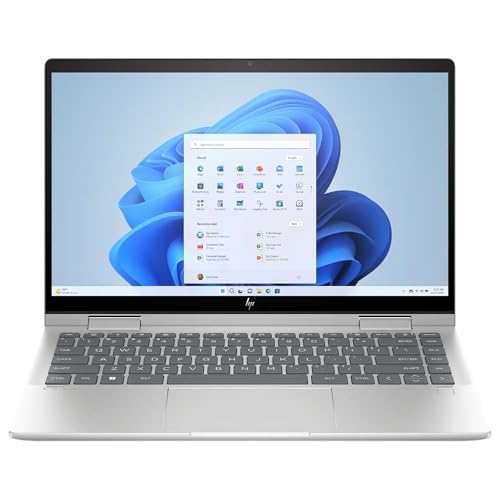
- Best for: Students on a tighter budget who want a flexible 2-in-1 for notes, reading and streaming.
- Intel Core 5 120U processor
- 14-inch Full HD touchscreen display
- 8GB DDR4 RAM
- 512GB SSD storage

- Best for: Students who want pen input, strong memory and storage, and a full set of study-friendly features.
- Intel Core 7 150U processor
- 14-inch WUXGA (1920 x 1200) touchscreen display
- 16GB LPDDR5 RAM
- 1TB NVMe SSD storage

- Best for: Students who study in bright rooms and want the brightest, most vivid touchscreen in this group.
- Intel Core Ultra 7 256V processor
- 14-inch OLED touchscreen display, 1920 x 1200, 60Hz, 500 nits peak, 100% DCI-P3
- 16GB LPDDR5X RAM
- 1TB SSD storage
All 3 Picks at a Glance
| Product | Specs | Action |
|---|---|---|
| HP Envy x360 14 |
| Check price on Amazon |
| Lenovo IdeaPad Flex 5 |
| Check price on Amazon |
| ASUS Vivobook Flip 14 |
| Check price on Amazon |
Key takeaways
- Five touchscreen laptops for college compared on pen support, battery-friendly portability, memory and display, with real Amazon listings to check.
What's inside
As an Amazon Associate I earn from qualifying purchases. This post may contain affiliate links at no extra cost to you.
College work asks more of a laptop than most jobs do. One day means typing an essay, annotating a PDF by hand, joining a video seminar and streaming a lecture recording, often in different rooms with no charger in sight. A touchscreen earns its place when it makes those switches easier: tapping through slides, signing a form, sketching a diagram or scrolling a long reading without reaching for the trackpad. The wrong machine turns each of those moments into friction.
This guide is for college students who want a touchscreen laptop as their one daily machine, whether they take handwritten notes, study in groups or present in class. The five picks below were chosen from the names and specifications shown on their Amazon listings, comparing pen support, display quality, memory and portability rather than brand reputation alone. Each one suits a different kind of student, so the right choice depends on your course and how you study.
Quick Picks
As an Amazon Associate we earn from qualifying purchases
| Product | Best for | Key spec from title |
|---|---|---|
| Lenovo Yoga 7i 14 | Premium note-taking with pen and OLED | WUXGA OLED touch, Yoga Pen, 16GB |
| HP Envy x360 14 | A flexible convertible on a student budget | FHD touchscreen, Core 5 120U |
| Lenovo IdeaPad Flex 5 | Pen included and strong everyday specs | WUXGA touch, Core 7 150U, 16GB |
| ASUS Vivobook Flip 14 | A bright OLED screen for long study days | OLED touch, 500 nits, Ultra 7 256V |
| Acer Swift Go 14 Touch | A fast Ryzen touchscreen for heavy days | Touch display, Ryzen 7 8845HS, 16GB |
How to Choose
Pen support changes how you study
A touchscreen without a pen is useful for tapping and scrolling, but a pen turns it into a notebook. The Yoga 7i 14 ships with a Yoga Pen, and the IdeaPad Flex 5 includes a Lenovo Digital Pen, so both are ready for handwritten notes, diagrams and annotated PDFs from the first day. If your course involves maths, science, design or languages with complex scripts, pen input is worth prioritising. Check the listing for whether the pen is bundled, because buying one separately adds cost and the wrong pen may not support pressure sensitivity on every panel.
Portability decides whether it leaves the dorm
A laptop that stays on a desk can be any size, but a college laptop travels between lectures, the library and group study rooms, so weight and battery life matter every day. All five picks here use 14-inch screens, which is the sweet spot for carrying: large enough for split-screen reading and writing, small enough to fit in a bag beside textbooks. Check the listed weight and the battery description before buying, and remember that a bright OLED screen and a powerful processor both ask more of the battery than a dim panel and a modest chip.
Memory and storage for a full degree
Sixteen gigabytes of memory is the right baseline for a student laptop, because coursework means a browser full of research tabs alongside a word processor, a PDF reader and a video call. The Envy x360 14 is the exception here with 8GB, which covers lighter workloads but leaves less room to grow over a multi-year degree. Storage follows the same logic: 512GB holds documents and apps, while the 1TB drives on the other four picks leave room for lecture recordings, project files and a media library without constant tidying.
Display quality for long reading sessions
Students read for hours, so the screen deserves as much attention as the processor. OLED panels, found on the Yoga 7i 14 and the Vivobook Flip 14, deliver deeper blacks and richer colours, and the Vivobook’s 500-nit peak brightness helps in sunlit lecture halls. Resolution matters too: a WUXGA panel at 1920 by 1200 shows more of a page than a Full HD one, which means less scrolling through long documents. If you study late, look for low blue light features and a comfortable brightness range rather than chasing the highest numbers.
The 5 Best Options
Lenovo Yoga 7i 14
The Yoga 7i 14 is the most complete student convertible in this guide, combining a WUXGA OLED touchscreen with a bundled Yoga Pen for handwriting and sketching. Its Core Ultra 7 processor, 16GB of memory and 1TB drive handle research, writing and media without strain, while Wi-Fi 7 keeps connections fast on campus networks. The 360-degree hinge turns the machine into a tablet for notes or a stand for group study, and the infrared camera plus fingerprint reader speed up sign-ins between classes. It is the pick for students who want touch and pen to be central to how they study.
Specs
- Intel Core Ultra 7 256V processor
- 14-inch WUXGA OLED touchscreen display
- 16GB RAM
- 1TB SSD storage
- Yoga Pen included
- Wi-Fi 7
- Windows 11 Pro
- 5MP infrared camera and fingerprint reader
Best for: Students who take handwritten notes, sketch diagrams and want a premium OLED touchscreen with pen input.
Watch out for: The OLED panel and pen add cost, so confirm the configuration on the listing matches the memory and storage shown here.
HP Envy x360 14
- Best for: Students on a tighter budget who want a flexible 2-in-1 for notes, reading and streaming.
- Intel Core 5 120U processor
- 14-inch Full HD touchscreen display
- 8GB DDR4 RAM
- 512GB SSD storage
Students on a tighter budget who want a flexible 2-in-1 for notes, reading and streaming.
Only 8GB of memory, so heavy multitasking with many apps open can feel tight, and some listings note the unit was opened for upgrades.
The Envy x360 14 is the accessible convertible, folding its Full HD touchscreen around so it works as a laptop, a tent for films or a tablet for reading. Its Core 5 processor and 8GB of memory cover essays, browsing, streaming and video seminars, while the 512GB drive holds a reasonable library of course files. Touch input makes it easy to scroll through readings and tap through slides, and the x360 hinge makes those modes practical rather than awkward. It is the lightest commitment in this group, suited to students whose workload stays moderate and who value flexibility over raw power.
Watch out for: Only 8GB of memory, so heavy multitasking with many apps open can feel tight, and some listings note the unit was opened for upgrades.
Lenovo IdeaPad Flex 5
- Best for: Students who want pen input, strong memory and storage, and a full set of study-friendly features.
- Intel Core 7 150U processor
- 14-inch WUXGA (1920 x 1200) touchscreen display
- 16GB LPDDR5 RAM
- 1TB NVMe SSD storage
Students who want pen input, strong memory and storage, and a full set of study-friendly features.
The screen is an IPS panel rather than OLED, so colours look flatter than on the Yoga 7i 14 or the Vivobook Flip 14.
The IdeaPad Flex 5 is the value pick with pen input included, pairing a 14-inch WUXGA touchscreen with a Lenovo Digital Pen in the box. Its Core 7 150U processor, 16GB of memory and 1TB drive cover demanding student workloads, from research with dozens of tabs open to group projects with shared files. The backlit keyboard helps during late library sessions, and the fingerprint reader plus 1080p webcam suit video seminars and quick sign-ins. It gives students nearly everything the Yoga offers, including the pen, in a more approachable package.
Watch out for: The screen is an IPS panel rather than OLED, so colours look flatter than on the Yoga 7i 14 or the Vivobook Flip 14.
ASUS Vivobook Flip 14
- Best for: Students who study in bright rooms and want the brightest, most vivid touchscreen in this group.
- Intel Core Ultra 7 256V processor
- 14-inch OLED touchscreen display, 1920 x 1200, 60Hz, 500 nits peak, 100% DCI-P3
- 16GB LPDDR5X RAM
- 1TB SSD storage
Students who study in bright rooms and want the brightest, most vivid touchscreen in this group.
The OLED panel is brightest at high settings, which uses more battery, so check battery expectations for your typical day.
The Vivobook Flip 14 stands out through its display, a 14-inch OLED touchscreen that reaches 500 nits at peak brightness with full DCI-P3 colour coverage. That brightness helps in sunlit rooms and near windows, while the OLED panel makes films, photos and dark interfaces look their best. Inside, the Core Ultra 7 processor, 16GB of memory and 1TB drive match the strongest picks here, and Thunderbolt 4 plus Wi-Fi 7 cover fast accessories and campus networks. It is the pick for students who spend long hours reading and watching on screen and notice display quality every day.
Watch out for: The OLED panel is brightest at high settings, which uses more battery, so check battery expectations for your typical day.
Acer Swift Go 14 Touch
The Acer Swift Go 14 Touch is the performance pick, built around a Ryzen 7 8845HS processor with 16GB of memory and a 1TB drive. That combination suits students whose coursework includes data analysis, coding, design tools or anything that asks more of the processor than essays and browsing. The touchscreen adds flexibility for scrolling and annotation, and the 14-inch body stays portable between lectures. It is the least polished of the group in extras, with no bundled pen, but it is the strongest where raw computing power matters most.
Specs
- AMD Ryzen 7 8845HS processor
- 14-inch touchscreen display
- 16GB RAM
- 1TB SSD storage
Best for: Students in technical, science or design courses who need a fast processor and a touchscreen in one portable machine.
Watch out for: No pen is bundled, so budget separately if handwriting matters, and confirm the touch configuration on the listing before buying.
Which One Fits Your Situation
You take handwritten notes in every lecture
Choose the Lenovo Yoga 7i 14 first, with the Lenovo IdeaPad Flex 5 as the value alternative. Both include a pen and a 360-degree hinge, so they turn into a notebook the moment you fold them. The Yoga adds an OLED screen and a faster processor, while the Flex covers the same note-taking idea with strong memory and storage at a more approachable level.
You study in bright rooms and read for hours
Choose the ASUS Vivobook Flip 14. Its OLED touchscreen reaches 500 nits at peak brightness, which keeps text readable near windows and in sunlit lecture halls, and the full colour coverage makes diagrams and photos look accurate. The Core Ultra 7 processor and 16GB of memory keep research and writing smooth alongside long reading sessions.
You need one laptop for a demanding technical course
Choose the Acer Swift Go 14 Touch. Its Ryzen 7 processor handles coding, data work and design tools better than the lighter chips in this group, while 16GB of memory and a 1TB drive leave room for large project files. The touchscreen adds a practical way to scroll through code and documents, even without a bundled pen.
You want flexibility without stretching your budget
Choose the HP Envy x360 14. Its folding touchscreen covers laptop, tablet and tent modes for notes, reading and films, and the Core 5 processor with 8GB of memory handles everyday student work. It is the simplest way into a convertible, and it suits students whose workload stays moderate through the degree.
Common Mistakes
- Buying a touchscreen without a pen, then discovering that handwriting with a finger is awkward for real note-taking.
- Choosing 8GB of memory for a full degree, when research tabs, documents and video calls together ask for 16GB.
- Ignoring weight and battery life, then carrying a heavy laptop between lectures with no charger in sight.
- Picking a dim screen for bright lecture halls, where glare and low brightness make reading a strain.
- Forgetting to check whether the pen is bundled, and finding the extra cost only after the laptop arrives.
Frequently Asked Questions
Is a touchscreen laptop worth it for college?
Yes, if you use it for notes, annotation and presentations. A touchscreen with a pen turns a laptop into a notebook for diagrams, maths and marked-up readings, which a standard laptop cannot do. If you only type and browse, the touch panel adds less, and a standard laptop with more memory for the same outlay may serve you better. The value depends on how you study, not on the feature alone.
Do I need a pen with a touchscreen laptop?
A pen matters when handwriting is part of your study routine, especially for science, maths, design or language courses where diagrams and scripts are common. The Yoga 7i 14 and the IdeaPad Flex 5 both include a pen, so they are ready from the first day. If your notes are typed, a pen is optional, and you can add one later if your course changes.
How much memory should a student laptop have?
Sixteen gigabytes is the right baseline for a college laptop, because coursework means a browser full of research tabs alongside a word processor, a PDF reader and a video call. Eight gigabytes, as on the Envy x360 14, covers lighter workloads but leaves little room to grow over a multi-year degree. Storage should be at least 512GB, with 1TB suiting students who keep lecture recordings and large project files locally.
Is OLED better than IPS for studying?
OLED delivers deeper blacks, stronger contrast and richer colours, which shows up clearly in films, photos and dark interfaces, and the Vivobook Flip 14 adds high brightness for sunny rooms. IPS panels, such as the one on the IdeaPad Flex 5, are perfectly good for reading and writing and often use less power on bright content. For long reading sessions, resolution and brightness matter more than the panel type alone.
Related guides
More from Amazon
Programs that pair well with the guide above. Offers and eligibility are set by Amazon and may change.
Free shipping on eligible items, Prime Video and more. Eligible new members can start with a free trial.
Start a Prime free trialAd-free music streaming. Eligible new subscribers can start with a free trial.
Try Music Unlimited freeA Prime membership for ages 18-24 with a trial period. Eligibility is set by Amazon.
See Prime for Young AdultsAudiobooks and podcasts to listen to on the go. Eligible new members can start with a free trial.
Try Audible freeAs an Amazon Associate we earn from qualifying purchases.









Write Your Review
No reviews yet. Be the first to share your experience!