
Our Short List of 3

- Processor: Apple M4 chip with 10-core CPU and 8-core GPU
- Memory: 16GB unified memory
- Storage: 256GB SSD
- Display: 13.6-inch Liquid Retina, 2560 x 1664
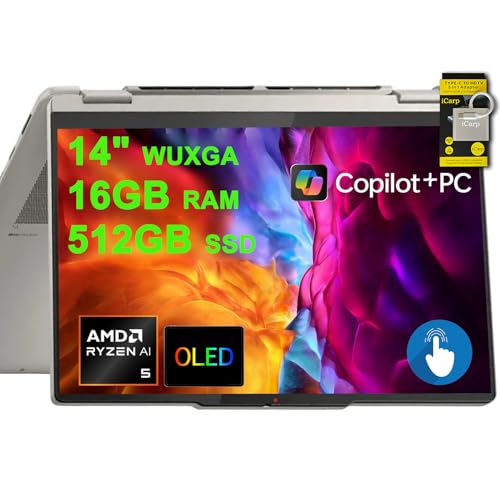
- Processor: AMD Ryzen AI 5 340, 6 cores
- Memory: 16GB DDR5
- Storage: 512GB SSD
- Display: 14-inch WUXGA OLED touch, 1920 x 1200, full DCI-P3 coverage

- Processor: Intel Core Ultra 7 155H
- Memory: 16GB LPDDR5X
- Storage: 512GB SSD
- Display: 14-inch IPS touch, 1920 x 1200
All 5 Picks at a Glance
| Product | Specs | Action |
|---|---|---|
| Apple MacBook Air 13 (M4) |
| Check price on Amazon |
| Lenovo Yoga 7 2-in-1 14 |
| Check price on Amazon |
| Acer Swift Go 14 |
| Check price on Amazon |
 HP Pavilion Plus 14 |
| Check price on Amazon |
 Lenovo IdeaPad Slim 3 15 |
| Check price on Amazon |
Key takeaways
- Graduates heading to college or a first job need a laptop that lasts. These picks pair long battery life, 16GB RAM and sharp webcams for class and calls.
What's inside
As an Amazon Associate I earn from qualifying purchases. This post may contain affiliate links at no extra cost to you.
Graduating from high school usually means the family computer, the borrowed Chromebook, or the aging hand-me-down laptop stops being good enough. The next machine has to survive a full college degree or the first years of a job: lectures and note-taking, research papers with dozens of browser tabs open, video calls with professors and employers, and the daily commute in a backpack that gets dropped, stuffed, and rained on. That is a different shopping problem from buying for a current student with a known major, and it is the only problem this guide covers. Other guides on this site look at laptops for specific college majors and general student machines; here, every pick is judged as a graduation machine first.
That framing changes the priorities. Battery life matters more than raw speed, because a laptop that dies halfway through a lecture hall day is useless no matter how fast it is. Memory and storage matter more than graphics, because coursework is mostly documents, tabs, spreadsheets, and video streams. A good webcam matters more than it used to, because hybrid classes, recorded presentations, and remote job interviews are now routine. And durability matters most of all: a graduate may not get another laptop for four years, so the machine has to be built to last that long.
The five laptops below cover the realistic range of graduation gifts and first serious purchases, from a budget machine that still gets the fundamentals right to a premium pick that should sail through an entire degree. Every model listed ships with 16GB of memory and at least 256GB of solid-state storage, every one has a webcam suited to classes and interviews, and every one is light enough to carry around a campus all day.
As an Amazon Associate, we earn from qualifying purchases.
Apple MacBook Air 13 (M4)
- Processor: Apple M4 chip with 10-core CPU and 8-core GPU
- Memory: 16GB unified memory
- Storage: 256GB SSD
- Display: 13.6-inch Liquid Retina, 2560 x 1664
Tier: premium
The MacBook Air is the default graduation laptop for a reason: it is the machine most likely to still feel fast in the final year of a degree. The M4 chip handles coursework, heavy browser sessions, photo editing for a student newspaper, and light creative projects without the fan noise that plagues older Intel machines, because the Air has no fan at all. The aluminum unibody shrugs off backpack life better than most plastic laptops, and the keyboard and trackpad remain the benchmark that Windows rivals are measured against.
Battery life is the headline for students. Apple rates the Air for up to 18 hours of video playback, and the efficient M4 chip means a full day of lectures, library work, and streaming rarely requires carrying the charger. The 12MP Center Stage camera is the best webcam in this roundup by a wide margin; it keeps the user framed during calls and produces a noticeably cleaner image for recorded class presentations and remote interviews. Touch ID makes signing in between classes instant.
The trade-offs are the fixed configuration and the ports. Memory and storage cannot be upgraded later, so the 256GB drive demands some discipline with large files, and there are only two USB-C ports plus a MagSafe charging connector. Graduates committed to Windows-only software for a specific program should check compatibility first. For everyone else, this is the safest long-term pick on the list.
Lenovo Yoga 7 2-in-1 14
- Processor: AMD Ryzen AI 5 340, 6 cores
- Memory: 16GB DDR5
- Storage: 512GB SSD
- Display: 14-inch WUXGA OLED touch, 1920 x 1200, full DCI-P3 coverage
Tier: mid-range
The Yoga 7 is the most versatile Windows laptop here. Its 360-degree hinge turns it from a standard laptop into a tablet for reading articles and annotating lecture slides, a stand for watching recorded lectures, and a tent mode that works well on cramped dorm desks. The 14-inch OLED touchscreen is the best display in this group: deep contrast and full DCI-P3 color coverage make it equally suited to media coursework and evening streaming.
Inside, the AMD Ryzen AI 5 340 processor with 16GB of memory and a 512GB drive covers everything a general degree throws at it, from statistics software to large slide decks. The 70Wh battery is one of the largest in this roundup, which translates into long unplugged days, and Wi-Fi 7 support means the wireless hardware will not feel dated before graduation number two. The IR camera supports Windows Hello face sign-in, and a fingerprint reader is built in as a backup.
At 3.04 pounds it is slightly heavier than the slimmest rivals, and the glossy OLED panel can reflect overhead lights in bright lecture halls. Graduates who take handwritten notes or sketch will get the most from the convertible design; those who never fold a laptop back may prefer a conventional clamshell and a lower price.
Acer Swift Go 14
- Processor: Intel Core Ultra 7 155H
- Memory: 16GB LPDDR5X
- Storage: 512GB SSD
- Display: 14-inch IPS touch, 1920 x 1200
Tier: mid-range
The Swift Go 14 is the pick for graduates who want strong everyday performance and an unusually good webcam without paying premium-brand prices. Its Intel Core Ultra 7 155H processor and Intel Arc integrated graphics are a step above typical mid-range hardware, so the machine stays responsive with many applications open and can even handle casual gaming and light video editing between classes.
The 1440p QHD webcam deserves emphasis, because most laptops in this class still ship with grainy 720p cameras. For a graduate attending hybrid lectures, tutoring online, or interviewing for internships over video, the sharper image is a genuine advantage rather than a spec-sheet decoration. The 14-inch touchscreen display runs at a taller 1920 x 1200 resolution, which shows more of a document or spreadsheet at once than a standard Full HD panel.
The chassis is aluminum, the weight is under three pounds, and the port selection includes USB-C, USB-A, and HDMI, so connecting a dorm-room monitor or an older printer does not require a drawer full of adapters. Battery capacity is generous at 65Wh. The speakers are merely average and the design is understated, but as an all-round package for coursework and calls, the Swift Go 14 is hard to beat at its level.
HP Pavilion Plus 14
- Processor: AMD Ryzen 5 7540U
- Memory: 16GB LPDDR5
- Storage: 512GB SSD
- Display: 14-inch WUXGA IPS, 1920 x 1200
Tier: mid-range
HP’s Pavilion Plus line exists for buyers who want features usually reserved for more expensive machines: an all-metal body, a high-resolution display option, and a proper 5MP webcam. This configuration pairs an AMD Ryzen 5 7540U processor with 16GB of memory and a 512GB drive, a combination that covers essays, research, presentations, and general multitasking without strain, and the Radeon 740M integrated graphics are fine for casual games and photo work.
The 5MP IR webcam is the standout for graduates. It produces a clear image for online classes and interviews, supports Windows Hello face recognition for fast sign-ins, and includes a physical privacy shutter for peace of mind in shared dorm rooms. The 14-inch WUXGA display uses the taller 16:10 aspect ratio, giving documents and web pages more vertical room, which students notice every day even if they never think about why.
Battery capacity is smaller than some rivals at 51Wh, so heavy users should expect to top up during long days rather than skip the charger entirely. The trade-off is a slim 3.04-pound metal chassis that feels a class above its price band. For a graduate whose college experience involves frequent video calls, the Pavilion Plus 14 makes a strong case.
Lenovo IdeaPad Slim 3 15
- Processor: AMD Ryzen 5 7530U, 6 cores
- Memory: 16GB DDR4
- Storage: 512GB SSD
- Display: 15.6-inch Full HD touch, 1920 x 1080
Tier: budget
Not every graduate needs, or can justify, a premium machine. The IdeaPad Slim 3 15 is the budget pick that refuses to cut the corners that matter: it still includes 16GB of memory and a 512GB SSD, the two specifications that decide whether a laptop feels fast in its third year. Many cheaper laptops halve one or both, and they age badly because of it. This one should not.
The AMD Ryzen 5 7530U processor is an efficient six-core chip that handles documents, browsing, streaming, and coursework without fuss, and the 15.6-inch Full HD touchscreen gives more room for side-by-side windows than the 14-inch models above, which helps when a paper and its sources need to share the screen. The larger size also means a roomier keyboard, useful for long writing sessions.
The compromises are the expected ones at this level. The chassis is plastic rather than metal, the webcam is a basic HD unit rather than the sharper cameras on the mid-range picks, and at 3.56 pounds it is the heaviest laptop here, though still perfectly portable. The 47Wh battery is sized for a day of classes rather than a day and a half. For a graduate heading to a program built around documents and the web, it delivers the essentials at the lowest cost in this roundup.
How to Choose
Start with memory and storage, because they cannot be fixed later on most modern laptops. Sixteen gigabytes of memory is the sensible floor for a machine expected to last four years: it keeps large browser sessions, office suites, and video calls running together without slowdowns. For storage, 256GB is workable for document-focused students who use cloud drives, but 512GB is the safer choice for anyone keeping photos, recorded lectures, or creative projects on the machine.
Battery life and weight come next, and they should be judged together. A graduate crossing a large campus several times a day will feel every extra pound, and a battery that cannot cover a full schedule forces a constant search for outlets. As a rule of thumb, look for a battery above 50Wh in a 14-inch laptop and a total weight under three and a half pounds; every pick in this guide meets at least one of those marks, and most meet both.
The webcam deserves more attention than it usually gets. A 1080p or better camera, or a 5MP unit like the ones on two picks above, makes a visible difference in hybrid classes and interviews compared with the basic 720p cameras still common on budget machines. Also check for a privacy shutter and Windows Hello or Touch ID sign-in, both of which suit shared living spaces.
Finally, think about the software the graduate’s program requires. Most degrees run happily on either Windows or macOS, but some engineering, accounting, and specialist programs still expect Windows, while some creative programs lean toward Mac. Check the college’s published requirements before buying, and prefer the operating system the student already knows if there is no requirement either way. A familiar system means one less thing to learn during the first semester.
Frequently Asked Questions
How much RAM does a new college student actually need?
Sixteen gigabytes is the right target for a laptop bought at graduation. It comfortably handles coursework, large browser sessions, office applications, and video calls at the same time, and it gives the machine headroom to stay responsive for a full degree. Eight gigabytes can feel adequate in the first semester but tends to struggle as software grows heavier, and most slim laptops cannot be upgraded later.
Is a Mac or a Windows laptop better for a high school graduate?
Neither is universally better; the right choice depends on the program of study and the student’s habits. Most general degrees work equally well on both. Some engineering and business programs rely on Windows-only software, while many creative programs are Mac-friendly. Check the college’s technology requirements first, and if there is no requirement, choose the system the graduate already knows so the first semester is spent studying rather than relearning an operating system.
Should a graduate choose a 14-inch or a 15.6-inch laptop?
A 14-inch laptop is the better default for students who carry their machine across campus all day, because it is lighter and fits more easily into lecture-hall desks and crowded bags. A 15.6-inch model gives more screen space for split-screen research and a roomier keyboard, at the cost of extra weight. Graduates who mostly work at one desk may prefer the larger screen; commuters and campus walkers usually prefer the smaller machine.
How long should a graduation laptop last?
A well-chosen laptop should last the full length of a degree, roughly four years, and often longer in a first job. The keys to that lifespan are 16GB of memory, a solid-state drive of at least 256GB, a metal or well-built chassis, and a battery large enough that it is not fully drained and recharged several times a day. Every laptop in this guide was selected with that four-year horizon in mind.
Final Verdict
For most high school graduates, the MacBook Air 13 with the M4 chip is the safest single recommendation: it is light, quiet, durable, and its battery and webcam lead this group, which is exactly the combination a four-year degree rewards. Graduates who prefer Windows, want a touchscreen, or need the flexibility of a convertible should choose the Lenovo Yoga 7 2-in-1, whose OLED display and large battery make it the strongest all-round Windows pick here.
On a tighter budget, the Acer Swift Go 14 and HP Pavilion Plus 14 deliver the mid-range essentials with webcams that punch above their class, while the Lenovo IdeaPad Slim 3 15 proves that a budget graduation laptop does not have to mean compromised memory or storage. Whichever direction the budget points, the principle is the same: buy the machine for the fourth year, not just the first semester.
Product and ASIN Reference
| Product | ASIN |
|---|---|
| Apple MacBook Air 13 (M4, 16GB, 256GB, Midnight) | B0DZD9S5GC |
| Lenovo Yoga 7 2-in-1 14 (Ryzen AI 5 340, 16GB, 512GB) | B0FM3WJP79 |
| Acer Swift Go 14 SFG14-72T-718K (Core Ultra 7 155H, 16GB, 512GB) | B0CNDTGC77 |
| HP Pavilion Plus 14-ey0010nr (Ryzen 5 7540U, 16GB, 512GB) | B0CFFSRYXC |
| Lenovo IdeaPad Slim 3 15 82XM0032US (Ryzen 5 7530U, 16GB, 512GB) | B0C3LYJ33P |
Related guides
More from Amazon
Programs that pair well with the guide above. Offers and eligibility are set by Amazon and may change.
Free shipping on eligible items, Prime Video and more. Eligible new members can start with a free trial.
Start a Prime free trialAd-free music streaming. Eligible new subscribers can start with a free trial.
Try Music Unlimited freeA Prime membership for ages 18-24 with a trial period. Eligibility is set by Amazon.
See Prime for Young AdultsAudiobooks and podcasts to listen to on the go. Eligible new members can start with a free trial.
Try Audible freeAs an Amazon Associate we earn from qualifying purchases.










Write Your Review
No reviews yet. Be the first to share your experience!