
Our Short List of 3

- Best for: Office workers and students who type all day and want a durable, no-nonsense machine.
- AMD Ryzen 7 7730U processor
- 14-inch display
- 16GB RAM
- 512GB SSD storage

- Best for: Everyday users who care most about screen quality for reading, streaming and browsing.
- Intel Core Ultra 5 125H processor
- 14-inch OLED WQXGA+ display
- 8GB RAM
- 512GB SSD storage
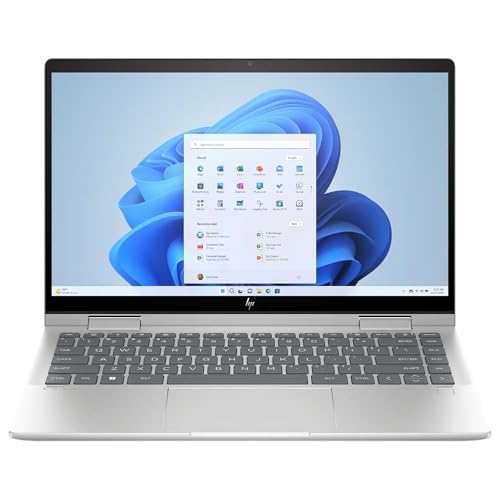
- Best for: Students and casual users who want one machine that bends between laptop and tablet modes.
- Intel Core 5 120U processor
- 14-inch Full HD touchscreen display
- 8GB DDR4 RAM
- 512GB SSD storage
All 5 Picks at a Glance
| Product | Specs | Action |
|---|---|---|
| Lenovo ThinkPad E14 Gen 5 |
| Check price on Amazon |
| Acer Swift Go 14 |
| Check price on Amazon |
| HP Envy x360 14 |
| Check price on Amazon |
 Dell Inspiron 16 5640 |
| Check price on Amazon |
 Lenovo Yoga 7i 14 |
| Check price on Amazon |
Key takeaways
- Five laptops around a thousand dollars compared on processor, memory, display and portability, with real Amazon listings to check before you buy.
What's inside
As an Amazon Associate I earn from qualifying purchases. This post may contain affiliate links at no extra cost to you.
This spending band sits in an awkward middle ground for laptop shopping. Spend less and you give up the processor, memory or screen that makes a machine last through several years of daily use. Spend much more and you are paying for graphics power or exotic materials that most buyers never use. The real decision is which compromises you accept: a sharper display or more memory, a lighter chassis or a bigger screen, a business-grade keyboard or a convertible hinge.
This guide is for students, remote workers and home-office buyers who want one laptop to cover work, study and streaming without a second machine. The five picks below were chosen from the names and specifications shown on their Amazon listings, comparing processor, memory, storage and display rather than marketing claims. Each one suits a different kind of buyer, so the right choice depends on how you actually spend your day.
Quick Picks
As an Amazon Associate we earn from qualifying purchases
| Product | Best for | Key spec from title |
|---|---|---|
| Lenovo ThinkPad E14 Gen 5 | Business-class durability for daily work | Ryzen 7 7730U, 16GB RAM, 512GB SSD |
| Acer Swift Go 14 | A vivid OLED screen for everyday use | OLED WQXGA+ display, Ultra 5 125H |
| HP Envy x360 14 | A flexible 2-in-1 for notes and media | FHD touchscreen, Core 5 120U |
| Dell Inspiron 16 5640 | Big-screen work, study and calls | 16-inch WUXGA touchscreen, 16GB DDR5 |
| Lenovo Yoga 7i 14 | A premium convertible with pen input | WUXGA OLED touch display, Yoga Pen |
How to Choose
Start with the processor, not the badge
The processor sets the ceiling for everything the laptop will do over the next few years, so it deserves the first look. Current mid-range chips such as the Intel Core Ultra 5 125H, the AMD Ryzen 7 7730U and the Intel Core Ultra 7 256V all handle office work, browsing with many tabs open, video calls and light photo editing without strain. Check the generation and the core count on the listing rather than trusting the brand name alone, because an older chip with a familiar name can be slower than a newer mid-range one. If your work involves compiling code, editing large spreadsheets or running virtual machines, favour the higher core counts in this group.
Memory and storage you cannot change later
Sixteen gigabytes of memory is the sensible floor for a laptop in this class, because it leaves room for a browser full of tabs alongside office apps and a video call. Eight gigabytes still works for light use, but it leaves little headroom and can feel cramped within a year or two. Just as important, many thin laptops solder the memory to the board, so you cannot add more later; check the listing for that detail before you commit. For storage, a 512GB solid-state drive is the minimum worth accepting, while 1TB suits anyone who keeps large photo libraries, course files or project archives on the machine itself.
The display decides daily comfort
You stare at the screen for hours, so its quality matters more than a small processor difference. OLED panels, such as the ones on the Swift Go 14 and the Yoga 7i 14, deliver deeper blacks and richer colours than standard IPS screens, which shows up clearly in films and photo work. Resolution matters too: a WQXGA+ panel renders text more crisply than a Full HD one, though Full HD is fine for documents and browsing. Touchscreens add flexibility for note-taking and scrolling, but they also add glare and a little weight, so weigh that trade before choosing.
Weight, battery and ports for real carrying
A laptop that lives on a desk can be bigger and heavier, while one that travels daily should be judged by its weight in the listing and the size of its charger. Fourteen-inch machines in this group are the easiest to carry, while the 16-inch Inspiron trades portability for a roomier screen and keyboard. Look at the port list as well: USB-C, full-size USB-A and HDMI cover most docks, monitors and accessories without dongles. A fingerprint reader and a decent webcam matter more than they used to, since sign-ins and video calls are now part of almost every working day.
The 5 Best Options
Lenovo ThinkPad E14 Gen 5
- Best for: Office workers and students who type all day and want a durable, no-nonsense machine.
- AMD Ryzen 7 7730U processor
- 14-inch display
- 16GB RAM
- 512GB SSD storage
Office workers and students who type all day and want a durable, no-nonsense machine.
The screen is a standard panel rather than OLED, so colours look flatter than on the brighter picks in this guide.
The ThinkPad E14 Gen 5 is the workhorse of this group, built around a business-class keyboard and a sturdy chassis that suits long typing sessions. Its Ryzen 7 processor and 16GB of memory handle office suites, browsers with dozens of tabs and video conferencing at the same time, while the 512GB drive gives room for documents and project files. ThinkPads are known for keyboards that stay comfortable through full working days, and this one fits buyers who type more than they tap. It is the least flashy pick here, but also the one most likely to still feel solid after years of daily use.
Watch out for: The screen is a standard panel rather than OLED, so colours look flatter than on the brighter picks in this guide.
Acer Swift Go 14
- Best for: Everyday users who care most about screen quality for reading, streaming and browsing.
- Intel Core Ultra 5 125H processor
- 14-inch OLED WQXGA+ display
- 8GB RAM
- 512GB SSD storage
Everyday users who care most about screen quality for reading, streaming and browsing.
Only 8GB of memory, so heavy multitasking with many apps open can feel tight over time.
The Swift Go 14 earns its place through its display, an OLED WQXGA+ panel that makes text sharper and films more vivid than the standard screens around it. The Core Ultra 5 processor keeps everyday work moving, and the 512GB drive is enough for documents, apps and a modest media library. At 8GB, the memory is the thinnest part of the package, so this pick suits buyers whose workload stays light rather than heavy multitaskers. If your day is mostly writing, browsing, streaming and video calls, the screen alone makes this one of the most pleasant laptops in the group.
Watch out for: Only 8GB of memory, so heavy multitasking with many apps open can feel tight over time.
HP Envy x360 14
- Best for: Students and casual users who want one machine that bends between laptop and tablet modes.
- Intel Core 5 120U processor
- 14-inch Full HD touchscreen display
- 8GB DDR4 RAM
- 512GB SSD storage
Students and casual users who want one machine that bends between laptop and tablet modes.
Some listings describe the unit as opened for upgrades, so read the seller note on the exact listing before buying.
The Envy x360 14 is the flexible pick, folding its touchscreen around a full circle so it works as a laptop, a tent for films or a tablet for handwritten notes. The Core 5 processor and 8GB of memory cover study work, documents and streaming, while the 512GB drive holds a reasonable library of files. Touch input changes how you use a laptop in lectures or on the sofa, and the x360 hinge makes that practical rather than a gimmick. It is not the strongest performer here, but it is the most adaptable shape for buyers who switch between typing, reading and watching.
Watch out for: Some listings describe the unit as opened for upgrades, so read the seller note on the exact listing before buying.
Dell Inspiron 16 5640
- Best for: Desk-based workers and students who want a large touchscreen and generous memory and storage.
- Intel Core 7 150U processor, up to 5.4 GHz
- 16-inch WUXGA (1920 x 1200) IPS touchscreen display
- 16GB DDR5 RAM
- 1TB SSD storage
Desk-based workers and students who want a large touchscreen and generous memory and storage.
The larger chassis adds weight, so check the listed weight if you plan to carry it daily.
The Inspiron 16 5640 is the big-screen option, pairing a 16-inch touchscreen with 16GB of fast DDR5 memory and a 1TB drive. That combination suits buyers who keep many windows open side by side, whether for research, spreadsheets or writing with reference material beside the draft. The Core 7 processor handles demanding everyday work, and the fingerprint reader plus backlit keyboard make it comfortable for long sessions. It is heavier than the 14-inch picks, so it fits a desk-centred routine better than a bag that travels across campus all day.
Watch out for: The larger chassis adds weight, so check the listed weight if you plan to carry it daily.
Lenovo Yoga 7i 14
- Best for: Note-takers, creators and professionals who want an OLED touchscreen, pen input and strong all-round performance.
- Intel Core Ultra 7 256V processor
- 14-inch WUXGA OLED touchscreen display
- 16GB RAM
- 1TB SSD storage
Note-takers, creators and professionals who want an OLED touchscreen, pen input and strong all-round performance.
The OLED panel and pen add cost, so confirm the configuration on the listing matches the memory and storage shown here.
The Yoga 7i 14 is the premium convertible of the group, combining a WUXGA OLED touchscreen with a bundled Yoga Pen for handwriting and sketching. The Core Ultra 7 processor, 16GB of memory and 1TB drive give it headroom for heavier multitasking, while Wi-Fi 7 keeps wireless connections fast on newer networks. The 360-degree hinge, fingerprint reader and infrared camera round out a package that feels a step above the others in build and features. It is the pick for buyers who want touch, pen and a superb screen in a single machine they will use for years.
Watch out for: The OLED panel and pen add cost, so confirm the configuration on the listing matches the memory and storage shown here.
Which One Fits Your Situation
You work from a desk most days
Choose the Dell Inspiron 16 5640. Its 16-inch touchscreen gives you room to keep a document and a reference window open together, and the 16GB of DDR5 memory plus 1TB of storage mean you rarely wait on the machine. The fingerprint reader speeds up sign-ins, and the backlit keyboard helps during late sessions. Weight matters less when the laptop mostly stays put, so the bigger chassis is a fair trade for the extra screen space.
You carry it between classes or meetings
Choose the Lenovo ThinkPad E14 Gen 5 or the Acer Swift Go 14. Both are 14-inch machines that slip easily into a bag, and both cover a full day of documents, browsing and calls. The ThinkPad suits heavy typists who want a durable keyboard, while the Swift Go suits readers and streamers who will notice the OLED screen every time they open the lid.
You want one machine for work and entertainment
Choose the Lenovo Yoga 7i 14. Its OLED touchscreen makes films and photos look their best, the pen adds a natural way to annotate, and the Core Ultra 7 processor with 16GB of memory keeps work apps running smoothly beside a streaming window. The convertible hinge lets the same machine serve as a laptop at a desk and a media screen on the sofa.
You need a touchscreen or pen
Choose the Lenovo Yoga 7i 14 first, with the HP Envy x360 14 as the lighter alternative. The Yoga adds a bundled pen and an OLED touch panel, which is the better combination for handwriting and sketching. The Envy covers the same convertible idea with a simpler screen and a smaller memory allowance, so it fits buyers whose touch use is occasional rather than central.
Common Mistakes
- Judging a laptop by its brand or model name instead of reading the processor generation, memory and storage on the exact listing.
- Buying 8GB of memory for heavy multitasking, then finding the machine slows down once browser tabs and office apps pile up.
- Ignoring screen quality and choosing a dim or low-resolution panel you will stare at for hours every day.
- Forgetting to check whether the memory is soldered, which means you cannot upgrade it later if your needs grow.
- Choosing a 16-inch laptop for a routine that involves carrying it across campus or between offices all day.
Frequently Asked Questions
Is 8GB of memory enough for a laptop in this class?
Eight gigabytes covers browsing, documents, streaming and video calls, and both the Swift Go 14 and the Envy x360 14 work well for that kind of day. It becomes a limit when you keep many apps open, edit large files or run virtual machines. If your workload grows, a 16GB machine such as the ThinkPad E14 Gen 5 or the Yoga 7i 14 gives you more room to grow.
Does an OLED screen make a real difference?
Yes, and you notice it most in films, photos and dark interfaces, where OLED delivers deeper blacks and stronger contrast than a standard IPS panel. Text also looks crisper on the higher-resolution OLED panels in this group. The trade is that OLED screens can cost more and use more power on bright content, so weigh the visual gain against the rest of the specification.
Should I pick a touchscreen laptop?
A touchscreen helps if you take handwritten notes, annotate documents, sketch or simply prefer tapping to scrolling. It is less useful if you mostly type, since the screen then adds glare and weight without changing your workflow. Convertible machines such as the Yoga 7i 14 and the Envy x360 14 make touch practical, while a standard clamshell suits buyers who never reach for the screen.
How much storage do I need?
A 512GB drive suits most buyers who store documents, apps and a modest media collection, especially if larger files live in cloud storage. A 1TB drive, as found on the Inspiron 16 5640 and the Yoga 7i 14, suits anyone who keeps photo libraries, course materials, project archives or large applications on the machine itself. Check the listing, because storage size varies between configurations of the same model.
Related guides
More from Amazon
Programs that pair well with the guide above. Offers and eligibility are set by Amazon and may change.
Free shipping on eligible items, Prime Video and more. Eligible new members can start with a free trial.
Start a Prime free trialAd-free music streaming. Eligible new subscribers can start with a free trial.
Try Music Unlimited freeA Prime membership for ages 18-24 with a trial period. Eligibility is set by Amazon.
See Prime for Young AdultsAudiobooks and podcasts to listen to on the go. Eligible new members can start with a free trial.
Try Audible freeAs an Amazon Associate we earn from qualifying purchases.










Write Your Review
No reviews yet. Be the first to share your experience!