
Key takeaways
- Find the best moble laptops for school with light designs, long battery life, and fast storage. Compare five portable picks for classes, homework, and study.
What's inside
As an Amazon Associate I earn from qualifying purchases. This post may contain affiliate links at no extra cost to you.
Finding the best moble laptops for school means finding a machine that is easy to carry, quick to start, and comfortable to use for a full day of classes. The best mobile laptops for school are light enough for a backpack, have a screen that stays readable in a bright classroom, and carry enough memory and storage for essays, research, slides, and video calls.

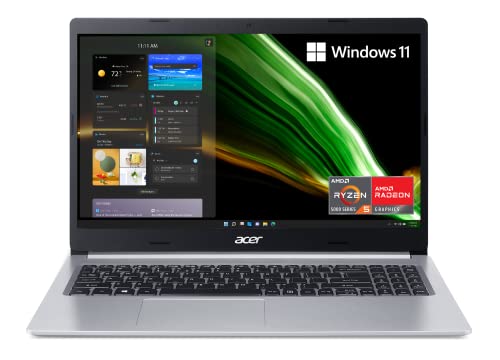
Quick answer: for a straightforward all-round choice, start with the Lenovo IdeaPad Slim 3, with a 15.6-inch Full HD display, 8GB of memory, and 256GB of storage. For more storage and a newer Intel processor, the HP 15 with an Intel Core i5-1334U and 512GB of storage is a solid step up. For the most portable screen here, look at the 14-inch Acer Aspire 5, while the ASUS Vivobook 15 suits lighter workloads. The Acer Aspire 5 with an AMD Ryzen 5 processor sits in the middle, with a good balance of speed and screen size.
This guide explains what makes a laptop truly mobile for school, compares five portable laptops listed on Amazon US, and helps you match each one to the way you study and work between classes.
Quick Picks
Our Short List of 3
All 4 Picks at a Glance
| Product | Specs | Action |
|---|---|---|
| 2. HP 15 (B0CXGPS24D) | Check price on Amazon | |
| 3. Acer Aspire 5 A515-45-R74Z (B09J1MXS2Z) | Check price on Amazon | |
 4. ASUS Vivobook 15 M515DA-WS33 (B0CRDCFNHW) | Check price on Amazon | |
 5. Acer Aspire 5 14 A514-56M-576D (B0D3WH6CMR) | Check price on Amazon |
How to Choose
Choosing a mobile laptop for school is different from choosing a desktop replacement. Weight, battery life, keyboard comfort, screen quality, and connectivity matter as much as raw speed, because the laptop has to work in a classroom, a library, and a study group, not only at a desk at home.
Weight and Portability
A school laptop travels every day, so look for a slim design and a weight that feels comfortable in a backpack alongside books and a charger. A 14-inch model is usually easier to carry and fits better on small desks and lecture-hall trays, while a 15.6-inch model gives you more screen space for split-screen reading and writing. The ASUS Vivobook 15 in this guide is listed at 3.9 lbs: light enough to carry daily, but still a full-size laptop.
Battery Life and Charging
A mobile laptop should last through several classes without a constant search for a power outlet. Battery life depends on screen brightness, Wi-Fi use, video calls, and how many programs run at once, so published battery figures are only a starting point. In practice, a laptop with an efficient modern processor, a solid-state drive, and a Full HD screen tends to last longer than a heavier machine with a brighter high-resolution display. Carry the charger on long days, keep brightness at a comfortable middle level, and close programs you are not using.
Screen Size and Readability
For school, a Full HD display with an IPS panel is a good baseline. It keeps text sharp, keeps colours steady when you tilt the screen, and makes long reading sessions easier on the eyes. A 15.6-inch Full HD screen is comfortable for writing essays, building slides, and watching lesson videos. A 14-inch WUXGA screen, like the one on the Acer Aspire 5 14 in this guide, packs slightly more vertical space into a smaller body, which helps when you read long documents. Touchscreens can be useful for note-taking, but they are not essential for most schoolwork, and a standard screen usually uses less power. An anti-glare coating, where listed, helps in bright classrooms and near windows.
Processor and Memory for Schoolwork
Most school tasks — word processing, spreadsheets, slides, web research, email, video calls, and light photo editing — run well on a modern quad-core or hexa-core processor with 8GB of memory. All five laptops in this guide have 8GB of RAM, which is the minimum worth choosing for smooth multitasking in 2026. The AMD Ryzen 5 5500U and the Intel Core i5-1334U and i5-1335U are the stronger processors here for heavier multitasking, such as running a browser with many tabs alongside a video call and a document. The AMD Ryzen 3 7320U and Ryzen 3 3250U are better suited to lighter, everyday schoolwork. If you plan to edit video or run design software, look for 16GB of memory and a stronger processor instead.
Storage That Fits School Files
Storage affects how many files and apps you can keep on the laptop, and how quickly it starts and opens programs. A solid-state drive, or SSD, is essential: it starts faster and opens files faster than an older hard drive. For most students, 256GB is a workable minimum, and 512GB gives much more room for documents, photos, downloaded lesson material, and apps. The ASUS Vivobook 15 in this guide has 128GB of storage, which is noticeably smaller than the other picks here. It can work if you store most files in cloud storage and keep only current projects on the laptop, but students who keep large media files locally should choose a 256GB or 512GB model instead.
Keyboard, Trackpad, and Ports
You will type on a school laptop for hours, so keyboard comfort matters. Look for well-spaced keys and, if you study in dim rooms, a backlit keyboard. The Acer Aspire 5 models in this guide list a backlit keyboard, which helps during evening study sessions. A responsive trackpad makes navigation faster, and a full-size keyboard with a number pad can help with maths and spreadsheets, although it also makes the laptop wider. For ports, look for at least one USB-C port, one or two USB-A ports, an HDMI port for connecting to a classroom display or a monitor at home, and a headphone jack. Wi-Fi 6 support, listed on several models here, helps with faster and more stable wireless connections on busy school networks.
Operating System and Software
All five laptops in this guide run Windows 11, either in full Windows 11 Home or in Windows 11 Home in S Mode on some configurations. Windows 11 works with the word processors, browsers, video-call apps, and learning platforms most schools use. If a model ships in S Mode, check whether your school apps are available in that mode, and note that switching out of S Mode is a one-way change on that device. Before the first day of term, install your school apps, test video and audio for online classes, and set up cloud backup for essays and coursework.
The Best Moble Laptops for School Reviewed
1. Lenovo IdeaPad Slim 3 (B0C3MNPB8P)
The Lenovo IdeaPad Slim 3 is a clear, everyday choice for school. It pairs a 15.6-inch Full HD display with an AMD Ryzen 3 7320U processor, 8GB of memory, and 256GB of solid-state storage, running Windows 11. That combination covers essays, research, slides, email, video calls, and streaming lesson videos without fuss.
Who it suits: students who want a simple, portable Windows laptop for general schoolwork, from secondary students to college students with a mainly writing and research workload. The Full HD screen keeps text readable, and the 256GB SSD gives room for current projects.
Who should skip it: students who edit video regularly, run demanding design or engineering software, or need a large local media library. For those workloads, a model with a stronger processor and more memory would be a better match.
2. HP 15 (B0CXGPS24D)
The HP 15 in this guide, model 15-fd0012nr, is the storage leader among the 15.6-inch picks here. It uses a 13th Generation Intel Core i5-1334U processor, 8GB of RAM, and 512GB of SSD storage, with Intel Iris Xe Graphics and Windows 11 Home. The larger drive means you can keep more years of coursework and downloaded material on the laptop itself, and the 10-core i5 processor handles multitasking with more headroom than the Ryzen 3 models in this list.
Who it suits: students who keep a lot of files locally, juggle many browser tabs, or want a laptop that stays useful for several school years without running short on space.
Who should skip it: students who prioritise the smallest and lightest bag possible. This is a full-size 15.6-inch laptop, so if desk space is tight, the 14-inch Acer Aspire 5 below may be a better fit. Also note that this listing describes an HD display rather than a Full HD display, so check the exact screen specification before you buy if sharpness is a top priority.
3. Acer Aspire 5 A515-45-R74Z (B09J1MXS2Z)
The Acer Aspire 5 A515-45-R74Z is the balanced middle pick in this roundup. It combines a 15.6-inch Full HD IPS display with an AMD Ryzen 5 5500U hexa-core mobile processor, 8GB of DDR4 memory, 256GB of NVMe SSD storage, Wi-Fi 6, a backlit keyboard, and Windows 11 Home. The IPS panel keeps text steady from different viewing angles, which helps when you share your screen with a classmate, and the backlit keyboard is a genuine help for evening study.
Who it suits: students who want a good all-round laptop for research, writing, slides, video calls, and light creative work. It is a strong fit for secondary and college students who use their laptop most days.
Who should skip it: students who need 512GB of storage from the start or who want the smallest possible laptop for a crowded bag. If you store a lot of video or large project files locally, the HP 15 or the Acer Aspire 5 14 with 512GB may suit you better.
4. ASUS Vivobook 15 M515DA-WS33 (B0CRDCFNHW)
The ASUS Vivobook 15 M515DA-WS33 is the lightest-duty pick in this guide. It has a 15.6-inch Full HD display with slim bezels, an AMD Ryzen 3 3250U processor, 8GB of memory, 128GB of SSD storage, and Windows 11 Home in S Mode on the listed configuration, in Transparent Silver. ASUS lists the weight at 3.9 lbs and describes a thin and light build with a metal-reinforced chassis, which suits daily carrying between home and school. It also includes USB-A, USB-C, HDMI, a headphone jack, and a microSD card reader, plus Wi-Fi 5 and Bluetooth 5.1.
Partial-fit flag: the 128GB of storage is the smallest in this roundup by a clear margin. This laptop fits best when most school files live in cloud storage and only current assignments stay on the device. Students who download large files, keep years of photos on the laptop, or install many large apps should choose a 256GB or 512GB model from this guide instead. Also check whether your school apps run in Windows 11 Home in S Mode, or whether you will need to switch out of S Mode first.
Who it suits: students with a light workload — writing, reading, research, email, and video calls — who want a slim, easy-to-carry laptop and use cloud storage for most files.
Who should skip it: students who need large local storage, who run demanding software, or who want the longest useful life without managing storage carefully.
5. Acer Aspire 5 14 A514-56M-576D (B0D3WH6CMR)
The Acer Aspire 5 14 is the most portable laptop in this roundup. Its 14-inch WUXGA IPS display fits into a smaller, lighter body than the 15.6-inch models, which makes it easier to carry and easier to use on small desks and in lecture halls. It pairs that smaller screen with a capable Intel Core i5-1335U processor, 8GB of LPDDR5 memory, 512GB of Gen 4 SSD storage, Wi-Fi 6E, and USB4 and Thunderbolt 4 support on the listed configuration.
Who it suits: students who walk a long way between classes, use crowded desks, or simply prefer a lighter bag. It is the only pick here that combines a 14-inch screen with 512GB of storage.
Who should skip it: students who prefer the largest possible screen for split-screen work, or who want a full-size keyboard with a separate number pad. A 14-inch laptop trades a little screen and keyboard space for portability.
What to Check Before You Buy
Before you buy any mobile laptop for school, confirm the exact configuration on the Amazon listing. Laptop model names often cover several versions with different processors, memory, storage, and screen resolutions, and a single letter in a model number can change the specification. Check the processor model, the amount of memory, the size and type of storage, the screen size and resolution, the operating system, and whether the listing is for a new laptop or a renewed one.
Next, check the weight and the battery specification on the listing, and read the dimensions so you know whether the laptop fits your bag and your desk. Confirm the ports you need: USB-C for modern accessories, HDMI for an external display, and a headphone jack for quiet study. If your school uses specific software, confirm that it runs on Windows 11 and on the processor in the laptop you choose.
Finally, plan for the first week. Charge the laptop fully before the first day, install school apps and sign in to school accounts, test the webcam and microphone for video calls, and set up cloud backup for coursework. Keep the charger and a simple sleeve or case in your bag. A little preparation makes the first week of term much smoother.
FAQ
What size laptop is best for school?
For most students, a 14-inch or 15.6-inch laptop is the sweet spot. A 14-inch model, like the Acer Aspire 5 14 in this guide, is easier to carry and fits better on small desks. A 15.6-inch model gives you more screen space for reading and writing side by side. Smaller screens can feel cramped for long essays, while larger screens add weight, so the choice comes down to how much you carry the laptop versus how much screen space you want.
How much RAM do I need for school?
For school in 2026, 8GB of RAM is the minimum worth choosing. It handles a browser with several tabs, a word processor, slides, and a video call at the same time. If you run many programs at once, edit photos or video, or want the laptop to stay smooth for several years, 16GB gives more headroom. All five laptops in this guide have 8GB, which suits general schoolwork well.
Is 256GB of storage enough for school?
For most students, 256GB is enough if you store older files in cloud storage and keep current projects on the laptop. It holds documents, slides, photos, apps, and downloaded lesson material with room to spare. If you keep large video files or years of photos on the laptop itself, 512GB is a safer choice. The 128GB drive on the ASUS Vivobook 15 here is the exception: it works best with cloud storage and careful file management.
Do I need a touchscreen laptop for school?
No, most students do not need a touchscreen for school. A touchscreen can help with note-taking, drawing, and navigation, but a standard screen works just as well for writing, research, and video calls. Touchscreens also tend to cost more and use more battery. Choose a touchscreen only if you know you will use it regularly for notes or creative work.
Should I choose AMD or Intel for a school laptop?
Both AMD and Intel make capable processors for school. In this guide, the AMD Ryzen 5 5500U and the Intel Core i5-1334U and i5-1335U are the stronger choices for multitasking, while the AMD Ryzen 3 7320U and Ryzen 3 3250U suit lighter everyday work. For general school tasks, the difference between a modern AMD and a modern Intel chip at a similar level is small. Focus instead on the amount of memory, the size of the SSD, the screen quality, and the weight.
Bottom Line
The best moble laptops for school are the ones that fit your day, not just a specification sheet. For a simple everyday laptop, the Lenovo IdeaPad Slim 3 is a strong starting point. For more storage and stronger multitasking, compare the HP 15 and the Acer Aspire 5 14, with the Acer winning on portability and the HP winning on screen size. For a balanced mid-range choice, the Acer Aspire 5 with the Ryzen 5 processor is hard to fault. The ASUS Vivobook 15 suits light workloads and cloud-based study, provided you accept its smaller 128GB drive. Whichever you choose, confirm the exact configuration on the Amazon listing and set it up before term starts.
Disclosure: As an Amazon Associate, we may earn from qualifying purchases.
Related guides
More from Amazon
Programs that pair well with the guide above. Offers and eligibility are set by Amazon and may change.
Free shipping on eligible items, Prime Video and more. Eligible new members can start with a free trial.
Start a Prime free trialAd-free music streaming. Eligible new subscribers can start with a free trial.
Try Music Unlimited freeA Prime membership for ages 18-24 with a trial period. Eligibility is set by Amazon.
See Prime for Young AdultsAudiobooks and podcasts to listen to on the go. Eligible new members can start with a free trial.
Try Audible freeAs an Amazon Associate we earn from qualifying purchases.









Write Your Review
No reviews yet. Be the first to share your experience!