
Key takeaways
- Find the best laptops to run revit smoothly, with fast CPUs, RTX graphics, 32GB RAM options, and large SSDs for large BIM models and rendering work today.
What's inside
- Quick Picks
- 1. Lenovo Legion Pro 5 — Best Overall for Large Revit Models
- 2. ASUS ROG Strix G16 (2024) — Best High-Refresh 32GB Option
- 3. Dell G16 7630 — Best Dell Option for Revit and Rendering
- 4. MSI Katana 15 — Best Value RTX 4070 Laptop
- 5. Lenovo LOQ 15 — Best Budget RTX 4060 Option
- Buying Guide: How to Choose a Laptop to Run Revit
- FAQ
- Conclusion
As an Amazon Associate I earn from qualifying purchases. This post may contain affiliate links at no extra cost to you.
Revit is not a light program. A small residential model may open on almost any modern laptop, but a large commercial project, a detailed family library, linked models, and real-time 3D views will quickly expose a weak processor, too little memory, or a slow drive. That is why the best laptops to run Revit need a fast multi-core CPU for model regeneration, at least 16GB of RAM and preferably 32GB for larger work, a dedicated NVIDIA GeForce RTX graphics card for smooth navigation and rendering, and a fast NVMe SSD with room for Revit, linked files, and archives. Every model below is a Windows laptop with a dedicated RTX card, a high-performance Intel or AMD processor, and specifications listed on Amazon that suit Revit work, from student projects to larger BIM models. We explain what each configuration does well, where it may feel limited, and who it suits best.


As an Amazon Associate, we earn from qualifying purchases made through links on this page, at no extra cost to you.
Quick Picks
Our Short List of 3
- Best for: Users who want 32GB of RAM and a sharp QHD display for detailed plans, with strong rendering performance.
- Processor: Intel Core i9-14900HX
- Graphics: NVIDIA GeForce RTX 4070
- Memory: 32GB DDR5
- Storage: 1TB PCIe SSD
- Best for: Professional Revit users who want a Dell laptop with a large QHD+ screen and strong CPU and GPU performance.
- Processor: Intel Core i9-13900HX
- Graphics: NVIDIA GeForce RTX 4070, 8GB GDDR6
- Memory: 16GB DDR5
- Storage: 1TB SSD
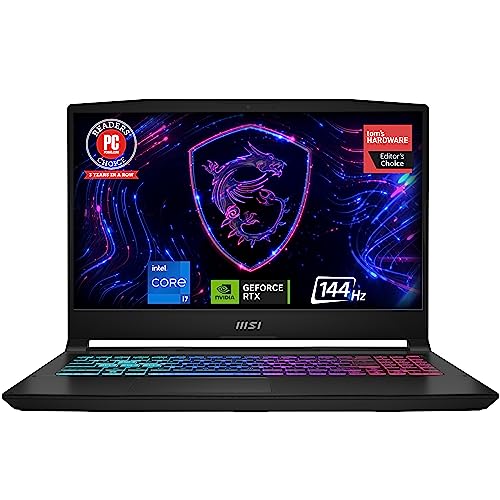
- Best for: Students and professionals who want RTX 4070 graphics for Revit at a lower price than the 32GB models.
- Processor: 13th Gen Intel Core i7
- Graphics: NVIDIA GeForce RTX 4070
- Memory: 16GB DDR5
- Storage: 1TB NVMe SSD
All 3 Picks at a Glance
| Product | Specs | Action |
|---|---|---|
| 2. ASUS ROG Strix G16 (2024) — Best High-Refresh 32GB Option |
| Check price on Amazon |
| 3. Dell G16 7630 — Best Dell Option for Revit and Rendering |
| Check price on Amazon |
| 4. MSI Katana 15 — Best Value RTX 4070 Laptop |
| Check price on Amazon |
1. Lenovo Legion Pro 5 — Best Overall for Large Revit Models
According to the Amazon listing, the Lenovo Legion Pro 5 in this configuration pairs a 16-core AMD Ryzen 9 7945HX processor with an NVIDIA GeForce RTX 4070 graphics card with 8GB of video memory, 32GB of DDR5 RAM, and a 2TB SSD. It has a 16-inch WQXGA display at 2560 x 1600, with a 240Hz refresh rate, 500 nits, 100% DCI-P3, and DisplayHDR 400 support. The listing also describes Windows 11 Pro and a backlit keyboard.
For Revit, that combination addresses the three bottlenecks that matter most. The 16-core Ryzen 9 processor suits multi-threaded work, including rendering and exporting, while its high clock speeds help with the single-threaded tasks Revit still relies on for modelling. The 32GB of DDR5 RAM is the amount many users aim for once projects grow beyond small models. The 2TB SSD is also practical, because Revit files, linked files, families, and rendered images add up. The RTX 4070 helps with smooth orbiting in 3D views, shaded and realistic visual styles, and GPU-accelerated rendering.
This is the pick to choose if you regularly work on large or complex models, use linked files, or render from Revit. It is a gaming laptop by design, so it is heavier and louder under load than an ultrabook, and battery life will be shorter when the dedicated graphics card is active.
Key specifications, according to the Amazon listing:
- Processor: AMD Ryzen 9 7945HX, 16-core
- Graphics: NVIDIA GeForce RTX 4070, 8GB
- Memory: 32GB DDR5
- Storage: 2TB SSD
- Display: 16-inch WQXGA, 2560 x 1600, 240Hz, 500 nits, 100% DCI-P3, HDR400
- Operating system: Windows 11 Pro
Best for: Architects and BIM professionals working on large models, frequent rendering, and heavy multitasking.
Consideration: A powerful gaming chassis, so expect more weight and fan noise under load than a thin business laptop.
2. ASUS ROG Strix G16 (2024) — Best High-Refresh 32GB Option
- Best for: Users who want 32GB of RAM and a sharp QHD display for detailed plans, with strong rendering performance.
- Processor: Intel Core i9-14900HX
- Graphics: NVIDIA GeForce RTX 4070
- Memory: 32GB DDR5
- Storage: 1TB PCIe SSD
Users who want 32GB of RAM and a sharp QHD display for detailed plans, with strong rendering performance.
According to the Amazon listing, the 2024 ASUS ROG Strix G16 in this configuration, model G614JIR-XS96, uses an Intel Core i9-14900HX processor, an NVIDIA GeForce RTX 4070 graphics card, 32GB of DDR5 memory, and a 1TB PCIe SSD. It has a 16-inch ROG Nebula display, 16:10 QHD, 240Hz, with Wi-Fi 6E and Windows 11 Pro.
The Core i9-14900HX is a high-core-count mobile processor, which helps when Revit is regenerating a model or exporting, and when you have other demanding programs open alongside it. The 32GB of DDR5 RAM gives the same headroom described above, which is especially useful for linked models. The QHD display is sharper than a standard Full HD panel, so lines, text, and small details are easier to read, while the 16:10 ratio gives more vertical space for toolbars and palettes. The RTX 4070 provides the graphics performance needed for shaded, realistic, and ray-traced-style views. Storage is the main difference from the Legion Pro 5 above: with 1TB rather than 2TB, you will need to archive finished work more regularly.
Key specifications, according to the Amazon listing:
Consideration: 1TB of storage is generous, but less than the 2TB Legion Pro 5, so plan for archiving larger projects.
3. Dell G16 7630 — Best Dell Option for Revit and Rendering
- Best for: Professional Revit users who want a Dell laptop with a large QHD+ screen and strong CPU and GPU performance.
- Processor: Intel Core i9-13900HX
- Graphics: NVIDIA GeForce RTX 4070, 8GB GDDR6
- Memory: 16GB DDR5
- Storage: 1TB SSD
Professional Revit users who want a Dell laptop with a large QHD+ screen and strong CPU and GPU performance.
According to the Amazon listing, the Dell G16 7630 in this configuration has an Intel Core i9-13900HX processor, an NVIDIA GeForce RTX 4070 graphics card with 8GB of GDDR6 memory, 16GB of DDR5 RAM, and a 1TB SSD. It has a 16-inch QHD+ display at 2560 x 1600, 165Hz, 3ms, and it runs Windows 11 Home.
The i9-13900HX is still a very capable processor for Revit, with the core count and clock speed to handle large models and frequent view regeneration. The 16-inch QHD+ screen shows fine detail clearly, and the taller 16:10 format gives more room for the ribbon, properties, and Project Browser. The main point to understand with this configuration is the 16GB of RAM. According to common practice, 16GB is a workable minimum for Revit, especially for student work and small to medium projects. It will run Revit well with this CPU and GPU, but it is the specification most likely to become a limit first as projects grow. Before buying, check the exact memory upgrade options for this model on the Amazon listing and with Dell. The Dell G16 7630 also looks more restrained than some gaming laptops, which makes it easier to use in a professional office.
Key specifications, according to the Amazon listing:
Consideration: 16GB of RAM is suitable for small to medium projects, but check memory upgrade options if you expect to work on larger BIM models.
4. MSI Katana 15 — Best Value RTX 4070 Laptop
- Best for: Students and professionals who want RTX 4070 graphics for Revit at a lower price than the 32GB models.
- Processor: 13th Gen Intel Core i7
- Graphics: NVIDIA GeForce RTX 4070
- Memory: 16GB DDR5
- Storage: 1TB NVMe SSD
Students and professionals who want RTX 4070 graphics for Revit at a lower price than the 32GB models.
According to the Amazon listing, the MSI Katana 15, model B13VGK-484US, is a 15.6-inch gaming laptop with a 13th Gen Intel Core i7 processor, an NVIDIA GeForce RTX 4070 graphics card, 16GB of DDR5 memory, and a 1TB NVMe SSD. It has a 15.6-inch Full HD display at 144Hz, USB Type-C, Cooler Boost 5 cooling, and Windows 11 Home. The listing describes the RTX 4070 as powered by the Ada architecture, with ray tracing support.
For Revit, the Katana 15 offers a useful balance of price and performance. The RTX 4070 is the same class of graphics card found in the more expensive laptops above, so 3D navigation, shaded views, and GPU-assisted rendering benefit in a similar way. The 13th Gen Core i7 processor is fast enough for most Revit modelling and export tasks, and the 1TB NVMe SSD gives fast load times, with room for several active projects. The differences from the higher-priced models are mainly in the display and memory. A Full HD display is perfectly usable for Revit, but it shows less detail at once than a QHD panel. As with the Dell above, 16GB of RAM is a solid starting point, and it is the specification to watch if your projects become larger.
Key specifications, according to the Amazon listing:
Consideration: Full HD display and 16GB of RAM are practical for most work, but less spacious than QHD 32GB configurations.
5. Lenovo LOQ 15 — Best Budget RTX 4060 Option
According to the Amazon listing, the Lenovo LOQ 15, model 15APH8, has an AMD Ryzen 7-7840HS processor, an NVIDIA GeForce RTX 4060 graphics card with 8GB of video memory, 16GB of RAM, and a 512GB SSD. It has a 15.6-inch Full HD display at 144Hz and runs Windows 11.
This is the most affordable route in this guide to a dedicated RTX graphics card for Revit, and it is a sensible starting point for students and for users working on smaller projects. The Ryzen 7-7840HS is a capable multi-core processor for Revit modelling, and the RTX 4060, while a step below the RTX 4070, is still a substantial improvement over integrated graphics. It will handle 3D views, shaded and realistic visual styles, and rendering far more smoothly than a laptop without a dedicated card. The limitations are storage and memory headroom. With 512GB of storage, you will need to be disciplined about archiving finished projects, using cloud storage or an external drive. The 16GB of RAM is suitable for learning Revit and for small commercial models, but it is the first upgrade to consider for larger projects.
Key specifications, according to the Amazon listing:
- Processor: AMD Ryzen 7-7840HS
- Graphics: NVIDIA GeForce RTX 4060, 8GB
- Memory: 16GB
- Storage: 512GB SSD
- Display: 15.6-inch FHD, 144Hz
- Operating system: Windows 11
Best for: Students, beginners, and budget-conscious users working on smaller Revit projects.
Consideration: 512GB of storage fills up quickly with large Revit files, so plan for archiving and possible upgrades.
Buying Guide: How to Choose a Laptop to Run Revit
Start with the CPU
Revit relies heavily on the processor for modelling, regeneration, and many calculations, and many of those tasks still depend on single-core speed. Look for a recent Intel Core i7 or i9 HX processor, or an AMD Ryzen 7 or Ryzen 9 HX processor, with high boost clock speeds. Avoid ultra-low-power U-series processors, designed for battery life rather than sustained Revit work.
Choose at least 16GB of RAM, and 32GB for larger work
Memory is often the difference between a smooth Revit session and a frustrating one. With 16GB, you can run Revit and a few other programs, but avoid keeping too many views, linked models, and applications open. With 32GB, you have room for linked files, CAD underlays, a browser, and a rendering tool. If you can afford 32GB now, choose it; if you choose 16GB, check whether the laptop allows a memory upgrade later.
Do not skip a dedicated graphics card
Integrated graphics can open Revit, but they are not a good choice for regular 3D work. A dedicated NVIDIA GeForce RTX card, such as the RTX 4060 or RTX 4070 in this guide, provides dedicated video memory, faster 3D navigation, and support for realistic and ray-traced views. The RTX 4070 with 8GB is a good target for most professional work; the RTX 4060, also with 8GB in the LOQ 15, is a capable alternative for smaller projects and students.
Get a fast SSD with enough space
Revit files load far faster from an NVMe SSD than from a traditional hard drive. Choose at least 512GB, and preferably 1TB or 2TB if you work on several projects at once. A 512GB drive is workable if you archive regularly, but a 2TB drive, as in the Legion Pro 5, means you can keep active projects and rendered output on the laptop without constantly managing space.
Pick a screen you can work on all day
For Revit, a 15.6-inch or 16-inch display is a good balance between portability and workspace. A Full HD display is usable, but a QHD or QHD+ display at 2560 x 1600 shows plans and small text more clearly. A 16:10 display gives extra vertical space for the ribbon and palettes, and a panel rated at 300 nits or more is preferable.
Cooling, weight, and battery life
Revit laptops with powerful processors and dedicated graphics cards generate heat, and they need good cooling to sustain performance. Gaming laptops such as the models in this guide have larger fans and vents, but they are heavier and louder under load than a thin ultrabook. Battery life is usually shorter when the dedicated graphics card is active, so plan to work plugged in for long sessions.
Windows is the practical choice for Revit
Revit is a Windows application, and a Windows laptop is the straightforward choice for most users. All of the laptops in this guide run Windows 11, so Revit, AutoCAD, and common BIM and rendering tools will install and run without compatibility workarounds.
FAQ
What are the minimum specs for a laptop to run Revit?
For regular Revit work, a practical minimum is a recent multi-core processor such as an Intel Core i7 or AMD Ryzen 7, 16GB of RAM, a dedicated graphics card such as an NVIDIA GeForce RTX 4060, and a 512GB NVMe SSD. For larger models and frequent rendering, 32GB of RAM, a faster i9 or Ryzen 9 processor, an RTX 4070, and 1TB or more of SSD storage will feel noticeably smoother.
Is 16GB of RAM enough for Revit?
Yes, 16GB of RAM is enough for many Revit users, especially for learning, residential projects, and small commercial work. It is the amount found in the Dell G16 7630, MSI Katana 15, and Lenovo LOQ 15 in this guide. It becomes a limit more quickly with linked models or many applications open at once. If you expect your projects to grow, 32GB, as in the Legion Pro 5 and ROG Strix G16 above, gives you more headroom.
Is an RTX 4060 or RTX 4070 better for Revit?
Both are capable graphics cards for Revit, and both have 8GB of video memory in the configurations listed here. The RTX 4070 is faster and will handle larger 3D views and GPU rendering more comfortably, which is why it appears in four of the five laptops in this guide. The RTX 4060 is still a strong choice for smaller projects. Choose the RTX 4070 if you render often, and the RTX 4060 if you want to keep the price lower.
Can I run Revit on a gaming laptop?
Yes, gaming laptops are often a good choice for Revit, because they pair fast processors with dedicated RTX graphics cards, plenty of RAM, and fast SSDs — the same hardware Revit needs. The trade-offs are usually more weight, louder fans under load, and shorter battery life than a thin business laptop, but for desk-based Revit work, those trade-offs are often acceptable for the performance gained.
Do I need a workstation laptop with a professional GPU for Revit?
Not necessarily. A workstation laptop with a professional GPU can be useful for certain certified workflows, but many architects and BIM professionals run Revit successfully on laptops with consumer RTX graphics cards, such as the RTX 4060 and RTX 4070 models in this guide. A professional workstation may be worth considering if your employer requires certified hardware, but it is not a requirement for most Revit users.
Conclusion
The best laptops to run Revit combine a fast processor, enough memory for your project size, a dedicated RTX graphics card, and a fast SSD with room to grow. If you work on large BIM models and render regularly, the Lenovo Legion Pro 5 with its Ryzen 9 processor, RTX 4070, 32GB of RAM, and 2TB SSD is the strongest all-round choice in this guide, with the ASUS ROG Strix G16 close behind. The Dell G16 7630 offers the same class of CPU and GPU with a large QHD+ screen, the MSI Katana 15 brings RTX 4070 performance to a lower price, and the Lenovo LOQ 15 is a sensible budget starting point with an RTX 4060. Before you buy, check the exact configuration on the Amazon listing, because the same model name can be sold in several configurations.
Related guides
More from Amazon
Programs that pair well with the guide above. Offers and eligibility are set by Amazon and may change.
Free shipping on eligible items, Prime Video and more. Eligible new members can start with a free trial.
Start a Prime free trialAd-free music streaming. Eligible new subscribers can start with a free trial.
Try Music Unlimited freeA Prime membership for ages 18-24 with a trial period. Eligibility is set by Amazon.
See Prime for Young AdultsAudiobooks and podcasts to listen to on the go. Eligible new members can start with a free trial.
Try Audible freeAs an Amazon Associate we earn from qualifying purchases.









Write Your Review
No reviews yet. Be the first to share your experience!