
Key takeaways
- The best new laptops of this generation compared: M4 MacBook Air, Snapdragon X Zenbook A14, Slim 7i Aura, Galaxy Book5 Pro 360 and Legion Pro 5i.
What's inside
As an Amazon Associate I earn from qualifying purchases. This post may contain affiliate links at no extra cost to you.
Buying a new laptop in this cycle is less about picking a fast machine and more about picking a platform. Intel’s Core Ultra, AMD’s Ryzen AI, Qualcomm’s Snapdragon X and Apple’s M4 generation all arrived within the same product year, and they behave differently: the ARM machines promise multi-day battery claims, the x86 models run every legacy Windows program, and Apple’s unified memory changes how much RAM you should order. Choose the wrong platform and no spec sheet rescues you.
This roundup is for three kinds of buyers: anyone replacing a laptop that is four or more years old, first-time Copilot+ PC shoppers who keep hearing about NPU figures, and gamers moving up to the RTX 50-series generation. Every pick below is a current-generation model taken from its Amazon product page name and stated specifications, covering one featherweight ARM ultrabook, one Apple machine, two Intel Lunar Lake designs and one full-power gaming laptop, so the platform decision comes first and the brand second.
Quick Picks
As an Amazon Associate we earn from qualifying purchases
| Product | Best for | Key spec from title |
|---|---|---|
| ASUS Zenbook A14 | Travelers who weigh their carry-on | Snapdragon X, 980 g |
| Apple MacBook Air 15 M4 | Intel Mac owners upgrading | M4 chip, 15.3-inch Liquid Retina |
| Lenovo Slim 7i Aura Edition | Office workers wanting OLED without bulk | Core Ultra 7 256V, 1TB SSD |
| Samsung Galaxy Book5 Pro 360 | Presenters who flip the screen to share it | 16-inch 3K AMOLED touch, 120Hz |
| Lenovo Legion Pro 5i Gen 10 | Gamers buying into the RTX 50 series | RTX 5070 Ti, 16-inch OLED |
How to Choose
Start With the Chip Generation, Not the Brand
The generation gap is widest in the processor. Apple’s M4, Intel’s Core Ultra Series 2 and Qualcomm’s Snapdragon X all advertise an NPU for on-device AI, and Microsoft’s Copilot+ label requires at least 40 TOPS of NPU performance, a figure the listings print for machines like the Zenbook A14 at 45 TOPS. What matters practically is compatibility and efficiency: Snapdragon X models run Windows on ARM, so a few older x86 programs and drivers still will not install, while Intel and Apple machines run their existing software unchanged. Match the chip to your oldest must-have program first, then compare speed.
Displays Moved Further Than Processors
Read the panel line before the processor line. OLED has moved from a flagship extra into mainstream ultrabooks this generation, and the listings state the differences plainly: the Slim 7i Aura and Zenbook A14 pair WUXGA OLED panels with standard refresh, the Galaxy Book5 Pro 360 raises its 3K AMOLED to 120Hz, and the Legion Pro 5i adds 500-nit brightness with 100% DCI-P3 coverage for color work. If you edit photos, prioritize a stated wide-gamut figure over resolution; if you mostly type, a matte finish and higher brightness matter more than OLED contrast.
Treat 16GB of Memory and 512GB of Storage as the Floor
This generation quietly reset the baseline: every pick here starts at 16GB of memory and 512GB of SSD storage, and that should be your floor for a machine you plan to keep four years. The catch is upgradability. The Zenbook A14, Slim 7i Aura and MacBook Air all use soldered or unified memory that can never be expanded, so the configuration on the listing is the configuration for life; order 24GB or 32GB now if you run virtual machines or large photo libraries. Some gaming chassis still take standard memory and a second SSD, which the listing’s memory description will state.
Check Wireless and Ports Against Your Desk
Connectivity splits the generation. Wi-Fi 7 appears on the Slim 7i Aura and Legion Pro 5i listings, while the Zenbook A14 still uses Wi-Fi 6E, a gap that only matters if your router is equally new. Ports deserve a slower look, because thin new models keep deleting them: count the USB-C ports on the listing, confirm whether an HDMI output survives for presentations, and assume no Ethernet jack on anything ultraportable. If your desk runs two monitors and a wired network, a dock becomes part of the real purchase, so check the port standard the dock will use.
The 5 Best Options
ASUS Zenbook A14

The Zenbook A14 is the headline act of the new ARM generation: ASUS builds the chassis from its Ceraluminum material and gets the weight down to 980 grams, a figure the listing prints proudly because no Intel ultrabook in this roundup comes close. Inside is Qualcomm’s Snapdragon X with a 45 TOPS NPU, 16GB of LPDDR5X memory and a 512GB SSD, behind a 14-inch WUXGA OLED screen. It suits consultants, students and field workers whose software lives in a browser or an ARM-ready app, and who would trade a little compatibility caution for a bag that feels empty.
Specs
- Processor: Qualcomm Snapdragon X with 45 TOPS NPU (Copilot+ PC)
- Memory: 16GB LPDDR5X
- Storage: 512GB SSD
- Display: 14-inch WUXGA (1920 x 1200) OLED
- Graphics: Qualcomm Adreno (integrated)
- Battery: 70Wh, up to 32 hours of offline video playback as listed
- Weight: 980 g, Ceraluminum chassis
- Wireless: Wi-Fi 6E
- Operating system: Windows 11 Home
- Color: Zabriskie Beige
Best for: Frequent travelers who want the lightest current-generation Windows laptop.
Watch out for: Windows on ARM still blocks some older x86 programs and printer drivers; confirm your must-have apps have ARM or browser versions before ordering.
ASIN: B0DV9YB8PP
Apple MacBook Air 15 M4

Apple’s M4 generation of the Air keeps the fanless, silent design and stretches it to a 15.3-inch Liquid Retina screen, which makes this the easiest upgrade path for anyone leaving an Intel Mac. The listing pairs the M4 chip with 16GB of unified memory and a 512GB SSD, adds a 12MP Center Stage camera for calls, and claims up to 18 hours of battery life. Choose it if your work lives in macOS apps, Safari and documents, and you want the new generation’s speed without the Pro model’s weight or fan noise.
Specs
- Processor: Apple M4 chip, 10-core CPU and 10-core GPU
- Memory: 16GB unified memory
- Storage: 512GB SSD
- Display: 15.3-inch Liquid Retina, 2880 x 1864, 500 nits, P3 wide color
- Camera: 12MP Center Stage
- Battery: Up to 18 hours as listed
- Weight: 3.3 lb (1.51 kg)
- Security: Touch ID
- Color: Midnight (model MW1M3LL/A)
Best for: Intel Mac owners who want the current Apple generation in a larger, still-portable screen.
Watch out for: Memory and storage are fixed at purchase; if you keep machines for five years, compare the 24GB configuration on the same listing before settling for 16GB.
ASIN: B0DZD9VLQ4
Lenovo Slim 7i Aura Edition
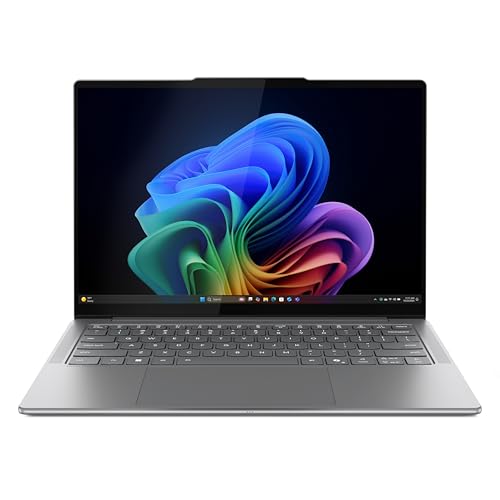
Lenovo’s Aura Edition is the conventional ultrabook brought up to date: an Intel Core Ultra 7 256V from the current Lunar Lake generation, 16GB of memory and a generous 1TB SSD in a Luna Grey chassis with a 14-inch WUXGA OLED display. Because it runs standard x86 Windows, every existing program, plug-in and peripheral driver carries over, which makes it the low-risk new laptop for office workers. The Aura branding adds Lenovo’s latest software layer, but the real story is the pairing of a modern OLED panel with double the storage most rivals list at this size.
Specs
- Processor: Intel Core Ultra 7 256V, up to 4.8 GHz
- Memory: 16GB LPDDR5X
- Storage: 1TB SSD
- Display: 14-inch WUXGA (1920 x 1200) OLED
- Wireless: Wi-Fi 7
- Operating system: Windows 11 Home, Copilot+ PC
- Model: 83MC0004US, Luna Grey
Best for: Office workers who want the newest Intel generation with zero software migration risk.
Watch out for: Memory is soldered LPDDR5X, so 16GB is permanent; heavy multitaskers should look at the 32GB configuration of the same model instead.
ASIN: B0DTC5N26L
Samsung Galaxy Book5 Pro 360

Samsung’s 2025 flagship convertible wraps Intel’s Core Ultra 7 256V around a 16-inch 3K AMOLED touchscreen that folds flat into tablet mode, and it is the only pick here that changes shape. The listing specifies 16GB of memory, a 512GB SSD and Windows 11 Pro, which suits professionals who present from the same machine they type on. Presenters, trainers and sales staff who mark up slides or sign documents on screen get the most from it; everyone else should weigh whether the hinge earns its keep against a lighter clamshell.
Specs
- Processor: Intel Core Ultra 7 256V
- Memory: 16GB
- Storage: 512GB SSD
- Display: 16-inch 3K AMOLED touchscreen, 120Hz, 360-degree hinge
- Operating system: Windows 11 Pro
- Model: NP964QHA-KG1US (2025 model)
- Color: Gray
Best for: Presenters and trainers who alternate between typing, presenting and writing on screen.
Watch out for: A 16-inch convertible is desk-first portability; if you commute daily, check the dimensions and weight on the listing against your bag before choosing it over a 14-inch model.
ASIN: B0DVCDC2NN
Lenovo Legion Pro 5i Gen 10

The Legion Pro 5i Gen 10 is where the new generation stops sipping power. Its listing combines Intel’s Core Ultra 9 275HX with an NVIDIA GeForce RTX 5070 Ti, 32GB of DDR5 memory and a 2TB SSD, behind a 16-inch WQXGA OLED panel rated at 500 nits with full DCI-P3 coverage. That is a desktop replacement for gamers who want this cycle’s graphics card and a color-accurate screen for editing between matches. It gives up any pretense of all-day unplugged work, so buy it for a desk, not for a departure lounge.
Specs
- Processor: Intel Core Ultra 9 275HX (24-core)
- Graphics: NVIDIA GeForce RTX 5070 Ti, GDDR7
- Memory: 32GB DDR5
- Storage: 2TB SSD
- Display: 16-inch WQXGA (2560 x 1600) OLED, 500 nits, 100% DCI-P3
- Wireless: Wi-Fi 7
- Keyboard: RGB backlit
- Operating system: Windows 11 Pro
Best for: Gamers who want the current RTX 50-series generation in a machine that also edits video credibly.
Watch out for: This configuration comes from a seller-configured listing rather than a Lenovo factory build, so verify the exact memory and storage on the page and check the warranty terms before ordering.
ASIN: B0FSDN51TG
Which One Fits Your Situation
You Travel Every Week
If your laptop lives in a carry-on, start with the Zenbook A14: at 980 grams with a 70Wh battery and a listed claim of up to 32 hours of offline video playback, it removes weight and charger anxiety. The condition is software: check that your apps run on Windows ARM or in a browser. If one essential program fails that check, the Slim 7i Aura offers similar OLED portability on standard Intel hardware, with 1TB of storage for offline files.
You Are Leaving an Intel Mac Behind
Move to the MacBook Air 15 M4 and the transition is mostly invisible: your documents, browser data and Apple services carry over, while the M4 chip, 16GB of memory and the larger 15.3-inch screen fix the three things Intel Mac owners complain about: heat, slowdowns and squinting. The fanless design stays silent in meetings, and Touch ID removes password friction. Just order storage honestly, because the 512GB in this listing can never be expanded later.
You Present, Annotate and Sign on Screen
Pick the Galaxy Book5 Pro 360. The 360-degree hinge turns the 16-inch AMOLED panel toward a client, folds it flat for handwritten notes, and stands it up for video calls, while Windows 11 Pro covers office network policies. The Core Ultra 7 256V and 16GB of memory handle documents, dashboards and calls without drama. Accept the trade honestly: this is the biggest machine in the roundup, so it suits people who present weekly more than people who fly weekly.
You Play Current Games at Native Resolution
Choose the Legion Pro 5i Gen 10. The RTX 5070 Ti is this generation’s step into serious laptop gaming, the 32GB of memory keeps big worlds and background apps comfortable, and the 2TB SSD holds a real library instead of forcing constant deletions. The WQXGA OLED panel doubles as an editing screen. Keep it plugged in at a desk; machines in this class trade battery endurance for graphics power by design.
Common Mistakes
- Buying last year’s model because the name looks identical, without checking the chip model number on the listing; a Core Ultra 7 155H and a 256V are different generations with different battery behavior.
- Assuming every Windows program runs on a Snapdragon X laptop; check ARM support for VPN clients, printer drivers and older plug-ins before ordering.
- Ordering 16GB of soldered memory for a five-year machine, then discovering that virtual machines or large photo libraries needed 32GB from day one.
- Treating a seller-upgraded configuration as a factory build; upgraded memory and storage can change who honors the warranty, so read the listing’s configuration note.
- Comparing battery claims across brands as if they were measured the same way; a 32-hour offline video figure and an 18-hour mixed-use figure describe different tests.
Frequently Asked Questions
What makes a laptop part of the new generation?
The chip and the platform around it. Current models pair a recent processor generation, such as Apple M4, Intel Core Ultra Series 2 or Snapdragon X, with faster memory, OLED or high-refresh display options and an NPU rated for on-device AI features. A familiar model name means little by itself; the processor model number on the listing is the reliable tell.
Will a Snapdragon X laptop run all my Windows programs?
Most mainstream apps now run natively or through Windows’ built-in emulation, and browsers, Office and major creative tools are covered. The gaps are specific: some VPN clients, printer and scanner drivers, older plug-ins and certain anti-cheat games still lack ARM support. List your three most important programs, check each maker’s ARM statement, and choose an Intel model like the Slim 7i Aura if any one of them is unsupported.
How much memory and storage should a new laptop have?
Treat 16GB of memory and a 512GB SSD as the starting point for this generation, which is where every pick in this roundup begins. Step up to 24GB or 32GB if you edit video, run virtual machines or keep dozens of browser tabs open, especially on machines with soldered memory. For storage, 1TB suits photo and game libraries; 512GB works when your files live in cloud storage.
Should you wait for next year’s models instead?
Only if your current laptop still does the job comfortably. New generations arrive on a yearly rhythm, so there is always a successor coming, but this cycle’s gains in battery life, display quality and AI hardware are already large compared with machines from three or four years ago. If your laptop struggles today, the current listings are a rational place to stop waiting.
Related guides
- Best Laptops to Play Roblox: From Budget Integrated Graphics to Dedicated GPUs
- Best Laptops for Zoom Teaching: Clear Video, Reliable Audio and All-Day Class Power
- Best Laptops for Video Editing and Music Production: Power, Screen and Storage
- Best Laptops for Network Engineers: Ethernet, RAM for Labs and Ports That Matter
More from Amazon
Programs that pair well with the guide above. Offers and eligibility are set by Amazon and may change.
Free shipping on eligible items, Prime Video and more. Eligible new members can start with a free trial.
Start a Prime free trialAd-free music streaming. Eligible new subscribers can start with a free trial.
Try Music Unlimited freeA Prime membership for ages 18-24 with a trial period. Eligibility is set by Amazon.
See Prime for Young AdultsAudiobooks and podcasts to listen to on the go. Eligible new members can start with a free trial.
Try Audible freeAs an Amazon Associate we earn from qualifying purchases.










Write Your Review
No reviews yet. Be the first to share your experience!