
Our Short List of 3

- CPU: Intel Core i5-13420H
- GPU: NVIDIA GeForce RTX 4050 Laptop GPU, 6GB GDDR6
- RAM: 8GB DDR5 (second slot free for upgrades)
- Storage: 512GB PCIe Gen 4 SSD

- CPU: AMD Ryzen 7 7735HS
- GPU: NVIDIA GeForce RTX 4060 Laptop GPU, 8GB GDDR6, full-power 140W class
- RAM: 16GB DDR5
- Storage: 1TB PCIe SSD
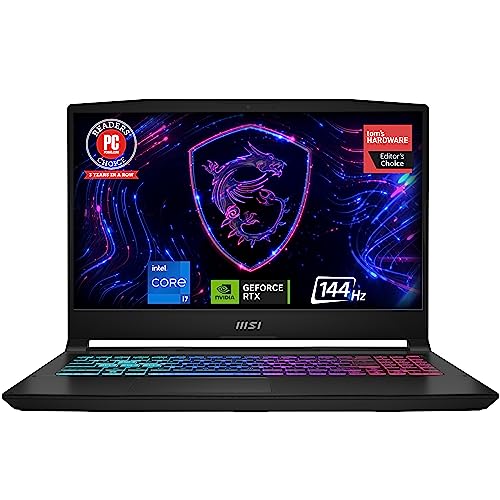
- CPU: Intel Core i7-13620H
- GPU: NVIDIA GeForce RTX 4070 Laptop GPU, 8GB GDDR6
- RAM: 16GB DDR5
- Storage: 1TB NVMe SSD
All 5 Picks at a Glance
| Product | Specs | Action |
|---|---|---|
| Acer Nitro V 15 (ANV15-51-51H9) — Budget |
| Check price on Amazon |
| ASUS TUF Gaming A15 (FA507NV-EH74) — Mid-Range |
| Check price on Amazon |
| MSI Katana 15 (B13VGK-484US) — Mid-Range |
| Check price on Amazon |
 Lenovo Legion 5i — Premium |
| Check price on Amazon |
 ASUS ROG Strix G16 (G614JV-AS73) — Premium |
| Check price on Amazon |
Key takeaways
- Compare gaming laptops built for Overwatch 2 at 1080p, with RTX graphics, fast-refresh displays, strong cooling and the specs ranked play actually needs.
What's inside
As an Amazon Associate I earn from qualifying purchases. This post may contain affiliate links at no extra cost to you.
Overwatch 2 is a game where hardware shows up directly in your rank. Fights turn on tracking fast-moving targets, reacting to flankers the instant they appear, and keeping your aim steady while six abilities go off at once. That makes frame rate and frame pacing far more important here than raw visual detail: a laptop that holds smooth, high frame rates at 1080p on a fast-refresh screen will feel noticeably sharper in a team fight than a prettier machine that stutters when the action peaks. The good news is that Overwatch 2 is not a heavy game by modern standards, so the gaming laptops in this price class have far more graphics power than the game asks for, and the real differences come down to display speed, cooling, memory configuration, and build quality.
This roundup is fenced strictly to that job: five gaming laptops in the 1k class whose graphics cards comfortably drive high frame rates in Overwatch 2 at 1080p, each paired with a display fast enough to show those frames. Every pick below is a dedicated gaming laptop with a discrete RTX graphics card, a high-refresh panel, and cooling designed for long sessions. They are ranked from the most accessible entry point up to the premium end of the class, so you can see exactly what each step up buys you in display quality, memory, storage, and sustained performance.
As an Amazon Associate, we earn from qualifying purchases.
Acer Nitro V 15 (ANV15-51-51H9) — Budget
- CPU: Intel Core i5-13420H
- GPU: NVIDIA GeForce RTX 4050 Laptop GPU, 6GB GDDR6
- RAM: 8GB DDR5 (second slot free for upgrades)
- Storage: 512GB PCIe Gen 4 SSD
The Nitro V 15 is the entry point of this roundup, and it earns its place because Overwatch 2 simply does not need much graphics power to run fast. Its GeForce RTX 4050 Laptop GPU sits comfortably above the game’s recommended hardware, which means high frame rates at 1080p are well within reach, especially at the competitive settings most ranked players use anyway. The 144Hz Full HD IPS panel is the important part of the package: it can actually display the frames the graphics card produces, so movement looks fluid and targets are easier to track than on a standard office-grade screen.
The Intel Core i5-13420H is a capable eight-core processor that will not hold the graphics card back in a CPU-light title like this one, and the 512GB Gen 4 SSD loads maps and menus quickly. The one specification to plan around is memory: this configuration ships with 8GB of DDR5, which runs Overwatch 2 fine on its own but leaves little headroom for voice chat, a browser, and background apps running alongside the game. The chassis has a second memory slot, so adding a matching stick later is a cheap and easy upgrade that brings the machine in line with the rest of this list. At under five pounds with Wi-Fi 6 and a backlit keyboard, it is also the easiest pick here to carry between classes, home, and a friend’s place for group queue sessions.
ASUS TUF Gaming A15 (FA507NV-EH74) — Mid-Range
- CPU: AMD Ryzen 7 7735HS
- GPU: NVIDIA GeForce RTX 4060 Laptop GPU, 8GB GDDR6, full-power 140W class
- RAM: 16GB DDR5
- Storage: 1TB PCIe SSD
The TUF Gaming A15 is the balanced pick of this class and the one most Overwatch 2 players should look at first. Its GeForce RTX 4060 runs at a full-power wattage for a laptop card, which matters more than the model name on the box: some thinner machines ship the same GPU name with far less power and noticeably weaker results. Here, the RTX 4060 has the headroom to push frame rates at 1080p well past what the 144Hz display can show, even with settings turned up beyond the usual competitive profile, and it supports DLSS for titles heavier than this one that you might play between seasons.
The supporting hardware is equally well judged. The AMD Ryzen 7 7735HS is a strong eight-core chip, 16GB of DDR5 memory is the right amount for gaming plus Discord and a browser, and the 1TB SSD doubles the storage of most rivals in this roundup, which is genuinely useful if your library extends beyond one hero shooter. The 15.6-inch Full HD panel refreshes at 144Hz with full sRGB coverage, so colors look accurate for everyday use as well. TUF machines are built to a military durability standard and carry a large 90Wh battery, unusual in this class, which makes the A15 a practical daily driver as well as a gaming machine. Cooling is handled by dual fans with plenty of venting, so long ranked sessions do not steadily erode performance.
MSI Katana 15 (B13VGK-484US) — Mid-Range
- CPU: Intel Core i7-13620H
- GPU: NVIDIA GeForce RTX 4070 Laptop GPU, 8GB GDDR6
- RAM: 16GB DDR5
- Storage: 1TB NVMe SSD
The Katana 15 makes a different trade from the TUF: it spends its share of the class budget on graphics power above everything else. Its GeForce RTX 4070 Laptop GPU is a clear step up from the RTX 4060 machines here, with more CUDA cores and stronger performance in every game you pair with Overwatch 2. For this title specifically, that extra power buys consistency: frame rates stay high and stable at 1080p even at maximum settings, and there is generous headroom for a future high-refresh external monitor if you later build a desk setup around the laptop.
The rest of the specification is sensible rather than flashy. The Intel Core i7-13620H is a ten-core processor with plenty of single-core speed for a game engine like this one, 16GB of DDR5 memory covers gaming and multitasking, and the 1TB NVMe SSD matches the TUF for library space. The 15.6-inch Full HD display runs at 144Hz, which is the right pairing for the GPU at this resolution. MSI’s Cooler Boost 5 system uses dual fans and a shared heat-pipe layout to keep the CPU and GPU in their boost ranges during extended play. The Katana’s chassis is plain and its speakers and webcam are ordinary, which is exactly where the money was saved to afford the stronger graphics card. If your priority is the highest and steadiest frame rates this class can offer, that is the right bargain.
Lenovo Legion 5i — Premium
- CPU: Intel Core i7-13650HX (14 cores)
- GPU: NVIDIA GeForce RTX 4060 Laptop GPU, 8GB GDDR6, 140W TGP
- RAM: 32GB DDR5
- Storage: 1TB PCIe NVMe SSD
The Legion 5i is the premium all-rounder of this roundup, and its standout feature is the screen. The 16-inch WQXGA panel runs at 165Hz with G-SYNC, which synchronizes the display to the graphics card’s output and eliminates tearing without the input lag of traditional v-sync — a real advantage in a game built on fast mouse movement. The higher 2560 x 1600 resolution also gives you a sharper image, and the RTX 4060 inside has enough power for Overwatch 2 at high frame rates; if you ever want maximum frames, the game can be run at 1080p or with a reduced render scale while keeping the panel’s refresh and sync benefits.
Underneath, this configuration is generously specified: an Intel Core i7-13650HX with fourteen cores, a full-power RTX 4060, 32GB of DDR5 memory — double most of this list — and a 1TB SSD. That memory headroom makes the Legion the best multitasker here for players who stream, record highlights, or keep many applications open while queued. Legion’s Coldfront cooling and the Fn+Q shortcut for switching thermal modes are genuinely useful in long sessions, and the four-zone RGB keyboard, Wi-Fi 6E, and full-size port selection round out a machine that feels a class above its rivals. It is the heaviest style of pick here in spirit rather than in hand, and the one to choose if this laptop is also your main computer.
ASUS ROG Strix G16 (G614JV-AS73) — Premium
- CPU: Intel Core i7-13650HX
- GPU: NVIDIA GeForce RTX 4060 Laptop GPU, 8GB GDDR6, full-power 140W class
- RAM: 16GB DDR5
- Storage: 512GB PCIe Gen 4 SSD
The Strix G16 is the enthusiast’s pick, built for players who care about responsiveness above everything else. Its 16-inch Full HD+ display refreshes at 165Hz in a taller 16:10 aspect ratio, and the machine includes a MUX switch, which lets the discrete graphics card drive the display directly instead of routing frames through the integrated graphics. That removes a small but real source of latency and lifts frame rates slightly — exactly the kind of marginal gain competitive players chase. The RTX 4060 here also runs at full power, so the G16 delivers strong, consistent 1080p frame rates with settings headroom to spare.
The Intel Core i7-13650HX matches the Legion’s processor, and ROG’s Intelligent Cooling uses liquid metal on the CPU and a full-width rear vent design to sustain boost clocks through long sessions. Storage is the one modest specification at 512GB, though a second slot makes expansion straightforward, and 16GB of DDR5 memory is standard for the class. At about five and a half pounds it is the least portable laptop in this roundup, but it counters with Wi-Fi 6E, a per-key RGB keyboard, and the strongest build feel of the five. Choose the Strix if Overwatch 2 is your main game, you play ranked seriously, and you want the most responsive built-in display experience this class offers.
How to Choose
Start with the display, because in Overwatch 2 the screen is half the experience. Every laptop here has at least a 144Hz panel, and that should be your floor: a 60Hz screen cannot show more than sixty frames per second no matter how powerful the graphics card is, and the difference in tracking smoothness is immediately obvious in a fast shooter. If you play competitively, the 165Hz panels on the Legion 5i and Strix G16, ideally with adaptive sync or a MUX switch, are worth prioritizing.
Next, look at the graphics card and its power level, not just its name. An RTX 4060 or RTX 4070 running at full laptop wattage will comfortably outpace a restricted low-wattage version of the same chip. For Overwatch 2 at 1080p, an RTX 4050 is genuinely sufficient, an RTX 4060 is the sweet spot with headroom for higher settings and heavier games, and an RTX 4070 buys maximum consistency and longevity. All three support DLSS, which is useful insurance for future titles.
Memory and storage decide how the machine ages. Treat 16GB of RAM as the practical standard for gaming alongside chat and browser apps; the Nitro V 15’s 8GB configuration is the exception, and it should be bought with a planned upgrade in mind, while the Legion’s 32GB suits streamers. For storage, 512GB is workable if Overwatch 2 is your main install, but 1TB removes the juggling act for a growing library. Finally, consider cooling and weight honestly: dual-fan designs with generous venting sustain performance in long sessions, and if the laptop travels daily, the lighter Nitro and Katana are easier to live with than the larger 16-inch machines.
Frequently Asked Questions
How much graphics power does Overwatch 2 actually need at 1080p?
Far less than most modern games. Overwatch 2 is well optimized and runs at high frame rates on mid-range hardware, which is why every laptop in this roundup — from the RTX 4050 in the Nitro V 15 upward — can drive it smoothly at 1080p. The stronger RTX 4060 and RTX 4070 machines add headroom for maximum settings, higher resolutions, and heavier games in your library, rather than being necessary for this title alone.
Is a 144Hz or 165Hz display really worth it for Overwatch 2?
Yes — for this genre it is one of the most noticeable upgrades you can buy. A high-refresh display shows more frames per second, which makes fast targets easier to track and reduces the delay between your mouse movement and what you see. The jump from 60Hz to 144Hz is dramatic; the step to 165Hz with adaptive sync, as on the Legion 5i, is smaller but still worthwhile for serious ranked players.
Should I choose 16GB or 32GB of RAM for gaming?
For Overwatch 2 itself, 16GB is comfortably enough, even with voice chat and a browser open. Choose 32GB, as in the Legion 5i configuration here, if you stream, record gameplay, edit video, or keep many applications running at once. If you buy the 8GB Nitro V 15, plan to add a second memory stick — it is inexpensive, uses the free slot, and brings the machine up to the class standard.
Can these laptops connect to an external gaming monitor later?
Yes. Every laptop in this roundup has HDMI output, and several support DisplayPort over USB-C, so any of them can drive an external high-refresh monitor for a desk setup. The RTX 4070 Katana 15 has the most headroom for a 1440p external display, while the others are best matched to 1080p high-refresh monitors, which is also where Overwatch 2 plays best.
Final Verdict
For most Overwatch 2 players shopping in this class, the ASUS TUF Gaming A15 is the pick: a full-power RTX 4060, 16GB of memory, a 1TB SSD, and a 144Hz display cover everything the game rewards, with a big battery as a bonus. If frame rates are your single priority, the MSI Katana 15’s RTX 4070 delivers the strongest and steadiest performance here. The Lenovo Legion 5i is the best all-round computer of the five, with its 165Hz G-SYNC display and 32GB of memory, while the ROG Strix G16 is the choice for competitive players who want a MUX switch and the most responsive feel. And if you simply want to get into ranked play for the least commitment, the Acer Nitro V 15 covers the essentials — just budget for a memory upgrade. Any of the five will run Overwatch 2 at 1080p far faster than its display can show; the right choice is the one whose screen, storage, and size fit how you actually play.
Product and ASIN Reference
| Product | ASIN |
|---|---|
| Acer Nitro V 15 (ANV15-51-51H9) | B0CP8D4SM2 |
| ASUS TUF Gaming A15 (FA507NV-EH74) | B0CJSY4PLN |
| MSI Katana 15 (B13VGK-484US) | B0BT3FKZ3N |
| Lenovo Legion 5i | B0DPWQ6WSS |
| ASUS ROG Strix G16 (G614JV-AS73) | B0BV8H8HVD |
Related guides
More from Amazon
Programs that pair well with the guide above. Offers and eligibility are set by Amazon and may change.
Free shipping on eligible items, Prime Video and more. Eligible new members can start with a free trial.
Start a Prime free trialAd-free music streaming. Eligible new subscribers can start with a free trial.
Try Music Unlimited freeA Prime membership for ages 18-24 with a trial period. Eligibility is set by Amazon.
See Prime for Young AdultsAudiobooks and podcasts to listen to on the go. Eligible new members can start with a free trial.
Try Audible freeAs an Amazon Associate we earn from qualifying purchases.










Write Your Review
No reviews yet. Be the first to share your experience!