
Key takeaways
- The 5 best AMD laptops under 500 for everyday work, from Lenovo IdeaPad and HP 15 to Acer Aspire 3 and ASUS Vivobook Go, compared by chip, memory, and screen.
What's inside
As an Amazon Associate I earn from qualifying purchases. This post may contain affiliate links at no extra cost to you.
Shopping for an AMD laptop on a tight budget is really a question about where the manufacturer saved money. A Ryzen 5 processor can handle office work, browsing, and video calls with ease, but a dim screen, a slow drive, or too little memory will make the laptop feel old long before the chip does. The trick is to find the model that spent its budget on the parts you touch every day.
This guide is for students, home workers, and first-time laptop buyers who want a capable AMD machine without paying for features they will never use. Every pick below was chosen from the names and specifications listed on its Amazon product page, with the processor, memory, storage, and display taken from the listing itself.
Quick Picks
As an Amazon Associate we earn from qualifying purchases
| Product | Best for | Key spec from title |
|---|---|---|
| Lenovo IdeaPad Slim 3 | Everyday work in a slim frame | 15.6-inch FHD display, AMD Ryzen 5 7520U, 8GB memory |
| HP 15 15-fc0499nr | Touchscreen convenience on a budget | 15.6-inch HD touchscreen, AMD Ryzen 5 7520U, 512GB SSD |
| Acer Aspire 3 A315-24PT | A touch display with a sharp IPS panel | 15.6-inch FHD IPS touch display, AMD Ryzen 5 7520U |
| ASUS Vivobook Go 15 | A tough everyday laptop with fast charging | 15.6-inch FHD display, AMD Ryzen 5 7520U, 8GB memory |
| Lenovo IdeaPad 1 15AMN7 | The simplest budget pick for basics | 15.6-inch FHD display, AMD Ryzen 5 7520U |
How to Choose
Pick the right Ryzen 5, not just any Ryzen 5
AMD sells several Ryzen 5 chips that sound similar but perform differently, so read the exact model number on the listing. The Ryzen 5 7520U used in every pick here is a four-core chip that boosts to 4.3 GHz, which is plenty for documents, browsers, and video calls. Avoid older Ryzen 5 chips from several generations back unless the listing clearly states the model, because an outdated processor is the hardest thing to fix later. A chip from the current generation also supports the latest Windows security features, which older chips sometimes lack.
Treat 8GB of memory as the floor
Every laptop in this guide ships with 8GB of memory, which is the minimum for smooth work with a browser, an office suite, and a video call open at once. Less than that means constant slowdowns once you open a few tabs. If you keep dozens of tabs open or edit large documents, look for a model that lets you add memory later, and check the listing for whether the memory is soldered or upgradeable. If the listing does not say whether memory can be upgraded, assume it cannot and choose the larger configuration.
Check the screen before the processor
On budget laptops the screen is where manufacturers cut corners, so compare resolution and panel type carefully. A full HD 1920 x 1080 display shows text clearly, while a lower-resolution HD panel looks soft and strains your eyes during long sessions. An IPS panel, like the one on the Acer Aspire 3, keeps colors steady when you tilt the screen, which matters if you share the display or work from a couch. Check the listing for the exact resolution in pixels, since marketing names like HD and Full HD are easy to confuse at a glance.
Confirm storage type and size
A solid-state drive is non-negotiable on a modern laptop, because a spinning hard drive makes even a fast processor feel slow. The picks here use SSD storage from 256GB to 512GB, and the larger size is worth having if you store photos, videos, or large files locally. Also check whether the listing mentions an extra storage slot, since a second drive bay makes a small drive much less of a problem. Also check the battery size on the listing, since a small battery means more time tethered to an outlet during long work sessions.
The 5 Best Options
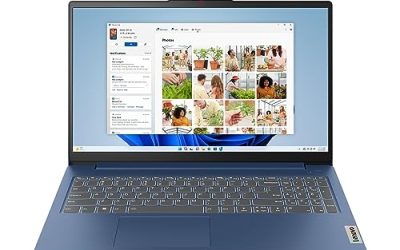
Lenovo IdeaPad Slim 3

The IdeaPad Slim 3 pairs a 15.6-inch full HD display with an AMD Ryzen 5 7520U processor, 8GB of memory, and 256GB of storage in a slim blue chassis. It is a straightforward everyday laptop: the screen is sharp enough for documents and video, the keyboard is full-size, and Windows 11 comes installed. For schoolwork, office tasks, and browsing, it covers the basics without asking you to learn anything new.
Specs
- 15.6-inch FHD display
- AMD Ryzen 5 7520U processor
- 8GB memory
- 256GB storage
- Windows 11
- Abyss Blue
Best for: Students and home workers who want a simple, slim everyday laptop.
Watch out for: The 256GB drive fills quickly with photos and synced files, so check your storage use or plan for external storage.
HP 15 15-fc0499nr

The HP 15 in this configuration adds a touchscreen to the budget formula, with a 15.6-inch HD touch display, an AMD Ryzen 5 7520U processor, 8GB of RAM, and a 512GB SSD. Touch input makes scrolling and tapping through apps feel natural, and the larger SSD gives you room for files without constant cleanup. The natural silver finish and Windows 11 Home round out a machine built for daily use at a desk or on a couch.
Specs
- 15.6-inch HD touchscreen display
- AMD Ryzen 5 7520U processor, up to 4.3 GHz
- 8GB RAM
- 512GB SSD storage
- AMD Radeon Graphics
- Windows 11 Home
Best for: Buyers who want touch input and generous storage in a budget laptop.
Watch out for: The display is HD rather than full HD, so text looks softer than on the full HD models in this guide.
Acer Aspire 3 A315-24PT

The Acer Aspire 3 combines a 15.6-inch full HD IPS touchscreen with an AMD Ryzen 5 7520U processor, 8GB of LPDDR5 memory, and a 512GB SSD. The IPS panel keeps colors and contrast steady from different angles, and the touch layer adds a direct way to scroll through documents and web pages. Wi-Fi 6 keeps wireless connections fast on modern routers, and the Steam Blue finish stands out from the usual silver and black.
Specs
- 15.6-inch Full HD IPS touch display
- AMD Ryzen 5 7520U processor
- 8GB LPDDR5 RAM
- 512GB SSD storage
- Wi-Fi 6
- Steam Blue
Best for: Buyers who want the sharpest budget screen with touch in this guide.
Watch out for: Touchscreens add weight and collect fingerprints, so keep a microfiber cloth nearby if that bothers you.
ASUS Vivobook Go 15

The ASUS Vivobook Go 15 is built for rough daily use, with a 15.6-inch full HD display, an AMD Ryzen 5 7520U processor, 8GB of memory, and a 512GB SSD in a slim silver chassis. The listing notes military-grade durability testing, fast charging, and a webcam shield for privacy, which are practical touches for a laptop that travels in a backpack. Windows 11 Home comes installed, and the full-size keyboard suits long typing sessions.
Specs
- 15.6-inch FHD display
- AMD Ryzen 5 7520U processor
- 8GB RAM
- 512GB SSD storage
- Windows 11 Home
- Military-grade durability, fast charging, webcam shield
Best for: Commuters and students who need a durable laptop that charges quickly.
Watch out for: The 8GB of memory is fixed for most everyday tasks, so avoid running many heavy apps at once.
Lenovo IdeaPad 1 15AMN7

The IdeaPad 1 is the simplest pick in this guide: a 15.6-inch full HD laptop with an AMD Ryzen 5 7520U processor and AMD Radeon graphics, aimed squarely at basic computing. It handles web browsing, documents, email, and video calls without fuss, and its straightforward design means there is little to configure or go wrong. For a first laptop, a spare machine, or a shared family computer, it does the job.
Specs
- 15.6-inch FHD display
- AMD Ryzen 5 7520U processor, 4 cores, up to 4.3 GHz
- AMD Radeon Graphics
- Windows 11
Best for: First-time buyers and families who need a no-fuss laptop for basics.
Watch out for: This is a basics-first machine, so confirm the exact memory and storage on the listing before ordering, since configurations vary.
Which One Fits Your Situation
You want the sharpest screen for the money
Pick the Acer Aspire 3. Its full HD IPS touchscreen shows text and images more clearly than the HD panel on the HP 15, and the IPS technology keeps the picture steady when you tilt the screen. The 512GB SSD is a bonus for storing files locally. The touch layer also makes it easy to scroll through documents when the laptop sits on your lap.
You want touch without giving up storage
Pick the HP 15. The touchscreen makes everyday navigation easy, and the 512GB SSD gives you twice the room of the base IdeaPad Slim 3. Just remember the display is HD, so text looks softer than on the full HD picks. The silver finish looks at home in an office, and the larger drive means fewer trips to delete old files.
You carry your laptop everywhere
Pick the ASUS Vivobook Go 15. Its slim frame, durability testing, and fast charging suit a bag that gets tossed around, and the webcam shield adds a small privacy win. The 512GB SSD also means you can keep files local. The slim frame fits in most backpacks, and the full-size keyboard stays comfortable during long typing sessions.
You want the simplest, cheapest route to a working laptop
Pick the Lenovo IdeaPad 1. It covers browsing, documents, and calls with the same Ryzen 5 chip as the others, without extras you may not need. Read the listing carefully to confirm the memory and storage of the exact configuration you order. Its straightforward design means there is little to learn, and the same Ryzen 5 chip keeps everyday tasks running smoothly.
Common Mistakes
- Buying a laptop with a spinning hard drive instead of an SSD, which makes even a fast processor feel slow.
- Choosing a low-resolution HD screen to save money, then straining your eyes during long work sessions.
- Ignoring the exact processor model number and ending up with a chip several generations old.
- Picking 4GB of memory to save money, then watching the laptop stutter with a browser and a video call open.
- Forgetting to check whether the listing is for a new machine or a renewed one, since the condition changes what you receive.
Frequently Asked Questions
Is a Ryzen 5 laptop good enough for everyday work?
Yes. The Ryzen 5 7520U in every pick here handles documents, spreadsheets, web browsing, email, and video calls comfortably, with four cores that boost to 4.3 GHz. It also manages light photo editing and casual media playback. Heavy video editing, 3D work, or modern gaming need a stronger chip and a dedicated graphics card.
How much memory do I need in a budget AMD laptop?
For everyday work, 8GB is the practical minimum, and all five picks in this guide meet it. That amount covers a browser with several tabs, an office suite, and a video call running at the same time. If you regularly keep dozens of tabs open or work with large files, look for a model with 16GB or one that allows a memory upgrade later.
Is a touchscreen worth it on a budget laptop?
It depends on how you use the machine. A touchscreen makes scrolling, tapping, and signing documents feel natural, and it helps on a couch or in a cramped space where a mouse is awkward. If you mostly type at a desk, the extra cost and weight buy little, so a standard display is the better value.
Should I choose a 256GB or 512GB SSD?
Choose 512GB if you store photos, videos, or large files on the laptop itself, because 256GB fills quickly once you sync cloud folders and install apps. A 256GB drive works fine if most of your files live in the cloud and you stream media instead of downloading it. Either way, confirm the drive is an SSD, not a hard drive.
Can these laptops run Windows 11 well?
Yes, all five picks ship with Windows 11 and meet its requirements, including the processor and security features it asks for. Windows 11 runs smoothly on the Ryzen 5 7520U with 8GB of memory for everyday tasks. Keep Windows updated and avoid running too many startup apps, and the experience stays responsive.
Related guides
More from Amazon
Programs that pair well with the guide above. Offers and eligibility are set by Amazon and may change.
Free shipping on eligible items, Prime Video and more. Eligible new members can start with a free trial.
Start a Prime free trialAd-free music streaming. Eligible new subscribers can start with a free trial.
Try Music Unlimited freeA Prime membership for ages 18-24 with a trial period. Eligibility is set by Amazon.
See Prime for Young AdultsAudiobooks and podcasts to listen to on the go. Eligible new members can start with a free trial.
Try Audible freeAs an Amazon Associate we earn from qualifying purchases.




Write Your Review
No reviews yet. Be the first to share your experience!