
Key takeaways
- The best laptops for game designers balance a strong GPU, a color-accurate display, and enough RAM for 3D scenes and long builds.
What's inside
As an Amazon Associate I earn from qualifying purchases. This post may contain affiliate links at no extra cost to you.
A game designer lives in three programs at once: a 3D package shaping a level, an engine previewing it in real time, and a document holding the design that ties it all together. The laptop has to keep all three responsive while a scene full of textures, lights, and physics loads in the background, and the moment it stumbles, the creative flow breaks. That makes the buying decision a balance between graphics power, a display that shows color honestly, and enough memory to hold a whole level in RAM.
This guide is for level designers blocking out worlds, systems designers prototyping mechanics, and indie developers who build, test, and ship from a single machine. Every laptop below was picked from the processor, graphics, memory, display, and storage details listed on its Amazon product page, with an eye on the hardware that keeps design tools and engine previews running side by side.
Quick Picks
As an Amazon Associate we earn from qualifying purchases
| Product | Best for | Key spec from title |
|---|---|---|
| Apple MacBook Pro 14 M4 | Design docs and 2D art | M4 chip, 16GB memory, Liquid Retina XDR |
| ASUS ROG Zephyrus G14 | Portable 3D design | Ryzen 9 270, RTX 5070, 32GB memory |
| Lenovo Legion Pro 5i Gen 9 | Large scenes and long builds | Core i9-14900HX, RTX 4070, 64GB memory |
| Razer Blade 16 | High-end real-time previews | Ryzen AI 9 HX 370, RTX 5090, OLED display |
| Dell XPS 14 | Color-accurate concept work | Core Ultra 7 255H, 32GB memory, 3.2K OLED |
How to Choose
Graphics power drives the engine preview
A game designer spends the day looking at a live engine viewport, and the graphics card decides whether that viewport runs smoothly or stutters every time the camera moves. A dedicated card with 8GB or more of video memory handles large scenes, real-time lighting, and high-resolution textures without forcing the designer to lower the preview quality. Integrated graphics can open a level, but they slow down the moment the scene gains detail. Match the card to the target platform: a laptop that previews the game at the quality players will see saves a round of surprises later.
The display has to show color honestly
Concept art, textures, and lighting all depend on a screen that reproduces color the way players will see it. A panel with wide color coverage and good brightness keeps a texture from looking washed out on one machine and oversaturated on another, which matters when the whole team reviews the same build. High resolution helps when working with detailed art, and a fast refresh rate makes the viewport feel responsive. An OLED or high-quality IPS panel is worth more here than a slightly faster processor.
Memory holds the whole level
A modern game level is a pile of meshes, textures, animation data, and audio, and the design tools keep as much of it in memory as possible. Sixteen gigabytes is the floor for small projects, but designers working with large 3D scenes should treat 32GB as the real starting point. Running out of memory forces the tools to stream from the drive, which turns every camera move into a pause. Memory that can be upgraded later extends the laptop’s useful life as projects grow.
Storage speed and ports shape the workflow
Game projects are large, with asset libraries, engine installs, and build folders that can fill a drive in months. A fast NVMe solid-state drive loads scenes quickly and keeps the editor responsive when switching between levels. One terabyte is a sensible minimum, and a second drive slot is a real advantage for anyone who keeps several projects active. Enough ports matter too: an external monitor, a drawing tablet, and a fast drive often share the desk at the same time.
The 5 Best Options
Apple MacBook Pro 14 M4

The MacBook Pro 14 with the M4 chip is the strongest choice for designers whose work leans toward 2D art, documentation, and prototyping rather than heavy 3D rendering. Its Liquid Retina XDR display shows color and contrast with unusual accuracy, and the 16GB of unified memory keeps design tools, a browser full of references, and a prototype running together without slowdowns. The 1TB solid-state drive loads large asset folders quickly, and the long battery life means a design session survives a full day away from the desk.
Specs
- Apple M4 chip, 10-core CPU and 10-core GPU
- 16GB unified memory, 1TB SSD storage
- 14.2-inch Liquid Retina XDR display, 3024 x 1964 resolution
- Up to 1600 nits peak brightness
- macOS, all-day battery life
Best for: Designers focused on 2D art, writing, and prototyping who want the most accurate screen in a portable body.
Watch out for: Some Windows-only design tools and engines need workarounds on macOS, so confirm the toolchain runs natively before buying.
ASUS ROG Zephyrus G14

The 2025 Zephyrus G14 is the portable 3D design machine in this group, pairing a current Ryzen 9 processor with an RTX 5070 graphics card in a 14-inch body. Thirty-two gigabytes of memory holds large scenes without paging, and the 2TB solid-state drive leaves room for several projects, engines, and asset libraries at once. Wi-Fi 7 keeps large asset downloads fast, and the 120Hz display makes the engine viewport feel immediate when orbiting a level.
Specs
- AMD Ryzen 9 270 processor
- NVIDIA GeForce RTX 5070 graphics with 8GB memory
- 32GB LPDDR5X memory, 2TB PCIe SSD storage
- 14-inch display, 120Hz refresh rate
- Wi-Fi 7, Windows 11 Pro, RGB keyboard
Best for: Designers who need real 3D power in a laptop they can carry to the office, a client, or a game jam.
Watch out for: The compact chassis runs warm under a sustained render, so give the vents room to breathe on a desk.
Lenovo Legion Pro 5i Gen 9

The Legion Pro 5i Gen 9 is the workhorse for designers building large scenes and waiting on long builds. Its Core i9 processor with 24 cores compiles code and bakes lighting quickly, while 64GB of memory holds enormous levels, texture sets, and animation data without forcing the editor to stream from disk. The 16-inch WQXGA display refreshes at 240Hz, which keeps the viewport smooth, and the 8TB solid-state drive means asset libraries never need pruning.
Specs
- Intel Core i9-14900HX processor, up to 5.80 GHz
- NVIDIA GeForce RTX 4070 graphics
- 64GB DDR5 memory, 8TB SSD storage
- 16-inch WQXGA display, 240Hz refresh rate
- Wi-Fi 6E, RGB backlit keyboard, Windows 11 Pro
Best for: Designers on large 3D projects who want the most memory and storage in one machine.
Watch out for: The machine is heavy and its battery drains fast under load, so treat it as a portable workstation rather than an all-day travel laptop.
Razer Blade 16

The 2025 Razer Blade 16 is the high-end preview machine for designers who want to see their game exactly as players will. Its RTX 5090 graphics card and QHD+ OLED display at 240Hz show real-time lighting, reflections, and color with a fidelity that cheaper panels cannot match. Thirty-two gigabytes of memory and a 2TB solid-state drive keep big scenes loaded, while the slim aluminum body still fits in a bag for design reviews away from the desk.
Specs
- AMD Ryzen AI 9 HX 370 processor
- NVIDIA GeForce RTX 5090 graphics
- 32GB LPDDR5x memory, 2TB PCIe Gen4 SSD storage
- 16-inch QHD+ OLED display, 240Hz refresh rate
- Windows 11, Copilot+ PC, Chroma RGB keyboard
Best for: Designers who need the most faithful real-time preview of lighting and color in a portable machine.
Watch out for: The top-tier graphics come with a heavy chassis and strong fan noise under load, so plan the workspace around cooling and sound.
Dell XPS 14
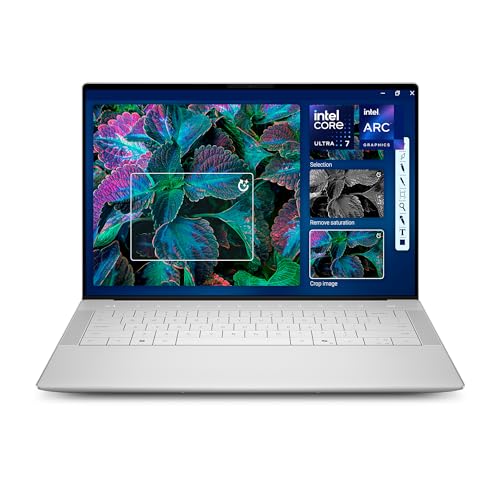
The Dell XPS 14 is the concept artist’s pick, built around a 14.5-inch touch OLED display that reproduces color with the accuracy a texture painter needs. Its Core Ultra 7 processor and 32GB of memory handle layered illustration files and 3D reference scenes without lag, while the 1TB solid-state drive keeps asset folders close at hand. The slim body and fingerprint reader suit designers who move between a desk, a meeting room, and a client presentation in the same day.
Specs
- Intel Core Ultra 7 255H processor
- Intel Arc Graphics
- 32GB memory, 1TB SSD storage
- 14.5-inch touch 3.2K OLED display, 48-120Hz refresh rate
- Backlit keyboard with fingerprint reader, Windows 11
Best for: Concept artists and illustrators who need a color-accurate touch screen for drawing and reference work.
Watch out for: Integrated graphics limit heavy 3D viewport work, so pair it with a stronger machine for large real-time scenes.
Which One Fits Your Situation
You design mostly in 2D and write docs
Pick the Apple MacBook Pro 14 M4, because its display shows color more accurately than any other screen here, and the quiet, long-lasting body suits a day of art, writing, and prototyping. The unified memory keeps reference material and design tools open together without slowdowns. That combination suits a designer whose work lives in documents, sketches, and prototypes rather than heavy 3D scenes.
You build 3D levels on the go
Pick the ASUS ROG Zephyrus G14, because it packs a current RTX 5070 graphics card and 32GB of memory into a 14-inch body that travels well. The large solid-state drive holds several projects at once, which matters at a game jam or a client site. At a game jam or a client review, the machine opens fast, renders smoothly, and never needs a desk to do its best work.
You work on large scenes and long builds
Pick the Lenovo Legion Pro 5i Gen 9, because 64GB of memory and 8TB of storage remove the two limits that slow large projects down. The 24-core processor also cuts compile and lighting-bake times, which adds up across a production week. Fewer waits mean more time designing, and the huge drive means the project archive travels with the machine instead of staying on a server.
You need the most faithful preview
Pick the Razer Blade 16, because its RTX 5090 graphics and OLED display show lighting and color closer to the final game than any other laptop here. It is the right call when the preview itself is part of the design review. When the design review happens around the screen, that fidelity turns a guess about lighting into a decision the whole team can trust.
Common Mistakes
- Buying a laptop for its processor while ignoring the graphics card that drives the engine viewport.
- Choosing a screen with narrow color coverage and discovering textures look wrong on every other display.
- Settling for 16GB of memory on a machine meant for large 3D scenes that need twice as much.
- Filling a small drive with engine installs and leaving no room for the actual project.
- Skipping the second monitor and trying to design, preview, and document on a single small screen.
Frequently Asked Questions
How much RAM does a game designer need?
Sixteen gigabytes covers small 2D projects and early prototypes, but 32GB is the sensible baseline for 3D design work with large scenes, textures, and animation data. Designers on large productions often benefit from 64GB, since it keeps whole levels in memory and avoids the pauses that come from streaming assets off the drive.
Is a gaming laptop good for game design?
Yes, because the same graphics card that runs games also powers the engine viewport, real-time lighting, and 3D previews that designers rely on. A gaming laptop adds the cooling and memory that design tools need, though its screen may need calibration for color-critical art work.
Do game designers need a dedicated graphics card?
For 3D design work, yes, because the engine viewport, lighting previews, and large scenes all depend on graphics memory and parallel processing. Integrated graphics can open a level, but they slow down badly once the scene gains detail, which breaks the flow of designing and iterating.
Mac or Windows for game design?
Both work, but the choice depends on the toolchain: Windows runs the widest range of engines and 3D tools natively, while macOS suits 2D art, writing, and prototyping with an excellent display. Designers who target consoles or use Windows-only tools should choose Windows, while those focused on art and documentation can choose either.
Related guides
More from Amazon
Programs that pair well with the guide above. Offers and eligibility are set by Amazon and may change.
Free shipping on eligible items, Prime Video and more. Eligible new members can start with a free trial.
Start a Prime free trialAd-free music streaming. Eligible new subscribers can start with a free trial.
Try Music Unlimited freeA Prime membership for ages 18-24 with a trial period. Eligibility is set by Amazon.
See Prime for Young AdultsAudiobooks and podcasts to listen to on the go. Eligible new members can start with a free trial.
Try Audible freeAs an Amazon Associate we earn from qualifying purchases.




Write Your Review
No reviews yet. Be the first to share your experience!