
Key takeaways
- Compare the 3 best WiFi cards for laptops in November 2026: Wi-Fi 6E and Wi-Fi 7 M.2 modules with the slot, CPU, and antenna checks that matter.
What's inside
As an Amazon Associate I earn from qualifying purchases. This post may contain affiliate links at no extra cost to you.
Choosing a WiFi card for a laptop is a decision about compatibility first and speed second. A module that does not match the slot key, the CPU generation, or the antenna connectors in the machine will never appear in Windows at all, no matter how fast its headline number looks. The real work happens before the purchase: opening the laptop, reading the old card, and confirming the socket it came out of.
This guide is for three groups of buyers. Owners of older Intel laptops want a cheap, reliable jump to Wi-Fi 6 or 6E. Owners of recent Intel machines want Wi-Fi 7 and the 6 GHz band. And anyone replacing a dead or flaky factory card wants a module that simply works after one screw and two antenna clips. Every card below is an internal M.2 module, chosen from its Amazon listing details.
Quick Picks
As an Amazon Associate we earn from qualifying purchases.
| Product | Best for | Key spec from title |
|---|---|---|
| NICGIGA WiFi 6E Wireless Card Intel AX210 NGW | Older Intel laptops needing a dependable Wi-Fi 6E upgrade | Wi-Fi 6E tri-band, 5400Mbps, Bluetooth 5.3, M.2/NGFF |
| NICGIGA WiFi 7 Wireless Card Intel BE200 NGW | Recent Intel laptops moving to Wi-Fi 7 | Wi-Fi 7 tri-band, 5800Mbps, Bluetooth 5.4, M.2/NGFF |
| OKN WiFi 7 BE200NGW WiFi M.2 Card | A second Wi-Fi 7 option with the full spec sheet spelled out | Wi-Fi 7 tri-band 802.11be, Bluetooth 5.4, M.2, 320MHz |
How to Choose
Match the Wi-Fi generation to your router and laptop
A Wi-Fi 7 card only delivers its headline speeds on a Wi-Fi 7 router, and a Wi-Fi 6E card only opens the 6 GHz band on a Wi-Fi 6E or Wi-Fi 7 router. On an older Wi-Fi 5 router, all three cards here still connect, but they fall back to the slower bands the router supports, so the upgrade buys reliability and Bluetooth rather than raw speed. If the router is staying put for another year, the AX210 is the sensible spend, while a household that already runs Wi-Fi 7 gets real value from a BE200. Never buy a generation the rest of the network cannot use yet.
Confirm the M.2 slot key before anything else
Laptop wireless cards use the M.2 2230 form factor, 22 mm wide and 30 mm long, in an A key or E key socket. That socket is not the same as the M key or B key slot used for storage drives, and a wireless card will not fit or work in a storage slot. Some laptops use Intel CNVi or CNViO2 slots, where part of the wireless logic lives in the CPU; standard PCIe cards such as the AX210 and BE200 do not work in those slots, and the listings say so explicitly. Open the laptop, look at the existing card, and match its keying before ordering.
Check the operating system and the CPU
Every card here lists Windows 10 or Windows 11 in 64-bit form, and the BE200 cards add Linux support. The BE200 modules carry a harder limit: they only support Intel 12th-generation and newer CPUs, and they do not support AMD processors at all. An AMD laptop with a removable M.2 wireless slot needs a MediaTek-based card instead, which is a different purchase from the Intel modules in this guide. Drivers matter too. Download the wireless and Bluetooth drivers from Intel before removing the old card, because a fresh install with no working network adapter makes fetching drivers afterward far harder than it needs to be.
Count the antennas and mind the Bluetooth
A laptop wireless card connects to two thin antenna leads inside the chassis, usually labelled MAIN and AUX, and both must be clipped onto the new card for normal range. The listings in this guide describe cards with two antenna connectors, and swapping the leads or leaving one loose is the most common reason a new card shows weak signal. Bluetooth rides on the same module, so the upgrade changes the Bluetooth version as well: the AX210 lists Bluetooth 5.3 and both BE200 cards list Bluetooth 5.4. If the laptop pairs headphones, a mouse, or a game controller, that Bluetooth bump is a genuine side benefit of the swap, not a footnote.
The 3 Best Options
NICGIGA WiFi 6E Wireless Card Intel AX210 NGW
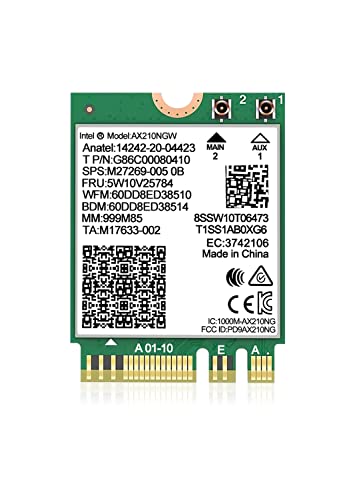
The AX210 is the safe default for most upgradeable Intel laptops, and this NICGIGA listing is the one to buy when the goal is a proven Wi-Fi 6E module rather than the newest standard. It opens the 6 GHz band on a compatible router, keeps working on older 2.4 GHz and 5 GHz networks, and its driver situation is mature, with Intel’s own wireless and Bluetooth packages covering it. For a laptop that shipped with Wi-Fi 5 or an early Wi-Fi 6 card, this is the upgrade with the fewest surprises.
Specs
- Wi-Fi 6E tri-band: 2.4 GHz, 5 GHz, and 6 GHz
- Maximum speed up to 5374Mbps (2400Mbps at 6GHz, 2400Mbps at 5GHz, 574Mbps at 2.4GHz)
- Bluetooth 5.3
- M.2/NGFF 2230, A/E key
- Compatible devices: Laptop
- Compatible operating system: Windows 10/11, 64-bit
- MU-MIMO support
- Brand: NICGIGA; model number: NIC-AX210
Best for: Owners of older Intel laptops who want Wi-Fi 6E and the 6 GHz band without paying for Wi-Fi 7.
Watch out for: The listing does not support CNViO2 protocol M.2 slots or mini PCIe slots, so confirm a standard A/E key socket first.
NICGIGA WiFi 7 Wireless Card Intel BE200 NGW

The BE200 is the step up for laptops new enough to use it, bringing Wi-Fi 7, the 6 GHz band, and Bluetooth 5.4 in the same M.2 2230 package as the AX210. Its listing is unusually blunt about the limits: Intel 12th-generation CPUs and newer only, no AMD support, and an M.2 E-key interface. That bluntness is useful, because it keeps buyers with older or AMD machines from ordering a card their laptop cannot use. On a qualifying Intel laptop with a Wi-Fi 7 router, it is the most future-proof module in this guide.
Specs
- Wi-Fi 7 tri-band: 2.4 GHz, 5 GHz, and 6 GHz
- Maximum speed up to 8774Mbps (5800Mbps at 6GHz, 2400Mbps at 5GHz, 574Mbps at 2.4GHz)
- Bluetooth 5.4
- M.2/NGFF, E-key interface
- Compatible devices: Desktop, Laptop
- Compatible operating system: Windows 10/11 (64-bit), Linux
- Only supports Intel 12th generation and above CPUs; does not support AMD processors
- Brand: NICGIGA; model number: BE200
Best for: Owners of recent Intel laptops with a Wi-Fi 7 router who want the newest standard and Bluetooth 5.4.
Watch out for: It will not work on AMD laptops or on Intel CPUs older than 12th generation, regardless of whether the card physically fits the slot.
OKN WiFi 7 BE200NGW WiFi M.2 Card

The OKN BE200 is a second source for the same Intel BE200NGW chip, and it earns its place as the alternative when the first BE200 listing is unavailable or when a buyer wants the fullest spec sheet before deciding. Its listing spells out the 320 MHz channel width and 4096-QAM encoding behind the headline speed, alongside the same tri-band layout and Bluetooth 5.4. The compatibility limits match the other BE200 exactly: Intel CPUs, an M.2 NGFF E-key slot, and no support for CNVi, CNViO2, or AMD systems.
Specs
- Wi-Fi 7 tri-band 802.11be: 2.4 GHz, 5 GHz, and 6 GHz
- Maximum speed up to 8774Mbps (5800Mbps at 6GHz, 2400Mbps at 5GHz, 574Mbps at 2.4GHz)
- Bluetooth 5.4
- 4096-QAM, 320MHz bandwidth, MU-MIMO
- M.2 NGFF 2230, E key
- Compatible operating system: Windows 10/11, 64-bit
- Not compatible with AMD motherboards, CNViO, or CNViO2 slots
- Brand: OKN; model number: BE200NGW
Best for: Buyers who want a Wi-Fi 7 BE200 card with the detailed spec sheet, or a fallback if the first BE200 listing is out of stock.
Watch out for: The listing title mentions a higher headline speed than the 8774Mbps breakdown in its own description, so use the band-by-band figures when comparing cards.
Which One Fits Your Situation
An older Intel laptop that drops connections or lacks 6 GHz
Pick the NICGIGA AX210. It fits the M.2 2230 A/E key slot found in most upgradeable Intel laptops, its drivers are mature, and it adds the 6 GHz band where the router supports it. It is also the cheapest way to fix a failing factory card without touching anything else in the machine. Confirm the old card is a removable M.2 module and not soldered down before ordering.
A recent Intel laptop with a Wi-Fi 7 router at home
Pick the NICGIGA BE200. It needs an Intel 12th-generation or newer CPU, so check the processor first, but on a qualifying machine it is the only card here that uses the full Wi-Fi 7 feature set, including 320 MHz channels on 6 GHz. Pair it with a Wi-Fi 7 router to see the difference; on a Wi-Fi 6 router it still works, just without the newest band features.
A Wi-Fi 7 upgrade where the first BE200 listing is unavailable
Pick the OKN BE200. It carries the same BE200NGW chip, the same tri-band speeds, and the same Bluetooth 5.4, with the added detail of 4096-QAM and 320 MHz spelled out in the listing. Treat it as an interchangeable alternative rather than a different tier: the checks before buying, Intel CPU, E-key slot, and two antenna leads, are identical.
Common Mistakes
- Buying a card for an M.2 storage slot or a CNVi/CNViO2 slot, where a standard PCIe wireless module cannot work.
- Ordering a BE200 for an AMD laptop or an older Intel CPU, then finding the card is never detected.
- Installing the new card before downloading Intel wireless and Bluetooth drivers, leaving the laptop with no network to fetch them.
- Clipping only one antenna lead, or swapping MAIN and AUX, and blaming the card for weak signal.
- Expecting the 6 GHz band on a Wi-Fi 5 router, when the router itself has no 6 GHz radio to connect to.
Frequently Asked Questions
Can I install a WiFi card in any laptop?
No. The laptop needs a removable M.2 2230 wireless module in an A key or E key socket, plus two antenna leads. Many thin ultrabooks solder the wireless chip to the board, and some business laptops use a BIOS allowlist that rejects third-party cards. Open the laptop or check the service manual for the existing module before buying anything.
Do I need to buy new antennas with the card?
Usually not. The cards in this guide use the two antenna leads already inside the laptop, which clip onto the small round connectors on the module. Replacement antennas only enter the picture when the original leads are damaged or the laptop never had them, which is rare in machines that shipped with a wireless card.
Will a Wi-Fi 7 card work with a Wi-Fi 6 router?
Yes, Wi-Fi standards are backward compatible, so a BE200 connects to Wi-Fi 6, Wi-Fi 5, and older networks. It simply cannot use Wi-Fi 7 features such as 320 MHz channels or Multi-Link Operation until the router supports them. Buy the BE200 for a future router upgrade, not for speed on the current one.
Does the new card change Bluetooth as well?
Yes. Bluetooth lives on the same M.2 module, so replacing the card changes the Bluetooth version to whatever the new module lists: Bluetooth 5.3 on the AX210 here, and Bluetooth 5.4 on both BE200 cards. Install the Bluetooth driver from the same Intel package as the wireless driver, and re-pair accessories afterward if they fail to connect.
Related guides
- Best Laptops to Play Roblox: From Budget Integrated Graphics to Dedicated GPUs
- Best Laptops for Zoom Teaching: Clear Video, Reliable Audio and All-Day Class Power
- Best Laptops for Video Editing and Music Production: Power, Screen and Storage
- Best Laptops for Network Engineers: Ethernet, RAM for Labs and Ports That Matter
More from Amazon
Programs that pair well with the guide above. Offers and eligibility are set by Amazon and may change.
Free shipping on eligible items, Prime Video and more. Eligible new members can start with a free trial.
Start a Prime free trialAd-free music streaming. Eligible new subscribers can start with a free trial.
Try Music Unlimited freeA Prime membership for ages 18-24 with a trial period. Eligibility is set by Amazon.
See Prime for Young AdultsAudiobooks and podcasts to listen to on the go. Eligible new members can start with a free trial.
Try Audible freeAs an Amazon Associate we earn from qualifying purchases.










Write Your Review
No reviews yet. Be the first to share your experience!