
Key takeaways
- Compare the best laptops for software development for November 2026: pro picks with the RAM, cores and docking support full-time development demands.
What's inside
As an Amazon Associate I earn from qualifying purchases. This post may contain affiliate links at no extra cost to you.
A professional development laptop is not bought for its badge or its benchmark headline; it is bought for what happens at 4 p.m. on a release day, when a full build, a container stack, a database and two IDE windows are all competing for the same memory. The real decision is how much headroom you need for that worst hour, and whether the machine can sustain it daily without throttling, swapping or forcing you onto a remote box for routine work.
This guide is for employed and contract developers who spec their own machines: backend and full-stack engineers running containers locally, platform engineers living in virtual machines, and mobile developers who need a specific operating system. Every pick below was chosen from its Amazon product page name and stated specifications, favouring memory capacity, core counts, docking ports and business-grade security over thinness or gaming hardware.
Quick Picks
As an Amazon Associate we earn from qualifying purchases
| Product | Best for | Key spec from title |
|---|---|---|
| Lenovo ThinkPad T14 Gen 5 | Developers running containers and VMs all day | 64GB DDR5 RAM, 2TB SSD |
| Apple MacBook Pro 14-inch (M4 Pro) | macOS and iOS development with long battery life | M4 Pro, 24GB unified memory |
| Lenovo ThinkPad P14s Gen 5 | Workstation tasks alongside everyday coding | RTX 500 Ada graphics, 32GB RAM |
| Lenovo ThinkPad X1 Carbon Gen 13 | Consultants who split time between client sites | From 2.17 lbs, 32GB RAM |
| Dell XPS 14 Premium (DA14250) | Windows developers who read code all day | 3.2K OLED touch display, 32GB RAM |
How to Choose
Memory and storage headroom for containers and virtual machines
Professional workloads stack memory in layers that student machines never see. An IDE with indexing, a browser full of documentation, a database container, a message broker and a test VM can consume 25GB before you write a line of code. Sixteen gigabytes is a legacy floor, 32GB is the working standard for full-time development, and 64GB, as fitted to the ThinkPad T14 listing below, suits engineers who keep several virtual machines resident. Storage follows the same logic: container images, SDKs and local datasets grow relentlessly, so treat 1TB as a sensible minimum and 2TB as the comfortable professional choice.
Sustained processor performance for builds and test suites
Compile times and CI-style test runs are sustained loads, not bursts, so the processor’s suffix matters as much as its name. Intel’s H-series chips, like the Core Ultra 7 155H in two listings below, are built to hold higher power for long builds, while U-series parts trade that endurance for battery life and thin chassis. Core count decides how parallel your build graph and container stack can run. Check the exact processor named on the product page, because the same laptop model often ships with both efficiency and performance variants at similar headline prices.
Docking, ports and multi-monitor support
Most professional developers work docked, with two or three external monitors, a wired network and peripherals hanging off one cable. That makes the port list a purchasing criterion, not an afterthought. Thunderbolt 4 ports, as stated on the ThinkPad listings here, carry display, data and charging through a single dock connection, while a built-in HDMI port covers meeting-room screens without adapters. If your work involves lab hardware, test benches or a segmented network, note whether the listing states an RJ-45 Ethernet port; several thin models have dropped it entirely, and only one pick below includes one.
Security, manageability and operating system fit
When a laptop holds production credentials and client code, employer-grade security stops being optional. Look for the features listings state plainly: Windows 11 Pro rather than Home, a fingerprint reader or infrared camera for biometric sign-in, and tamper detection on the workstation pick below. Operating system fit comes first, though. iOS and macOS development requires Apple hardware, .NET desktop work traditionally favours Windows, and Linux developers should confirm the exact model’s wireless and sleep support for their distribution, or plan to run their environment through WSL or virtual machines.
The 5 Best Options
Lenovo ThinkPad T14 Gen 5

This is the configuration for developers whose laptop is also their lab. The listing pairs a 16-core Intel Core Ultra 7 155H with 64GB of DDR5 memory and a 2TB SSD, which is enough room to keep a database, several containers and a virtual machine resident while the IDE stays responsive. It is also the only pick here whose listing states a built-in RJ-45 Ethernet port, which matters for lab benches and wired office networks. At 3.15 pounds it remains a machine you can carry between home, office and client sites without resentment.
Specs
- Processor: Intel Core Ultra 7 155H, 16 cores, up to 4.8 GHz
- Memory: 64GB DDR5-5600 RAM
- Storage: 2TB PCIe NVMe SSD
- Display: 14-inch 2240 x 1400 IPS, 400 nits, anti-glare
- Graphics: Intel Arc graphics (integrated)
- Ports: RJ-45 Ethernet, 2x Thunderbolt 4, 2x USB-A, HDMI 2.1
- Wireless: Intel Wi-Fi 6E AX211, Bluetooth 5.3
- Security: Fingerprint reader, 5.0MP + IR camera with privacy shutter
- Battery: 52.5Wh
- Weight: 3.15 lbs
Best for: Backend, platform and DevOps engineers who run containers or virtual machines locally all day.
Watch out for: This configuration is a seller-upgraded build and the listing states Windows 10 Pro, so confirm the exact specification, operating system version and warranty terms on the product page before ordering.
ASIN: B0DH2CHFMR
Apple MacBook Pro 14-inch (M4 Pro)

For developers inside the Apple ecosystem, this is the professional default. The M4 Pro chip’s 12-core CPU and 16-core GPU keep large Xcode, Android Studio and monorepo builds moving, while its media engines and efficiency cores leave battery in reserve through a full day of meetings and reviews. The 14.2-inch Liquid Retina XDR display renders small code text with exceptional clarity, and 24GB of unified memory is the sensible step up from the base MacBook configurations for container work through tools such as Docker Desktop or a Linux VM.
Specs
- Processor: Apple M4 Pro chip, 12-core CPU, 16-core GPU
- Memory: 24GB unified memory
- Storage: 512GB SSD
- Display: 14.2-inch Liquid Retina XDR
- Finish: Space Black
- Platform features: Built for Apple Intelligence
Best for: iOS and macOS developers, and Unix-terminal professionals who build and review away from a desk.
Watch out for: Memory and storage are fixed at purchase, and 512GB fills quickly with simulator images and container data, so consider a larger configuration on the same listing if your toolchain is heavy.
ASIN: B0DLHY2BJ6
Lenovo ThinkPad P14s Gen 5

Choose the P14s when your development work occasionally crosses into workstation territory: GPU-accelerated data tooling, CAD-adjacent viewers, or local inference experiments alongside the day job of writing services. Its listing combines an Intel Core Ultra 7 155H with 32GB of DDR5 memory, a 1TB SSD and an NVIDIA RTX 500 Ada graphics card, a pairing ordinary business laptops do not offer. The 14.5-inch WUXGA panel adds a little vertical room over standard 14-inch screens, and the listing’s stated tamper detection and Windows 11 Pro suit employer security policies.
Specs
- Processor: Intel Core Ultra 7 155H
- Memory: 32GB DDR5 RAM
- Storage: 1TB SSD
- Display: 14.5-inch WUXGA (1920 x 1200), anti-glare, low blue light
- Graphics: NVIDIA RTX 500 Ada Generation
- Operating system: Windows 11 Pro
- Security: Tamper detection
- Model: 21G2001VUS
Best for: Developers whose work mixes application code with GPU-assisted tooling or workstation software.
Watch out for: The RTX 500 Ada is an entry-level workstation GPU, so verify it meets your specific software’s requirements, and confirm the full model code 21G2001VUS on the listing, since P14s configurations vary widely.
ASIN: B0D6VRC3QP
Lenovo ThinkPad X1 Carbon Gen 13

This is the pick for senior engineers and consultants whose laptop travels more than it sits. The listing runs an Intel Core Ultra 7 265U with 32GB of memory and a 1TB Gen 4 SSD, which covers IDE work, code review, documentation and remote builds comfortably, and the whole machine starts at 2.17 pounds, so it disappears into a carry-on between client sites. The 14-inch WUXGA touchscreen works at a code-friendly 16:10 shape, the FHD+ infrared camera handles biometric sign-in, and Windows 11 Pro matches corporate deployment requirements.
Specs
- Processor: Intel Core Ultra 7 265U
- Memory: 32GB RAM
- Storage: 1TB PCIe Gen 4 NVMe SSD
- Display: 14-inch WUXGA (1920 x 1200) touchscreen, 100% sRGB
- Camera: FHD+ IR camera
- Keyboard: Backlit keyboard
- Operating system: Windows 11 Pro
- Weight: Starting at 2.17 lbs
Best for: Consultants and tech leads who split the week between client sites, offices and home.
Watch out for: The U-series processor prioritises battery life over sustained compile speed, and the configuration is fixed at purchase, so heavy local builders should choose the T14 above instead.
ASIN: B0FS9WHNQJ
Dell XPS 14 Premium (DA14250)
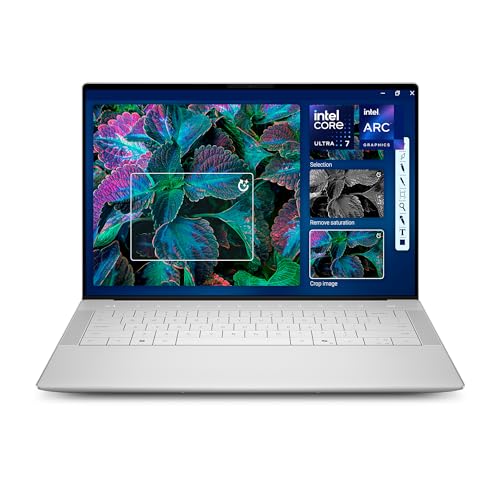
Pick the XPS 14 when your working day is mostly reading, writing and reviewing code at a Windows desk and the display is the tool you feel most. The 14.5-inch 3.2K OLED touchscreen renders dense code with outstanding clarity, and its variable refresh rate up to 120Hz keeps long files scrolling smoothly. Underneath, the Intel Core Ultra 7 255H is a performance-series chip matched with 32GB of memory and a 1TB SSD, so builds, containers and test runs have proper headroom. A backlit keyboard and fingerprint reader complete a desk-ready professional package.
Specs
- Processor: Intel Core Ultra 7 255H, up to 5.1 GHz
- Memory: 32GB LPDDR5X RAM
- Storage: 1TB SSD
- Display: 14.5-inch 3.2K (3200 x 2000) OLED touch, 48-120Hz
- Graphics: Intel Arc graphics (integrated)
- Keyboard: Backlit keyboard with fingerprint reader
- Model: DA14250
Best for: Windows developers who want the sharpest code display plus full performance-series headroom.
Watch out for: The memory is built into the system board and cannot be upgraded later, and this listing uses integrated graphics, so developers with GPU-heavy local workloads should look at the P14s instead.
ASIN: B0GT6C7JNR
Which One Fits Your Situation
You run containers and virtual machines all day
Choose the ThinkPad T14 Gen 5. Its 64GB of memory and 2TB SSD are the difference between a container stack that stays resident and one you restart between tasks, and the stated Ethernet port suits wired lab and office networks. Confirm the operating system version on the listing before ordering.
You develop for iPhone, iPad or Mac
Choose the MacBook Pro 14-inch with M4 Pro, because Xcode runs only on macOS and no Windows laptop substitutes for it. The 24GB configuration gives Docker Desktop and simulator fleets proper room, and the battery covers site visits and travel days. Order storage generously, since it cannot be expanded later.
You split your week between client sites and a docked desk
Choose the ThinkPad X1 Carbon Gen 13. At 2.17 pounds it travels without penalty, its Thunderbolt-class docking story covers a full desk setup on return, and Windows 11 Pro with an infrared camera satisfies most client security baselines. Leave sustained builds to a remote runner or the T14, and it will not slow your working week down.
Your coding sits next to GPU or workstation software
Choose the ThinkPad P14s Gen 5. It is the only pick here whose listing includes a workstation graphics card, the RTX 500 Ada, alongside 32GB of memory and Windows 11 Pro. Verify your software’s GPU requirements against that card before buying, because it is an entry-level professional part, not a high-end rendering card.
Common Mistakes
- Buying 16GB of memory for container-based work, then watching the IDE, browser and database fight over RAM within the first month.
- Choosing an efficiency U-series processor for a job built on long compiles, and losing minutes to throttled builds every single day.
- Ignoring the port list until the dock arrives, then discovering the laptop cannot drive your monitors or wired network over one cable.
- Forgetting that memory is soldered in most thin professional laptops, so the configuration on the product page is the one you keep for years.
- Buying a personal machine without checking your employer’s device requirements, then finding it cannot enrol in their management or security tooling.
Frequently Asked Questions
How much RAM does a professional developer actually need?
Thirty-two gigabytes is the practical standard for full-time development: it holds an IDE, a browser, a database and several containers without swapping. Move to 64GB, as in the ThinkPad T14 listing here, if you keep multiple virtual machines resident or run local Kubernetes. Sixteen gigabytes now belongs to light web work and remote-build workflows.
Is a Mac or a Windows laptop better for professional development?
Your stack decides, not the badge. iOS and macOS development requires a Mac, most enterprise .NET work favours Windows, and backend or web development runs well on either, with WSL giving Windows machines a Linux environment. Check your employer’s supported platforms and your toolchain’s Apple silicon support before choosing.
Does the processor suffix really matter for coding?
Yes, because development loads are sustained rather than bursty. Intel’s H-series processors, like the 155H in the ThinkPad listings here, hold higher power through long builds and test suites. U-series chips favour battery life and thin designs, which suits review and remote work but slows local compiling noticeably on large projects.
Can one of these laptops drive a proper multi-monitor desk setup?
Yes, provided the port list supports it. The ThinkPad listings here state Thunderbolt 4, which carries multiple external displays, peripherals and charging through a single dock cable. Confirm your dock’s wattage and display count against the laptop’s stated ports before buying, and note that only the T14 listing includes built-in Ethernet.
Related guides
- Best Laptops to Play Roblox: From Budget Integrated Graphics to Dedicated GPUs
- Best Laptops for Zoom Teaching: Clear Video, Reliable Audio and All-Day Class Power
- Best Laptops for Video Editing and Music Production: Power, Screen and Storage
- Best Laptops for Network Engineers: Ethernet, RAM for Labs and Ports That Matter
More from Amazon
Programs that pair well with the guide above. Offers and eligibility are set by Amazon and may change.
Free shipping on eligible items, Prime Video and more. Eligible new members can start with a free trial.
Start a Prime free trialAd-free music streaming. Eligible new subscribers can start with a free trial.
Try Music Unlimited freeA Prime membership for ages 18-24 with a trial period. Eligibility is set by Amazon.
See Prime for Young AdultsAudiobooks and podcasts to listen to on the go. Eligible new members can start with a free trial.
Try Audible freeAs an Amazon Associate we earn from qualifying purchases.










Write Your Review
No reviews yet. Be the first to share your experience!