
Key takeaways
- The best laptops for 500 with real SSD storage, 8GB to 16GB of RAM and Full HD screens, plus the S mode and capacity checks to make before you buy.
What's inside
As an Amazon Associate I earn from qualifying purchases. This post may contain affiliate links at no extra cost to you.
At this budget, the real decision is not which laptop is fastest — it is which corners you can live with. Every machine in this price band cuts something: storage type, memory, screen quality or the Windows edition. The listings that look cheapest often hide 4GB of memory, slow eMMC storage or a low-resolution screen behind a big discount banner, and those are the cuts that make a laptop feel old within a year.
This roundup is for home users, students and light office workers who need email, documents, browsing and streaming to feel smooth without paying for power they will never use. The picks come from Amazon product pages, chosen for honest spec sheets: a real SSD, at least 8GB of memory, a Full HD screen and a processor from a current budget line.
Quick Picks
As an Amazon Associate we earn from qualifying purchases
| Product | Best for | Key spec from title |
|---|---|---|
| Dell Inspiron 15 3535 | Everyday work with a number pad and touchscreen | Ryzen 5 7530U, 16GB RAM, 512GB SSD |
| Lenovo IdeaPad Slim 3 | A slim all-rounder with a backlit keyboard | Ryzen 5 5625U, 16GB RAM, 512GB SSD |
| Acer Aspire Go 15 AG15-42P-R3NB | Buyers who want the strongest processor in the band | Ryzen 7 5825U, 16GB RAM, 512GB SSD |
| ASUS Vivobook Go 15 E1504FA | A light 15.6-inch machine for carrying between rooms | Ryzen 5 7520U, 16GB LPDDR5, 512GB SSD |
| Acer Aspire Go 15 AG15-32PT-36KT | The lightest use: browsing, homework and video calls | Core 3 N355, 8GB RAM, touchscreen |
How to Choose
Storage type matters more than storage size
The single most common trap in this band is storage that is not a real SSD. Listings advertise capacity in big type, but the drive technology decides how the laptop feels: an NVMe or PCIe SSD boots Windows in seconds, while eMMC and UFS flash — the storage used in phones — makes updates and app installs crawl. A 256GB SSD is a better buy than 512GB of eMMC. Check the product details for “SSD” or “NVMe” in the drive description, and treat any listing that only says “flash storage” as a warning sign.
Memory: 8GB is the floor, 16GB is the comfort zone
Four gigabytes of RAM still appears on the very cheapest laptops, and it is not enough for Windows 11 with a browser full of tabs. Eight gigabytes is the workable minimum for email, documents and streaming. Sixteen gigabytes is where this band gets comfortable: video calls, a dozen tabs and a spreadsheet can run together without the machine swapping to disk. Also check whether the memory is soldered — on many slim budget models it cannot be upgraded later, so the amount in the listing is the amount you keep for the life of the laptop.
Read the Windows edition and the S Mode line
Many budget laptops ship with Windows 11 Home in S Mode, which only allows apps from the Microsoft Store. That is fine for browsing and Office web apps, but it blocks installing programs like a full desktop accounting package or some printer software. Leaving S Mode is free, but it is a one-way switch — you cannot turn it back on. Other listings in this band include full Windows 11 Home or even Windows 11 Pro. Read the operating system line on the product page and decide before you buy, not after your first install fails.
Screen resolution and the ports you already own
A 1920 x 1080 Full HD screen should be non-negotiable at this budget; 1366 x 768 panels still appear on the cheapest models and make text look soft and spreadsheets cramped. An IPS panel is a bonus worth having for viewing angles when two people watch a screen together. Then count ports against what you already own: HDMI for an old monitor or TV, at least two USB-A ports for a mouse and a flash drive, and an SD card reader if you move photos from a camera. A numeric keypad is worth seeking out if you type figures often.
The 5 Best Options
Dell Inspiron 15 3535

The Inspiron 15 3535 is the most complete package in this band for someone who works at a desk or kitchen table all day. The Ryzen 5 7530U is a six-core processor with headroom for office multitasking, and it is paired with 16GB of memory and a 512GB PCIe SSD — the two specs that decide long-term smoothness. The touchscreen suits quick scrolling and tapping through documents, the full-size keyboard includes a numeric keypad for figures, and Windows 11 Pro is unusual at this level. Note that this listing is a seller-upgraded configuration, so check the warranty wording on the page.
Specs
- Display: 15.6-inch FHD touchscreen
- Processor: AMD Ryzen 5 7530U (6 cores, up to 4.5 GHz)
- Memory: 16GB DDR4 RAM
- Storage: 512GB PCIe NVMe M.2 SSD
- Graphics: AMD Radeon Graphics
- Keyboard: Full-size with numeric keypad
- Ports: USB-C 3.2, USB-A 3.2, USB-A 2.0, HDMI 1.4, SD card reader
- Operating system: Windows 11 Pro
- Weight: 3.59 lb
Best for: Home-office work, bookkeeping and documents on a big touchscreen with a number pad.
Watch out for: The listing states the unit was resealed to upgrade the memory and SSD, with warranty cover split between the seller and Dell — read those terms before ordering.
ASIN: B0CDB8CZHZ
Lenovo IdeaPad Slim 3

Lenovo’s IdeaPad Slim 3 is the pick for buyers who want this budget to feel like a proper laptop rather than a compromise. The Ryzen 5 5625U is a six-core chip that handles office work, browsing and light photo sorting without fuss, and the 16GB of memory with a 512GB SSD matches the Dell above. The backlit keyboard is a genuine differentiator in this band — most rivals leave it off — and Wi-Fi 6 is on board for newer routers. Windows 11 Pro is included, which home users may not need but small-business buyers will appreciate.
Specs
- Display: 15.6-inch FHD
- Processor: AMD Ryzen 5 5625U (6 cores, up to 4.3 GHz)
- Memory: 16GB RAM
- Storage: 512GB SSD
- Graphics: AMD Radeon Graphics
- Keyboard: Backlit
- Connectivity: Wi-Fi 6
- Operating system: Windows 11 Pro
Best for: Students and remote workers who type in the evening and want a backlit keyboard.
Watch out for: This is a seller listing rather than a Lenovo factory configuration, so confirm the exact memory and storage figures on the page match this spec before checkout.
ASIN: B0FRMF4Z22
Acer Aspire Go 15 AG15-42P-R3NB
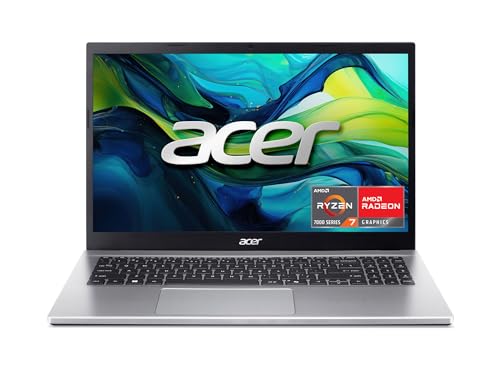
The Aspire Go 15 in this configuration carries the strongest processor in the roundup: the Ryzen 7 5825U is an eight-core chip, a step above the Ryzen 5 and Core 3 models around it. Around it Acer fits 16GB of DDR4 memory and a 512GB PCIe Gen4 SSD, so the core spec sheet has no weak point for everyday work. The listing states a battery life of up to 10 hours, which suits a machine that moves between rooms all day. The trade-offs are plain ones — Windows 11 Home rather than Pro, and no touchscreen — but for raw everyday speed per spec, this is the one to beat.
Specs
- Display: 15.6-inch FHD (1920 x 1080) IPS
- Processor: AMD Ryzen 7 5825U (8 cores)
- Memory: 16GB DDR4 RAM (up to 32GB supported)
- Storage: 512GB PCIe Gen4 SSD
- Graphics: AMD Radeon Graphics
- Connectivity: Wi-Fi 6
- Battery: Up to 10 hours (as listed)
- Operating system: Windows 11 Home
Best for: Buyers who keep a laptop for years and want the most processor headroom in the band.
Watch out for: The keyboard is not listed as backlit, and the memory is DDR4 rather than the newer DDR5 — neither matters for everyday work, but check if either is on your list.
ASIN: B0DTB4R3VP
ASUS Vivobook Go 15 E1504FA

The Vivobook Go 15 is the lightweight option for people who carry a laptop around the house or to a library rather than leaving it on one desk. Its Ryzen 5 7520U is an entry-level quad-core chip, but ASUS pairs it with 16GB of LPDDR5 memory — more RAM than most of this band, and the faster LPDDR5 type — plus a 512GB SSD, so everyday multitasking stays smooth. The spec to check is the wireless: the listing states Wi-Fi 5 rather than Wi-Fi 6, which is fine on most home networks but is a step behind the Acer and Lenovo above.
Specs
- Display: 15.6-inch FHD IPS
- Processor: AMD Ryzen 5 7520U
- Memory: 16GB LPDDR5 RAM
- Storage: 512GB SSD
- Graphics: AMD Radeon Graphics
- Connectivity: Wi-Fi 5
- Operating system: Windows 11 Home
- Model: E1504FA
Best for: Light everyday use with plenty of memory, carried from room to room.
Watch out for: The LPDDR5 memory is soldered and cannot be upgraded, and Wi-Fi 5 is a generation behind — acceptable here, but confirm both suit your home setup.
ASIN: B0G5PHGDQQ
Acer Aspire Go 15 AG15-32PT-36KT

This second Aspire Go 15 is the honest floor of the band: a touchscreen laptop for genuinely light use. The Intel Core 3 N355 with 8GB of DDR5 memory handles browsing, email, homework and streaming, and the 15.6-inch Full HD IPS touchscreen is the same class of panel as the pricier picks. What keeps it at the bottom is storage — 128GB of UFS flash rather than a true SSD — and Windows 11 Home in S Mode. For a first laptop, a grandparent’s email machine or a child’s homework computer, those limits may never bite; for a main family PC, choose one of the 512GB models above.
Specs
- Display: 15.6-inch FHD IPS touchscreen
- Processor: Intel Core 3 N355
- Memory: 8GB DDR5 RAM
- Storage: 128GB Universal Flash Storage (UFS)
- Graphics: Intel UHD Graphics
- Connectivity: Wi-Fi 6
- Operating system: Windows 11 Home in S Mode
- Model: AG15-32PT-36KT
Best for: The lightest everyday use — browsing, homework, email and video calls — with a touchscreen.
Watch out for: The 128GB of UFS storage fills fast and is slower than an SSD, and leaving S Mode is permanent, so be sure the Microsoft Store covers the apps you need.
ASIN: B0FMC1PTFF
Which One Fits Your Situation
You work from home on documents and spreadsheets all day
Choose the Dell Inspiron 15 3535. The numeric keypad speeds up figure entry, the touchscreen suits long documents, and 16GB of memory with a 512GB SSD keeps a full working day of tabs and files smooth. Windows 11 Pro also fits buyers whose employer or clients ask for it, and the SD card reader helps if you still move files on cards.
You are a student who types essays in the evening
The Lenovo IdeaPad Slim 3 is your pick. Its backlit keyboard is rare at this level and genuinely useful in a dim dorm room or bedroom, while the six-core Ryzen 5, 16GB of memory and 512GB SSD cover coursework, research tabs and streaming without slowing down. It is also slim enough to carry to lectures every day without noticing the weight.
You want one laptop to last the whole family for years
Take the Acer Aspire Go 15 AG15-42P-R3NB. The eight-core Ryzen 7 is the strongest processor in this band, and headroom is what keeps an older laptop feeling usable. With 16GB of memory and a Gen4 SSD, nothing in the core spec needs upgrading for everyday tasks, and the stated 10-hour battery suits a shared machine that rarely sits by one socket.
You need the cheapest sensible option for very light use
The Acer Aspire Go 15 AG15-32PT-36KT is enough for browsing, email, homework and calls, and its touchscreen is a pleasant surprise at the floor of the band. Just go in knowing the 128GB of flash storage and S Mode are real limits, not fine print — it works best as a second machine or a first laptop for one light user.
Common Mistakes
- Buying a 4GB laptop because the discount looks huge — Windows 11 with a browser needs 8GB at minimum, and 4GB models cannot usually be upgraded.
- Comparing storage by size alone — 512GB of eMMC or UFS flash is slower in daily use than a 256GB NVMe SSD, and the listing’s small print is where the truth sits.
- Forgetting the S Mode check — a Store-only Windows install blocks desktop programs, and switching out of S Mode cannot be undone.
- Accepting a 1366 x 768 screen to save a little — Full HD panels exist throughout this band, and the low-resolution screen will bother you every single day.
- Ignoring who actually sells the listing — seller-upgraded configurations carry different warranty terms from factory models, so read the warranty line before ordering.
Frequently Asked Questions
Is 8GB of RAM enough for a laptop in this price band?
For browsing, email, documents and streaming, yes — 8GB is the workable floor and every pick here meets it. If you regularly keep many tabs open, join video calls while sharing your screen, or plan to keep the laptop for several years, the 16GB models in this roundup will age noticeably better.
What does Windows S Mode mean, and should I avoid it?
S Mode restricts installs to apps from the Microsoft Store, which covers browsers, Office web apps and most everyday tools. It is a reasonable fit for children and light users. If you need a specific desktop program, you can switch out of S Mode for free, but the change is permanent, so decide before you need the software.
Can these laptops handle light gaming or photo editing?
Integrated graphics in this band run older and lighter games at modest settings, and casual photo editing in web-based tools is fine. They are not built for demanding 3D games or heavy video work — those need a dedicated graphics card, which sits in a higher price band than any laptop here.
How long will a budget laptop like these stay usable?
With 16GB of memory and a real SSD, the stronger picks here should handle everyday work for four to five years. The limiting factors are usually storage filling up and battery wear, not the processor. The 128GB touchscreen model is the exception — treat it as a light-use machine from day one.
Related guides
- Best Laptops to Play Roblox: From Budget Integrated Graphics to Dedicated GPUs
- Best Laptops for Zoom Teaching: Clear Video, Reliable Audio and All-Day Class Power
- Best Laptops for Video Editing and Music Production: Power, Screen and Storage
- Best Laptops for Network Engineers: Ethernet, RAM for Labs and Ports That Matter
More from Amazon
Programs that pair well with the guide above. Offers and eligibility are set by Amazon and may change.
Free shipping on eligible items, Prime Video and more. Eligible new members can start with a free trial.
Start a Prime free trialAd-free music streaming. Eligible new subscribers can start with a free trial.
Try Music Unlimited freeA Prime membership for ages 18-24 with a trial period. Eligibility is set by Amazon.
See Prime for Young AdultsAudiobooks and podcasts to listen to on the go. Eligible new members can start with a free trial.
Try Audible freeAs an Amazon Associate we earn from qualifying purchases.










Write Your Review
No reviews yet. Be the first to share your experience!